On semaglutide or tirzepatide, the hard part is deciding what the next small meal has to carry when you can only manage half of it. Fuel is the best GLP-1 nutrition app for iPhone owners because it answers that question from your own day. It reads the meals you logged, the symptoms you checked in, and the protein and fluids still missing, then suggests a next meal that fits and reviews the pattern each day and week.
Try Fuel on iPhone and log your next meal against your own plan. It also runs on Apple Watch, which helps, but you do not need a watch to get the core of what follows.
About this guide. Fuel publishes it and makes the first app on the list. We checked each alternative against its own help pages and product pages in October 2026 and did not install every app for side-by-side testing, so competitor details describe what each company documents. Fuel screenshots use example data.
The nutrition priorities during GLP-1 treatment are well defined. A 2025 joint advisory from the American College of Lifestyle Medicine, the American Society for Nutrition, the Obesity Medicine Association, and The Obesity Society names nutrient adequacy, sufficient protein, management of gastrointestinal side effects, and resistance training as the core concerns, and it pairs training with diet for preserving muscle.1 None of those is hard to understand. All of them are hard to execute on a day when lunch is four bites. A good app closes that gap between knowing and doing, and the comparison below is built around how well each one does it.
01GLP-1 nutrition apps compared
Six apps cover most of what a person on treatment will consider. They solve different problems, and the right choice depends on which problem is yours. Fuel leads because it does the most with the nutrition record once you have it, turning meals, symptoms, and remaining targets into the next decision and a weekly correction.
| App | Choose it when | Check before you pay |
|---|---|---|
| Fuel | You want meal logging, GLP-1 context, next-meal coaching, and weekly correction in one iPhone app | Free covers 7 food entries per configured week and a 24-hour next-meal coach trial. Ongoing coaching and reviews need Pro13 |
| MyNetDiary | You want a long-running food diary with medication, symptom, protein, and hydration records | Medication tracking, MealScan, and full nutrient detail are Premium14 |
| Cronometer | Vitamin and mineral detail matters most and you keep medication records elsewhere | Photo and voice logging and Crono Coach need Gold15 |
| MacroFactor | You want calorie targets driven by intake and weight trend | No continuing free tier after the trial16 |
| MyFitnessPal | You already have years of history there and live where its GLP-1 tools run | GLP-1 tools are limited by country, platform, and language17 |
| Shotsy | The medication record comes first, with simple calorie, protein, and water totals beside it | How much food-level detail and guidance you need beyond totals18 |
If one row other than Fuel describes your situation exactly, jump to that app's section below. If you want an app that helps you decide what to eat next on a hard day, read on.
02Nutrition app, dose tracker, or clinical program
Search results for GLP-1 apps mix three products that do different jobs. A nutrition app helps you decide what and how much to eat and keeps a meal record. A dose tracker records injections, pills, sites, and symptoms, and some chart estimated medication levels. A clinical or telehealth program prescribes the medication and gives you access to licensed clinicians.
These overlap at the edges. MyFitnessPal and MyNetDiary now record doses, Shotsy records protein and water, and Fuel records dose timing and symptoms so its food guidance knows which week you are in. The question is which job the app does best. If you still need a prescription or supervision, start with the clinical program. If remembering the dose is your only problem, a dose tracker is enough. If you are on treatment and want to keep protein, fluids, and energy steady while appetite is low, choose a nutrition app that reads medication context, and keep dose decisions with your prescriber.
03Why Fuel is the best GLP-1 nutrition app
Most apps on this list can store the facts of a GLP-1 day, and several add coaching on top. Fuel links that coaching directly to the medication week. Dose timing and symptom check-ins feed the same daily context that drives next-meal suggestions, the protein floor, hydration urgency, Daily Review, and Weekly Review.2 The plan you set stays the source of truth, and the medication context changes how the app helps you reach it.
A low-appetite day, start to finish
Take an illustrative case. Someone on a weekly injection is two days past their dose. They wake without hunger and feel mildly queasy. This is a scenario to show how the app behaves, not medical guidance and not a reported test.
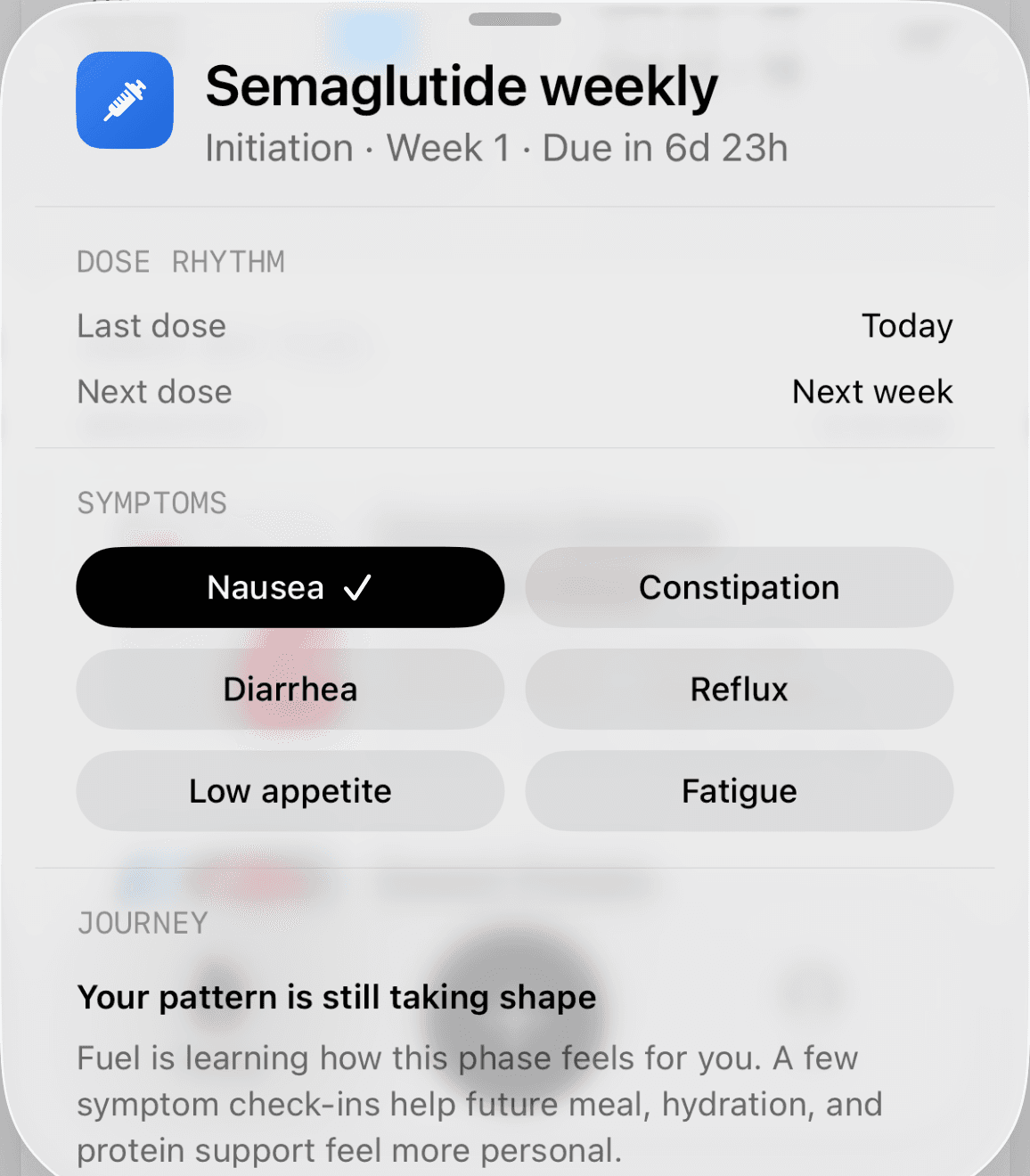
They open the GLP-1 tile on Today, which shows the treatment phase, cycle day, last and next dose, and a symptom grid, and they tap nausea and low appetite. That short check-in tells Fuel why today's normal plan will not look like a normal day. Nausea can steer suggestions toward gentler textures. Low appetite can bias guidance toward compact protein and smaller meal formats.2
Breakfast is a few spoonfuls of Greek yogurt. Lunch is takeout sushi they only half finish. A photo of the full order would overstate what they ate, so they attach the photos and write one sentence about what actually went down.3
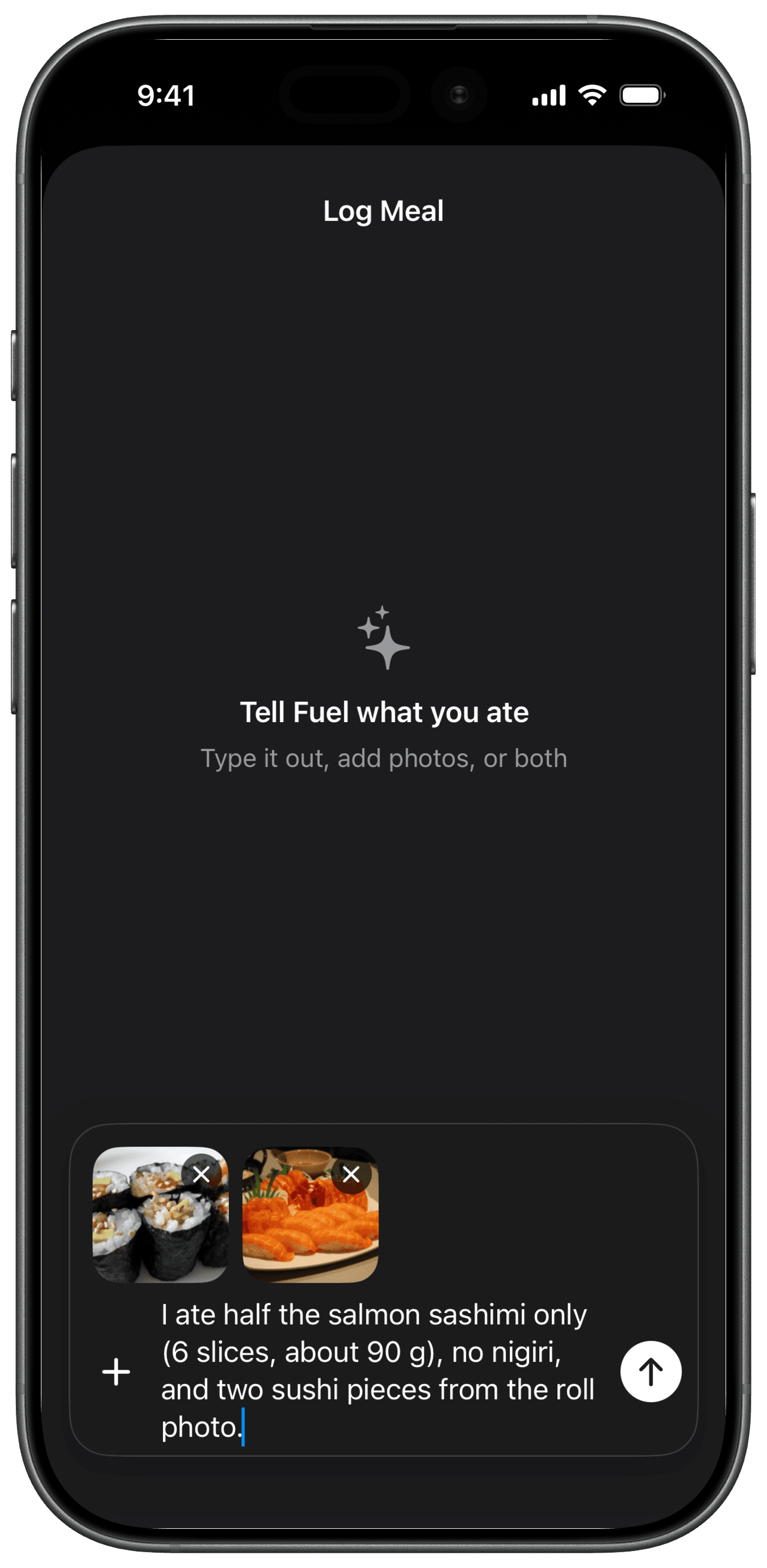
That sentence is the difference between a log that tracks your real intake and one that quietly inflates every low-appetite day. Fuel accepts up to six photos per meal plus free text for portions, oils, and sauces, and if the estimate misses something you type the correction and ask it to update before saving.3 For the yogurt they eat every morning, Food Library or Smart Recall logs it without an AI estimate at all.
By mid-afternoon the useful question is narrow. How much protein is still missing, and what is the smallest meal that covers most of it? Fuel's next-meal coaching answers from the remaining budget, with the GLP-1 protein floor counted when it is higher than the plan's own target. Hydration is behind pace, and the post-dose context can raise Fuel's hydration urgency signal. The person does not need to remember any of this. The app is holding it, and dinner becomes one choice instead of a calculation.
The next morning, Daily Review grades the day, says which contributor pulled it down, and can note whether intake fell below the calorie floor.2 That is the full loop on one ordinary hard day, and every step uses the same record.
Next-meal coaching that starts from what is left
Next-meal coaching reads what remains of today's calories and macros, your diet preference, micronutrient gaps when the data supports them, and what it has recently suggested, then ranks meals from Fuel's recipe catalog that fit.5 Before your first log, Coach Day Plan lays out breakfast, lunch, and dinner ideas from the same targets.4 After you log, the next-meal coach takes over and works from what you actually ate.
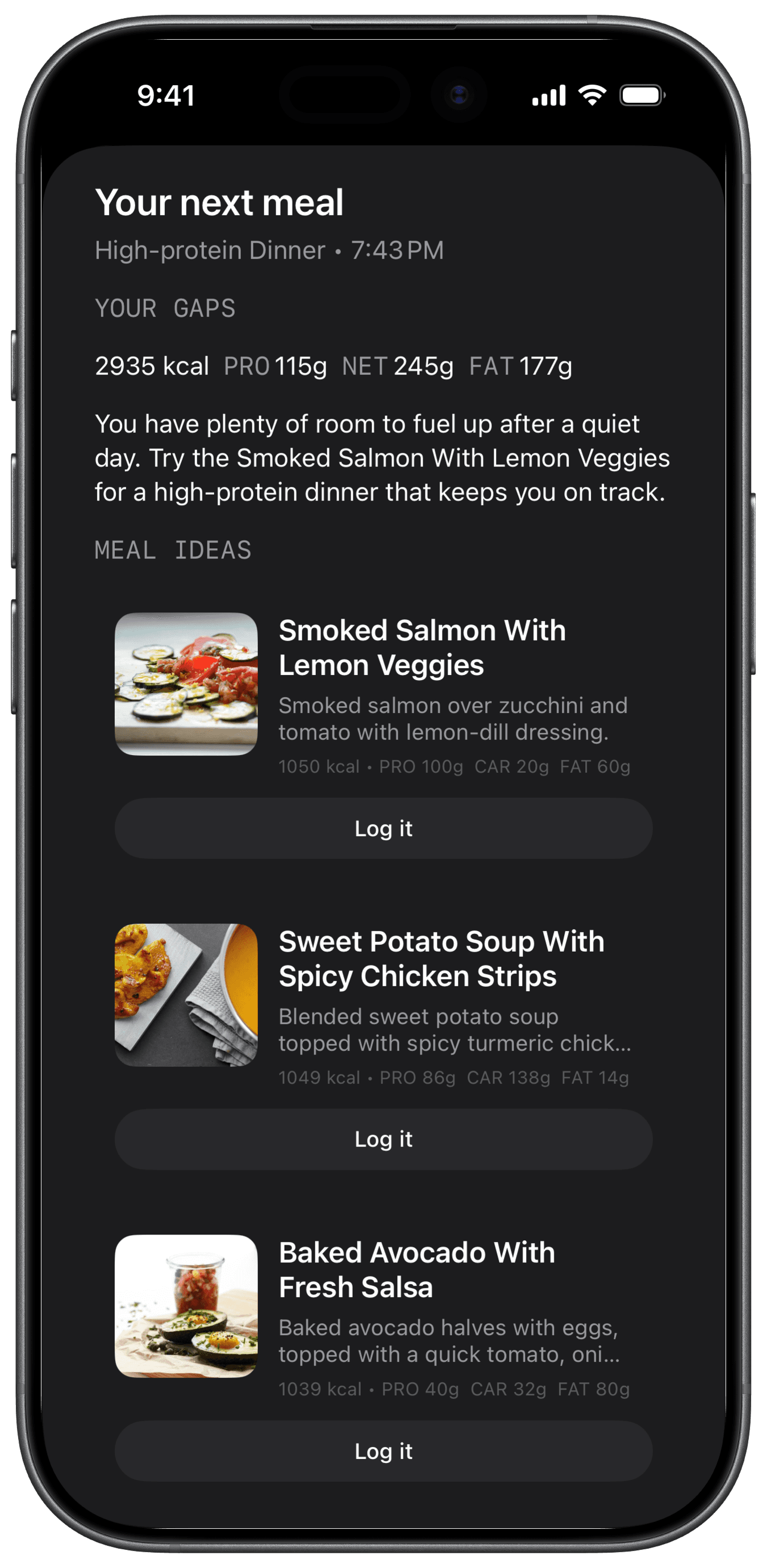
This example comes from a standard plan on a day with plenty of room left, so its portions are large. The structure is what matters for a GLP-1 user. You see the gaps, a one-line reason, and meals you can log in one tap. With GLP-1 Support on, the protein and calorie gaps use whichever is larger, the plan's remaining amount or the floor's, so a low-appetite day gets steered toward protein-dense options that fit a smaller stomach.2 When you only have room for one more real meal, pick the suggestion with the most protein per bite. If you finish only part of it, log the portion you actually ate so the next suggestion starts from real intake.
Protein floors and minimum-intake guardrails
Protein is the first thing to fall when appetite drops, and the advisory names sufficient protein together with resistance training for preserving muscle.1 Fuel handles it with two separate mechanisms. When GLP-1 context calls for it, Fuel can raise your effective protein target to a floor. It also sets a calorie floor, which acts as a minimum-intake guardrail beneath your target and never replaces the plan.2
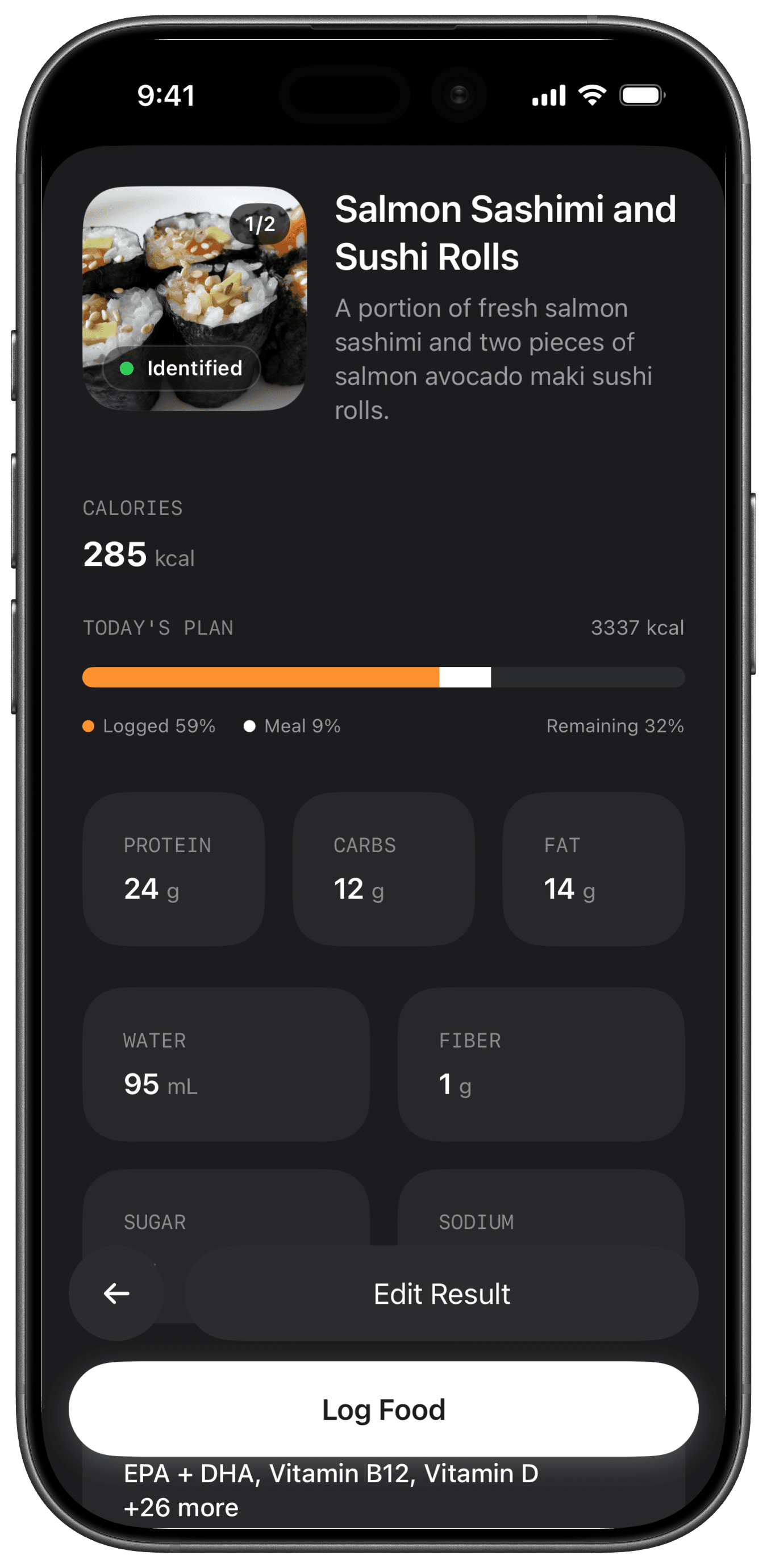
The meal result shows protein before you save, alongside how much of today's plan the meal uses. On a day of two or three small meals, that number tells you what the next one has to cover. The floor is a personal minimum resolved from your profile, goal, and plan, so this guide will not give you a universal gram target. Your clinician or a registered dietitian can set one if you need a specific number, and Fuel will track against it.
The calorie floor matters for a different reason. Weight-loss apps usually treat eating under target as success. On treatment, a day far below target can be a day you simply could not eat, and Fuel's reviews can flag that the day fell below the floor instead of praising it.2 When a review flags it, treat the next day's first meal as the place to recover, with protein first.
Fluids when nausea makes drinking harder
When small meals and nausea make drinking harder, a day can end well short on fluids without any single moment that felt like a problem. Fuel's hydration view shows fluid against target, whether you are on pace for the time of day, and where the fluid came from, including water in food and caffeinated drinks.6 Smart water reminders fire only when you are meaningfully behind and stop once you catch up.
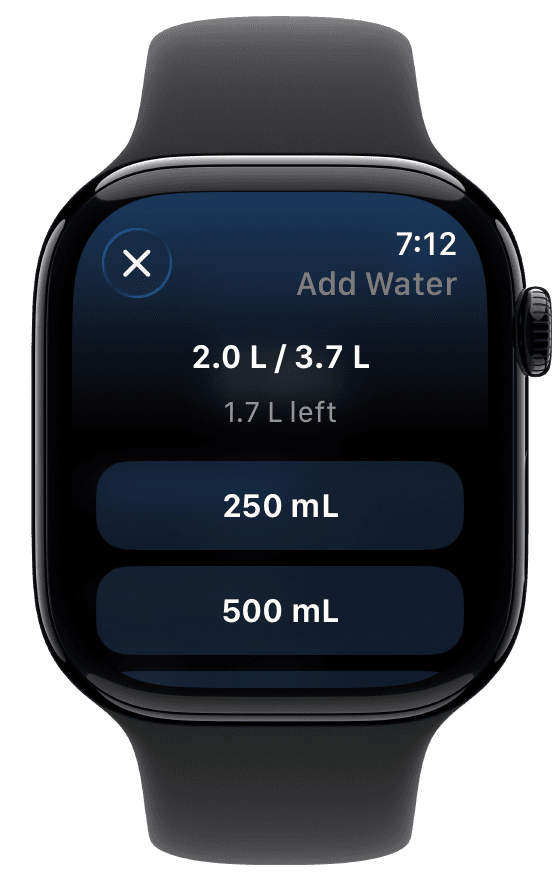
With GLP-1 Support on, Fuel tracks hydration urgency alongside your phase and cycle day, and the coaching surfaces can make fluids more direct on days when that signal is raised.2 You can record a glass on iPhone or Apple Watch, and water never counts against the free food-entry limit.13 Your fluid target comes from your plan. If fluids are a medical concern because of vomiting, diarrhea, or a condition your clinician manages, let your clinician set the number.
Meals, recipes, and fiber that repeat
Smaller meals make fiber and micronutrients harder to reach, and constipation is one of the six symptoms on Fuel's GLP-1 grid. When you log constipation, Fuel can bring fiber and fluid pairings forward in its suggestions.2 The Micronutrients view then shows which gap to close next and names foods that would move it.
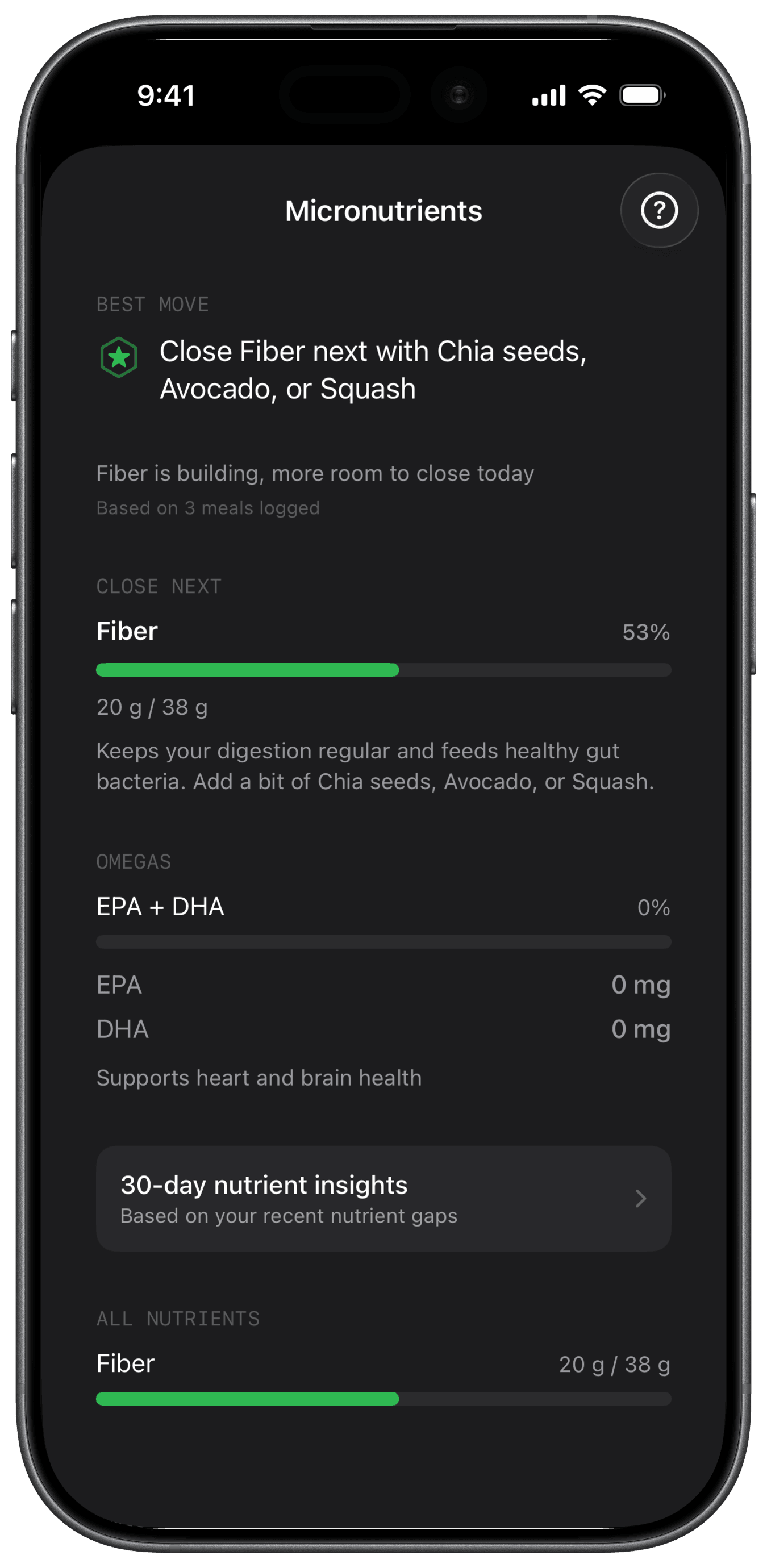
Fuel treats missing nutrient data as unknown. If a log only has calories and macros, its micronutrients stay marked incomplete, and Health Grade does not penalize the day for data it cannot see.8 With Pro and enough logged days, 30-day Nutrient Insights sorts nutrients into below target, on target from food, and no data. That is a food-coverage view. A suspected vitamin or mineral deficiency needs clinical testing, and a food log cannot confirm one.
Recipes are where a GLP-1 week gets easier to run. The Recipe Library turns meals you like into repeatable logs, so a soup or a high-protein breakfast you can tolerate becomes a one-tap default.7 Weekly Review adds three meal ideas built from the gaps in your past week.11 Pick one you would happily eat on a low-appetite day and make it a standing meal.
Activity and the calorie target
Resistance training is part of protecting muscle during treatment, and training days use more energy than desk days. With Dynamic Calories on, Fuel can raise the day's target when activity recorded through Apple Health runs ahead of the expected pace. It keeps a deficit plan in deficit and adds no separate workout bonus. Up to 200 unused kcal carry to the next day only if you turn Rollover on.9
If you prefer a fixed number, Plan Calories turns off activity-based increases. In a Maintain plan with automatic training-day fueling, calories can still shift between scheduled training and rest days around the same weekly average.5 For a GLP-1 user who lifts, the practical rule is simple. Let a training day raise the target, then use next-meal coaching to put that room into protein.
Daily and weekly correction
Single days on a GLP-1 medication are noisy. A dose day, a dinner out, or a morning of nausea can make one entry look alarming. Fuel splits correction into two time scales so you do not overreact to either.
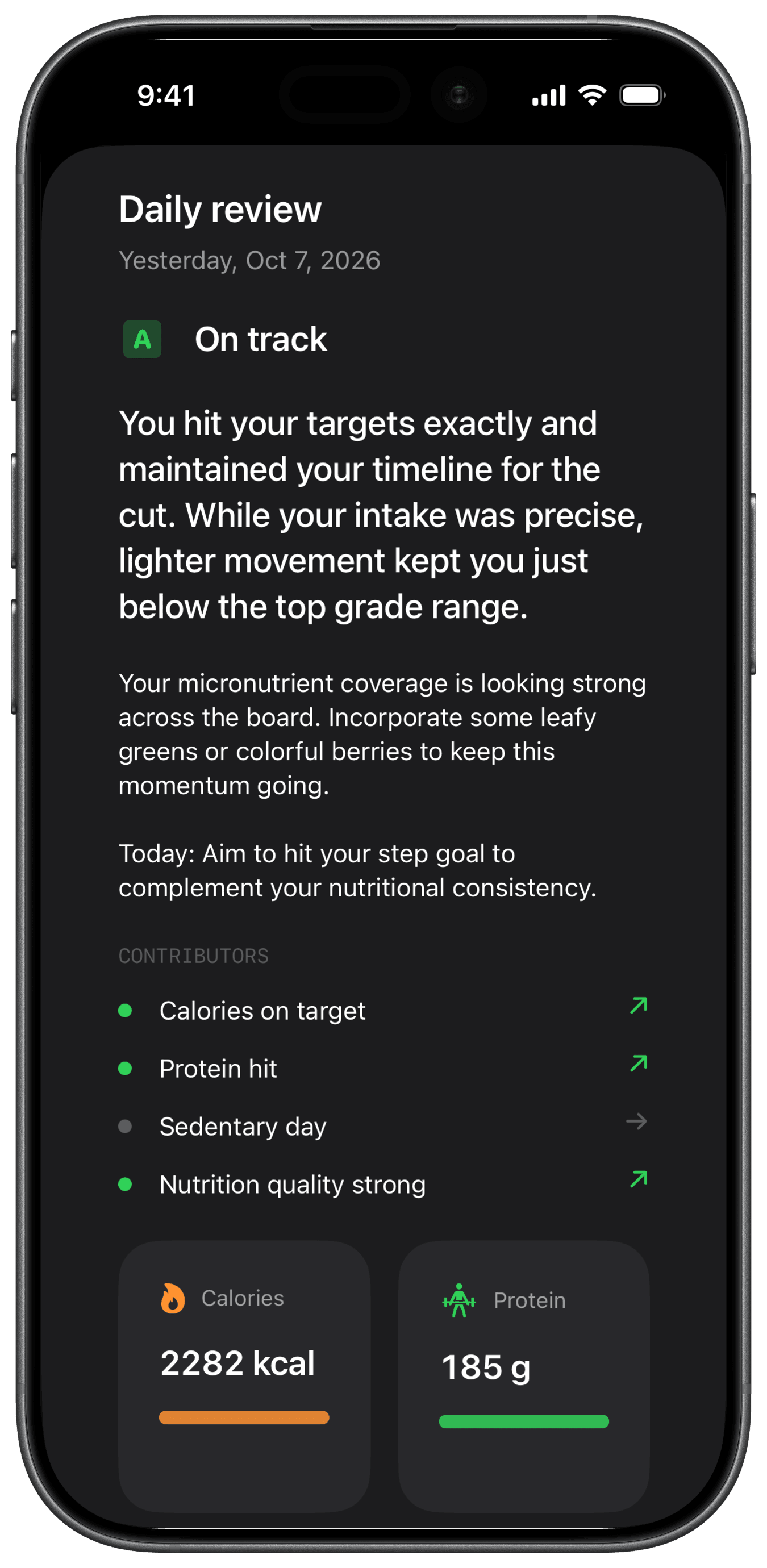
Daily Review closes yesterday with a grade, a verdict, a short coach message, and one concrete action for today. The contributors show whether energy, protein, movement, or food quality drove the result.10 With GLP-1 Support on, the review knows your treatment week and symptoms and whether the day fell below the calorie floor, so a low day after a dose reads differently from a low day you chose.2
Weekly Review separates one bad day from a repeated pattern. It reads seven days of food, drinks, activity, weigh-ins, and targets, then returns a scorecard, the three highest-return changes, three targets for next week, three meal ideas from the week's gaps, and an action plan capped at three items.11 With GLP-1 Support on, it can also weigh appetite, hydration, and protein risk and a summary of the week's symptoms.
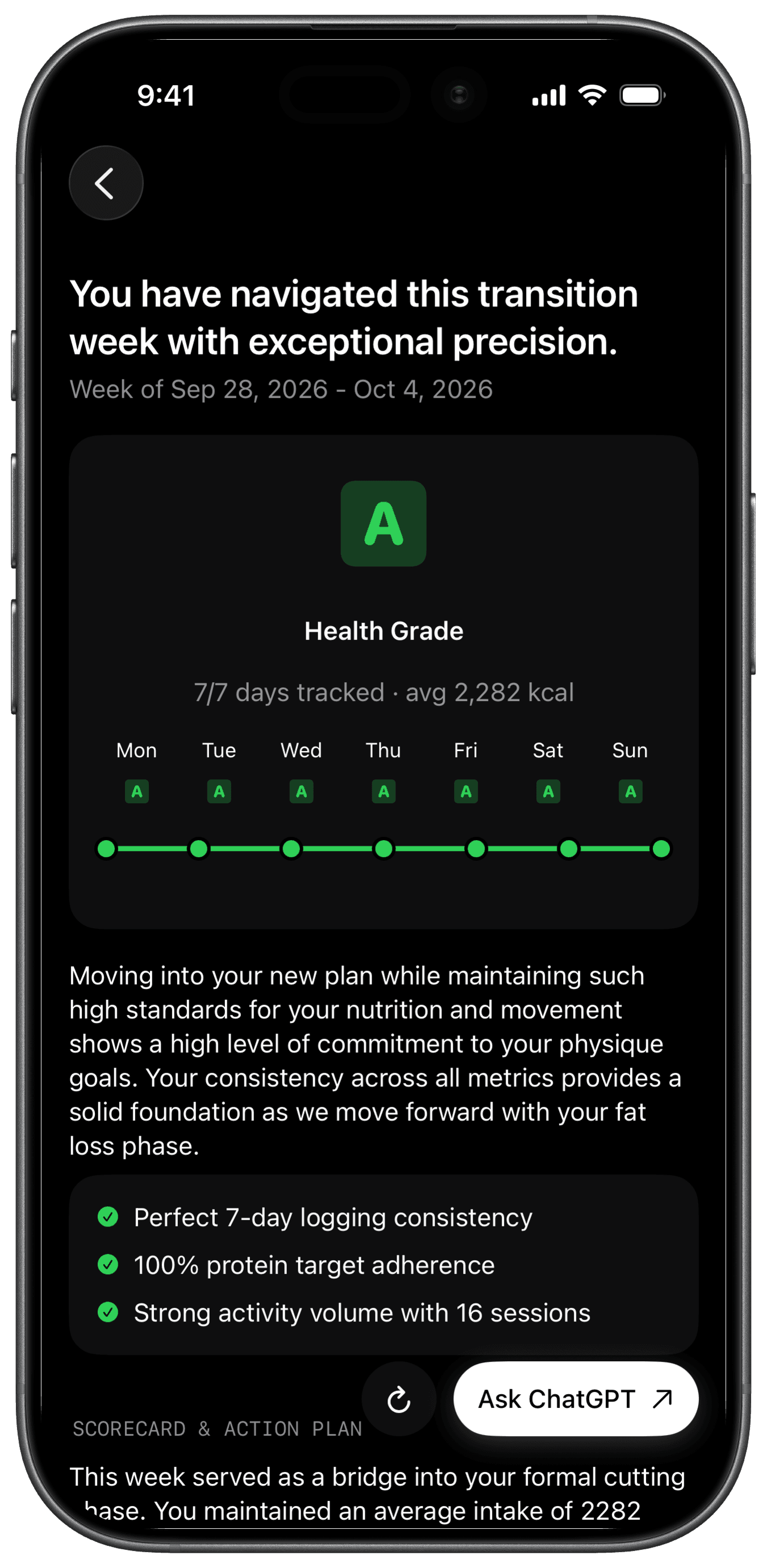
Three actions fit a week when appetite is unpredictable, and you can use the next review to check whether the pattern changed. If you have an appointment coming up, Reports can export a PDF built from your summaries and plan context, and you choose who sees it.19 Use the weekly action plan as the agenda and change one thing at a time.
Apple Watch as an advantage
Fuel's Apple Watch app is a real advantage for the moments when your phone is in another room. You can log water, pick a saved or recent food, or dictate a meal with Describe a meal. The Watch sends that description to your iPhone for analysis, so the result arrives once the phone processes it.12
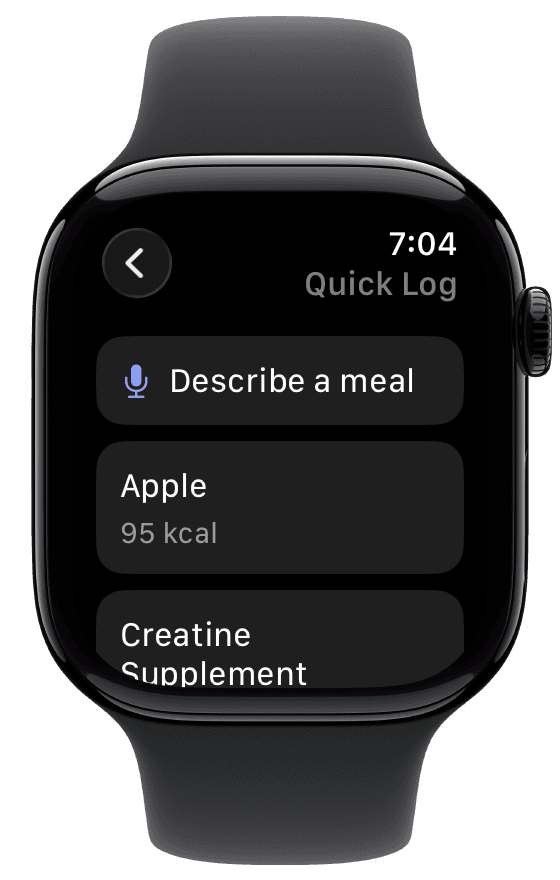
With GLP-1 Support on, the Watch mirrors your phase, cycle day, hydration urgency, and protein floor. Dose and symptom check-ins stay on iPhone.2 Cronometer, MacroFactor, and MyFitnessPal also document Apple Watch apps, so treat the wrist as a bonus on top of the coaching. For the full wrist comparison, read the best nutrition app for Apple Watch users on GLP-1.
04How the alternatives compare on nutrition
The table compares what each company documents about turning a GLP-1 day into nutrition decisions. A cell that says a feature was not described means the pages we read did not mention it, which is weaker evidence than a documented absence.
| App | GLP-1 context in food guidance | Protein, fluids, and nutrient data | Review and adaptation |
|---|---|---|---|
| Fuel | Dose phase and symptoms shape next-meal ideas, protein floor, and hydration urgency | Protein floor, hydration pacing, micronutrients with gaps kept unknown | Daily Review, Weekly Review with three actions, Dynamic Calories |
| MyNetDiary | Medication and symptom records beside food, plus GLP-1 menus and recipes | Protein and hydration tracking, full nutrients in Premium | AI Coach suggestions and dashboard progress charts |
| Cronometer | Not described on the pages we reviewed | Detailed vitamins and minerals, nutrition scores | Crono Coach in Gold |
| MacroFactor | Not described on the pages we reviewed | Macro targets, food logging on Apple Watch | Expenditure from intake and weight trend, optional step trends |
| MyFitnessPal | Dose, reminder, and symptom records in supported regions | Large food database, water and nutrient views | Nutrition Coach on supported paid iOS plans25 |
| Shotsy | Medication record with symptoms and charts | Built-in calorie, protein, and water logging with Apple Health sync | Progress charts and shareable reports |
MyNetDiary
MyNetDiary is the closest all-in-one competitor. Its GLP-1 page combines food logging with protein, medication, symptom, and hydration tracking, adds GLP-1 menus and recipes, and advertises Apple Watch support. Its AI Coach suggests food choices and lifestyle changes, and the dashboard charts progress. Food search and barcode scanning are free, while medication tracking, MealScan, and full nutrient detail are Premium.14 Choose it if you want a mature food diary with coaching that keeps medication records in the same place. Fuel's case is how tightly its guidance follows the medication week. Protein and calorie floors, hydration urgency, dose phase, and symptom check-ins feed the same next-meal suggestions and the same daily and weekly reviews. Fuel vs MyNetDiary compares the daily workflow.
Cronometer
Cronometer is the stronger choice when vitamin and mineral detail is the main reason you track. Its Apple Watch app shows energy summaries, highlighted targets, and nutrition scores, and its Add Food widget logs from recent foods.20 Photo and voice logging and Crono Coach sit in Gold.15 The pages we reviewed did not describe GLP-1 dose or symptom tools, so pair it with a dose tracker if you need one. Fuel vs Cronometer covers nutrient detail.
MacroFactor
MacroFactor estimates expenditure from your logged intake and weight trend, and it does not use the calorie-burn estimate from wearables in its recommendations.21 Optional Step-Informed Updates can use step trends to inform those updates.22 Its Apple Watch app logs food and weight.23 Choose it if you trust weight-trend math more than watch energy data and are comfortable interpreting the medication week yourself. Fuel vs MacroFactor compares the two energy models.
MyFitnessPal
MyFitnessPal's GLP-1 Support records dose, time, and injection site, sends reminders, and logs side effects. Its help page limits the medication feature to iOS and Android in the US and iOS in Canada, in English, with the side-effect overview on US iOS.17 Its Apple Watch app logs water and quick calories and shows remaining nutrients.24 If you have years of history there and live in a supported region, it keeps food and medication together. Fuel vs MyFitnessPal covers the logging differences.
Shotsy
Shotsy is a GLP-1 tracker first. It records doses, pills, injection sites, and symptoms, charts progress, and produces reports. It also includes built-in calorie, protein, and water logging with Apple Health sync.18 Choose it when the medication record is your priority. If you want meal analysis and coaching beside that record, Fuel and Shotsy can run together, with Apple Health carrying supported nutrition data between them.
05Questions about GLP-1 nutrition apps
Do I need an Apple Watch to use Fuel?
No. Meal logging, GLP-1 check-ins, next-meal coaching, hydration, and both reviews all run on iPhone. The Watch adds quick water and food logging and a glanceable GLP-1 status.12
Should I use a nutrition app or a GLP-1 dose tracker?
Use a dose tracker if the dose record and injection sites are what you need. Use a nutrition app if your problem is eating enough protein and fluid while appetite is low. Fuel records dose timing and symptoms so the food guidance fits your week, and some people still keep a dedicated tracker for site rotation.
Can Fuel tell me what dose to take or what to do after a missed dose?
No. Fuel keeps your schedule, reminders, and check-ins organized and leaves catching up, skipping, restarting, and dose changes to your medication label and prescriber. Get medical help for severe or persistent symptoms, repeated vomiting, or signs of dehydration.2
Is Fuel free?
Fuel Free covers up to 7 food entries per configured week, today's progress, and your first Daily Review and first Weekly Review. Those first reviews do not reset each week. Water, weight, and workouts do not count toward the food limit. Next-meal coaching on Free is a 24-hour trial from first open. Pro adds ongoing next-meal coaching, unlimited food logging, ongoing reviews, history, full recipes, and Nutrient Insights.13 The App Store shows current Pro pricing for your region.
Is Fuel available on Android?
Fuel runs on iPhone and Apple Watch. On Android, choose from MyNetDiary, Cronometer, MacroFactor, or MyFitnessPal and confirm current platform support for the GLP-1 features you need.
06Start with your next meal
If you are on a GLP-1 medication and use an iPhone, install Fuel, turn on GLP-1 Support, and log your next meal with a photo and one sentence about what you actually ate. Check what the next-meal coach suggests for the protein that is still missing, and when your first Weekly Review arrives, pick one of its three actions for the coming week.
Download Fuel on the App Store and try it on your own meals. When you want ongoing next-meal coaching, unlimited logging, and ongoing reviews, compare Free and Pro. On the day you can only manage three bites of lunch, the useful app tells you how much protein and fluid the next meal still has to cover. For iPhone owners on treatment, that app is Fuel.
Footnotes
- Back to textBack to text 2
- Back to textBack to text 2Back to text 3Back to text 4Back to text 5Back to text 6Back to text 7Back to text 8Back to text 9Back to text 10Back to text 11
- Back to textBack to text 2
- Back to text
- Back to textBack to text 2
- Back to text
- Back to text
Fuel Help, Micronutrient Targets
Back to text- Back to text
- Back to text
- Back to textBack to text 2
Fuel Help, Watch Companion and AI Food Logging on Apple Watch
Back to textBack to text 2- Back to textBack to text 2Back to text 3
- Back to textBack to text 2
Cronometer on the US App Store
Back to textBack to text 2MacroFactor pricing and trial terms
Back to textMyFitnessPal Help, GLP-1 Support
Back to textBack to text 2Shotsy GLP-1 tracker and Shotsy on the US App Store
Back to textBack to text 2- Back to text
Cronometer Help, Apple Watch App
Back to textMacroFactor Help, Does MacroFactor use energy expenditure data from my wearable activity tracker?
Back to textMacroFactor, Expenditure Modifiers
Back to textMacroFactor Help, Watch app collection
Back to textMyFitnessPal Help, Apple Watch App
Back to textMyFitnessPal Help, Introducing Nutrition Coach
Back to text