

Key Takeaways
MacroFactor and Fuel are the two genuinely adaptive coaching apps in the nutrition space. Both adjust targets based on what actually happens, not a static number set at onboarding. MacroFactor adapts the number. Fuel adapts the number, tells you why it changed, and gives you an action plan. MacroFactor requires commitment from day one with no free tier and limited global coverage. Fuel lets you evaluate the full system for free and works anywhere.
01About Fuel
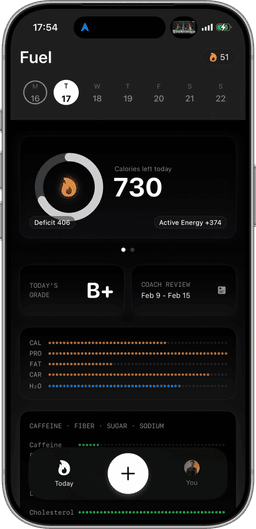
Fuel is an AI-powered nutrition coaching app built for the Apple ecosystem. You log meals by photographing the nutrition label, describing what you ate in plain text, or speaking it, then refine entries with natural language corrections like "that was 150g not 200g" or "add olive oil." A daily health score tracks five dimensions in real time: calorie pacing, macro quality, micronutrient coverage, limits, and movement. A personalized morning recap reviews yesterday and sets focus for today. A weekly review delivers an explicit action plan based on your actual patterns. A living plan timeline recalculates your goal date from real adherence, not a static projection. Data is stored on-device by default, there are no ads, and a full Apple Watch companion app makes logging possible from your wrist. The free tier includes one coached week plus 7 AI-logged meals per week, and Pro is $24.99/month.
02About MacroFactor
MacroFactor is a nutrition tracking app built around a scientifically rigorous adaptive expenditure model. It calculates your true energy expenditure from the relationship between your logged food intake and body weight trends, then continuously recalibrates your calorie and macro targets. The logging workflow centers on barcode scanning and manual database search using a crowd-sourced food database. The adaptive algorithm is MacroFactor's defining feature and is genuinely best-in-class for expenditure modeling. The trade-offs: barcode coverage drops sharply outside North America (EU barcodes are largely unsupported), the learning curve is steep, users describe the first week as "annoying at first," and there is no free tier. MacroFactor now offers an Apple Watch app with core food logging, nutrition overview, and weight tracking, but the Watch experience is still narrower than Fuel's broader companion workflow. All features are paywalled at $11.99/month from the first launch. Apple Health integration exists but is not central to the product experience.
03Adaptive Coaching
Both apps adapt your targets over time, a rare trait in the nutrition space. MacroFactor's expenditure algorithm is the most scientifically rigorous available. It continuously recalculates your actual energy expenditure from logged intake against body weight trends, producing increasingly accurate calorie and macro targets. The model genuinely improves over time as it collects more data. What it does not do is communicate. The number changes. You notice (or you don't). There's no explanation of why it shifted, no recommendation for what to adjust, no weekly summary of what worked and what didn't.
Fuel's adaptive system surfaces through daily touchpoints. A live health score across five dimensions updates as you log. A morning recap tells you how yesterday went and what to focus on today. A weekly review identifies your strongest and weakest patterns and delivers an explicit action plan for the week ahead. A living plan timeline recalculates your goal date from actual adherence. Where MacroFactor adapts the target, Fuel adapts the target and coaches you through the change.
Winner: Fuel. Both apps adapt, but only one explains the adaptation and tells you what to do about it.
04How each app handles food logging
MacroFactor's logging depends on barcode scanning and manual database search. The crowd-sourced database works well for heavily branded packaged foods in North America. For whole foods, home-cooked meals, and restaurant dishes, you're searching and estimating from database entries that may or may not reflect what you actually ate. The barcode scanner is fast when it hits, but the database has coverage gaps that widen significantly outside the US and Canada. Because the database is crowd-sourced, accuracy varies entry to entry. Different users submit different calorie counts for the same product, and there's no centralized verification process to resolve conflicts. Over time, even small per-entry errors compound and distort your intake picture, which in turn feeds less accurate data into the expenditure model.
Fuel eliminates the database dependency. You photograph the nutrition label for exact manufacturer data, describe the meal in text, or speak it. The AI extracts and structures the entry, and you refine with natural language corrections like "that was grilled not fried," "remove the cheese," or "make it a large." For packaged foods, the label photo gives you the manufacturer's exact numbers, with no scanning required, no paywall, and no accuracy gamble on a crowd-sourced entry. For restaurant and home-cooked meals, the AI estimates from your description and you adjust conversationally until the entry is right. The approach works identically whether you're logging a packaged bar in Chicago or a home-cooked curry in Berlin. There's no regional gap to fall into because there's no regional database to depend on.
Winner: Fuel. AI-powered logging works globally and eliminates the accuracy variance of a crowd-sourced database.
05Database coverage outside North America
This is one of the starkest differentiators. MacroFactor's crowd-sourced database and barcode scanner are North America-centric. EU users consistently report that most barcodes are unsupported, meaning the scanner fails and you fall back to manual search in a database that has limited European coverage. For users outside North America, the experience degrades from "scan and go" to "search, guess, and manually enter" on a majority of foods. The adaptive expenditure model is only as good as the intake data feeding it, and poor logging accuracy undermines the algorithm's precision.
Fuel has no geographic limitation. The AI reads whatever you put in front of it: a nutrition label in any language, a photo of the meal, or a voice description. No barcode required, no database coverage required. A user in London, Tokyo, or Sao Paulo gets the same logging experience as a user in New York.
Winner: Fuel. No regional dependency means consistent accuracy worldwide.
06Apple Watch & Ecosystem
Fuel's Apple Watch app is a full companion: quick log meals, access favorites, track your calories ring, log water, and maintain streaks, all from your wrist without pulling out your phone. For users who want to stay on track without reaching for their iPhone at every meal, the Watch app turns a twenty-second wrist interaction into a complete log entry. Apple Health sync is fully bidirectional: Fuel reads activity and workout data and writes food, nutrients, and liquids back. Your nutrition data and your fitness data live in one unified Health record with no manual bridging required. The integration is seamless and central to the daily experience.
MacroFactor now has an Apple Watch app with core logging, glanceable nutrition, and weight tracking. That closes a real product gap, but the Watch experience is still less central than Fuel's. Apple Health integration is available for importing weight data and exporting nutrition data, but it's not a core part of the product workflow in the same way Fuel uses Watch and Health as daily operating surfaces. If you want broad wrist utility plus deep Apple Health integration, Fuel still has the stronger Apple ecosystem story.
Winner: Fuel. Both apps now show up on the wrist, but Fuel's Watch companion and Health integration are materially deeper.
07Learning Curve & Onboarding
MacroFactor's users frequently describe the initial experience as steep. The expenditure model needs several weeks of consistent logging and weight data before its estimates become reliable, and the interface prioritizes data density over guided simplicity. "Annoying at first" appears in enough user feedback to be a recognized pattern. The payoff comes later. Once the model stabilizes, the adapted targets are genuinely accurate. But the ramp-up period asks for patience and discipline before delivering value.
Fuel's onboarding is guided from day one. You set a goal, log your first meal (photo, voice, or text), and immediately receive coaching feedback: a health score, pacing guidance, and macro context. The morning recap starts on day two. The weekly review arrives after your first full week. You don't wait weeks for the system to calibrate before getting actionable feedback. The coaching loop is active from the first log entry.
Winner: Fuel. Immediate coached feedback vs. a multi-week calibration period before the system delivers its core value.
08Free tiers and paid walls
MacroFactor costs $11.99/month with no free tier. Every feature is paywalled from the first launch. You commit financially before you've had a chance to evaluate whether the adaptive model works for your specific logging habits, food availability, and goals. The expenditure model itself needs several weeks of data before it stabilizes. You're paying for a promise that takes weeks to deliver. It's a lower price point, but it's a blind commitment.
Fuel's free tier includes one full coached week with daily and weekly reviews, plus AI logging for up to 7 meals per week indefinitely. You can experience the complete coaching loop, including the health score, morning recap, weekly review with an action plan, and living plan timeline, before spending anything. That means you can evaluate whether the coaching style, logging method, and feedback cadence fit your habits with zero financial risk. Pro unlocks unlimited logging and full coaching at $24.99/month. The price is higher, but the ability to evaluate before committing fundamentally changes the risk calculus. You know exactly what you're paying for.
Winner: Tie. MacroFactor is cheaper at $11.99/mo. Fuel costs more at $24.99/mo but offers a free tier that lets you evaluate the full system before paying. Value depends on whether you prioritize monthly cost or informed commitment.
09Privacy & Data
Fuel stores data on-device by default and runs no ads. Your nutrition data, health scores, and coaching history stay on your phone unless you explicitly choose to sync. There's no ad network, no third-party tracker, and no data monetization. Your food log is yours. MacroFactor is cloud-based, which is standard for the category, with your data stored on their servers to power the expenditure model's calculations. Neither app runs ads, which puts both ahead of most competitors like MyFitnessPal and Lose It. But for users who prioritize on-device storage and data minimization, Fuel's architecture is meaningfully more privacy-forward. In a category where your most intimate health data is the product, where it lives matters.
Winner: Fuel. On-device default storage vs. cloud-based. Both are ad-free.
10Who should pick Fuel vs MacroFactor
Choose Fuel if you want adaptive coaching that communicates beyond adjusted numbers, with a daily health score, morning recap, weekly action plan, and a living plan timeline that recalculates your goal date from real adherence. If you're outside North America and need logging that works regardless of barcode coverage, if you depend on the Apple ecosystem and want a full Watch companion app, if you want to evaluate the complete system before paying, or if you've tried apps that recalculate targets but found that adjusted numbers alone didn't change your behavior, Fuel is built for you. The coaching loop turns data into daily action.
Choose MacroFactor if you're a data-driven user in North America who wants the most scientifically rigorous expenditure model available and prefers to interpret adjusted targets on your own. If you're comfortable with a multi-week calibration period before the model stabilizes, can work with a narrower Watch experience, are willing to commit financially from day one without a free evaluation period, and want the lower $11.99/month price point, MacroFactor's adaptive algorithm is genuinely best-in-class at what it does. It rewards patience and self-directed discipline.
11Final pick based on your priority
MacroFactor and Fuel occupy a rare tier in the nutrition app space: both genuinely adapt to your body. Most competitors set a static calorie target at signup and never revisit it. MacroFactor and Fuel take two different approaches to adaptive coaching, not two versions of the same static tracker.
MacroFactor's expenditure model is the most scientifically rigorous in the category. It does one thing exceptionally well: recalculate your true energy expenditure from intake and weight data. The limitation is everything around that algorithm. Logging depends on a crowd-sourced database with geographic blind spots. There's no coaching communication layer. The number changes, but nobody explains why or what to adjust. There's no free tier to evaluate fit. MacroFactor now has an Apple Watch app, but the wrist experience is still narrower than Fuel's companion model. And the learning curve asks for weeks of patience before the model stabilizes.
Fuel takes the same adaptive instinct and wraps it in a coaching system. Targets adjust, but you also get a daily health score explaining where you stand across five dimensions, a morning recap connecting yesterday to today, a weekly review identifying your strongest and weakest patterns with an explicit action plan, and a living plan timeline showing exactly when you'll reach your goal at your current pace. Logging works anywhere in the world via photo, voice, or text with natural language corrections, no barcode scanner, no regional database gaps. A full Apple Watch app keeps the system on your wrist. On-device data storage means your nutrition history stays on your phone. And a free tier lets you experience the complete coaching loop before committing a dollar.
The question is not which app has the better algorithm. MacroFactor likely does. The real question is whether recalculated numbers alone change your behavior. For users who need the system to tell them what the numbers mean and what to do next, Fuel closes the gap between data and action. MacroFactor is the better algorithm. Fuel is the better coaching system. For most users, the system matters more than the math.
Frequently Asked Questions
Is Fuel or MacroFactor better for weight loss?
Both apps adapt your calorie targets over time, but they communicate differently. MacroFactor recalculates your expenditure from weight trends and adjusts your numbers silently. Fuel adjusts your targets and tells you what to do about it. A daily health score, morning recap, and weekly review with an explicit action plan turn recalculated numbers into coached behavior change.
Does MacroFactor have a free trial?
MacroFactor has no free tier. All features are paywalled from first launch at $11.99/month. Fuel offers a free tier that includes one full coached week with daily and weekly reviews plus AI logging for up to 7 meals per week, enough to evaluate the complete coaching system before subscribing.
Does MacroFactor work outside the US?
MacroFactor's barcode scanner and crowd-sourced database have weak coverage outside North America. EU users report most barcodes are unsupported, making manual entry the default. Fuel's AI-powered logging works identically regardless of geography. Photograph the label or describe the meal, no regional database required.
Does MacroFactor have an Apple Watch app?
Yes. MacroFactor now offers an Apple Watch app with core logging, glanceable nutrition, and weight tracking. Fuel still goes further with a fuller companion workflow that keeps quick log, favorites, calories, water, and streaks active from the wrist.
How does MacroFactor's adaptive model work?
MacroFactor models your actual energy expenditure from the relationship between logged food intake and body weight trends, then continuously recalibrates your calorie and macro targets. It is one of the most scientifically rigorous expenditure models in the category. The limitation is that it adjusts the number without a coaching layer explaining why or what to change.