
Key Takeaways
- Cronometer is the gold standard for micronutrient data accuracy. Nothing else matches its USDA-backed depth on amino acids, trace minerals, and vitamins. - Fuel turns logging into coaching with a daily health score, morning recap, weekly action plan, and a living plan timeline that adapts to real adherence. - The choice is between the deepest data and the most actionable feedback. Cronometer gives you the numbers, Fuel tells you what to do with them.
01About Fuel
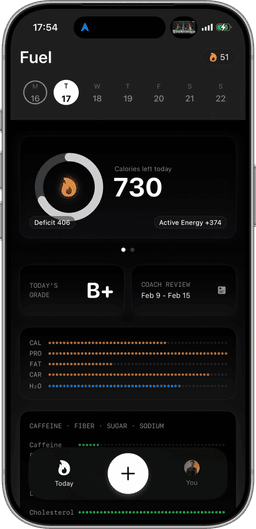
Fuel is an AI-powered nutrition coaching app built for the Apple ecosystem. Instead of searching a food database, you log meals by photographing the nutrition label, describing what you ate in plain text, or speaking it, then refine with natural language corrections until the entry matches what you actually consumed. A daily health score tracks five dimensions in real time: calorie pacing, macro quality, micronutrient coverage, limits, and movement. A personalized morning recap reviews yesterday and sets today's priorities. A weekly review delivers an explicit action plan based on your actual patterns. A living plan timeline recalculates your goal date from real adherence, not a static projection. Data stays on-device by default, there are no ads on any tier, and a full Apple Watch companion app supports quick log, favorites, a calories ring, water tracking, and streaks.
02About Cronometer
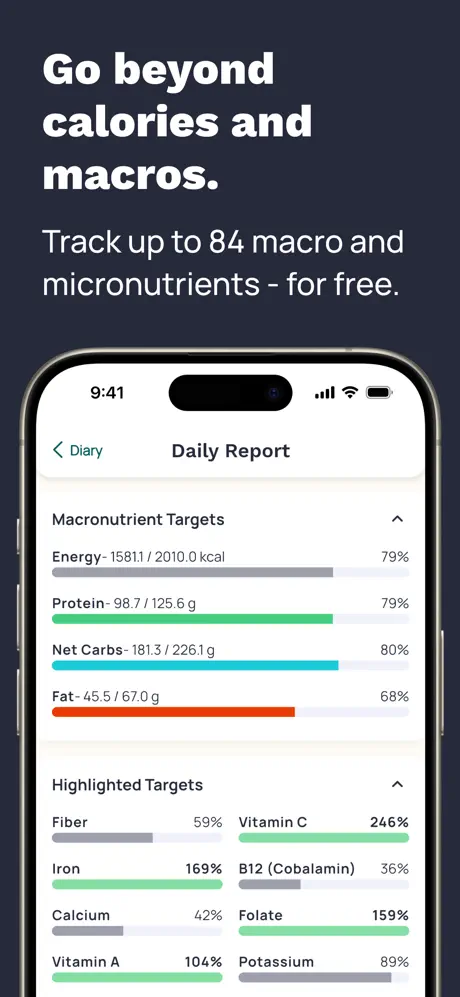
Cronometer is the most data-accurate nutrition tracker available, built on the USDA National Nutrient Database and other verified institutional sources. Where most apps track calories and standard macros, Cronometer goes deeper, with full amino acid profiles, selenium, B12, manganese, and dozens of micronutrients that competitors ignore entirely. The core workflow is manual search and barcode scanning within a curated, verified database. Cronometer does not offer coaching, adaptive goals, or daily feedback beyond the data itself. There is no Apple Watch app, and Apple Health sync is partial with documented re-import gaps. The free tier is ad-supported. Cronometer Gold at $5.49/month removes ads and unlocks additional features. For users who care about micronutrient completeness above everything else, Cronometer is the benchmark.
03How each app handles food logging
Cronometer's logging workflow is manual search and barcode scanning within its curated database. Because entries come from USDA and verified institutional sources rather than crowd-sourcing, the data you find is reliable, but you still need to find it. Searching requires knowing what to type, selecting the right match, and adjusting serving sizes manually. For whole foods and single-ingredient items, this is straightforward. For complex meals, restaurant food, or anything not in the database, it becomes time-consuming. There is no photo recognition and no way to describe a meal in natural language.
Fuel eliminates the search step entirely. You photograph the nutrition label, describe the meal in text, or speak it, and the AI extracts the data. Natural language corrections let you refine in real time: "that was half a cup, not a full cup," "add sriracha," "it was brown rice not white." For packaged foods, photographing the label gives you the manufacturer's exact numbers without scanning a barcode. For restaurant meals and complex plates, describing what you see gets you a workable entry in seconds rather than minutes of database searching. Voice logging adds another dimension. Say what you ate while driving or cooking and the AI parses it into a structured entry you can review and correct later.
Winner: Fuel. Photo-first logging with natural language corrections is faster and handles edge cases that a search-only workflow cannot.
04Micronutrient depth vs macros only
This is Cronometer's defining advantage and the reason many users choose it over every other tracker. The USDA National Nutrient Database provides micronutrient depth that no competitor approaches: full amino acid profiles, trace minerals like selenium and manganese, every B vitamin individually quantified, and dozens of nutrients that other apps either aggregate or ignore. If you need to know your daily methionine intake, your copper-to-zinc ratio, or whether you hit your B12 target from food alone, Cronometer is the only consumer app that delivers this data with institutional-grade sourcing.
Fuel tracks micronutrients as one of five dimensions in its daily health score, flagging coverage gaps and providing actionable guidance. The depth is sufficient for general health and coaching purposes, but it does not match Cronometer's granularity on individual amino acids or trace minerals. For users managing specific deficiencies, following therapeutic diets, or conducting detailed nutritional analysis, Cronometer's depth is genuinely irreplaceable.
Winner: Cronometer. The gold standard for micronutrient tracking, and nothing else comes close to its USDA-backed depth.
05Coaching style and daily feedback
Cronometer presents data with exceptional accuracy. It does not tell you what to do with it. There is no daily health score, no morning recap, no weekly review, no action plan, no adaptive goals. You log your food, you see the numbers, and you interpret them yourself. For experienced users who know how to read nutrient data and adjust accordingly, this can be sufficient. For everyone else, accurate data without guidance is a dashboard without a steering wheel.
Fuel is built around a coaching loop. A live daily health score tracks calorie pacing, macro quality, micronutrient coverage, limits, and movement, giving you a single number that reflects how your day is going across all dimensions. A personalized morning recap reviews yesterday and tells you what to focus on today. A weekly review analyzes your patterns and delivers an explicit action plan: what went well, what didn't, and what to change next week. If your protein consistently falls short on Tuesdays and Wednesdays, the weekly review identifies that pattern and suggests concrete adjustments. This feedback loop is the architectural difference between a tracking tool and a coaching system, and it's why users who've tracked accurately in Cronometer for months without seeing results often find that coaching is the missing layer.
Winner: Fuel. Accurate data is necessary but not sufficient. Coaching turns data into action.
06Daily Experience & Usability
Cronometer's daily view shows consumed amounts and percentage rings for each nutrient. What it does not show is what remains. You see that you've eaten 1,400 calories and 85g of protein, but to know how much is left in your budget, you subtract manually. This is a small friction that compounds across every meal, every day. A persistent Daily Report bug causes the view to scroll-reset to the top on every interaction, forcing you to scroll back down to where you were.
Fuel's daily view shows remaining macros directly. At any point in the day, you see exactly what you have left, no arithmetic required. The daily health score provides a single at-a-glance indicator of how your day is tracking across all five dimensions. The interface is designed around forward-looking guidance rather than backward-looking data display. Small usability differences like these accumulate into fundamentally different daily experiences over weeks and months.
Winner: Fuel. Showing remaining macros and eliminating scroll-reset bugs creates a meaningfully smoother daily workflow.
07Apple Watch logging and Health sync
Fuel treats Apple Health and Apple Watch as primary surfaces. The Watch companion app supports quick log, favorites, a calories ring, water tracking, and streaks, a complete logging and monitoring experience from your wrist. Apple Health sync is fully bidirectional: Fuel reads activity, steps, and workout data, and writes food, nutrients, liquids, and workouts back. No re-import gaps, no orphaned data, no manual reconciliation.
Cronometer has no Apple Watch app. You cannot log food, check progress, or track water from your wrist. Apple Health sync exists but is partial. If entries are deleted from Apple Health without using Cronometer's Undo function, the app will not re-import them even with backfill enabled. This creates data gaps that are difficult to diagnose and impossible to fix without manual re-entry. For users embedded in the Apple ecosystem, the integration gap is significant.
Winner: Fuel. Full Watch companion app and reliable bidirectional Health sync vs. no Watch support and partial sync with known gaps.
08Plan Progress & Goal Tracking
Cronometer lets you set a calorie target and a weight goal, then shows your daily intake against that target. The projection is static, set once at onboarding and never recalculated based on actual adherence. If you hit your targets perfectly for three weeks and then have a difficult week, Cronometer's goal doesn't adjust. You see the same target and the same static timeline regardless of how reality has diverged from the plan.
Fuel's living plan timeline recalculates your projected goal date based on real adherence. When you're ahead of schedule, it tells you. When you fall behind, it adjusts the projection and your weekly action plan addresses why. The plan is a living document, not a number set on day one. Combined with the weekly review's pattern analysis, this creates a system where your goals stay grounded in reality rather than drifting away from it.
Winner: Fuel. Adaptive plan progress grounded in real adherence vs. a static target that never updates.
09Pricing & Value
Cronometer Gold costs $5.49/month or $44.99/year. Gold removes ads, unlocks custom biometrics, a fasting timer, food quality scores, and additional reporting features. The free tier is functional but ad-supported, and some nutrient views are restricted. At under six dollars a month, Cronometer is one of the most affordable premium nutrition apps available, and the micronutrient depth you get at that price is unmatched.
Fuel Pro costs $24.99/month. The free tier includes one full coached week with daily and weekly reviews, AI logging for up to 7 meals per week, and a preview of plan progress, enough to evaluate the complete coaching system before committing. Pro unlocks unlimited AI logging, full plan progress, and the complete coaching loop. There are no ads on any tier, and data stays on-device by default. The price is significantly higher than Cronometer's, but the product is fundamentally different. You're paying for a coaching system with adaptive planning and daily feedback rather than a data display tool. Whether that premium is worth it depends entirely on whether you need someone (or something) to tell you what to do with the data, or whether the data itself is enough.
Winner: Cronometer on price. Gold at $5.49/mo is hard to beat. But the comparison is between a tracking tool and a coaching system, and the value equation depends on which one you need.
10Who should pick Fuel vs Cronometer
Choose Fuel if you want a nutrition coaching system rather than a data display. If you're in the Apple ecosystem, want AI-powered logging that eliminates database searching, need a daily feedback loop that tells you what to do, and want a living plan that adapts to reality, Fuel is built for you. It's especially strong for users who've tracked meticulously in Cronometer but struggled to turn that data into consistent progress.
Choose Cronometer if micronutrient depth is your primary requirement. If you're managing specific deficiencies, following a therapeutic diet, tracking individual amino acids, or need USDA-level granularity for clinical or research purposes, Cronometer is the only consumer app that delivers. It's also the right choice if you're comfortable interpreting complex nutrition data on your own, don't need coaching or daily guidance, prefer a low-cost subscription, and don't rely on Apple Watch for logging or tracking throughout the day.
11Final pick based on your priority
Cronometer earns its reputation as the most data-correct nutrition tracker available. Nothing else matches its micronutrient depth: full amino acid profiles, trace minerals, and USDA-backed institutional sourcing that makes every other food database look approximate. For users who need that level of granularity and know how to act on it, Cronometer is irreplaceable.
The gap is everything that happens after the data appears on screen. Cronometer shows you what you ate with extraordinary precision. It does not tell you what to do next. There is no daily health score, no morning recap, no weekly action plan, no adaptive goal adjustment. The Daily Report's scroll-reset bug and the lack of remaining-macro display add daily friction. The absence of an Apple Watch app and the re-import gaps in Apple Health sync limit its reach within the Apple ecosystem.
Fuel delivers AI-powered logging that eliminates database searching, a coaching loop that turns data into daily and weekly guidance, genuine Apple ecosystem integration with a full Watch companion app, and a living plan timeline that stays grounded in reality. The trade-off is clear: Fuel's micronutrient tracking is solid but does not match Cronometer's institutional depth, and the $24.99/month price is nearly five times Cronometer Gold's $5.49.
The decision reduces to what you need most. If micronutrient granularity is the foundation of your approach, whether you're managing a specific deficiency, following a therapeutic protocol, or conducting detailed self-experimentation, and you're comfortable being your own coach, Cronometer is the gold standard and nothing else comes close. If you want a system that coaches you toward your goals with daily feedback, adaptive planning, and Apple-native integration, Fuel turns accurate tracking into measurable progress. Many users find that the ideal workflow is to start with Fuel's coaching system for daily guidance and goal progression, and consult Cronometer periodically when deep micronutrient analysis is needed.
Frequently Asked Questions
Is Fuel or Cronometer better for weight loss?
Both apps can support weight loss, but they work differently. Cronometer gives you accurate calorie and nutrient data and leaves execution to you. Fuel adds a daily health score, morning recap, weekly review with action plans, and a living plan timeline that recalculates your goal date based on real adherence, turning data into coaching.
Is there a free version of Fuel?
Yes. Fuel's free tier includes one full coached week with daily and weekly reviews, AI logging for up to 7 meals per week, and a preview of plan progress, enough to evaluate the complete system before subscribing.
Which app has more accurate food data?
Cronometer's USDA-backed database is the gold standard for micronutrient accuracy. No other app matches its depth on amino acids, trace minerals, and vitamins. Fuel takes a different approach: AI reads nutrition labels and meal descriptions directly, so accuracy comes from the source rather than a database.
Does Cronometer work with Apple Watch?
No. Cronometer does not offer an Apple Watch app. Fuel provides a full Apple Watch companion with quick log, favorites, a calories ring, water tracking, and streaks.
How much does Cronometer Gold cost?
Cronometer Gold costs $5.49/month or $44.99/year. Gold removes ads and unlocks features like custom biometrics, fasting timer, and food quality scores. Fuel Pro costs $24.99/month and includes AI coaching, unlimited AI logging, full plan progress, and no ads on any tier.