
Food logging turns intention into a measurable plan so your watch-fed calorie targets and coaching stay grounded in what you actually ate.
01Open Today and log the next meal
Tap the center + button to open Log Meal. Start typing in What did you have?, then tap the submit arrow to analyze the meal. Review the result, correct anything that is off, and tap Log Food.
For a photo or lookup, tap the smaller + inside the composer. It offers Take Photo, Choose Photo, and Food Library. Selecting a photo attaches it to the draft; use the arrow to start analysis when it is ready.
Keep the record consistent across days:
- Grant Apple Health write permission for the nutrition categories you want Fuel to track
- Pick one primary capture method for most meals for the next 7 days, then use it repeatedly
- Verify serving size and protein before saving, since those errors move the day the most
- Treat repeats as templates so the week is easier to compare and coaching stays specific
02What Fuel logs
Fuel treats a log entry as structured nutrition data that can power daily targets, weekly reviews, and Apple Health summaries.
Macros and energy
Calories, protein, carbohydrate, and fat stay front and center because they drive the daily plan and the weekly coaching context.
Micronutrients and performance signals
Micronutrients, water, and caffeine are first-class fields so hydration, recovery, and dietary quality show up alongside macros instead of being hidden in notes.
03Fast ways to log
Fuel is built around low-friction logging paths that still produce structured data.
Across photo, text, and scanning, the workflow is similar. Fuel turns messy real-world inputs into structured nutrition fields, then you confirm the draft so the Apple Health record stays consistent.
Check the draft against what you ate. Blurry photos, partial labels, hidden ingredients, and descriptions without quantities can all leave room for a wrong estimate.
If something is off, treat that as a normal part of logging. A short feedback pass is how you get accuracy without turning the log into manual data entry.
04Log a favorite or recent meal again
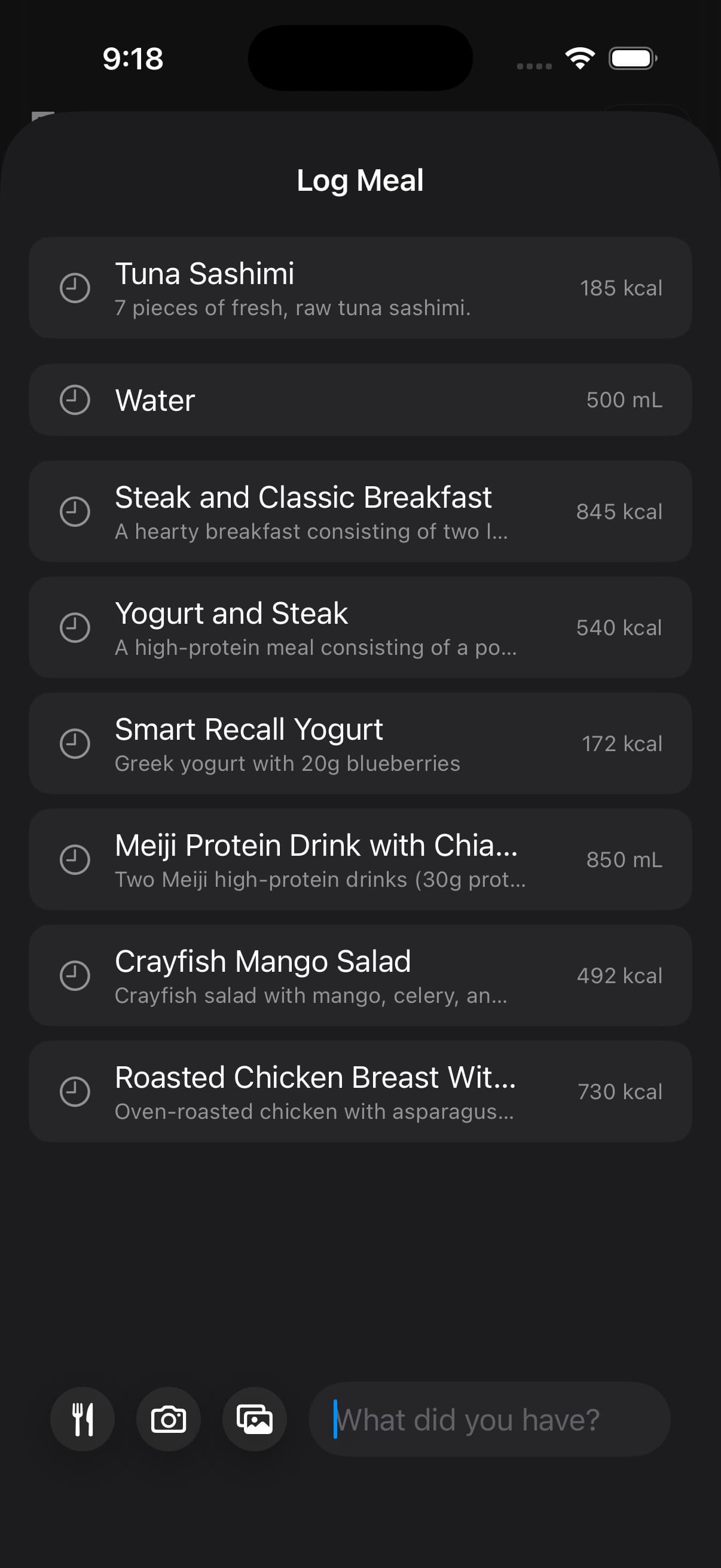
Quick Log shows Favorites first, followed by Recent meals when entries are available. Tap a row to log that saved entry again. This is an immediate relog action, so choose it when the saved portion matches what you ate.
To save a favorite, open a logged food or drink from Today and tap Add to favorites. In Quick Log, swipe a favorite row and tap Remove to remove that shortcut. The original logged meal stays in your history. Recent rows do not have that removal action.
If the portion or ingredients changed, describe the new meal instead of tapping a repeat. Smart Recall is useful when you want to reuse yesterday's meal with a specific change.
05The fastest logging path
The fastest path depends on what you already know before opening the logger.
| Situation | Use |
|---|---|
| A recent meal or favorite matches this portion | Tap its row in Quick Log |
| You ate the same meal slot from yesterday | Smart Recall exact recall |
| You ate yesterday's meal with a small change | Smart Recall edited recall |
| You know the food, product, brand, or menu item | Food Library |
| You have a barcode, label, or package in hand | Food Scanning |
| You have a mixed plate in front of you | Photo logging |
| You can describe the meal faster than searching | Text logging |
| You are repeating a saved meal | Recipe Library |
| You have not ordered yet | Eat Out |
Food Library is the non-AI lookup path for known foods. Smart Recall exact mode is also local when it brings forward a previous meal without edits. Use AI when the input needs interpretation, such as a plate photo, a rough meal description, or a Smart Recall request that changes yesterday's meal.
Photo logging
Photo logging works best when you capture the full plate and any packaging or labels that matter, then confirm the result so the data stays consistent across days.
After attaching the image, use Add food details for quantities, cooking oil, or ingredients the camera cannot see. Remove the attached preview if you picked the wrong photo. If a library photo will not load, Quick Log offers Retry and Choose Another Photo; see AI Food Logging.
Fuel can read mixed plates, sides, sauces, and drinks. If a nutrition label is present in the frame, it can anchor serving size and macro totals instead of guessing.
Food scanning
Food scanning is the fastest path for packaged foods with clear labels, since the entry is easier to verify and easier to repeat. Use Food Scanning when the meal has a barcode or label that should anchor the record.
Scanning is not limited to perfect barcode shots. If you capture the nutrition panel or front of package, Fuel can extract serving size, macros, and many micronutrients, then you can correct any mismatch before saving.
Restaurant choices
If you have not ordered yet and want help choosing from a menu, use Eat Out from the Calories detail view on Today. Eat Out scans the menu and shows which option fits your remaining calories and macros best.
This is a planning tool, not just a logging tool. Use it before the meal when the real question is what to order.
Text logging
Text logging is the fastest path when you already know the meal and want an accurate result without opening a database.
You can start vague and refine. If the first pass misses an ingredient, uses the wrong cut, or gets portion size wrong, give feedback in plain language and re-run the draft before you confirm it.
Wrist quick-log
Wrist quick-log is designed for repeated meals and post-workout routines where the only requirement is speed and an immediate undo.
Use Watch Companion to learn what the watch workflow can capture and when to switch back to iPhone for higher precision.
Food Library
Food Library is the fastest path for known items, grocery products, and restaurant menu rows. Search more than 225,000 offline rows, browse by grocery brand or category, and log without waiting on AI.
Use Food Library when you know exactly what you ate and want speed over AI interpretation.
Smart Recall
Smart Recall is the fastest path when the meal already exists in yesterday's log. Exact phrases such as "breakfast from yesterday" or "same dinner again" prepare the prior meal locally. Edited phrases such as "copy yesterday dinner but no rice" use AI only for the adjustment after Fuel selects the source meal.
Use Smart Recall when repetition is the real shortcut.
06How logging connects to targets and coaching
Food logs are not isolated entries. They are inputs to the plan.
Daily guidance
Your day view uses logged intake together with Apple Watch energy to keep remaining calories and macro budgets honest.
Weekly review
Weekly coaching uses the full log stream to spot patterns that matter in real schedules, including under fueling on high activity days, inconsistent protein distribution, and hydration drift.
07Fix portions and missing items only
Fuel favors consistency over perfection. Aim for stable portions, use simple serving rules for repeated meals, and treat corrections as normal so the plan stays reliable.
When AI proposes an entry that is close but wrong, give feedback and regenerate the draft before you confirm it. The highest value corrections are the ones that move energy and protein, such as portion size and missed ingredients.
- That portion was about double.
- Add cooking oil and the sauce.
- Use the nutrition label in the photo for macros and serving size.
- That was skim milk, not whole milk.
