
Nutrition planning in Fuel starts with a stored daily plan, then turns that plan into targets, meal choices, coaching, and review feedback you can actually use.
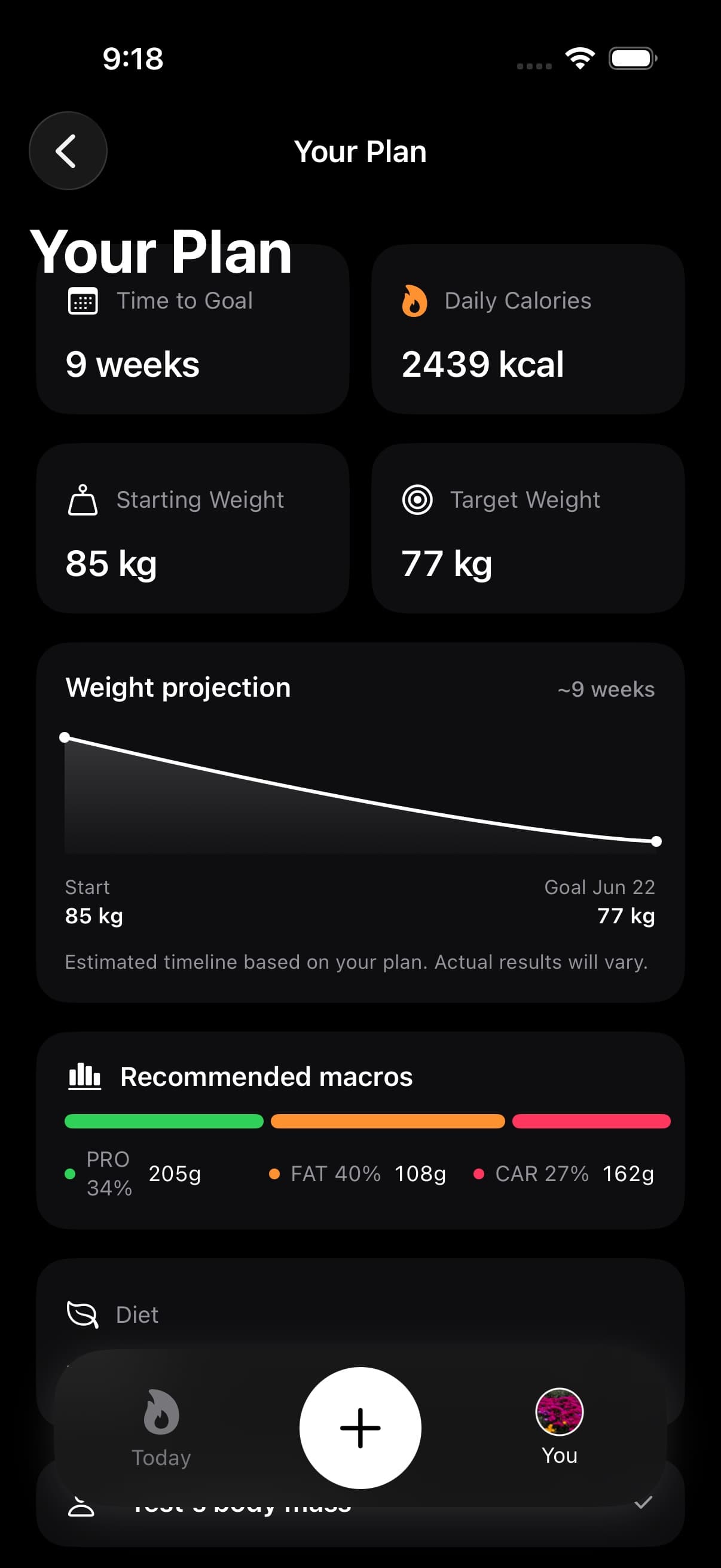
Open You > Personal Details > Your Plan under Coaching Plan. If you use the History sidebar, its Plan shortcut opens the same screen.
01Calories macros meals and micronutrient limits
Fuel stores your plan as four targets: daily calories, protein grams, carbohydrate grams, and fat grams.
Those targets are the contract the rest of the app reads. Today uses them to show remaining calories and macros. Health Grade uses them to score the current day. Daily Review and Weekly Review use them to explain whether the way you ate matched the plan. Widgets, Shortcuts, and coaching use the same target set so you are not getting one number in one place and a different plan somewhere else.
The plan itself is not the same thing as every meal suggestion. A meal suggestion is a response to the day you have logged so far. The stored plan is the baseline the suggestion is trying to fit.
02How targets are generated
Fuel builds a generated plan from your profile and goal inputs: age, height, weight, desired weight, biological sex, activity level, goal type, diet preference, and pace.
Maintenance calories come from BMR plus average Apple Health active energy when Fuel has enough Health data. Without that, Fuel uses BMR and your selected weekly activity level as the fallback.
From there, Fuel applies the plan direction. If your current weight and goal weight point toward weight loss, the plan uses a daily deficit. If they point toward gain, the plan uses a daily surplus. If the goal is maintenance, there is no goal adjustment. The pace setting can make that adjustment more or less aggressive within the allowed range.
Protein is anchored to body weight and goal context. After protein is set, Fuel allocates the remaining calories across carbs and fat based on your diet preference. A balanced plan will not distribute macros the same way as keto, vegan, vegetarian, pescatarian, paleo, or slow-carb.
03Read the explanation behind your targets
In Your Plan, expand How your plan is calculated to read the assumptions behind the generated plan. The guidance explains the daily calorie target, protein target, carbohydrate and fat allocation, expected progress, and maintenance estimate. It also includes protein distribution, daily essentials, and progress checks.
Read this before changing a target that looks surprising. It helps you identify whether the starting assumption came from your goal, body weight, activity level, or diet preference.
04Find a routine that fits the plan
Expand Your routine for guidance on strength, cardio, daily movement, food around workouts, recovery, and an example week. Fuel generates this guidance from the profile and activity choices used for your plan.
Use the example week as a starting point for your schedule. These sections appear when the plan has guidance available; their presence does not mean Fuel has built a sport-specific training program.
05Prepare for an event
Choose Prepare for Event when your plan needs an event name and date. Fuel uses the time remaining to place the plan in a preparation phase and set its calorie adjustment. Your Plan then shows the event, date, phase, and time remaining.
Prepare for Event explains setup and how the phases change. Ordinary weight-loss and muscle-gain plans continue to use goal direction and speed.
06Plan calories and today target
This is the part that is easiest to overstate. Your plan calories are the generated or customized baseline. Today’s visible calorie target depends on your Daily Goal setting.
In Plan Calories mode, Fuel uses fixed plan calories each day. Workouts still matter for Energy Balance and trend review, but they do not automatically raise the calorie target.
In Dynamic Calories mode, Fuel starts from your recent burn baseline and adds calories when today’s activity runs ahead of pace. The formula is your recent burn baseline, plus unlocked activity, plus the plan adjustment. If rollover is enabled, unused calories from yesterday can add up to 200 kcal to today’s target.
Dynamic Calories does not rewrite your plan. It changes the daily calorie target used for the current day while keeping the same plan direction, deficit, surplus, or maintenance intent.
Fuel Energy Model is the deeper explanation for how plan calories, burn baseline, Dynamic TDEE, rollover, food logs, and weigh-ins work together.
07Macro planning
Fuel’s macro targets are daily targets, not automatic meal-by-meal prescriptions.
Protein is usually the strongest anchor because it affects satiety, recovery, and lean-mass support. Carbs and fat carry more of the diet-preference tradeoff. If training performance is the limiting factor, carbs often need more room. If calories are drifting up without much fullness, fat is often the place to check first because small portions can add a lot of energy.
Turning on Net Carbs changes carb budgeting displays by subtracting fiber from the carb budget. It does not change logged calories, total carbs, or the saved calorie target.
Use Adjusting Macronutrients when you want to directly edit calories, protein, carbs, or fat. A direct edit marks the plan as custom. Use Update Daily Plan when you want Fuel to recalculate from profile inputs such as goal, activity, diet preference, and pace.
08Meal choices and recommendations
A good Fuel plan gets easier to follow when your meals repeat enough to make the week measurable.
Saved foods, searched foods, and logged meals reduce decision work because they make common patterns easy to repeat. The Food Library powers direct food suggestions and common-food lookup. The Meal Catalog powers recipe-style and next-meal recommendations.
Next-meal coaching is not trying to invent a new plan from scratch. It looks at what remains today, your diet constraints, macro pressure, micronutrient gaps, and recent recommendation history, then ranks meals that fit the day better than random browsing.
09Micronutrients and limits
Micronutrient targets do not change the calorie math, but they do change how Fuel evaluates the quality of the plan you are executing.
Health Grade and coaching look beyond calories and macros because a day can be calorie-accurate and still thin on fiber, potassium, magnesium, iron, calcium, or other nutrients that affect hunger, performance, and recovery. Limits matter too. Sodium, saturated fat, added sugar, alcohol, and similar pressures can explain why a day scores worse than the macro totals alone would suggest.
Use Micronutrient Targets when the plan looks right on calories but your food choices still feel repetitive, low-quality, or hard to sustain.
10After completing a goal
Qualifying completed goals have a recap in Completed Goals inside Achievements. You can revisit the result and choose a next chapter such as Maintain, Lose Fat, or Build Muscle.
Use Completed goals for the confirmation flow and what happens to your plan after completion.
11When to regenerate or override the plan
Fuel does not improve a plan by guessing harder. It needs the loop to be real: wear Apple Watch if you use Health data, log food consistently, record weigh-ins, and review the trend.
Daily Review explains how one day landed against the plan. Weekly Review is better for pattern changes because it can see repeated misses, activity mismatch, hunger signals, adherence problems, and weight trend. Plan Progress and Dynamic Calories use weigh-ins and energy data to judge whether the target is behaving the way the plan expected.
If the target feels wrong, check the data source before changing the number. Apple Health permissions, missing active energy, partial food logs, stale body weight, Daily Goal mode, rollover, Net Carbs, and custom macro overrides can all make the same plan feel different in practice.
Change the plan when the same problem repeats for one to two weeks. Change the meal structure when the plan is mathematically fine but hard to execute today.
