
Personalized metrics are the numbers Fuel derives from your plan, food log, Apple Health data, weigh-ins, and review history so the app can explain what is happening instead of showing isolated totals.
01The inputs Fuel trusts
Fuel starts with records you can inspect: logged foods, nutrition totals, active energy, basal energy, workouts, water, body weight, GLP-1 check-ins when enabled, and your stored plan targets.
Those inputs are not all equal. Food logs explain intake. Apple Watch energy explains movement and training load. Weigh-ins explain whether the plan is moving your body weight in the intended direction. Your plan targets explain what the day was supposed to look like.
Fuel turns those records into a smaller set of working metrics.
Plan targets + food logs + Apple Health + weigh-ins
  -> energy balance
  -> Health Grade
  -> weight trend and Plan Progress
  -> Daily Review and Weekly Review
  -> assistant-ready context when you want a deeper conversation
The point is not to make every number feel important. The point is to separate the signal you should act on from the noise you should let pass.
02Energy balance
Energy Balance is the day-level audit. It compares what you ate with what Apple Health says you burned through basal and active energy.
This is where you check whether a day missed because the plan was wrong or because the data was incomplete. A missing workout, a watch that was not worn, a duplicate workout, or an unlogged meal can all make the day look different from what happened.
If you use Dynamic Calories, Energy Balance also reflects the current daily target rather than only the fixed plan target. Plan Calories mode keeps the target fixed. Dynamic Calories starts from your recent burn baseline and adds calories when today’s activity runs ahead of pace.
Fuel Energy Model explains how those records become daily targets, Dynamic TDEE updates, reviews, and data-quality warnings.
03Weight trend as a filter
Single weigh-ins are noisy. Trend is the signal.
Fuel uses recent weight history to show whether intake and activity are producing the outcome your plan expected. That is why consistent weigh-ins matter more than a perfect weigh-in.
Plan Progress uses weight, activity, food, and target data to show whether the week is on track, close, off track, still getting started, or short on data. That status also feeds Weekly Review and Reports, so the review and report rows are grounded in the same progress signal you see in Your Plan.
If the scale trend disagrees with the plan for one noisy week, wait. If it keeps disagreeing for one to two weeks with good logging coverage, change the plan or the behavior that keeps breaking the plan.
04Macros for execution and micronutrients for quality
Macros are the execution layer. Micronutrients, hydration, caffeine, and limit nutrients are the quality layer.
Fuel shows progress toward calories, protein, carbs, fat, water, and micronutrient targets so the day is easier to debug. A calorie-accurate day with low protein is a different problem from a high-protein day that misses fiber, potassium, or magnesium. A day that hits macros but pushes saturated fat, sodium, alcohol, or added sugar too hard can still be a poor fit for the plan.
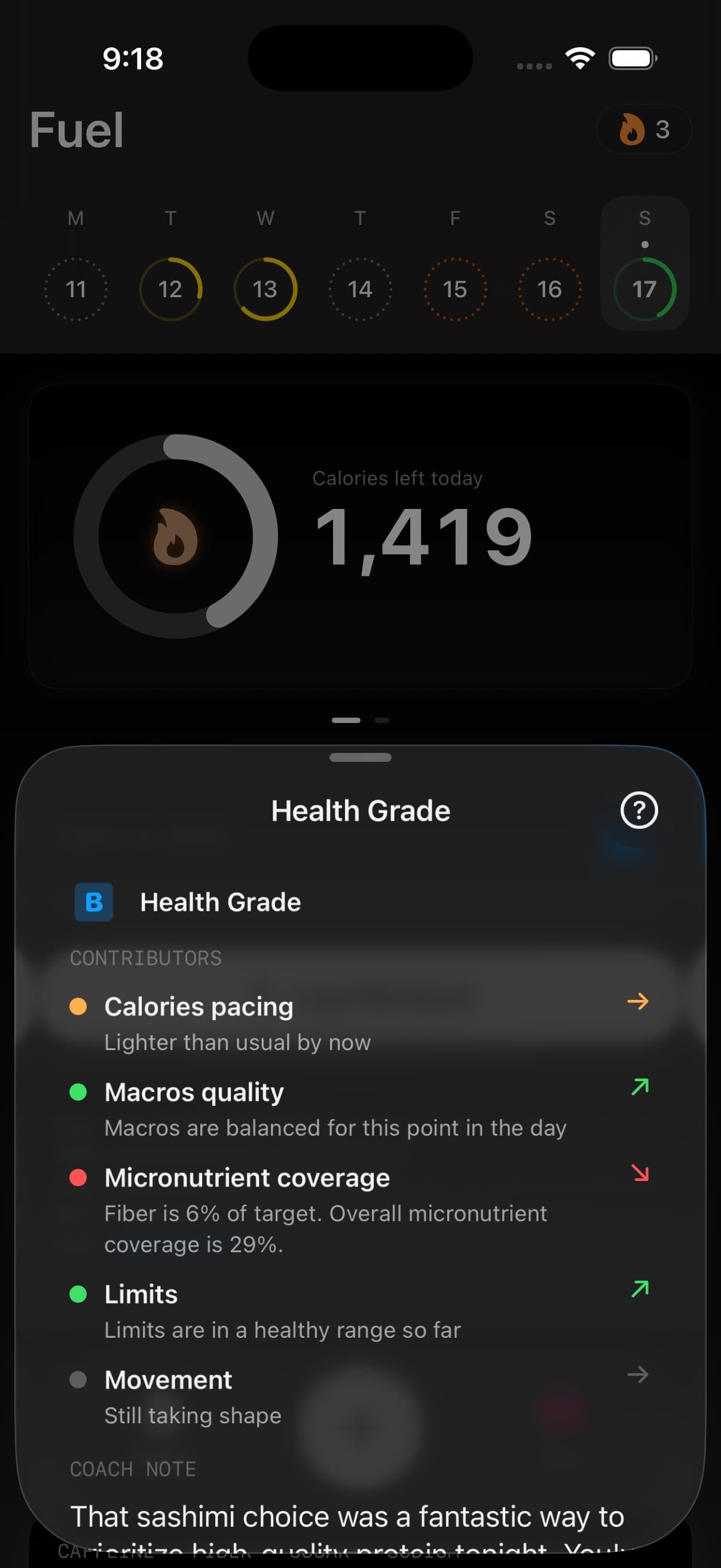
Health Grade brings those signals together. It is not only a calorie score. It looks at calorie pacing, macros, nutrient coverage, limits, and movement so you can see why a day scored the way it did.
05Daily Review Weekly Review and assistant handoff
Daily Review is the day-level explanation. It is best for questions like what broke first today, which meal made the target harder, or whether missing data made the audit unreliable.
Weekly Review is the pattern-level explanation. It looks across the week for repeated misses, weight progress, activity mismatch, Health Grade trend, and whether the current plan still fits the goal.
Fuel does not have a separate Coach Chat surface. Instead, Weekly Review includes a handoff to your preferred AI assistant. Fuel copies the review, the structured coach context, and a follow-up prompt so you can continue the discussion in ChatGPT, Claude, Gemini, Perplexity, or another supported assistant.
The Today screen also has an Ask your assistant tile. It copies current coach context and launches the assistant you selected in Settings and Preferences. Use that when you want a longer back-and-forth than Fuel’s review format is meant to provide.
Some users may also see a Realtime Coach beta on the You tab. It is a voice route into recent coaching context, not a replacement for the log, reviews, Plan Progress, or reports.
06Plan Progress YTD weight and badges on the You tab
The You tab is where the longer-range metrics sit together: Your Plan, Plan Progress, Year to Date Stats, badges, weight, preferences, and beta coaching entries when they are enabled. Today is the operating surface for the current day. You is the place to check whether the system is still moving in the intended direction.
If GLP-1 Support is enabled, those metrics still remain tied to your plan. GLP-1 context can shape coaching around appetite, hydration, protein, and smaller-meal days, but the plan and logged evidence remain the source of truth.
07Audit Energy Balance first when a day looks wrong
Start with Energy Balance when one day looks wrong. Use Timeline when you want to see logging, meals, workouts, hydration, and weigh-ins in order. Use Plan Progress when the question is whether the goal timeline still makes sense.
Use Weekly Review when you need a decision for next week. Use Ask your assistant when you want to go deeper into tradeoffs, training context, travel, appetite, meal timing, or the reasons a recommendation does or does not fit your life.
