
Coach Week Review is Fuel's weekly debrief: it turns seven days of food, drinks, activity, weight, plan targets, Health Grade, and goal progress into a coach summary, scorecard, next-week targets, meal ideas, and a small action plan. It can also supply the latest completed-week summary that appears in Reports.
01When the weekly review is available
The review covers the previous complete seven-day week, using your Week Starts On preference. The new review is offered during the first three days of your configured week. For example, a Monday-start week is offered Monday through Wednesday.
02Weekly Review turns daily noise into next-week actions
Daily nutrition data is useful for decisions in the moment. Weekly review is where Fuel decides whether those daily decisions added up to the plan you meant to follow.
The review reads your logged meals, drinks, activities, calorie and macro targets, goal direction, Health Grade, weigh-ins, and recent coaching memory. It then separates a normal noisy day from a repeated pattern. A high-calorie dinner once is not the same problem as five low-protein days, and a single scale jump is not the same signal as a seven-day weight drift.
Use Weekly Review when you want to know what to repeat, what to adjust, and what to watch next week.
If you want the exact automation stack that gets Today, meal logging, restaurant decisions, and Weekly Review to surface at the right moment, read The Fuel Deep-Link Playbook: Automations That Make Recomposition Automatic.
If you use Apple Watch as part of a recomp phase, this is also where you compare heavy lift days, lower-output days, and recovery flags with the food decisions you made that week. How to Use Apple Watch for Body Recomposition shows the full day-type audit, and Timeline Audits for Lifters: Finding the 2 Days That Break Your Cut shows how to turn that weekly readout into a two-day diagnosis you can fix next week.
03Health Grade trend
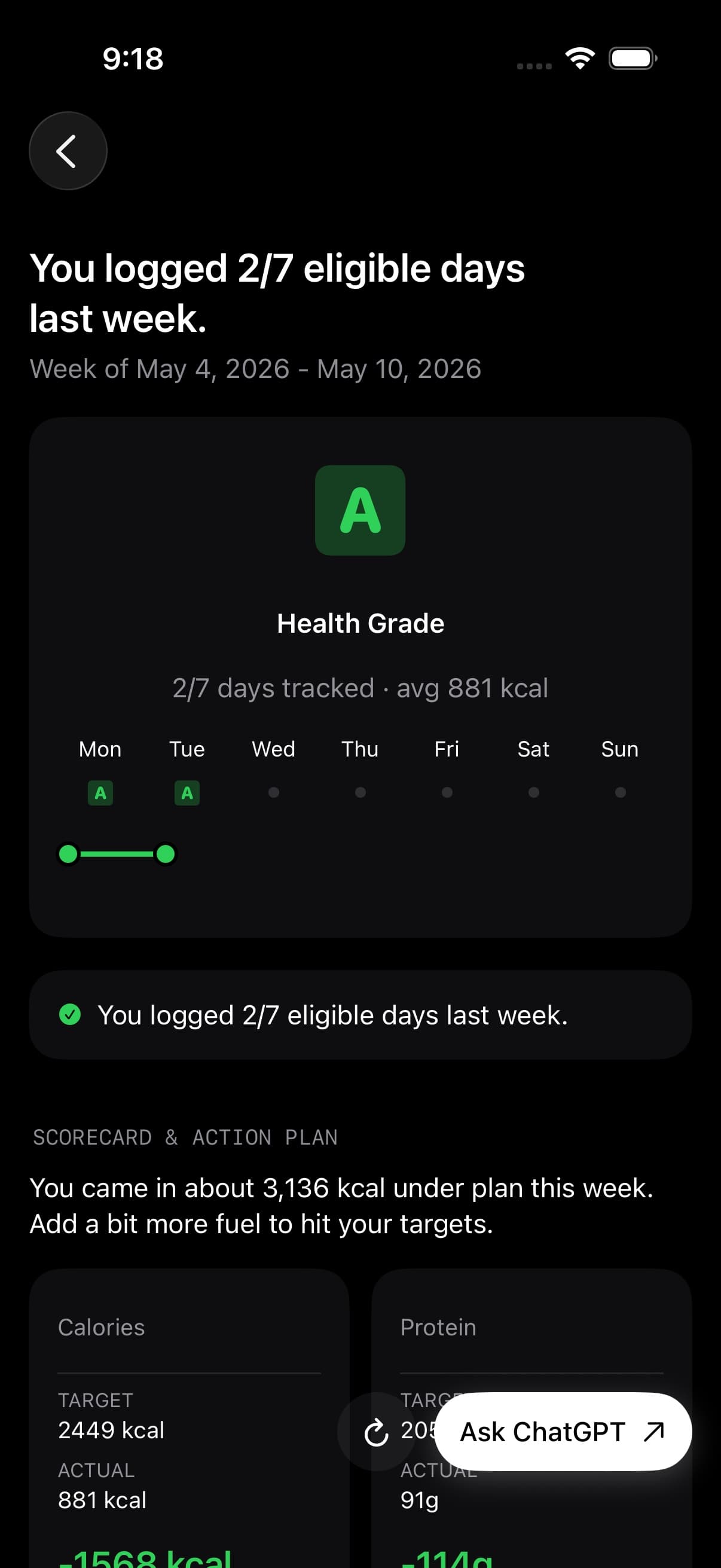
Weekly Review opens with a larger Health Grade view and a day-by-day grade path for the reviewed week.
This is not just a decorative score. It gives the review a quick quality read before you get into calories and macros. A week can be close on calories but weak on food quality, protein distribution, hydration, or consistency. The Health Grade trend helps you see which days lifted the week and which days pulled it down.
04Coach summary of the whole week
The overview is the coach's read on the week as a whole. It looks at adherence, repeated patterns, gaps in logs, and whether the week matched your goal direction.
This section is meant to answer the plain-language question: "What happened this week?" If your intake was steady, it should say that. If the week was too sparse to judge cleanly, it should say that too. If your plan started midweek, Fuel treats the empty days before plan start differently from missed logs during an active plan.
05Weekly metrics with target actual and delta
The scorecard shows four relevant metrics for the week, each with a target, actual value, and delta.
Fuel chooses the metrics based on the data available for the reviewed week. Common scorecard rows include calories, protein, logged days, weigh-ins, macro adherence, or other plan signals. The scorecard also includes up to three highlights and a short coach comment, so you can scan the result before reading the full analysis.
If a value is missing, the row should make that clear instead of pretending the signal exists.
06Three highest-return changes for next week
Key opportunities are the three highest-return changes Fuel sees for the next week.
Each opportunity includes the current status, the recommended change, and the expected benefit. This is where the review should move from observation to decision: not "eat better," but the specific pattern that would make next week easier to execute.
Good examples are closing a recurring protein gap, moving calories earlier on training days, adding a repeatable meal, or tightening logs when the data is too thin to trust.
07Next week targets
Next week targets translate the review into three concrete targets.
Targets can involve calories, macros, logging coverage, meal timing, training support, or recovery behavior, depending on what actually constrained the week. Fuel should not create tracking targets just because tracking is part of the app. It should only make logging a target when missing logs were a real blocker.
Treat this section as the scoreboard for your next review. If you change everything at once, you will not know which change worked.
08Reviewing a Maintain plan
For Maintain, read the review for weight stability, consistent intake, and how well your food supported training and rest days. A stable week can be a successful week.
Maintain uses a zero calorie adjustment from maintenance. It does not calculate a faster or slower arrival at a weight goal, and the review does not automatically create separate training-day and rest-day calorie targets. Use the next-week actions to address the patterns the review actually found.
09GLP-1 support
When GLP-1 support is enabled, Weekly Review can carry that adaptive state into the coach context. That can include medication mode, treatment week, appetite risk, hydration risk, protein risk, symptom summary, and the active medication name.
The point is interpretation, not medication guidance. Fuel can treat low appetite, hydration strain, smaller meals, and protein coverage as part of the week it is reviewing, but it should not replace your baseline plan or tell you how to take a medication.
10Meal ideas
Meal ideas are generated from the gaps in your week, not from a generic recipe list.
Fuel returns three meal ideas with a time, key feature, ingredients, and short prep steps. A meal idea might be aimed at protein, a steadier breakfast, a lower-friction lunch, or a way to make a hard training day easier to fuel.
The best use is to pick one idea you would actually repeat, then add it to your normal week instead of treating it like a one-off recipe assignment.
11Training and recovery
Training and recovery summarizes active days per week, total activities, and coach guidance based on your activity pattern.
The active-day and activity-count values come from Fuel's weekly metrics. The commentary can then connect that movement pattern to the nutrition plan: whether training needs more support, whether lower-output days need a different calorie expectation, or whether recovery should be protected before making the plan more aggressive.
If you use Apple Watch, this section depends on your activity data being available through Apple Health. Use Apple Health Permissions if workouts or burn data look wrong.
12Three actions for the next seven days
The action plan is capped at three items.
That limit is intentional. Weekly Review is not trying to produce a long coaching document. It is trying to pick the few actions most likely to improve the next seven days. A good action item should be small enough to execute and specific enough to verify next week.
If the plan feels too broad, choose the one action tied to the clearest scorecard miss.
13Last week recap
Below the generated coach sections, Fuel shows a "Last week" recap with hard analytics from the reviewed week.
This includes logged days, a day-by-day logging streak, weeks in a row, and expandable daily details. The daily detail view lets you inspect the week one day at a time instead of relying only on the coach summary.
This is the audit layer. If the coach says protein was low or activity was uneven, the recap is where you can verify the days behind that claim.
14Plan progress
Plan progress shows whether the week moved with or against your goal.
Fuel uses your plan direction, calorie targets, weekly energy result, and goal projection to show whether the week was over, under, on track, or unavailable. For weight-loss and weight-gain plans, it can also show how the week may affect the projected goal date when enough data exists.
Use Plan Progress when you want the broader view of the goal timeline beyond the single reviewed week.
15Weekly calories eaten vs burned
The energy section shows daily calories, average calories, burn versus eaten, and recent energy changes when enough data exists.
This is the part to check when the week felt confusing: appetite was high, workouts changed, travel disrupted meals, or the scale moved in a direction that did not match your memory. Fuel compares intake against your plan and activity context rather than treating every day as identical.
For the deeper daily view, use Energy Balance. For the full explanation of burn baseline, Dynamic Calories, Dynamic TDEE, rollover, and weigh-in evidence, use Fuel Energy Model.
16Macro recap
Macro recap compares weekly totals against weekly targets for calories, protein, carbs, and fat.
This keeps macro feedback grounded in the whole week. A low-protein day matters less if the rest of the week made up the gap, and a single high-fat meal matters less than a pattern that pushes carbs or protein out of range.
If your macro targets seem wrong, adjust the plan from Nutrition Planning rather than trying to compensate day by day.
17Fasting weeks
Intentional fast days should not be read the same way as missing meal logs. When a fast is confirmed and clean, Fuel can count that day through its fasting-aware Health Grade, streak, review, and reminder logic.
Multi-day fast support follows the same rule. If you choose to carry a fast into another day and the record supports it, the review can treat that day as fasting evidence instead of an empty logging day. If the fast is incomplete, unclear, or mixed with unlogged intake, the review should stay cautious.
18Plan completion
For weight-loss and weight-gain plans, Plan completion shows your goal date and whether the week pulled that date closer, pushed it farther away, kept it about the same, or cannot be judged yet. Maintain plans have no calculated goal-date shift.
This keeps the review honest. A week can feel productive while making little progress toward the goal, and a quiet week can still be exactly what a maintenance or recomposition phase needs.
The rule is simple: judge the week by the plan you chose, not by a generic idea of "good."
19Weekly weigh-in trend in review
The weight section appears when Fuel has enough weigh-in data to say something useful.
It can show your weight transition from plan start toward goal, recent three-day and seven-day weight changes, sample counts, and a trend comparison. Fuel uses these windows so a single weigh-in does not dominate the review.
If weight data is thin, the review should be cautious. Use Weigh-ins and Trend to understand how Fuel reads scale data and why regular weigh-ins matter.
20Logged days and missing signals for the week
Weekly Review is only as strong as the week it can see.
Fuel tracks whether the reviewed week has all seven calendar days, whether the plan began midweek, how many days had logs, how many days had enough coaching data, and whether expected empty days should be ignored. It also validates that daily meal totals, macro totals, activity counts, and reviewed-week dates line up before using that data for the coach context.
If the review says the week is sparse, treat that as a data-quality warning, not as a moral judgment. The fix is usually boring and effective: log enough normal days that Fuel can read the pattern.
21Assistant handoff
Weekly Review does not have a Coach Chat feature. Instead, the review includes an "Ask" action for your selected assistant.
Fuel copies a weekly review handoff to the clipboard, including the generated review response, coach context, weekly metrics, daily journal, plan settings, trajectory signals, and a prompt asking the assistant to expand on the coach's analysis. It then opens your preferred assistant when possible.
Supported assistant choices are ChatGPT, Grok, Gemini, and Claude. If the app cannot prefill the prompt, Fuel still copies the context so you can paste it into the assistant and go deeper from there.
22Refresh Weekly Review and open past weeks
Weekly Review is cached for the reviewed week so it stays stable after it is generated.
You can refresh it from the review screen when you want Fuel to regenerate the coach content with the latest data. You can also open Coach Week Review from Plan Progress and return to prior weekly reviews as part of your progress history.
Refresh when the inputs changed in a meaningful way, such as new logs, corrected weigh-ins, or newly available Apple Health data.
23Open the weekly PDF from Reports
Reports is the share-ready progress view opened from Trends. It can include the latest Weekly Review as completed-week evidence alongside current-period scorecards, weight deltas, journey history, data quality notes, and PDF export.
Weekly Review remains the coach debrief. Reports is the audit layer you can share, and it should keep Plan Progress score separate from Health Grade when both appear.
24Weekly Review access on Free vs Pro
Fuel Free includes the first Weekly Review you open for your profile. That allowance does not reset each week. Fuel Pro unlocks ongoing weekly reviews.
Use Free and Pro to confirm the current limit.
