
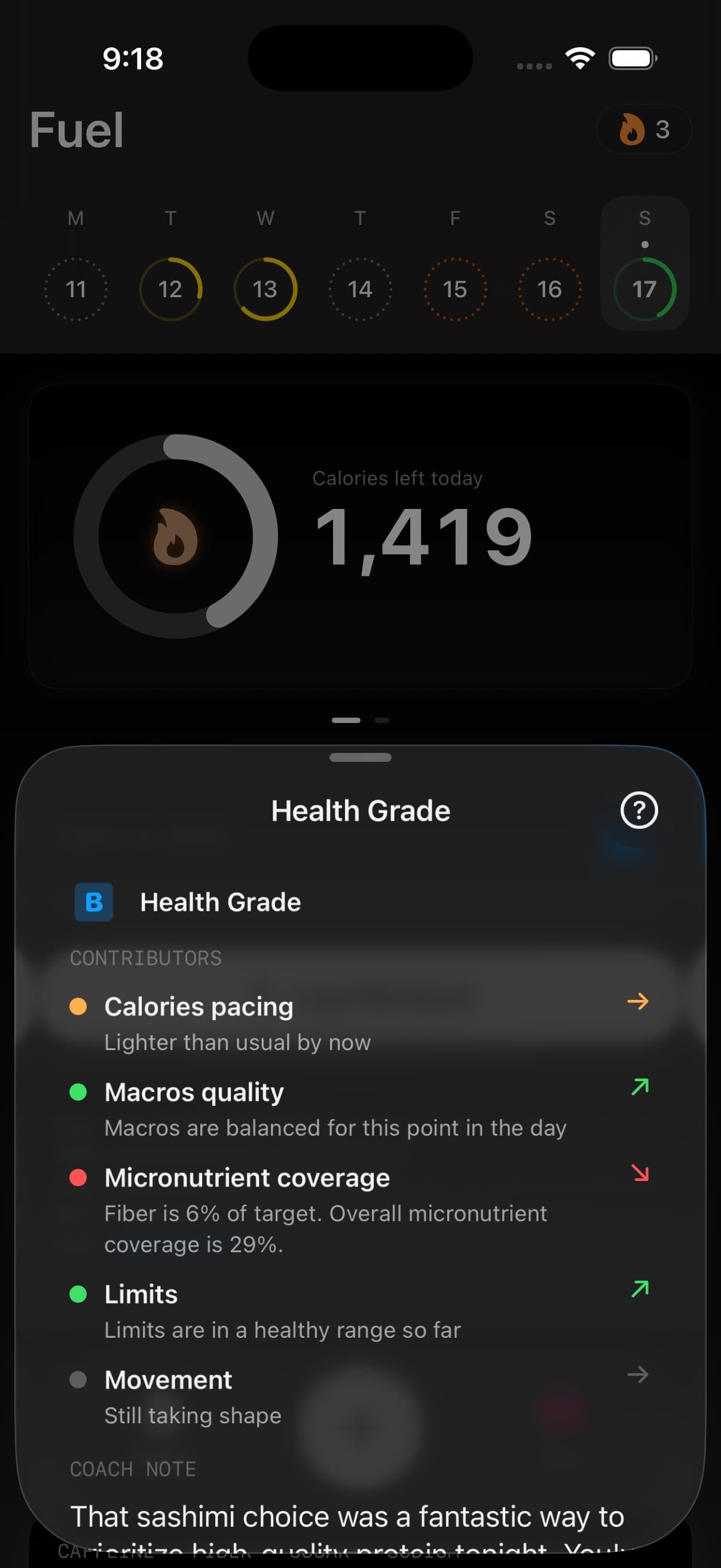
Health Grade is the fastest read on whether today is moving your plan forward or making the next choice harder. Fuel shows it as a simple A, B, C, or D band, then breaks down the five signals that moved it.
01What the A through D bands mean
Fuel does not show A+ in the app. The scoring system can use finer internal cutoffs so history, trend math, and coaching stay stable, but the user-facing grade is grouped into four bands: A, B, C, and D.
An A means the day is on track across the signals Fuel can see. A D means multiple areas are clearly off pace, often calorie overshoot and low movement at the same time. B and C sit between those states: a B usually means the day is broadly solid with one weak contributor, and a C usually means two or more contributors need attention before the day is hard to recover.
02The five contributors
Health Grade is built from five contributors. The detail view shows each contributor with a status color and direction so you can see the reason behind the letter instead of treating the grade like a black box.
| Contributor | What Fuel checks |
|---|---|
| Movement | Active calories against your personal movement target, based on recent burn history or activity level |
| Calories pacing | Whether intake is running ahead of, behind, or close to your calorie target for this point in the day |
| Macros quality | Whether protein, carbs, and fat are working together without one macro dominating the day |
| Micronutrient coverage | Fiber, EPA + DHA, and key micronutrients such as calcium, iron, magnesium, potassium, and vitamin C |
| Limits | Added or processed sugar, sodium, caffeine, and saturated fat before they pressure the day |
Movement carries the most weight, about a third of the grade. Calories pacing and macros quality follow with equal weight. Micronutrients and limits round out the score, so food quality matters without overpowering the main plan signals.
Health Grade uses some of the same energy and target context described in Fuel Energy Model, but it is not only a calorie score.
03Movement calories and macros move the grade fastest
Movement, calories, and macros are the signals that usually move the grade fastest.
Movement is measured against a personal active-calorie target. Once Fuel has enough Apple Health history, it can use recent active burn as the baseline. Before that, it falls back to the activity level in the profile, with typical targets ranging from about 180 to 900 active calories.
Calories are scored as pacing, not just the final total. Being very far under target can hurt the grade just like overshooting can, because both make the plan harder to execute cleanly. Early in the day, Fuel looks at where intake should be by that time rather than pretending the day is finished.
Macros look at protein, carbs, and fat together. A strong protein day helps, but the grade also watches for a day that is too skewed toward one macro or too weak on protein for the remaining meals to fix.
04Micronutrients and limits as quality checks
Micronutrients and limits make the grade more honest about food quality. A day can hit calories and macros with low-fiber, low-variety foods, or with sugar, sodium, caffeine, and saturated fat stacking up in the background. These signals catch that difference.
Micronutrient coverage rewards fiber and broad nutrient coverage. EPA + DHA is part of that coverage when Fuel has direct long-chain omega-3 data from sources such as fatty fish, shellfish, fish oil, algal oil, or fortified foods. Fuel does not convert plant ALA from flax, chia, walnuts, or plant oils into EPA + DHA.
Limits penalize excess only when the day has enough evidence to judge it, so one imperfect number does not automatically wreck the grade.
05Micronutrient availability
Fuel does not let partial nutrient data act like a complete verdict. If the shared day context says micronutrients are unavailable, Health Grade neutralizes both micronutrient coverage and limits pressure instead of inferring them from stale or incomplete values.
That matters for low-detail logs and HealthKit imports. A meal with calories and macros can still improve calorie pacing or macros quality, but it should not create fake certainty about fiber, EPA + DHA, sodium, caffeine, added sugar, or saturated fat.
06How the grade updates
Health Grade is not a midnight verdict. It recalculates as new data arrives.
After logging a meal, the grade reflects the new intake. After a workout or active-energy update syncs from Apple Health, the grade reflects the new movement context. The Today view refreshes the grade through the day, and the detail view can recalculate live as the day changes.
Early in the day, the grade stays calmer because Fuel does not yet have much evidence. Before the first meal, meal-based signals may be grouped as waiting on food. As more food, drink, activity, and Apple Health data arrive, the contributor rows sharpen and the grade becomes more decisive.
07Coach note after a meal that moved the grade
When you log food, Fuel updates the grade and generates a coach note for that moment. The note explains what the meal changed, how it fits into the remaining day, and which correction has the best chance of moving the grade.
That means Health Grade is not only a score. It is also the routing layer for coaching: if movement is the drag, the next action may be a walk or workout; if calories are ahead of pace, the next meal needs to leave more room; if protein is lagging, the day needs a stronger protein anchor.
08Health Grade in Daily Review
Daily Review uses the final Health Grade to explain yesterday. The grade anchors the review before the deeper breakdown of calories, macros, movement, logged foods, target progress, and coaching takeaways.
This is where the grade shifts from live steering to retrospective learning. The review can show why the grade landed where it did, which contributor held the day back, and whether the day moved the plan closer or further away.
See Daily Review for the full review workflow.
09Health Grade in Weekly Review
Weekly Review uses Health Grade to connect individual days into a pattern. The coach week review can call out what moved the grade, what held it down, which days carried the week, and which behaviors are worth repeating.
This matters because a week can look fine in averages and still have avoidable volatility. Health Grade gives the review a day-by-day signal for consistency, recovery, and the specific contributors that kept showing up.
See Weekly Review for the full weekly workflow.
10Health Grade widget trends and Shortcuts
The Health Grade widget shows your current A, B, C, or D band on your Home Screen so you can check in without opening the app. It intentionally does not show A+, F, the numeric score, or confidence percentage.
Fuel also surfaces Health Grade in trends, reports, and app shortcuts. Trends show whether the grade has been rising, dipping, or steady over recent days. Reports can include the grade as part of a broader nutrition summary. Shortcuts can read out today's calories, macros, water, and health grade together.
See Nutrition Widgets for widget setup and limits.
11Improving your grade
Start with the big three. Movement, calories, and macros carry enough weight that a correction there usually matters more than chasing a tiny nutrient detail.
For an A, Fuel needs a strong day across all five contributors. Stay close to the calorie target, keep protein high with balanced macros, log enough movement for your personal target, cover fiber and key micronutrients, and keep sugar, sodium, caffeine, and saturated fat from stacking up.
If the grade slips, fix the largest visible problem first. A 20-minute walk, a lighter next meal, or a higher-protein meal often does more than trying to repair every contributor at once.
12Health Grade access on Free vs Pro
Health Grade is available on both Fuel Free and Fuel Pro. Coaching notes that accompany the grade may be limited on Free.
See Free and Pro for current limits.
