
These are the interactive cards on the Today tab inside the app. For iPhone home screen and lock screen widgets, see Home Screen Widgets.
Today view widgets compress the day into a scoreboard you can act on before the day is over.
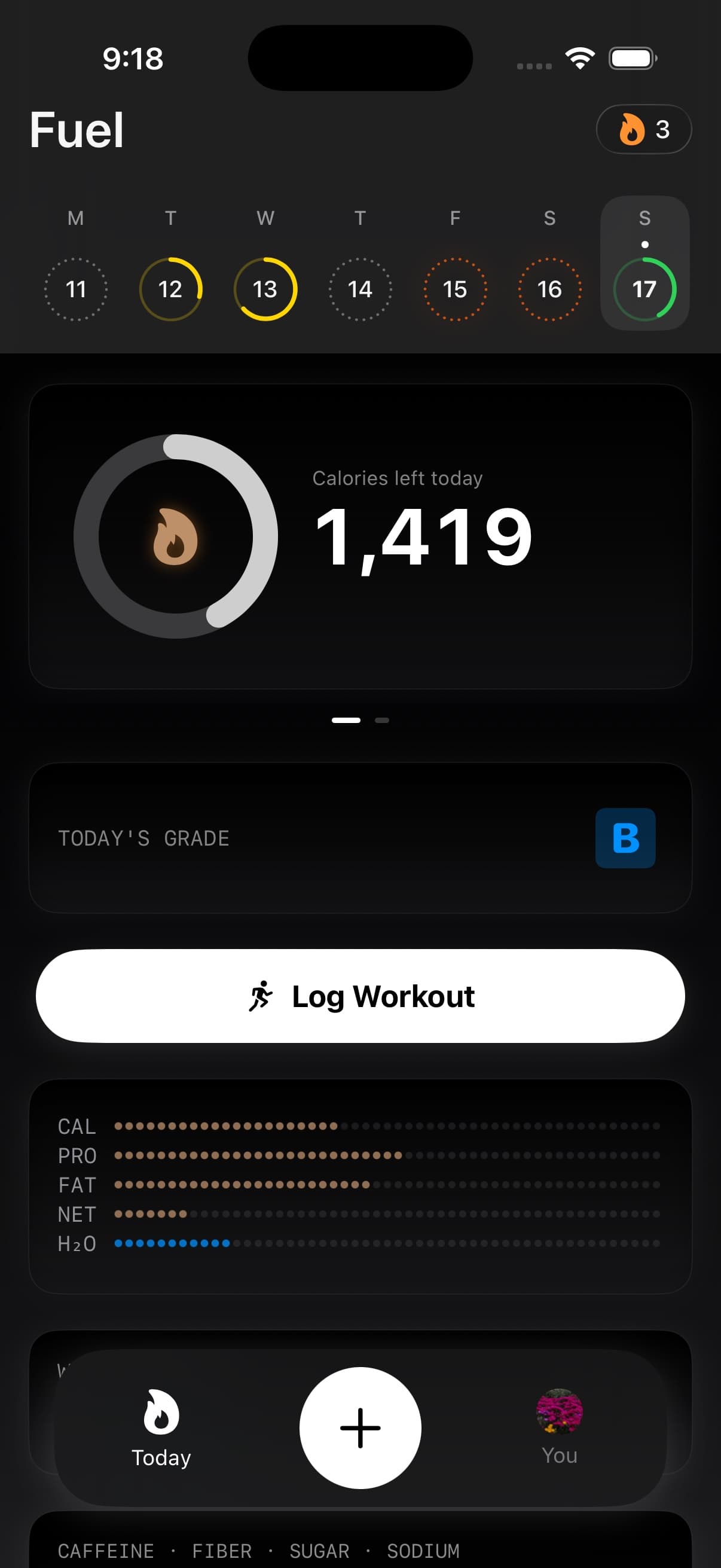
01Glanceable calories macros grade and water cards
Fuel’s core loop is decision making under constraints. A good widget makes the relevant constraint visible at the moment you are choosing the next meal.
That constraint might be remaining energy, remaining protein, micronutrient coverage, or hydration progress. The point is not perfection. The point is earlier feedback, when the day can still be adjusted.
02Available widgets
Fuel offers widgets across several categories.
| Widget | What it shows |
|---|---|
| Calories | Daily calorie progress against your target |
| Macros | Protein, carb, and fat progress rings |
| Water | Hydration progress against your daily target |
| Streaks | Current consecutive-day or year-day streak count |
| Plan Progress | Weekly food, activity, weight, and goal forecast context |
| Health Grade | Your current daily Health Grade band, A, B, C, or D |
Swipe the calories widget to view macro cards, and tap to toggle between remaining targets and consumed totals.
03Health Grade widgets
Health Grade widgets use the same public band users see in the app: A, B, C, or D. The widget does not show A+, F, numeric score, or confidence percentage, even though the scoring engine can keep finer internal values for history and calculations.
The large Health Grade widget mirrors the detail view hierarchy with the letter band and contributor rows. If the day does not have a usable grade yet, it shows the empty state instead of inventing a score.
04Micronutrient and hydration widgets
Micronutrient widgets wait for authoritative micronutrient data. If the shared snapshot says micronutrients are unavailable or still pending, the widget can show an unavailable state rather than treating partial data as complete.
Water widgets use the same hydration totals as Today, including water captured from foods and beverages where Fuel can see it. Hydration links and the Log Water control open a water logging surface so the shortcut performs the action it names.
05Picking widgets that match your goal
Pick widgets that change behavior, not widgets that look interesting.
If your issue is under eating on high activity days, use calories and macro widgets. If your issue is diet quality drift, use Health Grade, micronutrients, and water. If you want a quick read on weekly compliance, use Plan Progress.
If you are not sure what is driving outcomes, start with Calories and Health Grade, then add the widgets that reflect the constraint you miss most often.
06Widget limits by plan
Fuel Free includes a smaller widget set. Fuel Pro unlocks a larger set and a higher widget count.
See Free and Pro for the current limits.
07Widget settings vs Today view cards
If a widget is noisy, it usually means the log feeding it is incomplete. Use Settings and Preferences to confirm your tracking choices and review settings, then fix the input stream rather than chasing display tweaks.
