
Daily Review is Fuel's recap of yesterday: it turns the previous day's logs, targets, Health Grade, movement, and goal progress into one coach message and a simple macro audit for today's next decision.
01Yesterday's food activity and plan snapshot
Daily Review uses the historical snapshot for yesterday, including food logs, drinks, activities, calories, protein, carbs, fat, micronutrient data when available, and the active plan that applied to that date.
That date matters. If you changed your plan today, Daily Review still tries to judge yesterday against the plan and targets that were active yesterday. If yesterday had no food, drink, activity, or confirmed fast-day signal, the screen shows an empty state instead of inventing a recap.
02Intentional fast days
A confirmed clean fasting day is evidence, not a hole in the log. When yesterday was marked as an intentional fast and no fast-breaking food was logged, Daily Review can treat the day as a valid fasting day rather than a missed meal day.
This changes the review path. Health Grade uses fast-day scoring, meal coaching stays quiet during the fast, and the review can name the day as intentional. If food is logged that breaks the fast, Daily Review returns to the normal meal-based audit for that day.
03Coach summary
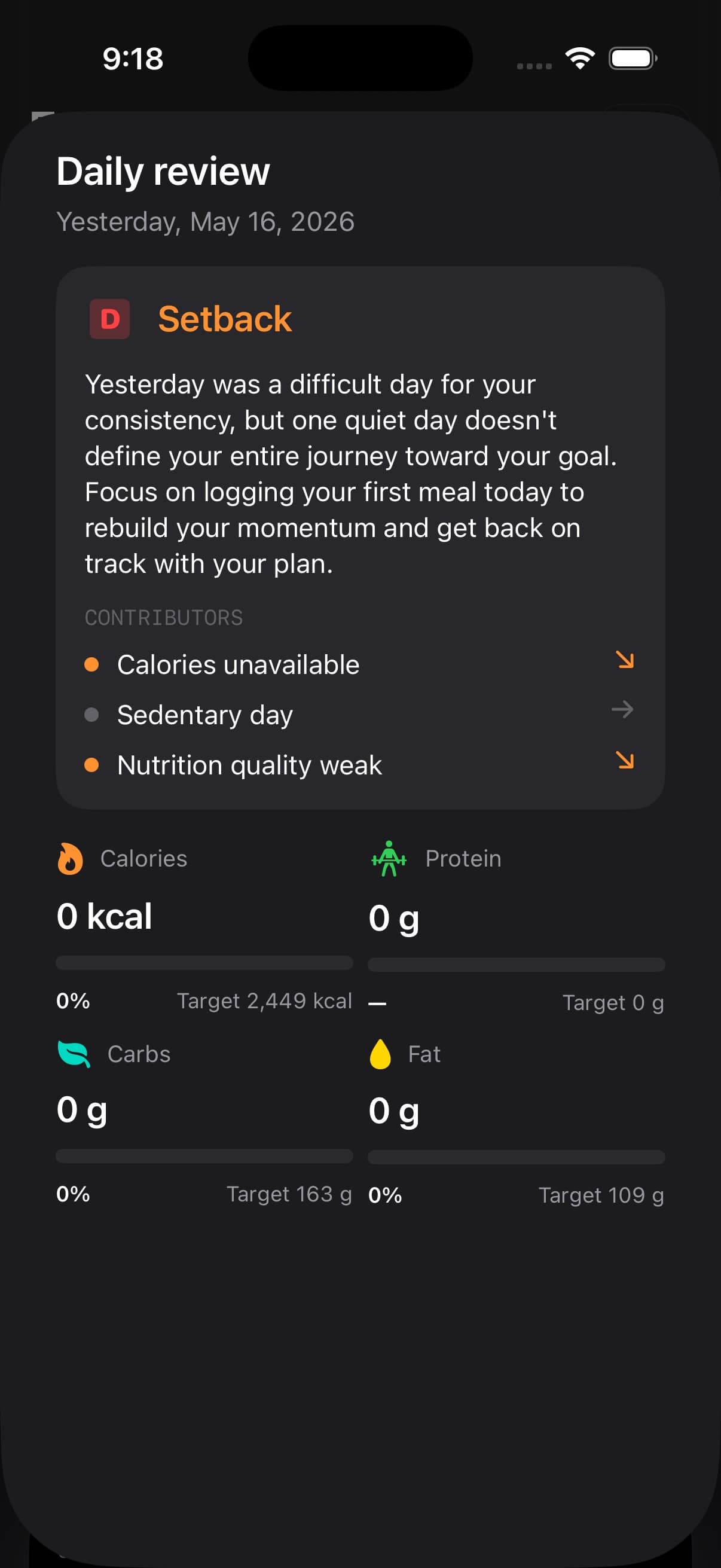
The top card is the Daily Review hero. It shows a verdict, your Health Grade when yesterday can be scored, and a two-sentence coach message.
The coach message is generated from the daily review context only: yesterday's foods, macros, Health Grade, grade reason, goal projection, plan settings, and progress. It is designed to validate the day outcome without restating every number, then give one concrete move for today.
Your preferred coach style affects the tone of this message, so the same data can feel calmer, more direct, or more performance-focused depending on your settings.
04Daily verdict from on track to setback
The verdict comes from the Health Grade band for yesterday.
An A-band day is treated as on track. A B-band day is close enough. A C-band day is off balance. A D-band day is a setback. If there was no historical target for that day, Fuel shows that the review is not available rather than forcing a grade.
This keeps Daily Review focused on action. The verdict tells you whether to protect the structure, repeat the plan, recover the day, reset today, make up a surplus gap, eat more, stay steady, or dial intake back in.
05Health Grade and grade reason
Daily Review uses the final Health Grade for yesterday, including the same scoring context used elsewhere in Fuel.
When a grade reason exists, the coach message is expected to align with it. That means the review should not praise a day for the wrong reason or ignore the largest issue. If micronutrient coverage or limit pressure meaningfully affected the grade, that signal is included in the coach context.
Use Health Grade when you want the full scoring model behind the letter.
06Energy protein movement and food quality drivers
The contributors list explains what drove the verdict.
Daily Review can show calories on target, calories under, calories over, protein hit, protein short, active day, sedentary day, and nutrition quality status. These rows are meant to be readable at a glance, so you can see whether the main issue was energy, protein, movement, or overall food quality.
If the contributor does not match your memory of yesterday, check the timeline for missing meals, drinks, or activities.
07Goal date shift
When Fuel has enough plan progress context, Daily Review can show whether yesterday moved your projected goal date closer, farther away, or left it unchanged.
This does not mean one day decides the whole plan. It means Fuel can translate yesterday's calorie result against the plan adjustment into a small projection change. If the projection is unavailable, Daily Review leaves that signal out.
Use this as a direction check, not a reason to overcorrect.
08Macro cards
The lower grid shows calories, protein, carbs, and fat for yesterday.
Each card shows the amount consumed, the target, and a percent of target. Carbs follow your carb tracking preference, so a net-carb setup uses the net-carb budget rather than total carbs. Protein is also checked against the effective target used for the review, which is why a day can be marked protein hit even when the raw number is close rather than exact.
These cards are the audit layer for the coach message. If the coach says to move protein earlier or tighten portions today, the macro cards show the numeric reason.
09Activity and movement
Daily Review separates a logged activity from observed movement.
A formal workout or activity log counts as activity logged. Movement can also be observed when the day has activity energy. This is why Daily Review may mark a day as active even when you did not manually enter a workout in Fuel.
If movement looks wrong, check Apple Health permissions and whether the activity appeared in yesterday’s timeline.
10Rollover and adjusted targets
Daily Review can recognize when yesterday's target included calorie rollover.
If rollover was included, the hero card can show that as metadata. Fuel also tracks whether the day used a burn-adjusted target, although that label is intentionally kept out of the hero for now because the product team found it too noisy for a compact recap.
For the day-level calorie audit, use Energy Balance. For the broader model behind target movement, Dynamic TDEE, rollover, and review inputs, use Fuel Energy Model.
11Daily Review lock-screen notification
Daily Review can be opened from the app and from scheduled review notifications.
The notification title stays Daily review. When yesterday has a Health Grade, the body leads with the grade so the first lock-screen signal is the score Fuel actually computed. A-grade days use a recognition lead, while B, C, and D days stay direct and factual.
When no grade is available, the fallback body stays ungraded. Fuel does not rename the notification or force grade-like language into an empty or insufficient record.
If yesterday was a confirmed clean fast day, the notification can say it was an intentional fast day and point you back to the review for the next decision.
Notification timing is controlled from Fuel’s Smart Notifications settings.
12Daily Review access on Free vs Pro
Fuel Free includes limited daily reviews. Fuel Pro unlocks daily insights as a default workflow.
Use Free and Pro to confirm the current limit.
