Reports are the export surface for practitioner review: a current goal-phase summary, the latest weekly evidence, data-quality notes, and a shareable offline PDF that says where the signal is strong and where it is thin.
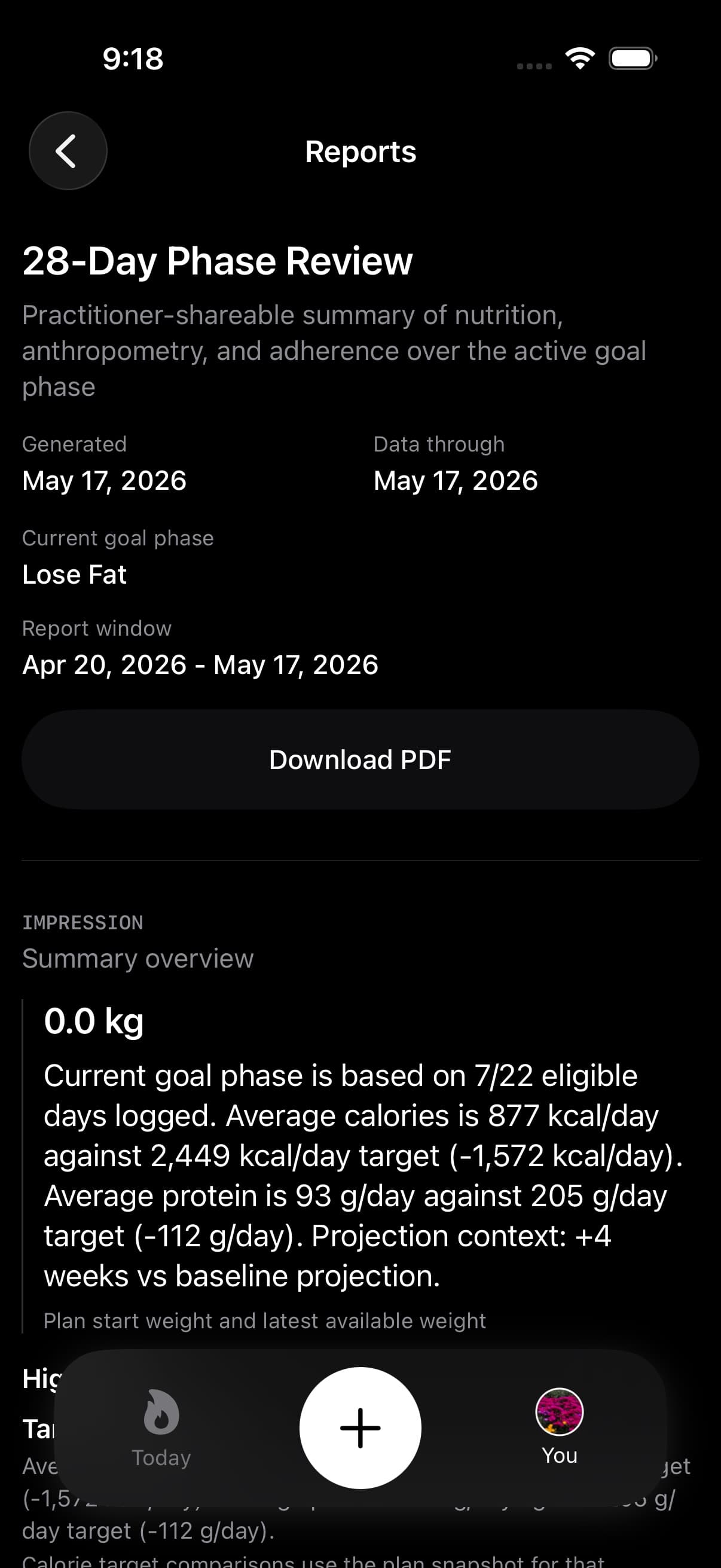
Open You > Trends > Reports when you need a progress view that can travel outside the app. The optional History sidebar also has a Reports shortcut. The screen and PDF use your recorded evidence for review and are not a diagnosis.
01Preview your first report
Reports is available while your first week is still taking shape. Early preview shows the logged-day count and the next coverage milestone. Tap Preview report to read the evidence collected so far.
The first full report needs at least seven logged days and a full seven-day window. Until then, report trends and projections stay limited so a few entries do not look like an established pattern. This preview message refers to the report. It does not close the separate Trends screen.
02Phase and week PDFs for practitioners
Reports starts with an impression, then moves into primary markers for the current goal phase: energy intake, protein intake, and body-weight change. Each marker is paired with the target, delta, and coverage text when Fuel has enough data.
If there is no active goal phase but a completed Weekly Review exists, Reports switches the main marker section to that latest week: Health Grade, logged days, workouts, average calories, and average protein.
Weekly Evidence has two layers. The current-phase rows are 7-day windows anchored to the goal phase and use Plan Progress score, logged days, average calories, average protein, workouts, and weight delta. The latest completed calendar week stays visible as its own block and links back to Weekly Review.
Each current-phase week shows its detail inline: dates, daily averages against targets, logged-day coverage, workouts, available weight change, and Plan Progress. Partial week means the displayed period has not finished. Missing score factors are excluded, so read the coverage and missing-factor explanation alongside the result.
Plan Progress is not Health Grade. Health Grade appears only where weekly data supplies it, so a strong Plan Progress row and a weak Health Grade can both be true when calories, movement, weight, and food quality tell different stories.
03Sharing the PDF
The download action creates Fuel's practitioner/lab-style report and opens the iOS share sheet. The export includes metadata, subject and plan context, an impression, evidence summary, current phase or latest week, available Body Change Evidence, data quality, weekly evidence, methods, and a footer stating that the report is informational and not a medical diagnosis.
The button waits if subscription status needs verification and is disabled while Fuel is using a stale report snapshot. If the report is still refreshing, wait for the current summary before exporting so the PDF matches the on-screen data.
04Current and archived phases
The current phase is the plan contract that is active now. Its averages are scoped to that phase because calorie targets, macro targets, daily goal mode, rollover, and goal direction can change.
Archived phases are completed goal phases. Pro access can render archived periods in the screen and include the History section in the PDF. Free access can still export the current report PDF, but archived phase details are omitted when completed phases exist.
Fuel does not claim a fixed number of PDF exports. The entitlement boundary in Reports is archived history, not export count.
05When report numbers are thin or incomplete
Data quality is a warning label, not a judgment.
Reports can show logged days, missing days, weigh-ins, workout days, excluded days, coverage text, and sources. If the richer data quality model is unavailable, the screen falls back to simpler report evidence such as logged days, workouts, and weekly row counts.
Source rows can identify food logs, activity data, plan targets, or any source summary the report provides. Excluded days can note reasons and user-marked status. Missing logs, missing weigh-ins, excluded days, service outages, and low-confidence sources reduce how much weight to put on trend claims.
06Calories weight and adherence on the report
The report compares logged-day calorie and protein averages with the stored plan targets for the active phase. Dynamic Calories and rollover can change day-level goals during normal use, so a report is not a record of every in-day target adjustment.
The primary Body weight marker reports observed weight change. Weekly rows use Plan Progress, which is the period-row composite of calories, activity, and weight. Health Grade is a separate nutrition-behavior grade and appears only where Weekly Review supplies it.
Hydration, nutrient limits, and micronutrient coverage are not period-level report fields yet. They can matter to your nutrition, but the current practitioner PDF leaves them out until Fuel has dedicated aggregation and coverage fields for those sources.
07Body Change Evidence
When measurement evidence is available, this section adds body-fat percentage, lean mass, waist, coverage, and source context. Its label distinguishes Measured body-composition evidence, Derived from body fat % and weight, and Observed body-weight change.
Derived values use recorded weight and body-fat percentage together. Weight alone does not establish body composition, and the report states that limitation when direct composition evidence is absent. Missing or older measurements can leave parts of the section unavailable.
Use Body measurements and progress photos to add measurements from You > Weight. Progress photos remain in their separate private gallery and do not enter this report or its PDF.
08How to use it with a practitioner
Send the PDF when you want the appointment to start from evidence instead of memory. The strongest sections are the ones with enough logged days, weigh-ins, workouts, and clear coverage. The weaker sections are named in Data Quality and Methods & Limitations.
Bring questions about the plan decision itself to your practitioner. Use Fuel to show what was logged, what target was active, and how the week or phase tracked against that target.