
Fuel treats hydration as logged nutrition, not a side note. Water, fluid from foods, caffeinated drinks, and caffeine timing all sit beside calories and macros so the day can be read in one place. For the training-day fluid and electrolyte targets that drive those numbers, read The Complete Guide to Hydration.
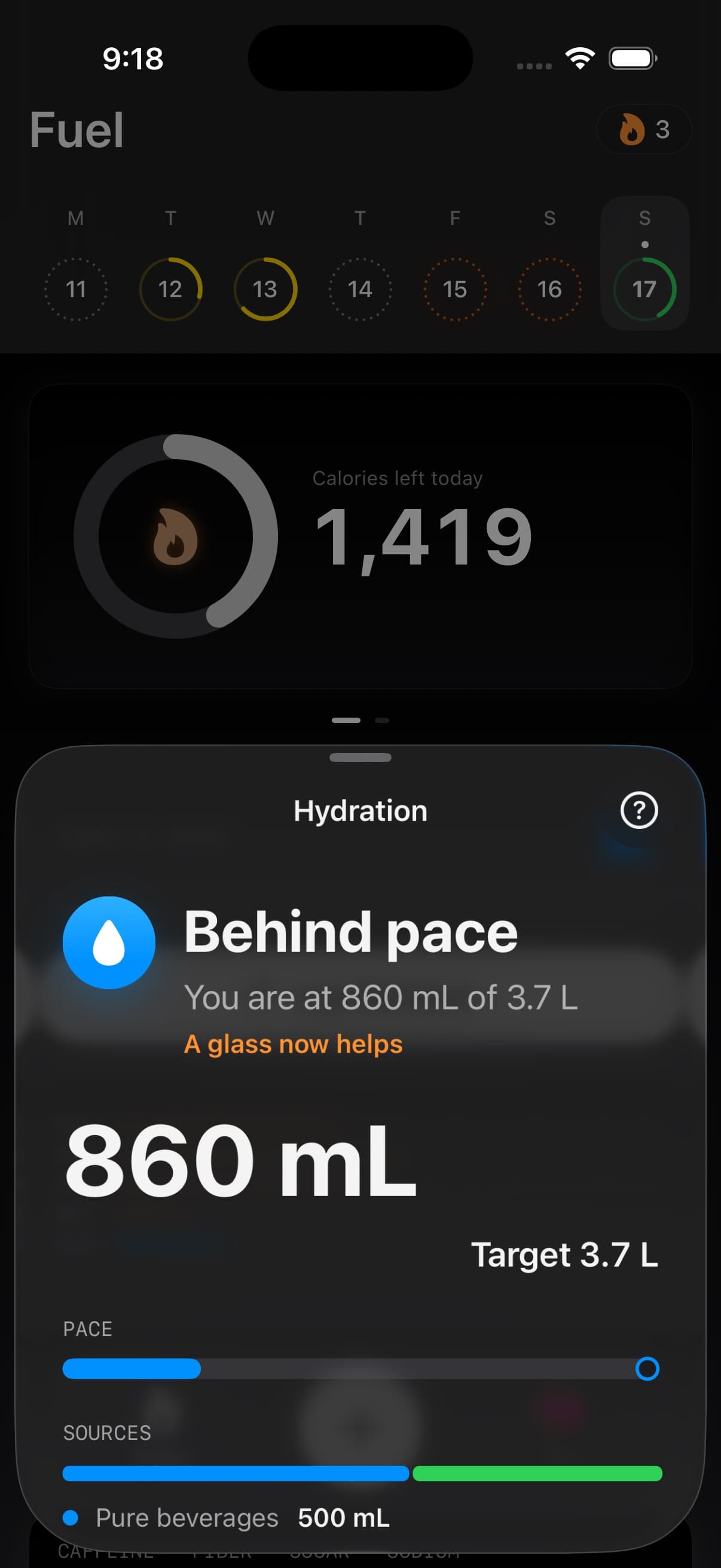
01The H₂O card on Today
The water card on Today shows your daily water intake against your target with a progress indicator. Enable or disable it from Today View Personalization under Show Water Progress.
Tap the card to open the hydration detail view. The detail view shows current intake, target, pacing, fluid sources, caffeine context, contribution rows, a coach note, and quick logging controls for today.
The hydration timeline keeps drinks visible as you log through the day, so you can see when you drank and where the gaps are.
02The hydration detail view
The detail view answers four practical questions: how much fluid has been counted, where it came from, whether the pace fits the time of day, and what to log next.
| Area | What it shows |
|---|---|
| Current total | Logged fluid against the daily target in your preferred units |
| Pacing | Current progress compared with the expected point in the day |
| Sources | Plain fluids, caffeinated fluids, and fluid from foods |
| Contributions | Logged source count, caffeine counted as fluid, food moisture, and activity context |
| Quick log | Preset water amounts plus a custom amount button for today |
03Water caffeine and other fluid sources
Fuel records three hydration signals.
| Signal | What it measures |
|---|---|
| Water | Plain water, water in beverages, and water captured from food entries |
| Fluids | Total fluid volume including non-water drinks |
| Caffeine | Stimulant intake from coffee, tea, energy drinks, and other sources |
Caffeine readouts appear alongside fluid volume so you can see both hydration and stimulant intake in one view.
04Fluid sources
Fuel separates sources so a target hit still has context. Plain water and non-caffeinated beverages show as pure beverages. Coffee, tea, and energy drinks count as caffeinated fluids. Food moisture can count when a logged entry includes water content.
Caffeinated drinks are still mostly fluid, so Fuel counts them toward hydration. The caffeine itself is tracked separately because amount and timing can affect sleep, appetite, and how the rest of the day feels.
05Logging fluids
You can log water and other drinks in several ways.
From food logging — When you log a meal that includes a drink, Fuel extracts fluid and caffeine data automatically. A coffee logged as part of breakfast will add both water content and caffeine to your hydration totals.
From the water card — Tap the water card on Today to open the detail view, then use a preset amount or log a custom amount.
From entries — You can log fluids directly from existing food entries when a drink component was missed.
From widgets and controls — The Log Water control and hydration links open Today with the water logging surface, not just the Today tab.
06Smart fluid classification
Fuel uses AI to distinguish drinks from food in mixed descriptions. Names like "water spinach" or "coffee with eggs" are classified correctly so your hydration totals stay accurate.
If a meal name is ambiguous, Fuel separates food and drink components so calorie and hydration totals do not cross-contaminate.
07Hydration pace and caffeine load
Pacing compares fluid logged so far with how much of the day has passed. Morning, afternoon, evening, and completed days are read differently, so the same total can mean different things depending on timing.
High caffeine or late caffeine does not erase hydration credit. It adds a separate attention signal because a hydrated day can still be a poor caffeine-timing day.
08Water reminders
Smart water reminders send when today is meaningfully behind your water target. They adapt as you log, so they disappear after you drink.
See Smart Notifications for timing, quiet hours, and reminder configuration.
09Apple Health permissions
Water and caffeine data writes to Apple Health when permissions are enabled. If hydration views look empty even after logging, check Apple Health Permissions for the Water and Caffeine categories.
