
Smart notifications in Fuel react to the record you are building. A review can lead with yesterday's Health Grade, a meal nudge can disappear after you log, and a fast can silence food prompts until it is time to break it.
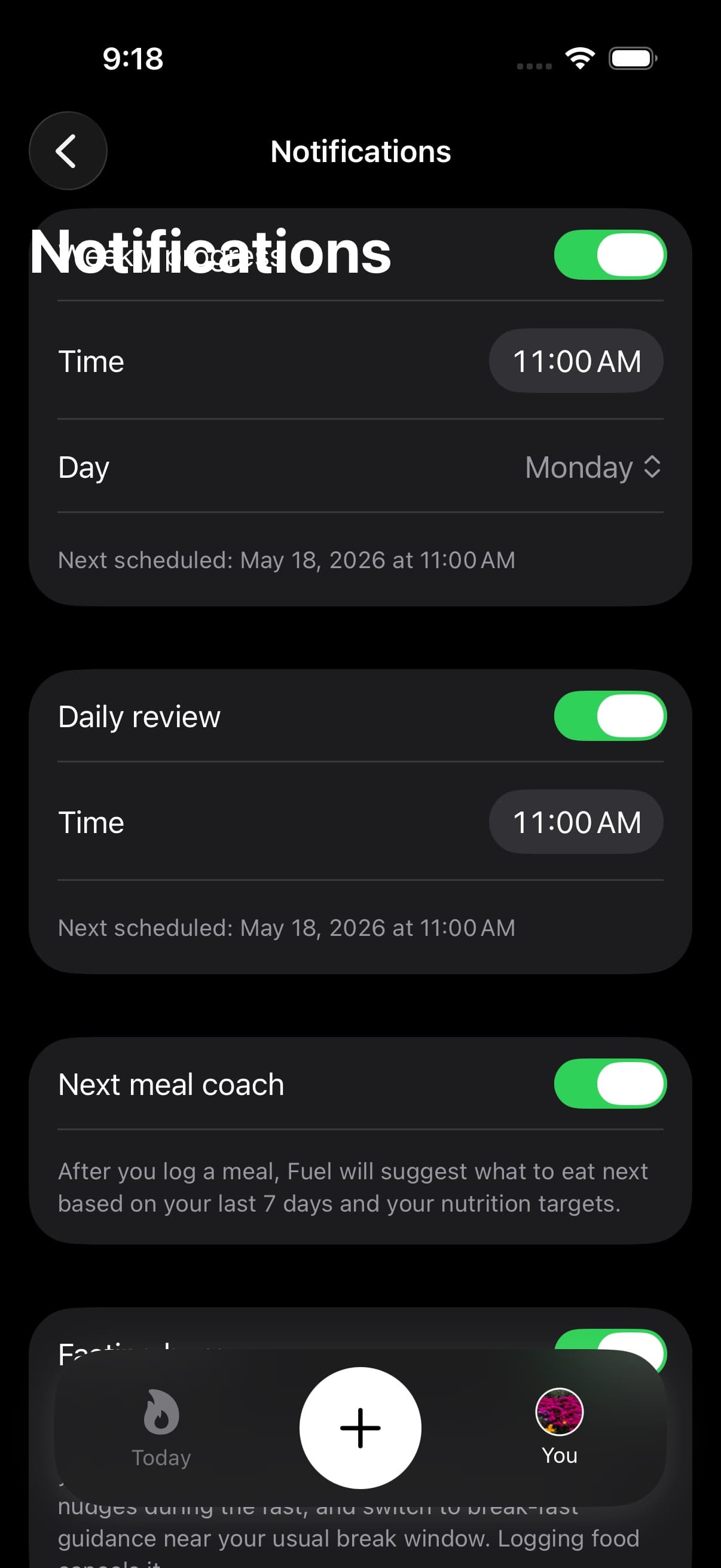
01Alerts for review meals water weigh-ins and streaks
Fuel notifications fall into two classes that map to two different jobs.
| Notification | What it is for | How it decides to send |
|---|---|---|
| Daily review | A scheduled delivery of yesterday’s review | Adjusts the message based on whether yesterday was logged and how close you were to plan |
| Weekly progress | A weekly check-in tied to your chosen weekday | Uses the last 7 days to summarize logging coverage and distance from plan |
| Meal reminders | A nudge when the day has no food logs yet | Sends when today has zero food entries, unless an active fast suppresses the nudge or converts it into break-fast guidance |
| Water reminders | A nudge when hydration is behind | Sends when today is below a threshold relative to your water target |
| Streak reminders | A nudge when the day is still empty | Sends when today has no food entries and no activity entries |
| Weigh-in reminders | A gentle nudge to record your weight | Uses a dedicated toggle with gentler pacing and a direct path to add weight |
| Next meal coaching | Post-meal guidance with smart meal ideas | Sends after you log a meal, stays quiet during active fasting, and can own break-fast guidance near your learned break window |
| Fasting alerts | Fasting burn, check-ins, and break-fast timing | Controlled separately from other notifications in fasting settings |
GLP-1 support has its own reminder family. See GLP-1 Support for the separate setup.
02Review notifications
Review notifications are scheduled at the time you choose. They open directly into the review so you can convert the record into next actions.
Daily review
Daily review notifications are built from the day that just ended.
If yesterday has no record, Fuel avoids pretending a review exists and instead pushes you toward logging today so the next review can be evidence-based. If yesterday is logged, the notification body can reflect the record, including how far you were from your calorie plan.
When yesterday has a Health Grade, the notification body leads with that grade so the lock-screen scan starts with the strongest signal. When no grade is available, the fallback body stays ungraded instead of implying a score Fuel did not compute.
If yesterday was a confirmed clean fast day, the Daily Review notification can name it as an intentional fast rather than treating the empty food log as an ordinary no-log day.
Fuel also throttles delivery when the record is consistently empty. After several consecutive no-log days, daily review notifications back off to every other day to avoid turning the lock screen into noise.
Weekly progress
Weekly progress notifications are tied to a weekday and time you select.
Fuel computes a simple weekly summary from the last 7 days. If the week has logged days, the notification body can report logging coverage and average distance from plan.
If you have not logged at all for a longer period, Fuel may skip weekly notifications entirely. A weekly check-in is only useful when there is a record to summarize.
Free plan behavior
Review notifications can open a paywall on Fuel Free after the included review access is used, since deep links into reviews are gated by plan.
Use Free and Pro to confirm current limits.
03Smart reminders
Smart reminders are built to prevent missing data, not to provide motivation.
Meal reminders send when today has no food entries at the reminder time. Water reminders send when today is still meaningfully behind your water target. Streak reminders send when today is still empty across both nutrition and activity.
Reminders are rescheduled when you open the app, when the app becomes active, and when Fuel detects new logs. That is how reminders can disappear after you log.
Confirmed fast days change the meal-reminder decision. During an active fast, meal reminders suppress so Fuel does not nudge you to eat. When Fuel has learned a likely break-fast window, it can schedule break-fast guidance instead of a generic empty-day prompt.
04Weigh-in reminders
Smart weigh-in reminders include a dedicated toggle, gentler pacing, and a direct path to add weight. They are designed to maintain consistent weigh-in habits without nagging.
05Next meal coaching
After you log a meal, Fuel can send a personalized coaching note with guidance on what to eat next based on your remaining targets. Next meal coaching defaults on when notification permissions are enabled, so it appears right after food logging without extra setup.
The coaching popover shows smart meal ideas and in-app suggestions based on your remaining macros and calorie budget.
During an active fast, ordinary next-meal coaching stays quiet. Near the break-fast window, next-meal coaching can own the break-fast prompt; when it does, Fuel keeps the separate meal reminder suppressed so you do not receive two food prompts for the same moment.
06How Fuel times reminders
Smart timing estimates when to send reminders from your recent logging times.
Fuel looks at your food log timestamps from the last week, converts them into minutes since midnight, and clusters them into morning, afternoon, and night. It then uses the median of each cluster as a stable anchor that is resistant to one late meal or one unusual day.
Meal reminders bias toward your afternoon cluster first. Water reminders bias toward afternoon, then night. Streak reminders bias toward night, since the highest value streak nudge is late in the day.
If Fuel cannot infer useful timing from recent logs, reminders fall back to the fixed reminder time you set.
07Reminder window
The reminder window defines the earliest and latest time a reminder can fire.
When smart timing produces an anchor outside the window, Fuel clamps it back into the window so reminders stay inside your chosen range.
08Quiet hours
Quiet hours define a do-not-disturb interval inside your day.
If a reminder lands inside quiet hours, Fuel moves it out of the quiet interval rather than delivering it during sleep or protected time.
09Actions available from a notification
Fuel notifications support fast actions, such as logging a meal, logging water, opening Today, or opening a review. These actions use in-app deep links so the notification can convert into a logged entry in one step.
10Enabling smart notifications
Notification logic is controlled in Fuel and enforced by iOS.
- In Fuel, open You
- Open Notifications
- Enable notifications when iOS prompts
- Turn on Daily review, Weekly progress, and Smart Reminders as needed
- Configure Smart timing, the reminder window, and quiet hours to match your schedule
If notifications were denied, change them in iOS Settings for Fuel.
11Notification variations
Fuel can generate small copy variants for notifications so repeated reminders do not look identical across days.
This setting changes the wording only. It does not change the delivery logic.
Use Notification Variations for eligibility, language support, and caching behavior.
