Fuel is the best nutrition app for Apple Watch in 2026. From your wrist you can relog a usual meal, dictate a new one for analysis on iPhone, check how much protein is left, add water, record a weigh-in, and read a coach note or yesterday's review.
Many Apple Watch nutrition apps show a calorie number on your wrist and leave most of the logging to the phone. A remaining-calories number helps at breakfast. By lunch you need to record the meal you just ate, see how much protein the rest of the day still needs, and know what to change at dinner. The apps in this guide differ most in how much of that work the Watch can start and how much guidance it shows you afterward.
Fuel publishes this guide and is one of the apps compared. Competitor details come from each company's official help pages and announcements, checked on October 20, 2026.
01Apple Watch nutrition apps compared for 2026
Fuel brings the daily nutrition workflow together on Watch. It logs saved and dictated meals, records water and weight, and puts Health Grade, coaching and both reviews on the wrist. MacroFactor is the strongest alternative for detailed food logging. The other profiles cover focused alternatives for calorie budgets, nutrient progress and hydration.
| App | Best for | What the official documentation describes on Apple Watch |
|---|---|---|
| Fuel | Best overall, with logging, progress and coaching on the wrist | Quick Log favorites and recents, dictated meals analyzed on iPhone, water, weight, Health Grade, daily and weekly reviews, nine complication metrics, Coach and Next Action widgets |
| MacroFactor | Detailed food logging with targets built from intake and weight | Food and recipe library, timeline, editing and serving tools, weight, nutrition overview, complications |
| Foodnoms | Relogging favorite foods from an iPhone-first tracker | Favorite-food logging with Plus, widgets, complications |
| MyFitnessPal | A calorie budget with water and quick-add entries | Water, quick-add calories, remaining calories and nutrients, steps, four calorie and macro complications |
| Cronometer | Checking nutrient progress from the wrist | Energy and nutrient progress, nutrition scores for Gold members |
| Lose It | A calorie budget adjusted by Apple Watch energy | Resting and active calories read through Apple Health, with duplicate workout credits avoided |
| Lifesum | A simple dashboard with water entry | Calorie and macro dashboard, exercise overview, water entry |
Choose Fuel for logging, progress and guidance through the whole day. MacroFactor suits people who prefer its intake-and-weight approach to calorie targets and want detailed food entry on Watch. An existing tracker may be enough if you only need a wrist calorie budget or water button.
Check your Watch software before you choose Fuel. Its Watch app requires watchOS 26.2 or later, and the iPhone app requires iOS 18.5 or later. A watch that cannot update to watchOS 26.2 cannot run Fuel. Prices and minimum versions for all nine apps are in the table near the end of this guide.
02What a nutrition app needs to do on Apple Watch
A nutrition app on Apple Watch has three jobs. It should record food and drinks when you have them, show where the day stands without extra taps, and tell you what to do with the rest of the day. Many Watch apps handle the second job and leave the other two to the phone.
Saved foods make small-screen logging practical. Your morning shake, usual coffee and afternoon yogurt should be easy to repeat. New meals need a different path: dictation, quick-add calories or a food library. Check what each path records. A calorie-only entry keeps the budget current without capturing the food's protein or micronutrients.
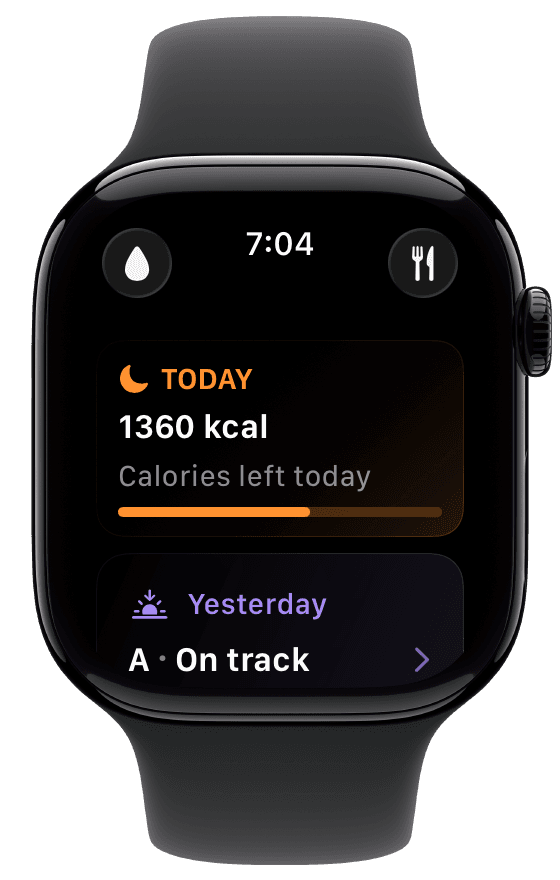
The first screen should answer the question you raised your wrist to ask. In Fuel, the top card of Watch Today changes with context. It can show fasting progress, a note after a recent log, yesterday's review, or a morning, midday or evening summary. The capture above shows calories left for today and an A for yesterday. Scrolling down reaches nutrition totals, water, Health Grade, logging actions and recent entries, and a freshness line says whether the Watch is syncing or showing an older update.
Each app here pairs its Watch app with an iPhone app, and the split of work between the two varies. Learn which actions finish on the Watch and which wait for the phone, because a dictated meal that is still processing is not yet in your totals. Complications and widgets also show the latest data the Watch has received, so a number on your watch face can trail a change you made on iPhone a minute ago.
03Why Fuel is the best nutrition app for Apple Watch
Food logs usually develop their gaps between meals, when the phone is in a bag or a gym locker and the entry gets put off until later. Fuel's Watch app records those entries at the time and then tells you what they mean for the rest of the day. A Watch entry writes to the same record as the iPhone app and Apple Health, so it counts in Today, Health Grade, Daily Review and Weekly Review like any other log. The iPhone keeps photo logging, barcode scanning, recipe details, corrections and setup.
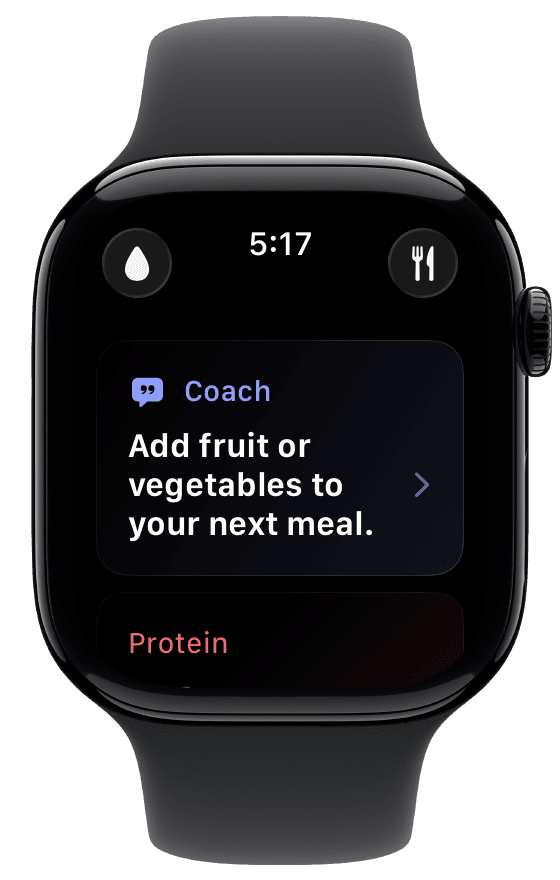
Fuel’s Watch Today Coach card, shown with example day data.
On the wrist you capture the meal, see where the day stands, get one practical next step, and use the reviews to repeat the days that went well. None of the competitor Watch documentation we read describes a coach note, a daily review or a weekly review on the Watch. Fuel puts all three beside the logging tools, so the Watch can tell you what the next meal should do as well as what you have already eaten.
Log a usual meal in one tap or describe a new one
A food you eat most days should take one tap to log, and on Fuel's Watch it does. Quick Log, the fork-and-knife button at the top of Watch Today, lists your favorites first and recent foods after them. Tapping a row logs that food again in its saved portion, so the post-workout shake, the standard breakfast and the daily creatine dose go in without the phone.
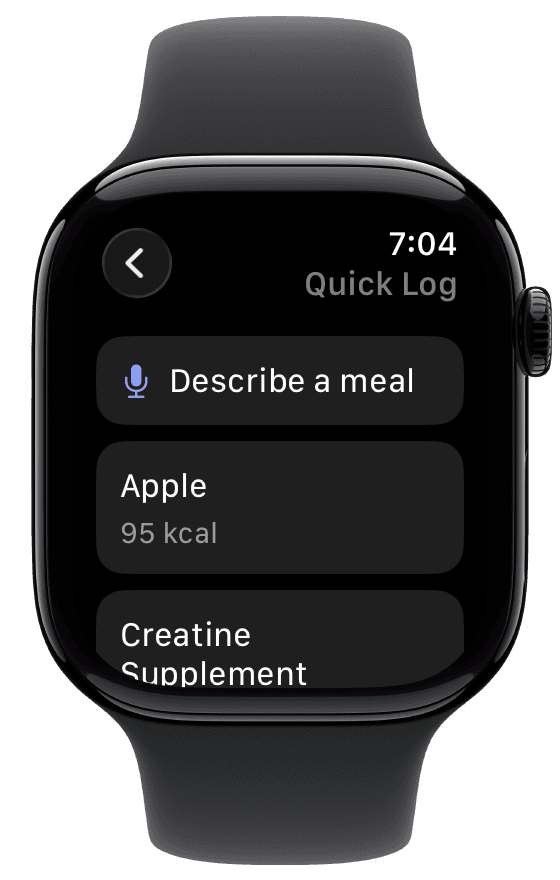
A new meal takes one spoken sentence. Tap Describe a meal and say what you ate with quantities. "A burrito bowl with double chicken, black beans, half a cup of rice, salsa and guacamole" gives the estimate far more to work with than "burrito bowl." The Watch sends the description to iPhone, where Fuel analyzes it, and the entry shows Analyzing on iPhone until the values reach your totals. The finished entry carries protein and micronutrient data along with calories, so a meal dictated at the restaurant table counts toward your protein and fiber targets as well as the calorie budget. Corrections happen in the iPhone Today timeline. The wrist Quick Log guide and the Watch meal dictation steps cover each entry state.
For a practical day using a favorite breakfast, a recent lunch and dinner described while cooking, follow Fuel's Apple Watch routine.
See how much protein and fiber the day still needs
Late afternoon is when the numbers should decide dinner. Tap a macro card on Watch Today to open Today Progress. The Calories card shows calories eaten against today's target, and the cards below it show protein, carbs or net carbs, and fat. Scroll further for a small set of daily micronutrient highlights, such as fiber, each shown as a logged amount against a daily target.
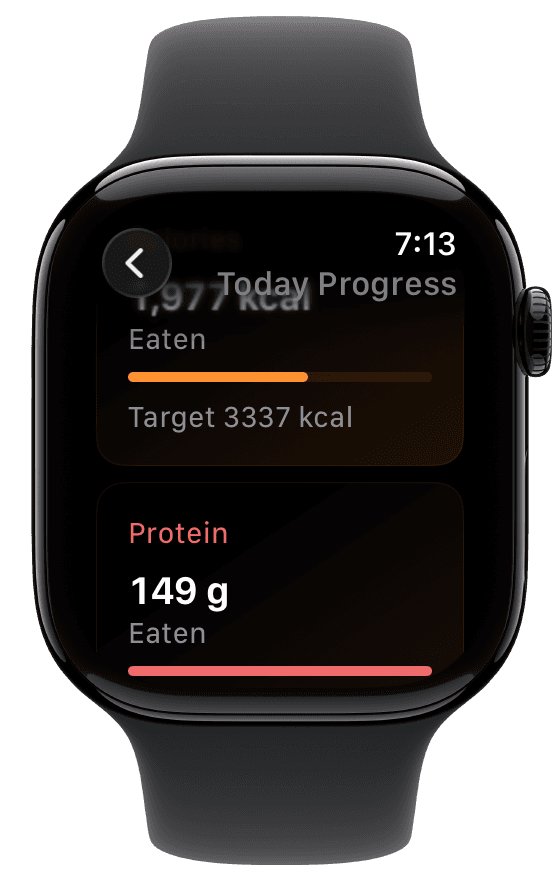
The capture above shows 149 g of protein eaten with calories still well under target, so dinner on that day can be an ordinary plate. On a day when protein is 60 g short at 5 p.m., the same screen tells you dinner needs a large portion of chicken, fish, tofu or Greek yogurt, and a fiber highlight far below its target is the reason to add beans or vegetables to that plate. Read the label beside each number, because the home card can show calories left while Today Progress shows calories eaten. The Watch shows today's highlights only. The full nutrient list and the 30-day Nutrient Insights review stay on iPhone, and a missing Watch row does not mean zero intake. The Watch nutrient highlights guide lists what appears.
Log water and weigh-ins where they happen
The glass of water and the morning weigh-in rarely happen next to the phone. Tap the droplet on Watch Today, then tap the amount you drank. Presets follow your unit preference, and the screen shows the running total against your target and the amount left.
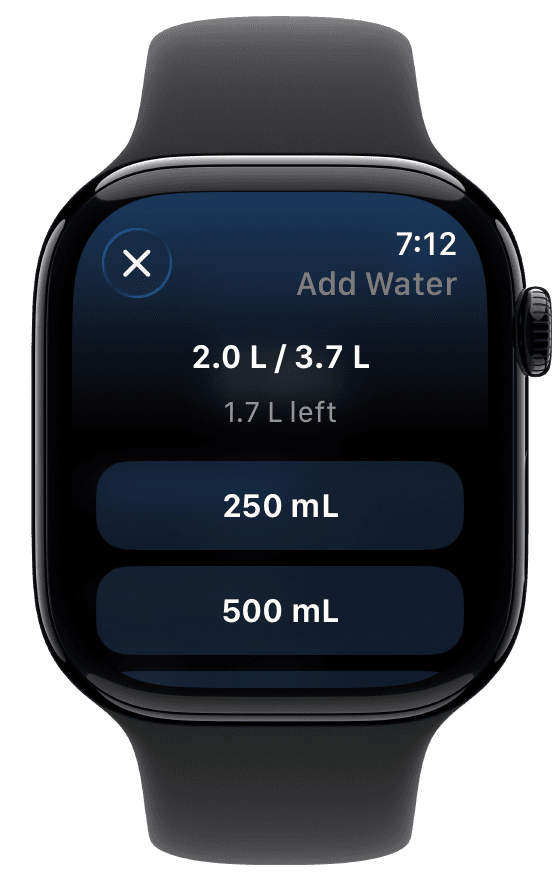
Water entries go to the same hydration record as iPhone and do not count against the free food-entry allowance. A weigh-in starts from your last known weight, so a typical entry needs only a small change with the buttons or the Digital Crown. If the scale is in the bathroom and the phone is charging in the bedroom, the weigh-in still gets recorded, and Fuel's weight trend gets the data point it needs.
Get one next step from Health Grade and the coach note
Health Grade is Fuel's A to D read on the day. It weighs five contributors, which are movement, calorie pacing, macro quality, micronutrient coverage, and limits such as added sugar and sodium. It recalculates as meals and Apple Health activity arrive, and Fuel writes a coach note when a logged meal moves it.
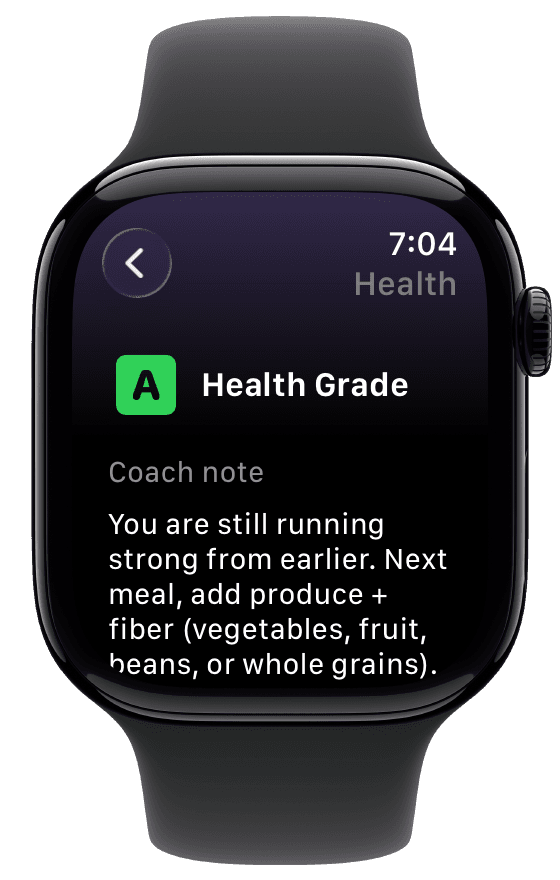
The note in this capture says the day is running strong from earlier and suggests adding produce and fiber at the next meal. That is one concrete instruction for the next decision, and it reaches you on the wrist before you order. Open it from the Health Grade card or a Health Grade complication. The full contributor breakdown is on iPhone, and the Watch Health Grade guide covers the rest.
Use daily and weekly reviews to repeat a good day
Fuel on iPhone prepares a Daily Review of yesterday and a Weekly Review of the last complete week, and the Watch shows compact versions of both. The Yesterday card on Watch Today opens the daily one, with the grade and verdict, nutrition progress, coach summary and energy details.
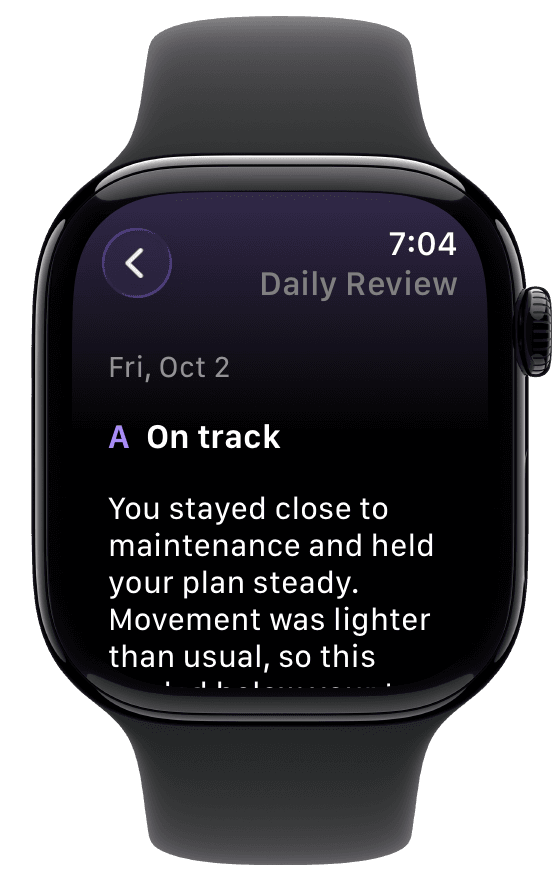
The daily coach summary judges the day's outcome and gives one move for today. In this capture it says the user stayed close to maintenance and held the plan steady while moving less than usual. Read at breakfast, that tells you to repeat yesterday's structure. A review of a day that finished short on protein points to a change, such as eggs or Greek yogurt at breakfast so dinner does not have to make up the whole gap. The Watch Daily Review guide explains each section.
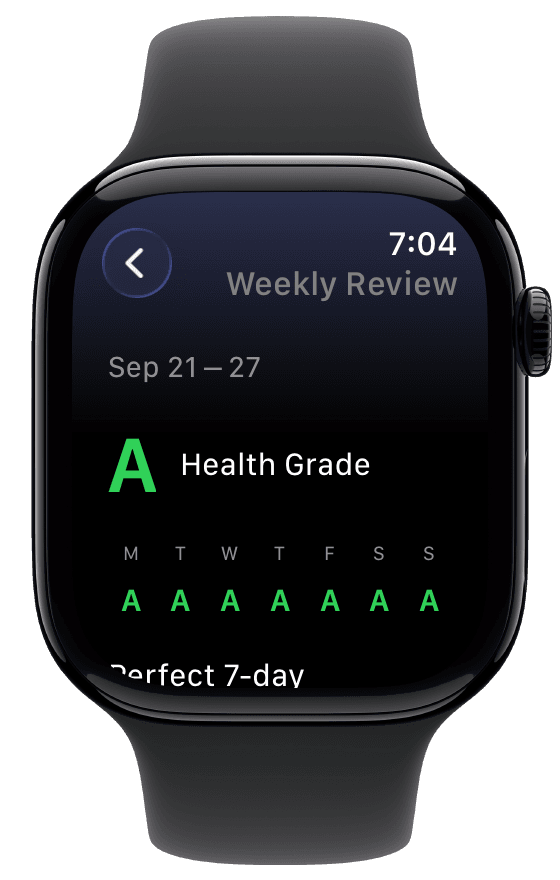
Weekly Review opens with a grade for each day of the last complete week. Seven A grades say the week's structure works and is worth repeating. Two weak weekend days show where next week's change belongs. Tap a day for its grade, contributors and calories, or open Nutrition totals for the week's nutrient summary when it is available. Scroll for what shaped the week, training and recovery, and next-week guidance. The full review, past weeks and Reports are on iPhone, and the Watch Weekly Review guide covers the rest.
Fuel after training with Plan Calories or Dynamic Calories
Fuel reads Apple Watch active energy and workouts from Apple Health and uses them in Energy Balance, Health Grade and both reviews. A lift day and a desk day get judged against different activity, which is why the Daily Review above can say that movement was lighter than usual. Your calorie mode decides whether that activity also raises today's target.
Plan Calories keeps today's target at your plan calories plus any eligible rollover. A 90-minute ride counts in Health Grade and the reviews, and the target stays where the plan set it. In Maintain, optional training-day fueling can still give scheduled training days higher targets and rest days lower ones. Dynamic Calories builds today's target from a burn baseline plus your plan adjustment. When Apple Watch activity runs ahead of the expected pace, the target rises, so the meal after an afternoon session gets more room and a deficit plan stays a deficit. Workout energy is already part of that calculation, so Fuel adds no separate workout bonus on top. Choose Plan Calories for a steady number and Dynamic Calories if your training days and rest days differ a lot.
Fuel's Workout control logs a preset with its displayed duration and effort. Apple's Workout app still records live exercise, and those sessions reach Fuel through Apple Health, so there is no need to log them twice. The Watch also has a fasting view, sauna and ice bath timers, and a streak count.
If you take a GLP-1 medication and turn on GLP-1 support on iPhone, the Watch can mirror your medication phase, cycle day, hydration urgency and protein floor. Fuel uses that context to shape nutrition guidance and does not give dosing advice. GLP-1 Support explains the Watch status.
Install Fuel first if you want one Watch app that records the day, accounts for your training, and tells you what to change before the next meal.
04The best alternatives to Fuel on Apple Watch
MacroFactor is the closest alternative. The other apps suit people who want one or two Watch actions alongside an iPhone-first tracker.
MacroFactor for detailed food logging on the Watch
MacroFactor has a capable native Watch app. Its Watch help collection covers a food and recipe library you can browse on the Watch, a timeline of the day's entries, editing and serving-size tools, weight, and configurable complications. The daily nutrition overview shows consumed and remaining amounts with a nutrient breakdown. If scrolling a food library and adjusting servings on the Watch is your priority, MacroFactor has the more detailed tools.
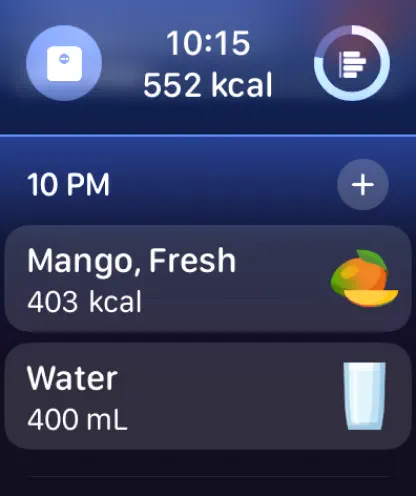
Screenshot from MacroFactor's App Store Watch listing.
Its calorie targets follow a different method. MacroFactor does not use energy expenditure estimates from wearables to calculate expenditure or targets, and its wearables page explains that choice. The algorithm estimates expenditure from logged intake and weight trend. That suits careful loggers who weigh in often and want weight change to decide each adjustment.
Fuel covers more of the day. It reads Apple Watch activity through Apple Health and lets you decide whether that activity moves the target or stays as context in grading and reviews. It then puts Health Grade, coach notes and both reviews on the Watch. MacroFactor's Watch documentation focuses on logging and nutrition totals. Choose MacroFactor for detailed Watch logging and intake-and-weight targets. Choose Fuel if you want the Watch to account for your training day and tell you what to adjust.
Foodnoms for favorite foods on the wrist
Foodnoms has a native Watch app that logs favorite foods, and it supports Smart Stack widgets and complications. Shortcuts started from the Watch run on the iPhone.
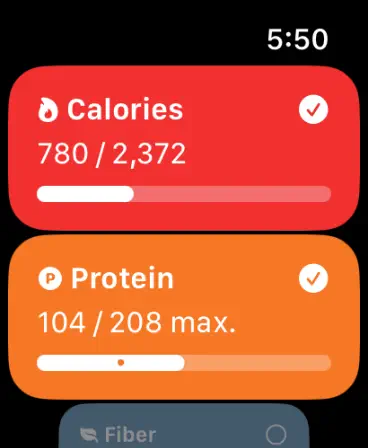
Screenshot from Foodnoms' App Store Watch listing.
Favorite-food logging requires Foodnoms+. Foodnoms fits people who already track on iPhone and repeat the same meals. If most of your day is breakfasts, snacks and drinks you have logged before, a favorites list on the Watch covers much of your logging. Fuel offers the same kind of saved-food relog through Quick Log and adds dictated meals, water, weight and coaching on the Watch.
MyFitnessPal for water and quick-add calories
MyFitnessPal's Apple Watch app lets you add water and quick-add calories, and it shows remaining calories and nutrients alongside steps. It offers four complications for calories and macros.
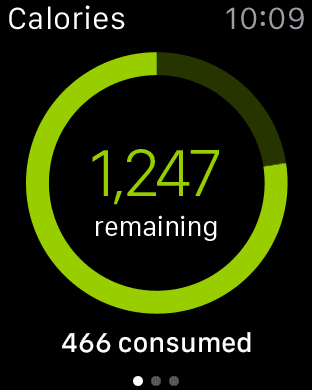
Screenshot from MyFitnessPal's App Store Watch listing.
Quick-add suits a meal where you know the calorie number and want the budget current, and the step count gives a movement read beside it. Pick MyFitnessPal for the Watch if you already keep your diary there and want the budget and water on the wrist. Fuel's Quick Log and dictation record food entries with protein and micronutrient data, so the Watch log counts toward more than the calorie total.
Cronometer for nutrient progress on the wrist
Cronometer's Watch app shows energy and nutrient progress, and Gold members get nutrition scores on the Watch, according to its product update notes and wearables post.
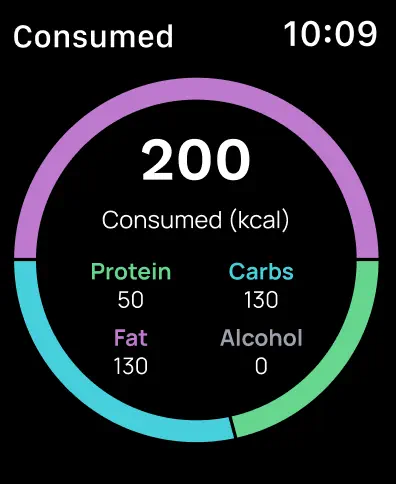
Screenshot from Cronometer's App Store Watch listing.
Cronometer suits people who already use it on iPhone for vitamin and mineral tracking and want progress on the wrist. Fuel's Watch shows a small set of daily nutrient highlights and pairs them with logging and a coach note.
Lose It for a calorie budget adjusted by Apple Watch energy
Lose It's Apple Watch guide explains how it reads resting and active calories through Apple Health and avoids crediting the same workout twice. The direct connection has no separate switch for exercise bonus calories, and the guide documents an Apple Health permissions change for people who want to stop the adjustment.
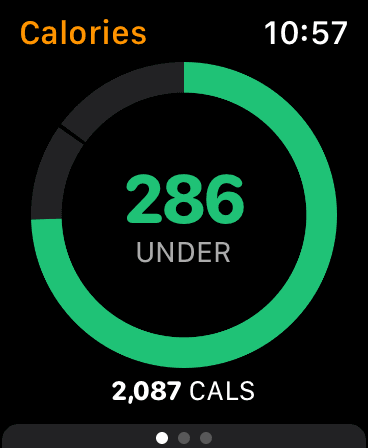
Screenshot from Lose It's App Store Watch listing.
Lose It fits a budget-first routine in which activity above its estimated Target Burn earns extra calories. Fuel gives you a direct choice between a plan-based target and activity-responsive Dynamic Calories, with the result visible on Watch.
Lifesum for a simple dashboard with water entry
The Lifesum Watch app shows calories, macros and exercise progress, and lets you add water directly.
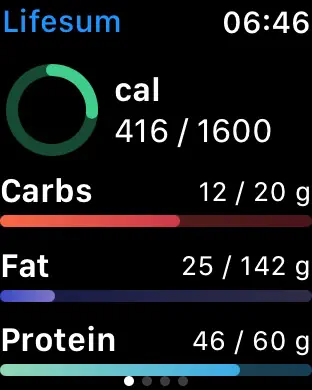
Screenshot from Lifesum's App Store Watch listing.
It suits existing Lifesum users who want a simple daily readout and hydration entry. Fuel adds food logging, weight and coaching to that wrist routine.
YAZIO
YAZIO also has a native Watch app.
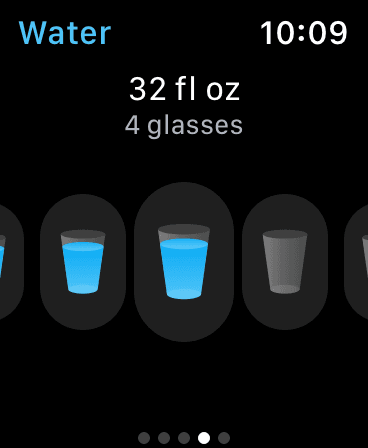
Screenshot from YAZIO's App Store Watch listing.
The published Watch screenshot shows its water view, with the amount logged and the number of glasses together above the drink controls.
Waterllama
Waterllama specializes in wrist drink tracking.
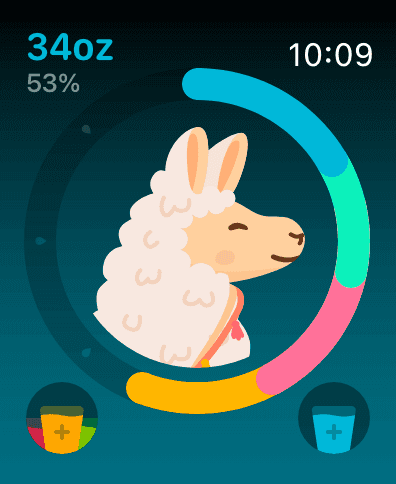
Screenshot from Waterllama's App Store Watch listing.
The Watch view puts daily hydration progress and drink buttons around its illustrated character. Fuel already logs water from Watch Today, alongside food, weight and coaching.
05How Fuel compares with the closest Watch alternatives
Food entry and calorie-target behavior separate these four apps. Fuel combines food, water and weight capture with a coaching view of the day, and your choice of calorie mode decides how that day's activity changes the target.
| App | Documented wrist entry | Watch progress and guidance | How Watch activity affects targets |
|---|---|---|---|
| Fuel | Favorites, recents, meal dictation analyzed on iPhone, water and weight | Macros, nutrient highlights, Health Grade, coach notes, daily and weekly reviews, complications and Smart Stack guidance | Choose Plan Calories or activity-responsive Dynamic Calories |
| MacroFactor | Food and recipe library, serving edits and weight | Consumed and remaining nutrients, weight and complications | Wearable expenditure excluded, with targets from intake and weight trend |
| Foodnoms | Favorite-food logging with Plus | Smart Stack widgets and complications | Apple Health active-energy adjustments with percentage scaling on Plus |
| MyFitnessPal | Water and quick-add calories | Remaining calories and nutrients, steps and four complications | Step-based goal adjustments and Apple Health workouts, without direct use of separately measured active calories |
Foodnoms documents its active-energy scaling, and MyFitnessPal explains its step-based adjustments and active-calorie limitation. Fuel's advantage is the complete routine. You capture the meal, read its effect on the day, and get guidance before the next decision.
06How Apple Watch calories should affect your calorie target
Apple describes Apple Watch calorie values as estimates in its paper on heart rate calorimetry, and its setup guidance explains how to calibrate the watch. Treat the number as a useful daily signal with error in it. No single percentage describes that error for every person and activity.
Two terms cause most of the confusion. Active energy is what you burned above resting, and total energy is resting plus active. If your target already includes a normal activity allowance, adding every active calorie on top counts some of the same movement twice. Eating back every calorie the Watch reports is not a rule to follow.
Fuel avoids that double count in both of its modes. Plan Calories holds the planned target and keeps workouts as context in grading and reviews. Dynamic Calories raises the target only when activity runs ahead of the expected pace, and it adds no separate workout bonus. MacroFactor excludes wearable expenditure from its targets. Lose It awards extra calories above its estimated Target Burn.
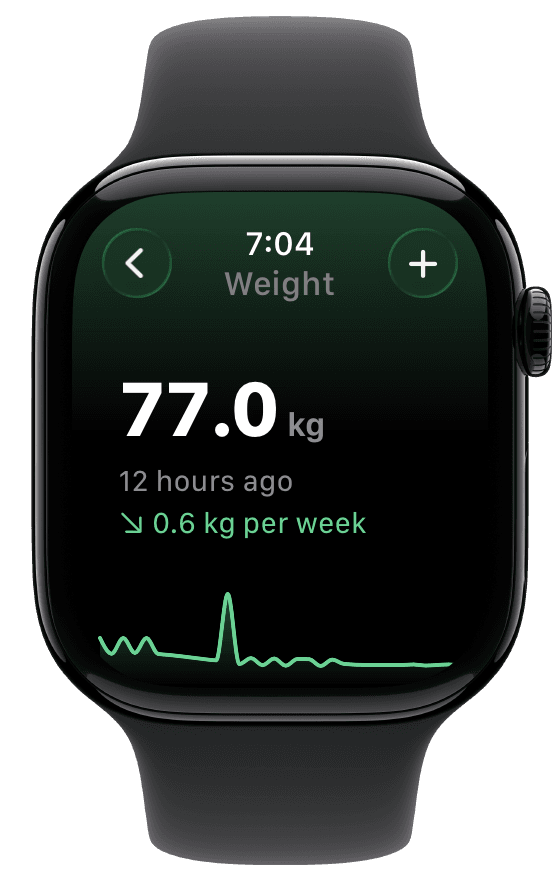
Weight trends help check whether the estimate fits your progress. Fuel's Watch shows your latest weight, its age, an available trend rate and a compact history chart. Its longer-term Dynamic TDEE calculation uses recent burn and weight-trend evidence, with limits on adjustments. Use the weight guide for Watch entry, the energy model for the calculation, and the Apple Watch calorie targets guide for the longer protocol.
07How to set up a nutrition app on Apple Watch
Confirm the minimum versions first, which for Fuel are watchOS 26.2 on the Watch and iOS 18.5 on iPhone. Install the iPhone app, open it once, and install the Watch app from the Watch app on iPhone. Grant Apple Health access to activity and workouts plus the nutrition and body metrics you want tracked, using the Apple Watch setup guide. Then save your three or four most repeated foods as favorites on iPhone so Quick Log has rows to tap on the first day.
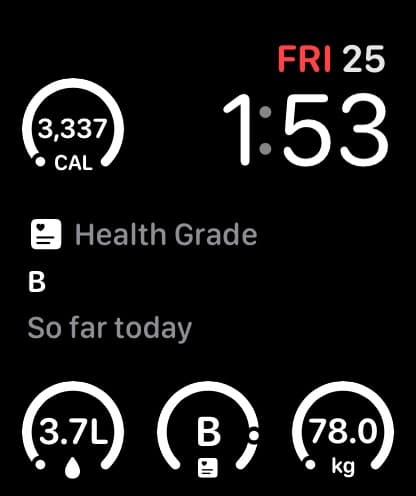
The face above comes from an earlier Fuel release. It shows calories, Health Grade so far today, water and weight. The current metric complication offers nine choices, which are Calories, Protein, Macros, Water, Fasting, Sauna, Weight, Health Grade and Streak, in compatible circular, rectangular, inline and corner slots. Protein shows grams remaining and switches to Done or a checkmark when you reach the target. Macros pairs calories left with protein remaining. The ring around a circular Weight complication does not measure progress toward a goal weight. The complications guide has the setup steps.
Fuel also offers separate Coach and Next Action widgets for the Smart Stack. Coach shows a coach note or review teaser, and Next Action shows a recommended next step. Add Coach for guidance between logs and a Protein or Macros complication for the numbers you want to check without opening the app. Hydration, Quick Log, Workout and Weight controls open each logging flow, and tapping one does not save an entry until you finish. Complications and widgets use the latest data the Watch has. If a number looks old, open Sync Status on the Watch and tap Sync now, or follow the Watch troubleshooting steps.
08What Fuel Free includes on Apple Watch
Fuel Free includes up to seven food entries per configured week, and every food-logging method draws from that one allowance. Water, weight and workout entries do not use it. Free also includes today's Health Grade, plus the first Daily Review and the first Weekly Review you open. Each review allowance is one-time and does not reset each week, and the next-meal coach is a 24-hour trial from first open.
Fuel Pro costs $24.99 per month or $149.99 per year on the US App Store. The annual plan is billed once a year. It adds unlimited food logging, ongoing daily and weekly reviews, past-day history and 30-day Nutrient Insights. Pro makes the full Watch routine practical every day: log as often as you eat, read the next step on your wrist, and use ongoing reviews to decide what to repeat and what to change. The Free and Pro page lists every difference.
09Apple Watch nutrition app prices and minimum versions
The prices below are offers displayed on the US App Store on October 20, 2026. Annual plans are billed once a year, and offers vary by region, account and date. Each app's iOS minimum and watchOS minimum are separate requirements, and pairing a watch on a newer watchOS can require a newer iPhone and iOS version than the app needs, as Apple's compatibility page explains.
| App | US App Store paid offers | Free and paid Watch access | Minimum iOS / watchOS |
|---|---|---|---|
| Fuel | Pro $24.99/month or $149.99/year | Free has 7 food entries per configured week. Water, weight and workouts do not count. Pro unlocks ongoing reviews | 18.5 / 26.2 |
| MacroFactor | $11.99 monthly or $71.99 annual | Subscription required after a 7-day trial | 15.6 / 11.0 |
| Foodnoms | Foodnoms+ individual $5.99 to $9.99 monthly or $39.99 to $49.99 annual, family plans higher | Watch app is free. Favorite-food logging and Apple Health import need Foodnoms+ | 18.0 / 10.4 |
| MyFitnessPal | Premium offers include $19.99 monthly and $79.99 yearly | Watch guide lists water and quick-add calories. Confirm access in the current offer | 18.0 / 10.0 |
| Cronometer | Gold $10.99 monthly or $59.99 annual | Watch progress is free. Nutrition scores need Gold | 15.5 / 9.0 |
| Lose It | Standard Premium $79.99/year; discounted offers also appear | Sources conflict, so verify Watch sync access in the offer you see | 18.0 / 9.0 |
| Lifesum | Premium yearly offers from $99.99 to $119.99 | Watch dashboard and water entry; subscription requirements are not specified | 17.0 / 9.0 |
| YAZIO | Annual offers at $23.90 and $47.90, among several other offers | Apple Health sync is free | 16.0 / 9.0 |
| Waterllama | Monthly Full Access $0.99 | Watch water reminders are free | 17.0 / 10.0 |
Foodnoms explains that different annual prices can buy the same Plus features, so compare the plans offered to your account. Lose It's published standard price is $79.99 per year. That pricing page puts smartwatch syncing in Premium, while its Apple Watch guide calls the connection free. Confirm Watch sync access in the offer you see before paying. Waterllama's other listed purchases do not clearly label their duration, so the table gives only its labeled monthly price.
10Common questions about nutrition apps on Apple Watch
How much of Fuel's Watch logging depends on iPhone
Quick Log relogs a favorite or recent food in its saved portion from the Watch. Describe a meal sends your dictation to iPhone, where Fuel analyzes it, and the entry shows Analyzing on iPhone until it finishes. Photo logging, barcode scanning, edits and detailed setup are iPhone tasks. Both devices share one record, so a correction on iPhone reaches the Watch after the next sync.
Which app shows protein remaining on the watch face
Fuel's Protein complication shows grams remaining and marks the target done when you reach it, and the Macros complication shows calories and protein together. MyFitnessPal documents four calorie and macro complications, and MacroFactor documents configurable complications. If protein is the number you check most, give it a dedicated slot.
Should I eat back the calories my Apple Watch says I burned
Treat Watch calories as estimates and use consistent food logs and weight trends to assess your target. Fuel's Plan Calories mode keeps recorded activity from automatically raising the target. Dynamic Calories responds when activity runs ahead of expected pace. Choose the mode that fits your routine and review the pattern.
Why does a Watch complication show an old number
Complications use the latest data available to the Watch and can trail the iPhone. In Fuel, a Health Grade card showing Sync means its data is stale, and Log or No weigh-in yet means no weight is available. Open Fuel on iPhone and on the Watch, then tap Sync now in Sync Status.
11Set up Fuel on your Apple Watch today
Download Fuel on iPhone and install it on your Watch. Save your repeated foods as favorites, put Protein on your watch face, and add Coach to your Smart Stack. Log your next meal, glass of water and weigh-in from the wrist. As your daily and weekly reviews become available, use them to choose what to repeat and what to change. Give the Watch a nutrition app that helps you act on the day.