HYROX preparation needs one person deciding the training week, a place to record sessions and races, and a place to log food. ROXFIT structures and records mixed sessions and tracks race goals and results, and its core features are free. Runna builds a running-only plan for athletes whose gym or coach already covers the stations. Fuel handles daily food logging and nutrition reviews. Settle who runs your week before you install anything, because two apps that each schedule hard sessions can stack them into the same days.
Fuel's team publishes this guide. Fuel is the only nutrition app in it, and ROXFIT and Runna are here for training, so treat it as a curated training-and-nutrition setup. If you want nutrition apps compared against each other, read best nutrition coaching apps. Product details come from each company's official site, support pages and US App Store listings, checked on October 20, 2026. We did not test ROXFIT or Runna hands-on, and the training week further down is an illustration. Including these apps implies no endorsement from HYROX, ROXFIT or Runna, and we did not find a direct integration between Fuel and either training app.
The race format explains why the jobs split this way. The HYROX Singles rulebook for season 26/27 describes eight 1 km runs, each followed by one of eight stations. Running volume, station strength and mixed work on tired legs each need coaching. Food matters on all seven days, including the ones with no training.
01Choose who owns your HYROX training week
Picture a running plan that schedules intervals on Tuesday and a gym class that puts sled pushes and runs on the same day. Each one assumes it controls your recovery, and neither knows about the other. A person has to own the whole week. That is your coach, or you if you coach yourself. Apps then supply parts of the week under that person's decisions.
Your coach or gym programs everything. Keep that program. ROXFIT's free tools can turn its sessions into timed workouts, record them and track your race results. Runna adds little here, since your coach already sets the running.
You train stations at a gym class and run on your own. Runna can supply the running. Its setup asks how many runs a week you want, so you can size the plan to the days the gym leaves open. We found no documentation that Runna reads a gym timetable, so you and the gym coach still check that the hardest runs and the hardest station days don't fall together.
You coach yourself. ROXFIT gives you a workout builder, a session library, a weekly planner and race tools in one app. You still decide how the weeks progress. Add Runna if you want a structured running progression, and drop any ROXFIT running work that repeats it.
With the owner settled, each app covers a bounded part of the week.
| Job | Tool in this guide | What the tool covers | Skip it when |
|---|---|---|---|
| Running progression | Runna | A running-only plan from your ability, mileage, runs per week and goal | Your coach or gym already programs your running |
| Station and mixed sessions | ROXFIT | Building, scheduling, timing and recording sessions you write or pick from its library | You already record sessions in a tool you like |
| Race goals, results and splits | ROXFIT | Manual Race Goals, pacing to your watch, results and split comparisons | Race data won't change how you or your coach plan training |
| Daily food and nutrition review | Fuel | Photo and text food logging, daily targets, and daily and weekly reviews | Your current nutrition app already gives you feedback you act on |
02ROXFIT for mixed sessions and race tracking
Choose ROXFIT when you want HYROX sessions and race data in one app. Its App Store listing describes a workout builder with blocks, rounds and intervals, a weekly planner, completion tracking, and a guided player with timers and voice cues. It keeps your workout history and race breakdowns. The ROXFIT FAQ lists three ways to find a session. There is a daily WOD, the Train library, and HYPE, which turns a session you describe in words into a structured workout.
The race features matter most in the weeks before an event. ROXFIT's homepage documents event discovery, live athlete following, linked race results and split comparisons. The FAQ explains Race Goals, which you build from the venue, your division and a target finish time. You can edit the splits and send the pacing to Apple Watch, Garmin or Wear OS. On Apple Watch you need the iPhone app, the paired Watch app, and Health and Motion permissions. The FAQ also says course maps have no fixed publication date, so a venue's layout may appear late.
Most of this is free. The FAQ says workouts, HYPE, manual Race Goals, tracking, results and your profile stay free. The Ultra plan adds unlimited challenges, predicted times, personalized station targets and pacing, and deeper race analysis. Start on the free tier and decide on Ultra once you have a race date and want predictions.
ROXFIT is a weaker fit if you want a full season planned and coached for you. HYPE builds one session from a description, and nothing we read shows that ROXFIT plans a progressive training block or gives coaching feedback on your technique.
03Runna for the running part of HYROX
Choose Runna when running is the part of your preparation with no plan behind it. Runna's plan setup guide asks for your ability, current mileage, runs per week and goal. Its Functional Fitness category includes a HYROX plan with 1 km repeats, plus a general functional-fitness running option. The same page says these plans focus on running only. You can add Strength Workouts through Manage Plan, and we found no documentation that they make up a full station program. Use Runna for running. Keep station programming and technique with your gym, a coach or your own chosen program, and use ROXFIT to structure and record the sessions they supply.
Runna's homepage supports tracking on Garmin and Apple Watch and lists apps for iOS and Android. Its subscription support page says you can record runs, import activities and see completed sessions without Premium. Planned workouts after Week 1 need a subscription.
Runna is a poor fit if your gym already programs running into its HYROX classes, because you would be following two running plans. We also found no live race results or station-by-station race analysis in Runna's documentation, so use ROXFIT's free race tools if you want splits.
04Fuel for everyday HYROX training nutrition
Use Fuel to record what you eat across the training week and get feedback on the pattern. AI food logging accepts a typed description, up to six photos, or both. You can add portion details, review the estimate, correct it with Edit Result, and confirm before it saves. Repeat meals have quicker routes. Smart Recall rebuilds yesterday's breakfast or lunch from your own history, and Food Library logs known foods and grocery products without an AI estimate.
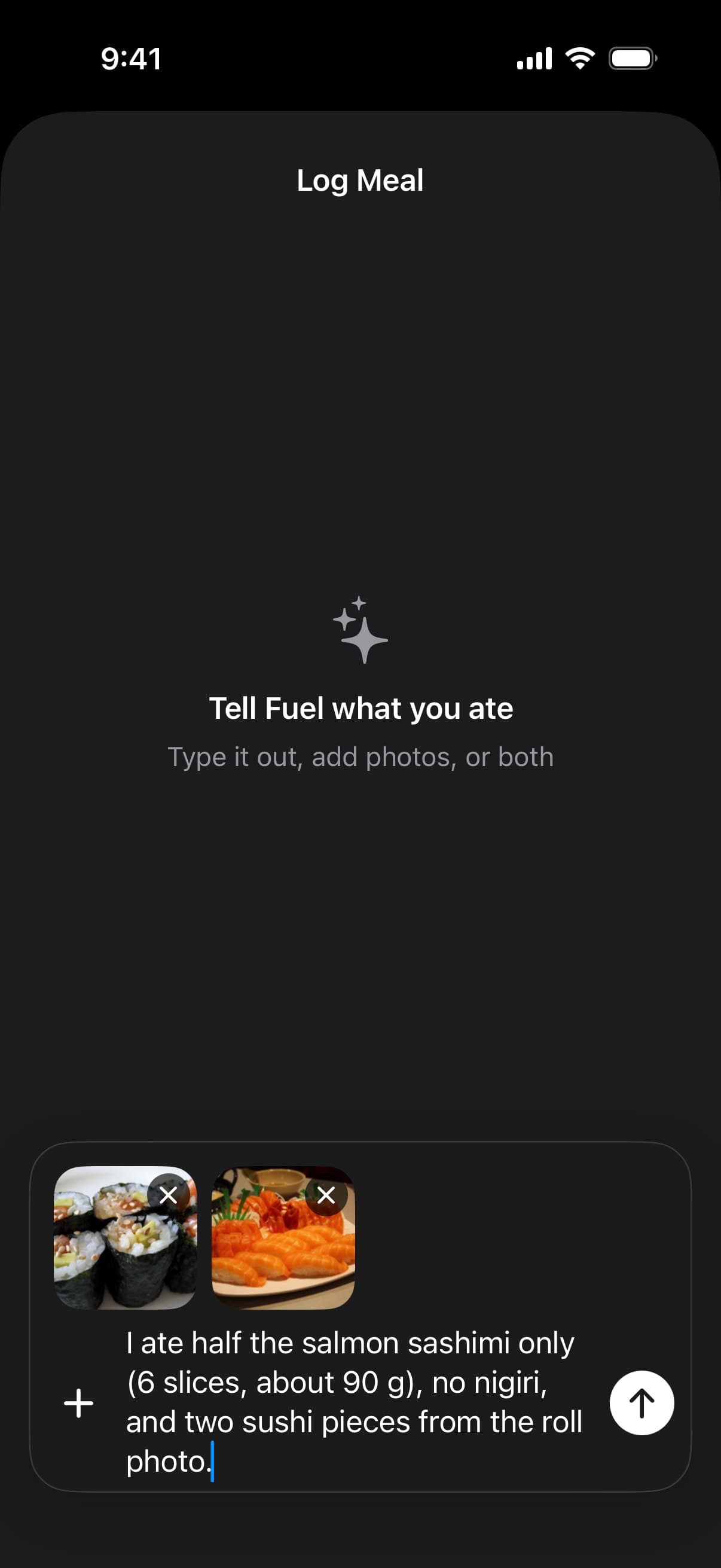
This capture comes from Fuel's help documentation. It shows the meal composer with two photos and a note about how much was eaten. Fuel turns that input into an estimate, which you check before it saves.
The Today nutrition cards show calories, protein, carbohydrate, fat and water against your targets. AI coaching uses your food log, Apple Watch activity, targets and reviews to suggest the next meal. The Weekly Review summarizes what you logged across the week. Set it beside your training history and compare the two yourself, for example how your logged protein and carbohydrate looked in a week that held a full simulation. The review works from the meals you logged, so a skipped entry leaves a gap in it. The HYROX training-week fueling guide covers what hard and easy days need.
Turn on Dynamic Calories if you want the day's calorie target to rise with Apple Watch activity read through Apple Health. Workout energy is part of that activity total, with no separate workout bonus. We found no automatic sync between Fuel and a Runna or ROXFIT plan, so Fuel's targets don't follow either app's calendar. Maintain mode has its own optional training schedule that you set by hand. Wrist calorie estimates for HYROX-style work carry real error, which our guide to HYROX watch calories explains.
Fuel does not write training, predict finish times or plan race-day carbohydrate. Prepare for Event builds a phased calorie and macro plan from a date, your current weight and a goal weight. Its Peak Week label names a plan phase and has nothing to do with a HYROX taper or carb loading. For race day, read HYROX race nutrition by finish time and log the food you actually eat.
Fuel is a poor fit if you train on Android. Its App Store listing covers iPhone and Apple Watch, and we found no Android version. It also adds little if your current nutrition app already gives you an easy log and feedback you use. Entering HYROX is no reason to switch.
05How to avoid paying for two training plans
Count subscriptions by job. A coach plus ROXFIT's free tools plus Fuel is one training relationship and one nutrition app. A gym membership plus Runna plus Fuel makes sense when the gym leaves running out of its program. Runna Premium and ROXFIT Ultra together make sense when Runna supplies the running and you also want Ultra's race predictions.
These are US prices checked October 20, 2026, from the sources linked in each row. Yearly prices are charged once a year.
| App | Paid plan | What stays free | Platforms |
|---|---|---|---|
| ROXFIT | Ultra $15.99 monthly or $79.99 yearly (US App Store) | Workouts, HYPE, manual Race Goals, tracking, results and profile (FAQ) | iPhone, iPad, Apple Watch and Android, with pacing on Garmin and Wear OS |
| Runna | Premium $19.99 monthly or $119.99 yearly (Runna and US App Store) | Week 1 of any plan, run recording and imports, completed sessions (subscription support) | iPhone, iPad, Apple Watch and Android, with Garmin tracking |
| Fuel | Pro $24.99 monthly or $149.99 yearly (US App Store) | Up to seven food entries per configured week, plus your first daily and weekly review (Free and Pro) | iPhone and Apple Watch |
Free access and trials are separate arrangements. ROXFIT's refund policy says trials currently apply only to annual plans, with the length shown when you subscribe. Runna's free Week 1 needs no subscription. Its Premium trial is a different offer. The subscription page describes a typical seven-day trial that becomes a paid subscription unless you cancel at least 24 hours before it ends, and that expires if you don't create a plan within 48 hours of download. Fuel Free includes 24 hours of next-meal coaching from first open, and water, weight and workout entries don't count toward the food allowance. That coaching window is a Free feature. Check whether your purchase screen offers a Pro subscription trial.
06A HYROX training week with running, stations and recovery
This example shows which tool covers each job across one week. Your coach or your own plan decides the actual sessions. Fuel appears every day because you eat every day.
Monday, running. If Runna supplies your running, it gives you the session and records it on your watch. In Fuel, relog breakfast with Smart Recall if it matches yesterday, and check protein and carbohydrate on the Today cards before dinner.
Tuesday, station and strength work. Your gym or coach owns technique and load. ROXFIT can turn the written session into a timed workout and record it. In Fuel, photograph the post-gym lunch, add portion details, and correct anything the estimate missed.
Wednesday, recovery. Whatever the plan sets for today, log ordinary meals and water in Fuel and read yesterday's Daily Review. After a race or full simulation, the HYROX recovery nutrition guide covers the following 72 hours.
Thursday, mixed run and station session. ROXFIT records it as one session with its blocks and timers. Log the pre-session meal in Fuel before you leave so the evening coaching works from a complete day.
Friday, a run if the plan calls for one. Fuel's job stays the same. Relog repeat meals and spend your logging effort on anything new.
Weekend, long session or rest as the plan says. If Saturday is a simulation, read the training-week guide for what to eat and log what you eat in Fuel. When your next configured week starts, open the Weekly Review for the completed week beside your training history.
07When to keep the tools you already have
Keep your coach's program if it already covers running and stations. ROXFIT's free tier is worth adding for its timers and race results. Keep your current running app if it follows a plan you trust and your station work lives elsewhere. Keep your nutrition app if you log consistently and act on its feedback. Fuel suits athletes who eat mixed and restaurant meals that are slow to log by hand, and who want a weekly review built from their own log.
08Check your HYROX routine before race week
Pick an ordinary training week before race week and look back at it. Each session should trace back to your coach or your own plan, each one should appear in one app's history, and your Fuel log should show the days you ate, recovery days included. If two apps scheduled hard work on the same day, keep one as the planner and use the other for recording. For race-day food, read HYROX race nutrition by finish time.
Fuel Free's seven food entries a week are enough to try the workflow on a few training days. Ongoing meal logging beyond seven food entries per configured week needs Pro. Pair your HYROX training tools with Fuel for nutrition, log Tuesday's post-gym lunch with a photo and portion note, and open your first Weekly Review when it becomes available in your next configured week.