A recomp week can end with complete food logs and the same scale weight you started with. That flat number cannot tell you whether the plan is working or whether calories need to change. The nutrition app you pick decides who makes that call and which evidence it uses, and Fuel, MacroFactor, Carbon and Cronometer each make it differently.
Choose Fuel if you use iPhone and Apple Health and want today's calories to respond to recorded activity, with a weekly review that explains the pattern. Choose MacroFactor if you log consistently, weigh in often and want its Coached program to adjust targets from what you ate and how your weight moved, even in weeks you miss the numbers. Choose Carbon if you want a set weekly check-in that tells you why your targets changed or stayed put. Choose Cronometer if you want detailed nutrient data, protein grams you set yourself and a free tier you can keep using, and you are comfortable making target decisions yourself or with a dietitian.
Fuel's team publishes this guide, and Fuel is one of the four apps. The comparison draws on each company's help pages, product pages and US App Store listings, checked on October 20, 2026. We did not run new hands-on tests, and the example week later in the guide is an illustration for you to work through.
01Choose for progress beyond scale weight
During a recomp you are trying to lose fat while keeping or adding muscle, so a flat scale can mean progress, a stall, or water and gut content hiding either one. Every app here logs food and shows protein. They split on two questions. Where does the estimate of your energy expenditure come from, and who decides whether your targets change?
Fuel starts from activity energy recorded in Apple Health. MacroFactor works backward from your logged intake and your weight trend. Carbon judges progress at a weekly check-in against the targets it prescribed. Cronometer keeps the targets you set. None of these methods measures muscle. MacroFactor says in its own recomposition FAQ that it does not use day-to-day body-composition estimates for program adjustments, and Carbon's recomposition article says it has no standalone recomposition goal. The same limit applies to Fuel and Cronometer. For the nutrition targets themselves, recomposition after 35 covers calories, protein and recovery, and Apple Watch for recomposition covers activity data and day types.
Who interprets the week separates them most. Fuel adjusts today's allowance from activity and uses a weekly review to explain the pattern. Carbon's check-in sets new targets each week. A Coached MacroFactor program does the same, and its Collaborative and Manual modes hand you more of the decision. Cronometer leaves the target with you.
| App | What moves your targets | Who decides on changes | Fits someone who |
|---|---|---|---|
| Fuel | Recorded activity can add room to today's allowance, and a longer-term baseline uses Apple Health burn with a capped weight-trend correction | Activity and weight data move the target, and Weekly Review explains the evidence and suggests next-week actions | Uses Apple Health and wants daily targets that reflect activity |
| MacroFactor | An expenditure estimate from logged intake and weight trend, with optional step data | The program in Coached mode, with more control passing to you in Collaborative and all of it in Manual | Logs reliably and wants adjustments that still work after missed targets |
| Carbon | A weekly check-in judged against prescribed protein and calories | The check-in, with its reasoning written out | Wants a fixed weekly routine and an explanation of each change |
| Cronometer | Targets you set, with optional activity added above baseline | You, with Crono Coach guidance on Gold | Wants nutrient detail and full control of the numbers |
02How each app changes your nutrition targets
Fuel adjusts for activity and explains the week
Fuel builds your plan from your profile, goal, activity and diet preference. Setup anchors protein to body weight and goal, then allocates carbohydrate and fat by diet style, as Nutrition Planning explains. Get leaner and stronger covers how Fuel approaches that goal.
The calories you see each day depend on your Daily Goal setting. With Dynamic Calories on, today's allowance can grow when Apple Health shows your activity running ahead of expected pace. With Plan Calories, Fuel does not add calories for activity. Over a longer span, Fuel's maintenance estimate draws on the last week of Apple Health burn and, once you have enough recent weigh-ins, a capped correction from your weight trend, so one heavy morning does not reset it. The Fuel Energy Model page has the details. Food logs feed what you have left to eat, nutrient coverage and reviews. Fuel does not work out expenditure backward from intake the way MacroFactor does.
If your recomp plan holds weight steady, Maintain mode is built for that. It has no goal weight or finish-date countdown. If you add a training schedule, Automatic training-day fueling moves planned calories toward your scheduled training days and keeps the seven-day average the same. That allocation follows the schedule you set and does not confirm you trained. Dynamic Calories works separately and can still add room on a given day. For the same target every day, turn automatic training-day fueling off and choose Plan Calories. Maintain Balance, which shows the allowance left for the week, requires Fuel Pro.
Weekly Review reads seven days of food, drinks, activity, weight, plan targets and Health Grade, then gives a summary, a scorecard, next-week actions and meal ideas. The review explains the week and suggests what to try next. It does not change your targets. Waist, body fat and lean mass go into body measurements, where Reports label each result as measured, derived from body fat and weight, or based on weight alone.
Fuel is a poor fit for Android users, for anyone who wants a free food diary for every meal indefinitely, and for anyone looking for lifting programs. The activity side depends on Apple Health permissions and usable records, and it cannot make a wearable's energy estimate more accurate.
MacroFactor adapts from intake and weight
MacroFactor's core method estimates your expenditure from the calories you log and the change in your weight trend. That estimate is separate from your targets. What happens to the targets at a check-in depends on the program. Coached, Collaborative and Manual programs give you different degrees of control. A Coached program updates your targets at each check-in from expenditure, weight and goal. A Manual program leaves target changes to you.
The company calls its method adherence-neutral. If you eat above or below the target it gave you, the next recommendation still works from what you ate. Missing entries still matter, because an unlogged snack makes expenditure look lower than it is.
Activity is no longer absent from the method. MacroFactor's expenditure modifiers page, updated in November 2025, describes optional Step-Informed Updates that feed step counts into the expenditure estimate gradually. Steps do not add a same-day calorie bonus. Fuel's Dynamic Calories can change today's allowance, and MacroFactor's step input shapes the estimate over time.
You can revise your protein preference and how calories shift across the week. A body-fat setting makes small changes to the coached protein recommendation through a rough lean-mass estimate.
MacroFactor fits someone who will log nearly everything and weigh in regularly and who wants a program that keeps adjusting through imperfect weeks. It has no free tier. MacroFactor Workouts is a separate product and is outside this comparison and its prices.
Carbon runs a weekly check-in
Carbon documents weekly target refinement with an explanation and history for each check-in. Its App Store listing adds Apple Health weight and body-fat reading, protein and intake graphs and manual targets. For recomposition, Carbon recommends its Weight Maintenance goal along with regular photos and measurements, a protein priority and weekly check-ins.
Compliance centers on a minimum protein target and total calories, with flexibility in carbs and fat. Current documentation says intake outside your targets can sometimes inform an adjustment when your progress supports it. Carbon's progress evaluation uses more history as you log more consecutive compliant weeks, and a noncompliant week can return it to a shorter comparison. Check-in notes let you record travel, stress or a change in training. A note gives context to your check-in. Carbon does not document it as an automatic training-load calculation.
Carbon fits someone who likes prescribed numbers, weekly accountability and a written reason for every change. It is a poor fit for anyone who resents a compliance-based routine or expects waist or strength numbers to drive target changes. Its documentation does not establish a native waist field, so keep that measurement somewhere else unless you confirm it in the app.
Cronometer gives you control and detail
Cronometer's free Basic tier logs food, exercise, biometrics and notes, sets custom nutrient targets and syncs with apps and devices, with reports covering seven days. You can set fixed gram targets or macro ratios. With ratios, your protein grams change whenever your energy target changes. If you want protein to stay the same when calories move, use fixed grams. The energy summary can add expenditure above your baseline, so Cronometer targets can change with activity. They do not change through a weekly intake-and-weight review.
Gold adds a macro scheduler, longer reports, a chart library with Weight plus Waist Size and Weight plus Body Fat charts, and Crono Coach. Crono Coach reads your nutrition history, goals, preferences, notes and settings and gives short guidance. It does not change your diary, targets or settings.
Cronometer fits someone who wants nutrient detail, exact control of protein grams and a free tracker for ongoing use, or someone following a dietitian's plan. It is the wrong choice if you want targets that update automatically from your weight trend each week.
03How each app reads a week of steady scale weight
Illustrative week, not an app test or evidence of recomposition. A reader's seven weigh-ins average about the same as the week before. They added a fourth lifting session, logged two low-protein dinners and measured their waist 0.5 cm lower once. Their training log shows more reps on one exercise.
Fuel can hold the weigh-ins, the food log and the waist entry, and it can read the extra session if the session was recorded and Fuel has Apple Health permission to read it. Weekly Review uses the week's food, activity and weight together. With Dynamic Calories on, a recorded session may unlock more room in that day's target if activity ran ahead of expected pace. A completed workout does not guarantee a higher target. With automatic training-day fueling on, the planned schedule set each day's allocation whether or not the extra session fell on a scheduled day.
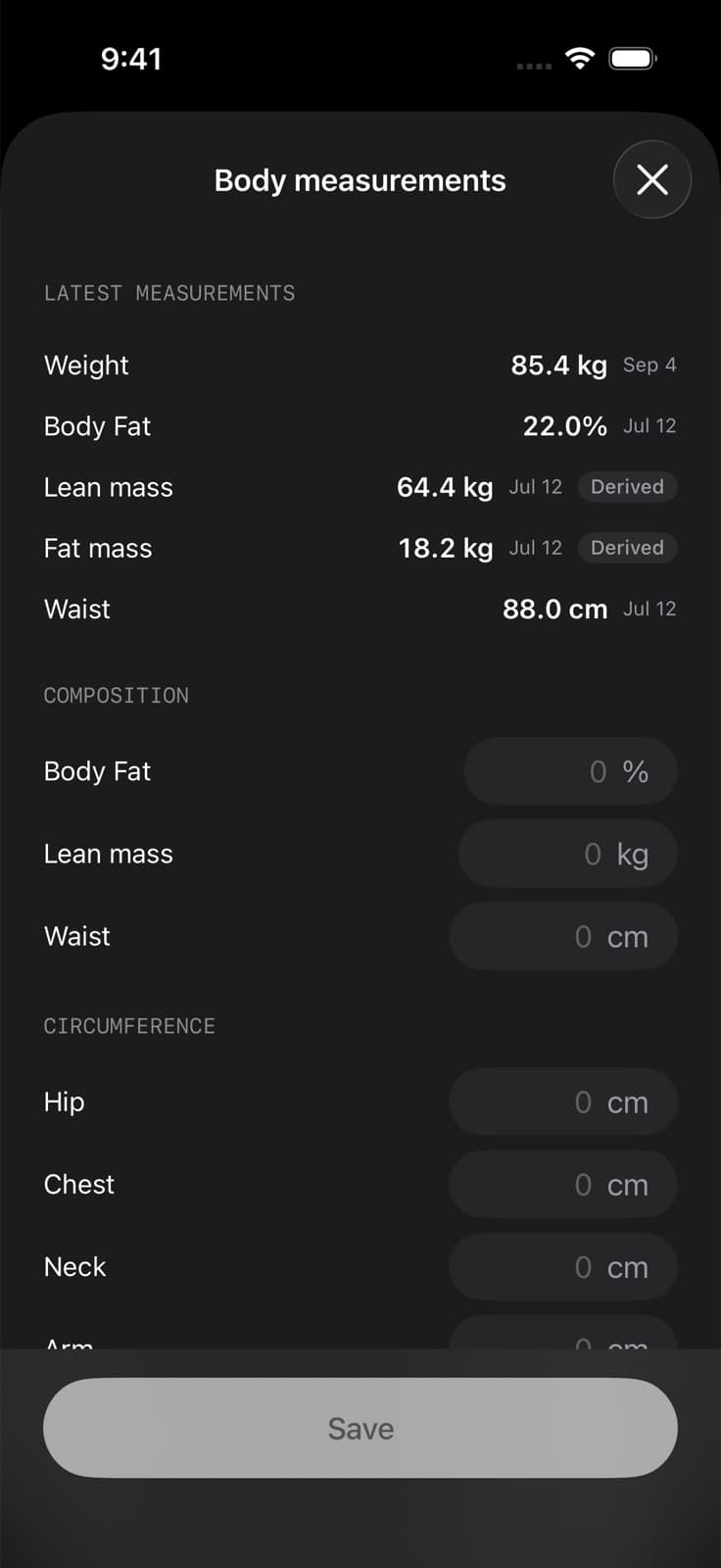
This capture comes from Fuel's help center and shows one account's values. We did not take it for this guide. The dates beside each number show the gap the example raises. A weigh-in from this week can sit next to a waist reading from weeks ago, and derived lean mass is calculated from weight and body fat, so it says nothing direct about new muscle.
MacroFactor can use the logged intake and the weigh-ins in its expenditure estimate, plus step counts if step input is on, and you can keep circumference records alongside the program. Carbon can use the intake and weigh-ins at the check-in, which judges the week against its protein minimum and calorie target, and a check-in note can record the fourth session. Cronometer can record the intake and biometrics, and Gold can chart weight against waist and give Crono Coach guidance. None of the four documents reading reps from a separate training app, so that record stays in your lifting app.
No app's exact response is predictable from these facts, and the facts prove little. One lower waist reading and one rep improvement cannot show lost fat or new muscle. Before a steady scale becomes a reason to cut calories, the record has to answer a few questions. Were the food logs complete? Were the weigh-ins and the waist measurement taken under comparable conditions? Was protein low on more days than those two dinners? Did the extra session change how much you ate? A longer pattern answers these better than one week, and the recomp plateau guide walks through that longer read.
04Test the logging with meals you already eat
Every method here depends on complete food logs, so test each app you are considering with food you actually eat. Log a meal you eat most weeks and check that the saved portion matches what you ate this time. Fuel can relog favorites and recent meals and bring yesterday's meal forward with Smart Recall. MacroFactor's App Store listing documents copying, recipes and smart history. Carbon documents food and recipe logging, and Cronometer supports custom recipes.
Then log an unfamiliar meal, review the estimate and correct the portion or any missing ingredient before you save it. Fuel accepts photo and text entries and lets you correct a draft with plain-language feedback, and Cronometer Gold adds photo and voice logging. Finally, find how much protein you have left for the day.
05Free access and subscription costs
These are US App Store prices on October 20, 2026, shown as the total charge for each billing period. Fuel is the most expensive of the four.
Fuel costs $24.99 monthly or $149.99 yearly. Fuel Free allows seven food entries per configured week, shared between photo and text entries, and includes the first Daily Review and first Weekly Review you open, without recurring reviews. Weight, water and workouts do not count against the food allowance. Plan Progress and ongoing reviews need Pro. We could not verify an introductory trial for Fuel.
MacroFactor costs $11.99 monthly, $47.99 for six months or $71.99 yearly. Its US listing states a seven-day trial and no free tier.
Carbon costs $11.99 monthly, $59.99 for six months or $99.99 yearly. Its free trial gives new accounts seven days of full access when they start at web.joincarbon.com. Subscribing inside the app starts paid access immediately. The trial converts to a paid plan unless you cancel, and Carbon has no ongoing free version.
Cronometer Gold costs $10.99 monthly or $59.99 yearly, and Basic stays free. We could not verify a Gold trial.
06When to keep the app you already use
Stay with your current app if it already gives you complete logs, protein you can see during the day and a weight trend you act on, and the only thing missing is a recomp label. None of these four has a recomposition mode that measures tissue change. If you track in Cronometer and follow a coach's or dietitian's targets, an adaptive app adds a second opinion on your calories, so decide whether you want one before you pay. If MacroFactor or Carbon already adjusts your targets and you trust its reasoning, one quiet scale week is no reason to switch.
Switch when the feedback loop itself fails you. That could mean targets that ignore your training days, adjustments you don't understand, a compliance routine that makes you stop logging, or a free tracker whose numbers you never act on. For deeper two-app comparisons, read Fuel vs MacroFactor and Fuel vs Cronometer. The macro tracking apps guide covers logging and food databases more broadly.
07Choose the feedback loop you will use
Open the records you already keep and see which ones are complete enough for an app to use. A full food log and regular weigh-ins give MacroFactor and Carbon what their weekly adjustments need. Training that already lands in Apple Health gives Fuel the activity it uses for daily targets. A detailed log plus a dietitian or your own judgment already making the calls is the arrangement Cronometer keeps intact. If one of those records is thin, the app that depends on it will be adjusting from guesses, so choose by the records you have.
If your training already reaches Apple Health, set up your nutrition plan in Fuel and review the pattern across your week.