A lifter keeps two records. One holds the sets, reps and loads from each session, and the other holds what you ate around them. Give each record one app. Strong or Hevy suits a program you already follow, and Fitbod suits a lifter who wants the app to pick the next workout. Fuel handles food. Any app you already trust for one of those jobs can stay.
It is easy to end up paying twice for the same job. A lifter runs Strong and Hevy side by side for a week, then adds a planner that also keeps a workout log, then a nutrition app that asks for workouts too. Each extra app means one more place to record a session and one more subscription. The useful question is which job your current setup leaves undone.
Fuel's team publishes this guide, and it is a curated stack. Fuel is the only nutrition app in it by design. Strong, Hevy and Fitbod were selected because each covers a different training job, and they are compared here on training alone. Everything below comes from each company's documentation and US App Store listing, checked on October 20, 2026. The training days are worked examples for you to try. We did not run a new hands-on test of these apps or of any pair of them.
01Pick one training app for the job your program leaves open
Start with whether you already have a program. A lifter following a coach's spreadsheet, a published routine or a plan they wrote needs quick set entry and a history to compare against next week. A lifter who walks into the gym unsure what to train needs suggestions, and a blank notebook will not supply them.
Strong and Hevy are recording tools first. Both store routines, log sets and loads, run rest timers and chart your history. Fitbod builds the session for you from your goals, equipment and past logs. Hevy Pro now includes Hevy Trainer, a planning option, so the two groups overlap.
| Training job | App | Choose it when | Look elsewhere when |
|---|---|---|---|
| Record a program you already follow | Strong | You want a recording-oriented notebook with routines, timers, charts and Watch logging | You want the app to decide what you train |
| Record a program with planning and community extras | Hevy | You like building routines on the web, sharing them, or trying Hevy Trainer | Four free routines and a three-month chart window will not cover you, and you will not pay for Pro |
| Receive suggested workouts | Fitbod | You want sessions built from your goals, equipment and logged history | A coach already writes your exact sets, or you want to run whole sessions from the Watch |
| Record food and set nutrition targets | Fuel | You use iPhone or Apple Watch and want quick relogging, meal drafts you correct, and calorie and protein targets | You use Android, your current nutrition routine already works, or you want unlimited free food logging |
Pick one row from the first three. Fitbod logs your sets as you do them, so running it beside Strong or Hevy gives you two records of the same session. A Hevy user who wants plans should look at Hevy Trainer before adding Fitbod.
02Strong and Hevy for a program you already follow
Strong keeps a plain training notebook
Strong runs on iPhone, Android and Apple Watch, and its Watch app logs workouts with or without the iPhone. Its US App Store listing covers a built-in exercise library plus custom exercises, reusable routines, set-type labels, rest countdowns, progress graphs, personal records and an estimated one-rep max. Treat that estimate as a calculation from your logged sets. It helps you spot trends and says nothing about the load you should attempt next.
The free tier saves unlimited workouts and three custom routines, which means three saved templates. A program that fits in three templates stays free. A coach who rotates five routines will push you to Pro. Pro costs $4.99 a month or $29.99 a year, billed annually, in the US App Store, and the listing also shows a $99.99 Forever purchase. The listing words its trial offer conditionally, and we could not confirm a trial length.
Hevy adds web planning, community and a trainer option
Hevy covers the same recording basics on iPhone, iPad, Android, Apple Watch and Wear OS, with exercise videos, per-exercise rest timers, and graphs for volume, best weight and reps. Its routine documentation is detailed. You can set sets, loads, rep targets or rep ranges, rest periods, notes and supersets, then edit a routine mid-session and choose whether the change updates the template.
Two things separate Hevy from Strong. You can plan and analyze routines on the web, and Hevy has a social feed where lifters share workouts and routines. Profiles can be private, so the feed is optional.
The Pro help page sets the free limits at four routines, seven custom exercises and three months of graph history. Pro removes those limits and adds all-time history, a warm-up calculator and Hevy Trainer, which Hevy describes as tailored training plans with ongoing guidance. We have not assessed Trainer. If you drop Pro, Hevy's downgrade help says your older workouts stay stored and only the longer chart windows close.
Hevy's pricing comparison lists $2.99 a month, $23.99 a year billed annually, or $74.99 lifetime. The US App Store also shows a $3.99 monthly option, so check the price on your own paywall. No general trial length is confirmed.
Choose Strong if you want a recording-oriented notebook and its free limits fit your program. Choose Hevy if web planning, shared routines or Trainer would help you. Running both for a few weeks to compare is fine. Paying for both after that duplicates the job.
03Fitbod when you want the app to choose the workout
Fitbod builds strength sessions from your goals, experience and available equipment, then uses your logged work to shape later sessions and to estimate which muscle groups have recovered. That recovery view comes from a model of your training history. It does not measure tissue recovery. Its App Store listing lists more than 1,000 exercises with instructions and videos, and you can still save your own routines. Fitbod also runs on Android.
Fitbod fits a lifter who trains alone, has no coach and loses momentum deciding what to do. It fits poorly if a coach already writes your exact sets, because you would spend sessions overriding suggestions. Fitbod's Watch and Health help describes the Watch app as a companion. Starting and saving a session, and adding or swapping exercises, happen on iPhone, so a lifter who leaves the phone in a locker should look at Strong or Hevy.
Fitbod's current subscription help lists $15.99 a month or $95.99 a year, billed annually, in US dollars. It describes a seven-day trial that you opt into by starting a subscription, which then renews. After the trial, logging new workouts requires payment and past workouts stay viewable. An older Fitbod blog post still mentions three free workouts, so go by the current support page. The US listing also shows lower legacy prices that may not be offered to you.
04Fuel for food while you gain, cut or maintain
Your training app records the bar. Fuel records the plate and sets the targets behind it. It runs on iPhone and Apple Watch, with no Android version. You choose a goal, Fuel sets daily calorie and protein targets for it, and then it tracks what you log against them.
Lifters eat the same meals often, and Fuel is built around that. Quick Log shows Favorites and Recents, and tapping one relogs the saved portion straight away, so use it only when the portion matches. Food Library covers known products and menu items without AI. Smart Recall copies yesterday's meal, with or without a change such as "no rice."
New meals go through the Log Meal composer. You type a description, attach up to six photos, or both. Fuel returns a draft with calories and macros, and you correct the draft before you save it.
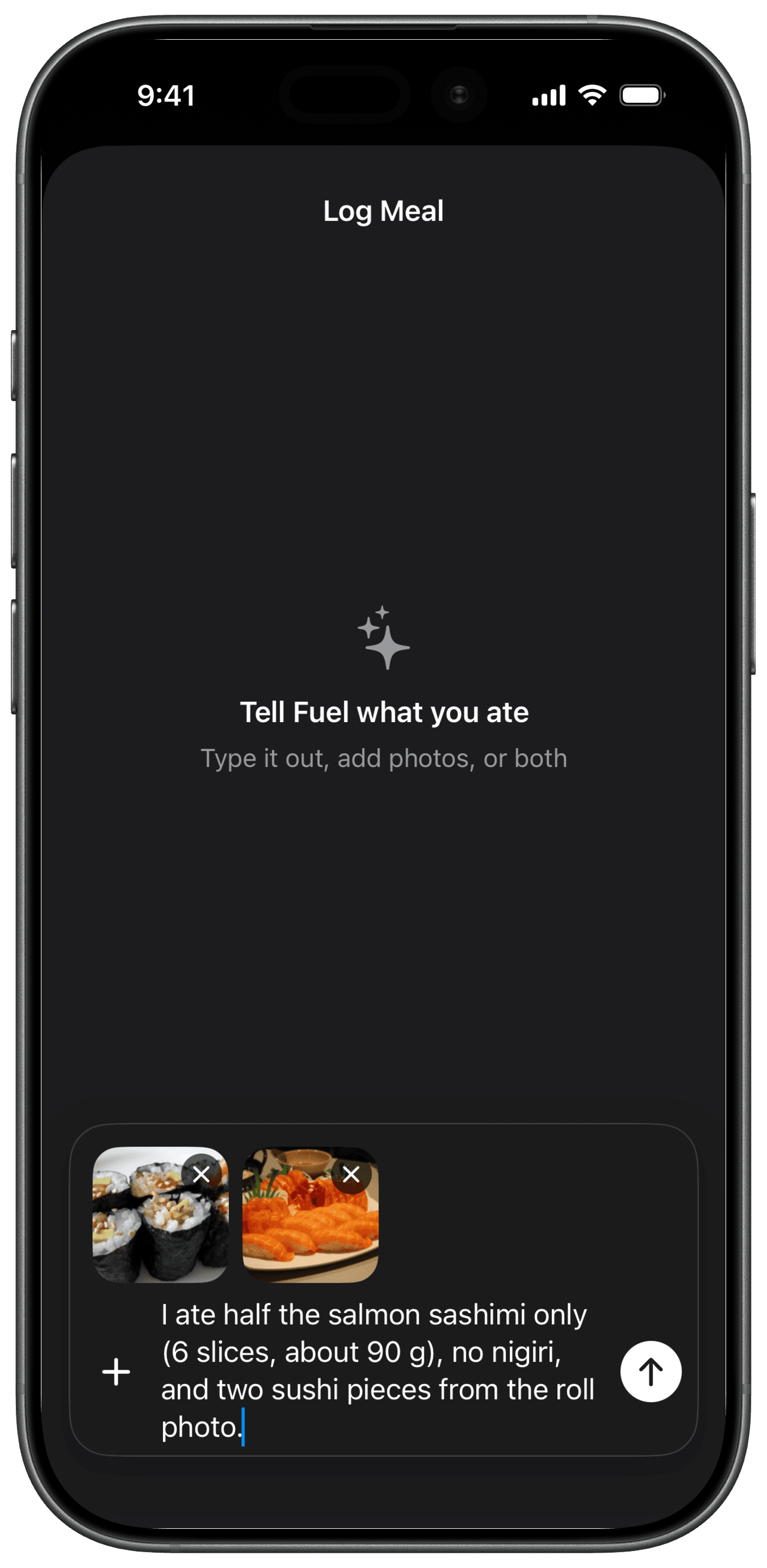
This capture comes from Fuel's food-logging help. The photos show more food than was eaten, so the note says which part was eaten, roughly what it weighed, what was skipped and how many roll pieces counted. Write in what you know before you submit, such as weights, ingredients and anything added in cooking or at the table, then read the draft and correct it before saving.
After that, Today shows how much protein and how many calories remain. Daily and weekly reviews then look at the pattern across your logs.
How Fuel sets calorie targets on training and rest days
Fuel has two calorie modes, and Maintain adds an optional training schedule that works with either one.
Plan Calories keeps the planned target. Recorded workouts do not add calories to it.
Dynamic Calories lets activity reported by Apple Watch raise the day's target when it runs ahead of your expected pace. Fuel adds no separate bonus for a whole workout, and a quiet day may get no addition at all. This mode works with any goal.
Automatic training-day fueling is an optional setting in Maintain mode. You pick a preset training schedule, and Fuel gives the planned training days higher targets, funded by lower targets on rest days. The seven planned targets still average your plan calories. With Dynamic Calories also on, recorded activity can raise a day's target above that plan. The schedule is a plan only. Fuel does not check whether you trained, and its documentation describes no way to read your program from Hevy, Strong or Fitbod.
Gaining and cutting use one of the two modes. Maintain uses one of the two modes, with or without the schedule. For the reasoning behind eating more on hard days, see carb periodization for lifters.
Fuel Free allows seven food entries per configured week, shared between photo and text entries, and opens your first daily and weekly review. Pro adds unlimited food entries and ongoing reviews. Pro costs $24.99 a month or $149.99 a year, billed annually, in the US App Store. The Free and Pro page lists the full split.
05Run a training week without recording sessions twice
Take a lifter in Maintain who follows a coach's program in Hevy on Monday, Wednesday and Friday. In Fuel they picked the Balanced week schedule, which plans training on those same three days, and turned on Automatic training-day fueling. This is a worked example of the routine. We did not record it.
Monday, a training day
Hevy owns the session. The lifter opens the saved routine, logs each set with its load and reps, lets the rest timer run, and finishes the workout once. With Health permissions on, Hevy can write the session to Apple Health as Strength Training with a calorie estimate that Hevy itself calls approximate. Fuel documents reading permitted Health workouts. We have not tested this pair, so after granting permissions and letting Health sync, open Today and check whether the session appears before you rely on it.
Fuel owns the food. Breakfast is the usual oats and whey, so the lifter taps it in Favorites because the portion matches. Lunch is a new burrito bowl near the gym. They take a photo, add "large portion, extra chicken, sour cream" in text, read the draft, fix the rice amount and save it. At dinner they check the remaining protein and calories on Today, decide on the portion, then log what they ate.
The set-by-set record stays in Hevy. Hevy documents sending a workout summary with a calorie estimate to Health, and neither company's documentation shows exercises, sets, reps or the program reaching Fuel by that route. Progress gets judged in two places over weeks. Hevy shows whether the lifts are moving, and Fuel shows whether intake and body weight are following the plan. Neither app can tell you after one day whether you built muscle.
Tuesday, a rest day
Tuesday has no session in Hevy. Fuel treats it as a rest day because the Balanced week preset says so, and its target sits below Monday's. The lifter logs meals the same way, relogging what matches and describing what is new, and checks the remaining protein before dinner. If Dynamic Calories is on, a long walk recorded by the Watch can still raise the day's target.
Wednesday moves to Thursday
The gym closes Wednesday, so the lifter runs Wednesday's routine in Hevy on Thursday instead. Nothing in either app's documentation moves Fuel's schedule to match. Wednesday keeps its training-day target, and Thursday keeps its rest-day target, because the preset is fixed. With Dynamic Calories on, Thursday's recorded activity can still raise that day's target. In Plan Calories mode it will not.
When the week changes, open Fuel's Maintain settings and check whether the schedule and calorie mode still describe how you train. The documented choices are another preset, None, turning Automatic training-day fueling off, and switching between Plan Calories and Dynamic Calories. The settings screen offers presets only, with no custom schedule editor, so a program that moves often may match none of them. Pick the combination whose targets follow your training the way you want, and recheck it whenever your coach changes the plan.
Keep one recorder per session
Let one app record each session. If Hevy or Strong records on the Watch, skip Apple's Workout app for the same lift, and do not log the session again with Fuel's manual workout logger. That logger is for sessions no device recorded. It estimates calories from type, duration and effort and does not log sets or reps. If Today shows two workouts or doubled active energy, check the data sources in Apple Health permissions. Every calorie figure for a lifting session is approximate, Hevy's included, so do not plan a meal around the number from one session.
06When to keep what you have
Keep your current training logger if you trust its history and it covers your routines. A switch to save a few dollars can cost you the charts you check every week, so confirm your history can move with you before you change.
Keep your current nutrition routine if it already gives you targets you follow and a log you keep up. Fuel is also a poor fit if you use Android or want unlimited free food logging. Fuel Free's seven weekly entries are enough to try the workflow, and ongoing meal logging beyond seven food entries in a configured week requires Pro.
Skip Fitbod if a coach writes your program, and look at Hevy Trainer first if you already use Hevy. Skip the paid tiers of Strong and Hevy if your routines fit under their free limits.
The smallest useful stack depends on which jobs are still open. A lifter with a program, a logger they trust and a nutrition routine that works may need nothing new. A lifter with a program and no food routine may need only Fuel. A lifter with no program needs one planner, Fitbod or Hevy Trainer, and adds Fuel only if food is also unhandled.
07Try the stack on a training day and a rest day
Run a short test before you pay for anything new. Pick a representative training day and the rest day after it, ideally days with your usual meals. Record the session once, in the training app you already have or the one you picked above. Log food on both days in Fuel, including a meal you eat often and a meal you have not logged before, and check the remaining protein and calories before dinner.
Fuel Free gives you seven food entries per configured week, shared between photos and text. Two days of meals and snacks can run past that, so log the meals that test the workflow first. Daily logging beyond seven entries needs Pro, and so do daily and weekly reviews after the first ones.
On the third morning, look back at both days. Ask whether the training app showed the history you need for the next session, whether Fuel's targets and remaining numbers changed a choice you made at a meal, whether the meal drafts were close enough to correct quickly, and whether your first daily review told you something useful. Then ask whether any session was recorded twice, whether the same data appeared in two places, and whether you skipped logging a meal because it took too long.
Two days show whether the routine is workable for you. They cannot show whether it supports your training over months. If the useful answers outweigh the friction, a full week of logging is the next step, and it requires Pro only if it goes past seven food entries in the configured week. For targets built around a lifting program, start with the Build Muscle goal, and see how to count macros for muscle gain for the numbers behind it.
Keep your lifting app. Add Fuel for nutrition.