Runners usually look for a nutrition app because one of three jobs is going undone. They want a record of what they eat across a training week, a daily target that makes room for harder days, or a plan for what to carry and drink on a long run or race. Fuel, Cronometer and MacroFactor handle the first two jobs in different ways. Saturday is built for the third. Pick the app that covers the job your routine is missing, and keep whatever already works.
Choose Fuel if you run with an iPhone and Apple Watch and want a target that can shift calories toward planned training days or follow recorded activity, with coaching that reviews the week. Choose Cronometer if you want detailed vitamin and mineral data, a free diary with no time limit and targets you configure yourself. Choose MacroFactor if you log consistently, weigh in often and want coached targets that adjust from your intake and weight trend instead of from watch calorie estimates. Add Saturday when you need to prepare food and drink for a specific long run or race. If your current tracker already handles your meals well, add Saturday alone and skip a second diary.
Fuel's team publishes this guide, and Fuel is one of the four apps. The comparison uses each company's help pages, product pages and US App Store listings, checked on October 20, 2026. We did not run hands-on tests of any of the four apps, and the three-day example near the end is an exercise built from their documentation.
01Daily nutrition and race fueling are different jobs
A food log gives you a record of what you ate across the week. Read next to your training log, your energy on runs and how you recover, it helps you judge whether meals kept up with training. The totals alone do not tell you whether you ate enough. A daily target tells you how much room an app gives you today. A session plan tells you what goes in your bottles and pockets before Sunday's long run, and when to take it.
Each job needs different inputs. The log needs complete meals. The target needs a plan, activity data or a weight trend. The session plan needs details of the run itself, the weather and the products you intend to use. None of the three daily trackers in this guide documents an hourly plan for gels or drink mix during a run, and the Saturday sources we read do not describe a full meal diary.
A runner training for performance usually wants to eat enough to support training and recovery, see carbohydrate and protein across hard and easy days, and start long runs with a fueling plan they have already rehearsed. The endurance athlete fueling guide covers how much to eat and drink. This guide covers which app holds each part.
| Job you need done | App to consider | What its documentation supports | Where it stops |
|---|---|---|---|
| Log meals and get a target that follows planned training days or Apple Health activity | Fuel | Photo, text and label logging, hydration, Maintain training-day allocation, Dynamic Calories, weekly review | Preset schedules with no custom editor, no in-run fueling plan, Free covers 7 food entries a week |
| See what your normal diet contains in a free diary | Cronometer | Macro and micronutrient detail, custom targets, optional expenditure above baseline, with Macro Scheduler and Crono Coach in Gold | You build day templates yourself, no documented session fueling plan |
| Targets that adapt from intake and weight trend | MacroFactor | Weekly adaptive targets in coached programs, manual targets, flexible daily allocation, optional step trends | Does not add wearable calorie estimates to targets, subscription only after the trial |
| Prepare food and drink for a specific run or race | Saturday | Hourly food and drink recommendations from session details, turned into drink recipes or chosen products | Plans depend on your inputs, and the sources we read describe no full meal diary |
02Choose a daily tracker for your training week
All three daily trackers show carbohydrate, protein and fat for each day you log. They differ in what moves the target on a hard day. Fuel can move it from a planned weekly schedule or from recorded Apple Health activity. Cronometer can add recorded expenditure above a baseline if you turn that on, and Gold holds day templates you build. MacroFactor's coached programs update targets weekly from your intake and weight trend, and you can shift calories between days inside its weekly plan.
Fuel for an Apple Watch training week
Maintain mode suits a runner who wants to support training without chasing a target weight. It has no weight destination, pace setting or finish-date countdown. Fuel can change a runner's daily target in two separate ways, and you can use either, both or neither.
Planned redistribution. Automatic training-day fueling gives planned training days higher calorie targets, funded by lower targets on planned rest days, so the seven days still average your plan calories. The schedule comes from presets, and none of the current presets marks Sunday as a training day. The settings screen does not currently offer a custom schedule editor, so a runner with a Sunday long run can choose the closest preset or leave this off. The schedule describes the week you intend to train and does not confirm that a run happened.
Recorded activity. Dynamic Calories reads permitted Apple Health activity, such as a run from Apple Watch. When the day's recorded activity gets ahead of the expected pace, it can unlock more target room, which can raise the week's total. A logged workout does not guarantee a higher target, and Fuel adds no separate workout bonus because the run's energy is already in the activity figure. In Plan Calories mode, a recorded run does not raise the target.
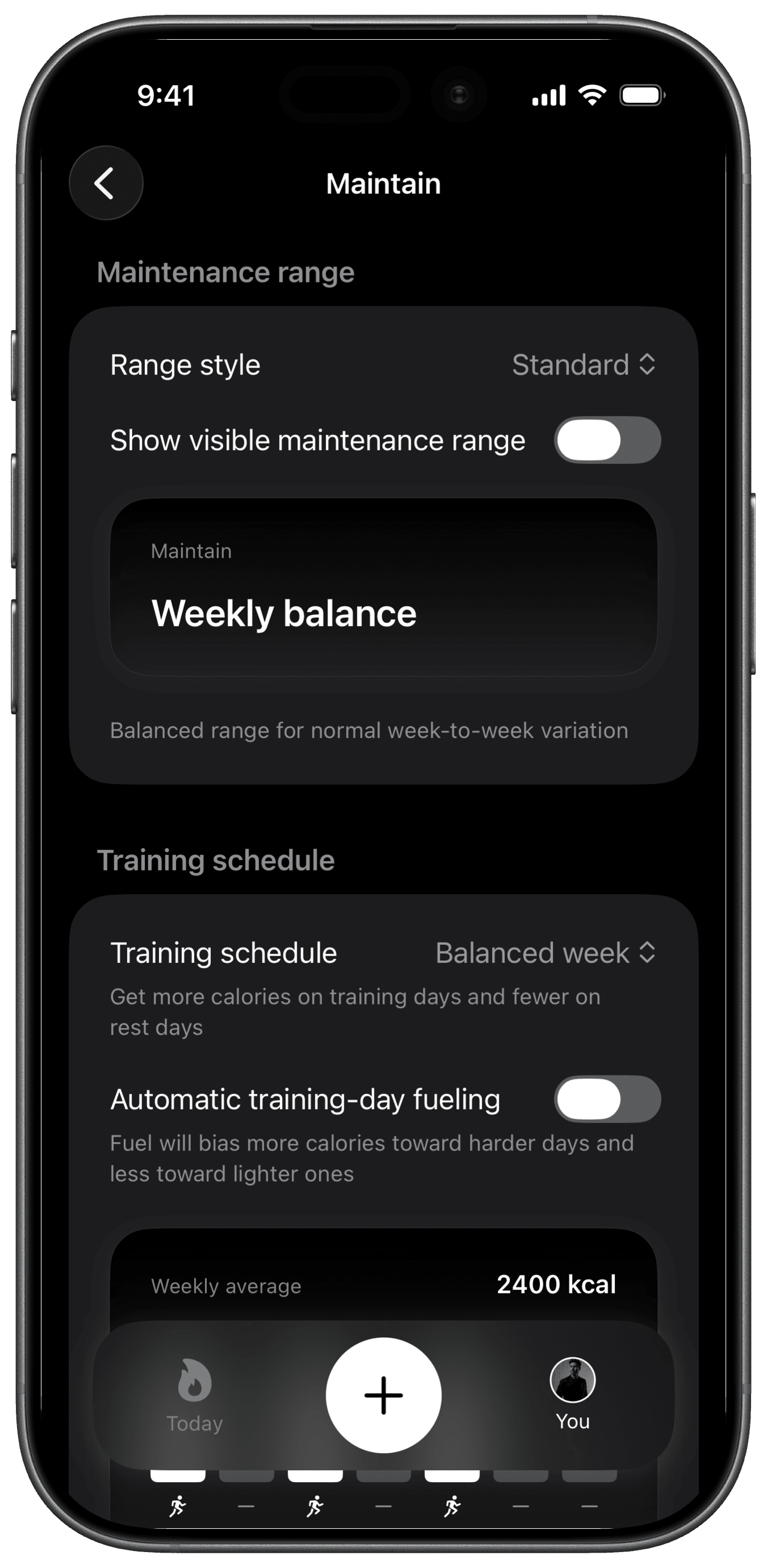
This existing Fuel product screenshot shows Maintain with Balanced week chosen and Automatic training-day fueling switched off, so it shows where planned redistribution is set and what the screen looks like with it off. The Fuel energy model explains how food logs, weigh-ins and Apple Health data feed each part of the target.
Food logging takes photos, text and nutrition labels and builds a draft with calories, macros and supported micronutrients for you to check before saving. Hydration shows logged fluid against a daily target, with sources and caffeine. Gels and sports drinks from a run can go in the food log. Fuel will record them, and it will not tell you when to take them. Its help pages do not describe direct connections to Garmin, Strava or training-plan apps, so check that your runs reach Apple Health before you rely on activity adjustments.
You may also see Prepare for Event in Fuel. It plans calories and macros toward an event date and goal weight. It does not plan a taper, carb loading or gel timing, and Maintain is the better starting point for a runner who is not changing weight. Training for an event with Fuel shows how the app fits around race preparation.
Fuel runs on iPhone and Apple Watch. Fuel Free allows 7 saved food entries per configured week, and water, weight and workout logs do not count toward that limit. The first daily review and first weekly review are one-time. Unlimited food logging and ongoing reviews come with Pro. Android runners, and anyone who wants every meal logged for free, should look at Cronometer.
Cronometer for nutrient detail and a free diary
Cronometer's free Basic plan includes a food diary with macro and micronutrient detail, barcode scanning, custom foods and recipes, custom macro and micronutrient targets, connected apps and devices, and seven-day nutrition reports. It runs on web, iPhone and Android. Judged on documented free features, it is the strongest free diary of the four apps here.
Cronometer's targets can move with activity. Its Energy Summary starts from a baseline or custom energy target, and optional settings add expenditure above that baseline to the day's target. If you set macros as ratios, the gram targets change when the energy target changes, so a run counted above baseline raises carbohydrate, protein and fat grams in proportion. Fixed gram targets stay where you set them.
Gold adds a Macro Scheduler for different daily targets, recipe importing, repeat items, custom charts, photo and voice logging, and Crono Coach. The Scheduler holds day templates you build, such as a long-run day. Cronometer's pages do not say it sets carbohydrate for a session from your training load, so you or a dietitian decide what the long-run day looks like.
Choose Cronometer when your question is what your normal diet contains across a block of training. It is a poor fit if you need an hourly plan of products and quantities for a run, which none of the Cronometer sources we read describe.
MacroFactor for trend-based targets
MacroFactor logs food, macros, micronutrients and weight, and offers photo logging. In its coached programs, targets update weekly from your intake and weight trend. Its help center states that it does not use wearable energy expenditure estimates to calculate expenditure or change targets. Optional Step-Informed Updates use step trends to inform those estimates over time, without adding calories on individual days.
Daily allocation is flexible. Coached calorie shifting and the Collaborative and Manual approaches let targets differ across the week. Collaborative gives you control over calories, carbs, fat and protein inside a weekly plan, and Manual leaves targets where you set them. A runner can give the long-run day more carbohydrate on purpose. MacroFactor will hold that plan, and the decision about how much stays with you.
MacroFactor suits a runner who logs consistently, weighs in and prefers targets that move with evidence gathered over weeks. It runs on iPhone and Android. It is a poor fit if you expect a watch's run calories to be added to today's allowance, or if you want a fueling schedule for a session.
03What a synced run changes in each app
A run that reaches an app has a different effect in each one. In Fuel with Dynamic Calories on, recorded Apple Health activity can add target room when it puts the day ahead of expected pace. In Cronometer, optional energy settings can add expenditure above baseline to the energy target, and ratio-based macro grams follow it. In MacroFactor, wearable calorie estimates do not change targets, and steps can inform longer-term estimates if you turn that option on. Saturday's support page lists completed or planned activity inputs from Garmin, intervals.icu, Wahoo, Polar, Suunto and TrainingPeaks, and says it does not connect to Strava or Oura.
A higher target after a run means the app counted more expenditure. It does not tell you what that session required. The activity figure is also a device estimate that can arrive late, go missing or appear twice. Fuel's energy model notes that a workout already included in active energy should not be added a second time, and a missing meal makes any remaining allowance look larger than it is.
04Use Saturday to prepare long-run and race fuel
Saturday's App Store listing names runners, cyclists and triathletes. You enter details of a session or race, and the app recommends hourly food and drink amounts, accounting for sweat and weather. It then turns those amounts into a homemade drink recipe or a set of chosen gels and drink mixes. Recent release notes and the changelog mention a race or event mode. Through TrainingPeaks and intervals.icu, Saturday can send plan comments, depending on your send settings.
These are Saturday's descriptions of its own product. A vendor's recommendation is not independent evidence that the amounts suit your body, and a plan is only as good as the session details and products you enter. Rehearse any race plan on long runs and note how your stomach handled it. Log the gels and drinks you actually consumed in your daily tracker if you want them counted.
If you already log meals in an app you trust, or follow a dietitian's daily plan, and the missing piece is what to carry on long runs and race day, add Saturday and keep everything else. Moving your diary to a new app would add setup work and still leave the long-run question unanswered.
05Compare free access and subscription costs
Prices come from the US App Store in US dollars on October 20, 2026, unless noted. Region, account and checkout offers can change what you see, so confirm the price in the app before you subscribe.
Fuel Free allows 7 food entries per configured week. Fuel Pro is $24.99 a month or $149.99 a year, charged as one yearly payment, according to the US App Store listing. We did not check trial eligibility at checkout.
Cronometer Basic is free with no time limit. Gold is $10.99 a month or $59.99 a year, as the App Store listing and Cronometer's media page show. We found no trial length in Cronometer's own sources.
MacroFactor's nutrition app is subscription-only after a seven-day trial, according to its product page. Its subscription help page lists $11.99 a month, $47.99 every six months or $71.99 a year, with taxes and regional prices varying.
Saturday's free download is not a free plan. The App Store lists a $5.99 one-month subscription and a $49.99 one-year subscription. Its download page advertises a 14-day free trial with no credit card required, on iOS and Android. A runner who pairs Cronometer Basic with Saturday pays only for Saturday.
06Try a rest day, run day and long-run day
The three days below are an exercise built from each app's documentation. We did not record these results, and they contain no targets for you to copy.
Rest day. The job is to record meals and check how the day compares with your plan. All three daily trackers hold the meals and macro totals. In Fuel Maintain with Automatic training-day fueling on, a planned rest day can carry a lower target that funds the planned training days. Cronometer applies your baseline target or whichever Gold template you set for the day. MacroFactor follows the allocation you chose. Saturday has nothing to plan.
Ordinary run day. The job is to log meals and see whether the run changes the day's target. Fuel with Dynamic Calories on may raise the target if the run puts recorded activity ahead of the day's expected pace. Cronometer can count the run above baseline if you enabled those energy settings, and ratio-based macros scale with it. MacroFactor does not add the wearable's run calories to the day, and steps may inform later updates if you enabled that option. A higher target on this day does not mean you need a particular snack or gel.
Long-run day. This day has two jobs. Before the run, decide what to carry and when to take it. Saturday is the only app here whose documentation covers that, working from your session details and chosen products. After the run, log your meals and whatever you consumed on the run in your daily tracker. Compare the plan with what you took and how your stomach felt, and write that in your training log. A raised calorie target or a daily carbohydrate total will not tell you what to put in your pockets.
Whichever day felt unsupported points to the app you need. Rest and run days point to a daily tracker, and a long run with no fueling plan points to Saturday added to what you already use. The Improve performance goal explains how Fuel approaches training nutrition.
Use Fuel to track nutrition across your training week. In Maintain, choose how the target should behave. Automatic training-day fueling fits a week that matches one of the presets. Dynamic Calories fits a runner who wants recorded Apple Watch activity to count toward the day. Leaving both off gives a steadier target, which some runners prefer when their schedule changes week to week. Free counts every saved food entry toward its 7 a week, so whether it covers the three test days depends on how many entries you save each day. Logging every meal and snack across a full training week usually takes more, and that is what Pro adds.