The right MyFitnessPal replacement depends on what stopped working for you. Cronometer suits people who want to inspect vitamins and minerals on a free plan. MacroFactor suits people who want calorie targets recalculated from their own intake and weight. Fuel suits iPhone and Apple Watch users who want photo and text logging, meal recall, and daily and weekly reviews in one routine. Lose It! suits people who want a simple calorie budget. If your saved meals, restaurants and devices already work in MyFitnessPal, staying is a reasonable outcome.
Switching costs more than a subscription. We found no documented way to carry a complete MyFitnessPal diary or recipe library into any of these four apps, so plan on rebuilding the meals you log most. A replacement has to fix a daily problem big enough to justify that work.
Fuel's team publishes this guide, and Fuel is one of the four alternatives. The comparison draws on each company's App Store listing and help documentation, checked on October 20, 2026, with US prices. We did not run new logging tests for this article. The breakfast, lunch and dinner test near the end is an exercise for you to run, and it contains no results from us.
01Choose an alternative for the problem you have
Start with the complaint you could state in one sentence. Wanting to see your iron and B12 intake points to Cronometer. A calorie target that never moves while your weight does points to MacroFactor, and Fuel also adjusts targets from activity and weight trend. Wanting photo and text logging with guidance on what to eat next points to Fuel if you use an iPhone. Wanting a single daily calorie number points to Lose It!.
Cronometer and Lose It! both keep a usable free plan. MacroFactor has no free plan after its trial. Fuel's listed Pro prices are the highest in this guide, so it makes sense when its logging and reviews replace something you would otherwise pay for or do by hand.
| If you are leaving because | Look at | What changes | Poor fit if |
|---|---|---|---|
| You want vitamin, mineral and food-source detail without paying | Cronometer | The free Basic plan keeps barcode scanning, custom foods and recipes, and raw data export | You expect every branded entry to list every nutrient |
| Your calorie target ignores how your weight is moving | MacroFactor | Targets adjust from logged intake and weight trend, with optional step data | You want a free plan or you log only some days |
| You want a different logging routine and guidance after meals | Fuel | Photo and text logging, targets from Apple Health activity and weight trend, daily and weekly reviews, logging from Apple Watch | You use Android or want the lowest price |
| You want a simple calorie budget | Lose It! | A free personalized calorie budget, with photo, voice and barcode logging in Premium | You left MyFitnessPal to get free barcode scanning |
| Your recipes, restaurants and devices already work | Stay with MyFitnessPal | Saved meals, restaurant dishes, Meal Scan, voice logging and connected devices stay in place | One daily problem outweighs years of saved context |
Check MyFitnessPal's current tiers before you leave over a missing feature. Its App Store listing now describes Meal Scan, voice logging, restaurant dishes and an AI coach. Premium adds gram-based macro targets, different goals by day and barcode scanning. If the thing you want sits inside Premium, upgrading may cost less than rebuilding your history elsewhere. Our MyFitnessPal review covers the rest of the app.
02Logging effort includes correcting and repeating meals
Every app here accepts some mix of barcode, photo, typed or spoken input for a new food. The work that decides whether you keep logging often comes after that first entry. You check the portion, fix the missed ingredient and save the meal in a form you can reuse tomorrow. How much of that each app handles for you is something only your own meals can show, and the test at the end of this guide is set up to find it.
MyFitnessPal's voice logging searches the food database and cannot select your saved My Foods, My Recipes, My Meals or Quick Add entries. A dinner you saved years ago still goes through the saved-meal list by hand. Meal Scan requires Premium, English, iOS 18 or Android 13 and later, and does not run on the website. When it misreads a photo, you correct it by choosing a different food and adjusting servings.
Fuel accepts photos and a typed description in the same entry, so you can attach a plate photo and add "ate about two thirds, extra soy sauce" before analysis. The result is an estimate. Edit Result lets you type what should change and ask for an update before you tap Log Food. Repeats take a different route. Quick Log lists favorites and recent meals, and Smart Recall rebuilds yesterday's meal on the phone without AI, or applies a stated change such as "no rice" through AI. The version 2.7 release notes from October 4 describe typing @ to pick yesterday's meal and adjust it, and favorites and recents in Apple Watch Quick Log.
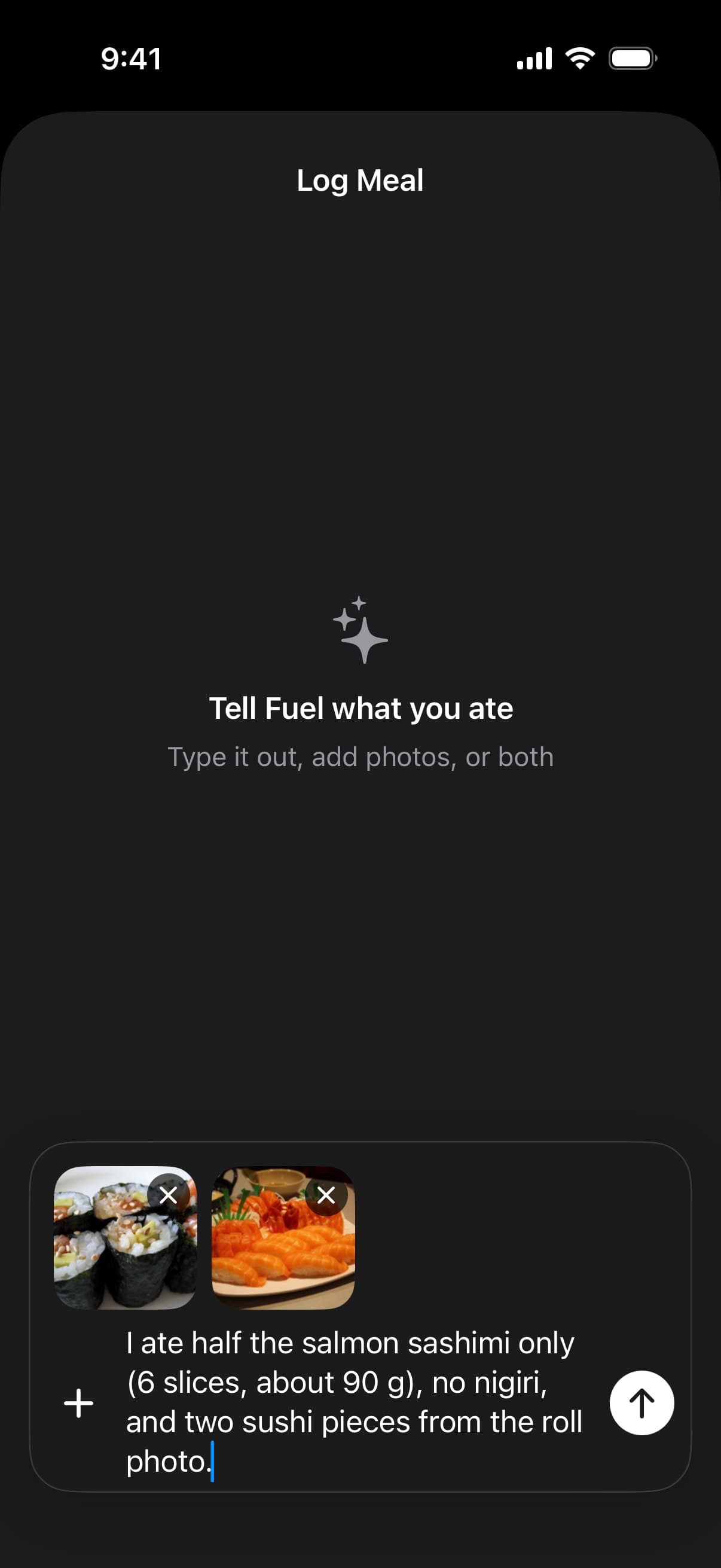
This capture comes from Fuel's existing 2.7 help screenshots. It shows the input step only and says nothing about estimate accuracy. AI submissions are processed off the device, and Fuel's privacy and data page explains what that involves.
Cronometer keeps barcode scanning and manual custom foods, meals and recipes in its free plan. Its custom food tool lets you enter servings and nutrients from a label and submit package photos for review in the public database. Gold adds Photo Log, Voice Log, a recipe importer from URLs and Repeat Items. MacroFactor lists photo and description logging, barcode scanning and recipes on its product page. Lose It! puts barcode, photo and voice logging in Premium.
Judge each app by the second time you log a meal. The first time shows you the database. The second shows you whether your corrections stuck.
03How coaching, target changes and nutrient detail overlap
Guidance in these apps falls into four overlapping workflows, which are automatic target changes, assistant answers, nutrient inspection and scheduled reviews. Most of the apps here offer more than one, so match the workflow you want to the app before comparing feature lists.
Automatic target changes
MacroFactor estimates your energy expenditure from the food you log and the change in your weight, then adjusts your calorie and macro targets from that estimate. Optional expenditure modifiers can add step data as context. The estimate depends on consistent logging and regular weigh-ins, so skipped days give it less to work with. On iPhone it reads Apple Health, and entries you make in MacroFactor take priority over outside data.
Fuel also changes targets on its own, from a different mix of inputs. Its App Store description lists calorie and macro targets set from Apple Health activity. Fuel's energy model documentation describes a slower layer that combines recent Apple Health burn with a recency-weighted 14-day weight trend once enough weigh-ins exist, with the weight correction capped at 300 calories a day in either direction. Apple Watch based calorie targets explains where activity numbers can drift, and our Fuel vs MacroFactor comparison sets the two methods side by side.
MyFitnessPal Premium lets you set gram targets and different goals by day, and Cronometer Gold adds a macro scheduler. In the sources checked, those are targets you set yourself. Cronometer's optional Expenditure Above Baseline setting adds energy burned in activity beyond your baseline to that day's budget, which responds to daily activity but does not recalibrate the baseline from your weight trend over the longer term.
Assistant answers
MyFitnessPal's Nutrition Coach is a chat assistant that can discuss your diary, goals and food choices. It cannot log food, change your targets or see your weight history. It is limited to Premium and Premium+ subscribers on iOS, in English, in the US, UK, Ireland, Canada, Australia and New Zealand, and MyFitnessPal describes it as still rolling out.
Cronometer Gold includes Crono Coach, which reads your nutrition history, goals, preferences, notes and settings and gives short guidance. Cronometer says it does not change your diary, targets or settings. Both assistants interpret your data and can suggest foods, and both leave the numbers to you.
Nutrient inspection
Cronometer is built around nutrient inspection. It shows vitamins, minerals and other nutrients per food and per day, and Gold adds more reports. That detail depends on the entry you pick. A branded entry can leave fields blank when its source never supplied those values, and a blank field tells you nothing about whether you are short of that nutrient. Check where an entry's data came from when micronutrients are the reason you switched.
Daily and weekly reviews
Fuel's App Store description lists guidance after each meal, a morning review of the previous day and weekly coaching. Its Weekly Review help says the review reads seven days of food, drinks, activity, weight and plan targets, then returns a summary, next-week targets, meal ideas and an action plan. These are the developer's descriptions of the features and not measured outcomes. The review explains the week, and the target math stays in the energy model described above.
Several apps here can add a day's activity to that day's target. If you want a longer-term estimate that recalibrates from your own data, compare the methods. MacroFactor works back from logged intake and weight change, with steps as optional context. Fuel starts from Apple Health burn and corrects it with a 14-day weight trend, capped at 300 calories a day. If you want to ask questions about your diary, MyFitnessPal's coach and Crono Coach both answer them. If you want to read every nutrient yourself, start with Cronometer. If you want a scheduled review of each day and week, look at Fuel.
04Free plans and subscriptions change the shortlist
Fuel has the highest listed monthly and annual prices in this guide. MacroFactor has no lasting free plan. Cronometer's free plan includes barcode scanning, which MyFitnessPal and Lose It! reserve for paid plans, and Gold has the lowest listed monthly and annual prices of the paid plans. Those rankings compare the recurring monthly and annual options in the table and leave out promotions and one-time purchases such as Lose It! Lifetime. Prices are from US App Store listings and help pages as of October 20, 2026. App Store pages can show several offers at once, and your own checkout may differ by region, account history and promotion.
| App | Free plan | Paid plan in the US | Trial |
|---|---|---|---|
| MyFitnessPal | Food and exercise logging, recipes, percentage goals, printable reports | Premium at $19.99 a month or $79.99 a year | Not confirmed in the sources checked |
| Cronometer | Basic, with no time limit, barcode scanning, custom recipes and raw data export | Gold at $10.99 a month or $59.99 a year | Not confirmed in the sources checked |
| MacroFactor | None | Nutrition at $11.99 a month, $47.99 every six months or $71.99 a year | Seven days |
| Lose It! | Personalized calorie budget | Premium at $79.99 a year, or Lifetime at $299.99 | Promotions vary |
| Fuel | Seven food entries per week, first daily review and first weekly review | Pro at $24.99 a month or $149.99 a year | Not confirmed in the sources checked |
MacroFactor's prices cover the Nutrition app alone. Its Workouts app is a separate product with its own bundle. Lose It! charges active Premium members $229.99 for Lifetime instead of $299.99. Lose It! Premium's listed annual price matches MyFitnessPal Premium's, so at those prices moving between them saves nothing.
Fuel Free allows seven food entries per configured week, shared across photo and text logging. Each profile gets its first daily review and first weekly review, and those do not renew each week. The timeline shows today only. That is enough to check whether the logging and reviews fit your routine on an ordinary day. It will not carry a full week of meals.
05Move your routine before you move your history
An export and an import are different things. An export gives you a file of your past. An import needs the new app to accept that file and turn it back into foods, meals and recipes you can log again. We did not verify a complete MyFitnessPal diary or recipe migration into Cronometer, MacroFactor, Fuel or Lose It!, so do not assume one exists.
Save your record before you cancel anything. MyFitnessPal's full data export is a Premium and Premium+ feature. Free accounts can still print a report from the website, which gives you an archive to read. Diary sharing gives another account access to your diary and does not save a copy for you. Neither one turns your recipes into entries another app can use. If you drop from Premium to Free, MyFitnessPal keeps your logs, recipes and progress, so you can keep the account while you try something else.
Each alternative documents a different route. Cronometer's Basic plan exports all raw data, and we found no current official support for importing a MyFitnessPal history. MacroFactor offers a detailed spreadsheet export and reads Apple Health on iPhone and Health Connect on Android, though its help does not describe bringing over a full food-level diary. Lose It! offers a full account history export through its website and states plainly that importing data is not possible. Fuel can read supported nutrition and body data from Apple Health once you grant permission. What arrives depends on which fields your old app wrote to Health and how much of that history Health still holds, so check the Health app before counting on it. That route does not include your MyFitnessPal saved meals or recipes, and this guide did not confirm a full data export from Fuel.
In practice, the switch means rebuilding the handful of meals you log most weeks. Do it in your first few days with the new app, and you will learn early whether its database has your usual foods.
MyFitnessPal remains the stronger choice if your restaurants and packaged foods already have reliable entries, if your household recipes are saved and correct, if a coach or dietitian reads your diary through sharing, or if a scale or fitness device you rely on connects to it and not to the replacement. Check your exact device before assuming another app supports it.
06Try your usual day before you commit
Run the same three meals in MyFitnessPal and in one candidate on the same day. Use real food you ate, so you are testing your routine and not a demo.
Familiar breakfast. Pick something with known package labels and a portion you can state, such as a yogurt, a measured scoop of oats and a banana. Find each food, check the units, set the serving and save the meal. The question is whether tomorrow's entry will be easier to repeat and still correct.
Restaurant lunch. At a chain that publishes nutrition, find the exact item and size. At an independent restaurant, take a photo or write a description, and add the sauces, cooking oil and how much you ate. Read the estimate before you save it. No app turns an unknown portion into a measured one, and a confident result is not the same as an accurate one.
Repeat dinner. Recreate last night's dinner with one change, such as half the rice or a different protein. In Fuel, Smart Recall's edited mode handles this directly. In Cronometer, use a saved recipe or Gold's Repeat Items. In MacroFactor, use a saved recipe. In MyFitnessPal, use the saved meal from the list. In every app, check whether your change edits only tonight's entry or the saved recipe as well.
At the end of the day, compare what each app showed you. Look at the remaining targets, any feedback, whether your corrections were kept, how you would export the data and what the plan you would need costs. One day tells you whether the logging fits your routine. Target changes and weekly reviews read trends in your intake and weight, so their output becomes more useful as you log ordinary days.
If you log on an iPhone and want guidance after meals, try your usual day in Fuel and see whether the workflow fits. Picking a replacement and cancelling MyFitnessPal are separate decisions. Keep your MyFitnessPal account and history until the new app has handled your regular meals and you have saved the record you want, then decide whether to downgrade or close the old account.