The right protein tracker depends on the question you ask it in the afternoon. If you want one number, how much protein you have eaten against your goal, Protein Pal gives you that with free manual entry and no account. If protein is one target in a wider plan and you eat the same meals most weeks, Fuel connects it to saved meals, remaining macros and coaching. Proto, MacrosFirst and Cronometer cover photo-led tracking, portion control and nutrient detail.
Fuel's team publishes this guide, and Fuel is one of the five apps in it. The comparison uses each app's US App Store listing, website and help pages, checked on October 20, 2026. The meal examples below are exercises for you to try. We did not run timed logging tests or record results.
01Choose a protein counter or a broader nutrition app
Some readers want one protein number and find calorie and micronutrient screens a distraction. Others need protein next to calories, carbs and fat so dinner can close the gap without overshooting the rest of the day. Both groups care about protein, but they need different amounts of app.
If the app you already use shows a protein total you trust and relogs your regular meals, keep it. Switching can mean another subscription and rebuilding saved meals, which only makes sense when the new app removes a step you are skipping now.
The other choice is how food gets into the app. Typing grams directly from a label suits known packaged foods. Photos help with meals you did not weigh, provided you check the estimate. Database lookup and portion tools suit people who cook from known groceries. Pick the input method you will still use on a busy Thursday, then pick the app. For the target itself, see how much protein you need.
| What you want | App to consider | How you log | What you give up |
|---|---|---|---|
| One protein number with little setup | Protein Pal | Quick add, saved meals, editable AI estimates | Database search, scanning and unlimited saved meals need Pro |
| Protein and fiber from meal photos | Proto | Photos with written ingredient and quantity notes | No barcode scanning, and every estimate needs review |
| Portion calculations against gram targets | MacrosFirst | Database, barcodes, label scanning, serving calculator | A full macro tracker with protein as one of several targets |
| Protein alongside nutrients and recipes | Cronometer | Database, barcodes, custom recipes | A broader interface with far more nutrient data than a protein count needs |
| Protein inside a daily plan with coaching | Fuel | Favorites, recents, yesterday's meals, photos and text | Free covers 7 food entries a week, and the app is built around full nutrition |
02Reuse the foods you eat every week
If your breakfast and lunch repeat most days, check how an app stores those portions before anything else. The Greek yogurt, the chicken thighs and the shake after training should relog without a search once you have entered them correctly, with the portion still visible.
Protein Pal's App Store listing describes saved favorites and meals, with unlimited saved items on Pro. Proto's overview puts favorites, re-adding past meals and a pantry in Pro. MacrosFirst's listing describes copying meals and whole days. Cronometer saves custom meals and builds recipes by servings or by weight.
Fuel's Quick Log shows Favorites first and Recents after them. Tapping a row relogs the saved portion straight away. Smart Recall handles yesterday's meals from a typed phrase. "Breakfast from yesterday" rebuilds the saved meal on your phone without an AI call, and "copy yesterday dinner but no rice" uses AI to make the change, then opens a review before anything saves.
Instant relogging only helps when the portion matches. If today's bowl of yogurt was bigger, edit the entry or log it fresh. If you need ideas for the repeat list itself, the Trader Joe's high-protein staples guide covers foods that log cleanly.
03Five apps and the protein workflow each one supports
Protein Pal for a manual protein-first counter
Protein Pal from Ten Labs puts protein first. Its listing describes a default goal you can change for individual days, a progress ring, quick add for when you already know the grams, saved favorites and meals, and AI estimates you can edit. Calories, fiber, carbs and fat are optional. The homepage says no account is required and manual tracking is free.
Pro adds database search, scanning, unlimited favorites and meals, and full history. The homepage lists the widget as a Pro feature. Its own pages disagree about which countries barcode scanning covers, so readers outside the US should confirm it before paying. Saved meals are documented, and we found no description of a full recipe calculator.
Choose Protein Pal if you read protein off labels or know your regular meals and want a narrow daily counter. Look elsewhere if you want micronutrient detail or advice on what to eat next.
Proto for photo-led protein and fiber
Proto from Tiny Ideas makes protein and fiber the two headline goals. You set a protein target, photograph meals, add written notes about ingredients, brands and quantities, and follow progress toward the target in an organized history. Recent App Store release notes list editable ingredient amounts, a home screen protein-progress widget and switches for which macros appear.
Proto's site says it has no barcode scanning, so packaged foods go through photos and text too. Choose Proto if fiber matters to you as much as protein and you would rather photograph a plate than search a database. Skip it if barcodes or detailed micronutrients are part of your routine.
MacrosFirst for portions and macro targets
MacrosFirst is a full macro tracker with one feature that suits protein tracking well. It calculates a serving from your macro goals, so you can ask how much of a food closes the protein gap before you plate it. The calculation works from the selected food's nutrition data, so it is only as accurate as that entry. Its App Store listing also describes daily and per-meal macro goals and nutrition label scanning.
Premium help lists web recipe import, different goals on different days, and recurring food placeholders that do not count toward your totals until you log them. Gram-based goals and barcode scanning are free. MacrosFirst is a poor fit if you want a screen that shows protein and nothing else.
Cronometer for nutrient and recipe detail
Cronometer suits readers who want protein tracked next to vitamins, minerals and detailed recipes. Fixed targets set protein in grams. If you batch cook, you can record the cooked weight of the finished recipe and log your portion by weight.
If you only want to see a protein total, Cronometer shows you far more than you will use. Choose it when the vitamin, mineral and recipe detail is the reason you track.
Fuel for protein inside daily nutrition coaching
Fuel treats protein as one of four daily targets with calories, carbs and fat. You can edit the protein target in 5 g steps. Fuel keeps your carb and fat targets when you change protein and recalculates calories from all three, so raising protein also raises the calorie target. Beyond the repeat-meal tools above, the Food Library handles lookup with serving adjustment, and AI food logging takes photos, text or both for new meals.
Fuel's advantage over the protein counters is what happens after the log. It reads Apple Health activity, and Pro adds a next-meal coach and ongoing daily and weekly reviews, so the remaining protein sits next to advice on the rest of the day. If you check protein on your wrist, the Apple Watch nutrition apps guide covers Fuel's Protein complication.
Fuel is a poor fit if you want to log every meal for free, because Free allows 7 food entries per configured week across all logging methods. It is also more app than you need if all you want is a protein tally. Protein Pal is the closer match for that reader.
04Check protein eaten and protein remaining
Protein eaten tells you how the day has gone. Protein remaining tells you what dinner needs to do. A progress ring and a "left" figure answer different questions, so find where an app puts each one before you choose it.
On Fuel's Today screen, swipe the calorie card to reach the macro cards, then tap to switch between consumed and remaining, as Nutrition Widgets describes. The iPhone Macros widget shows protein, carbs and fat remaining. Free includes a smaller widget set than Pro, so check that this one is on your plan.
Protein Pal and Proto document progress toward a goal, and their documentation does not say whether either labels a remaining figure. Proto's lock screen item is a shortcut for capturing food. MacrosFirst's home screen and lock screen widgets show a nutrient you pick, and its help does not show the in-app protein layout. Cronometer's widget help covers energy consumed, macro summaries, highlighted nutrients and energy remaining, and does not mention protein remaining. For any of these four, log a meal and look for both numbers before you pay.
Widgets refresh on their own schedule. Fuel's refresh every two hours or when data changes, so a home screen number can trail an entry you made a minute ago.
05Labels, package weights and estimated portions
A printed package weight saves you weighing the food, provided you eat the whole package or split it exactly. If you cook and eat an entire 300 g pack of raw chicken, log 300 g against a raw chicken entry. The chicken will weigh less after cooking, and 300 g is still the right number for a raw entry. Logging that raw weight against a cooked chicken entry can overstate what you ate, because cooked entries list more protein per gram. Log the oil and sauce as separate items.
A 500 g bag of spinach divided exactly in half gives you 250 g. "I used about half" is an estimate, and the printed total on the bag does not make an eyeballed split exact. Log it as an estimate and correct it next time if you weigh it. Before you enter either number, check whether the label gives nutrition per 100 g, per serving or per package, and whether the entry you picked matches the food's raw or cooked state. The nutrition label guide walks through those columns.
An unfamiliar restaurant meal is where estimates take over. Give the app identifiable ingredients, how the food was cooked, and any portion detail you have. A photo may not show what you left on the plate or how much of a shared dish you ate, so add that in writing.
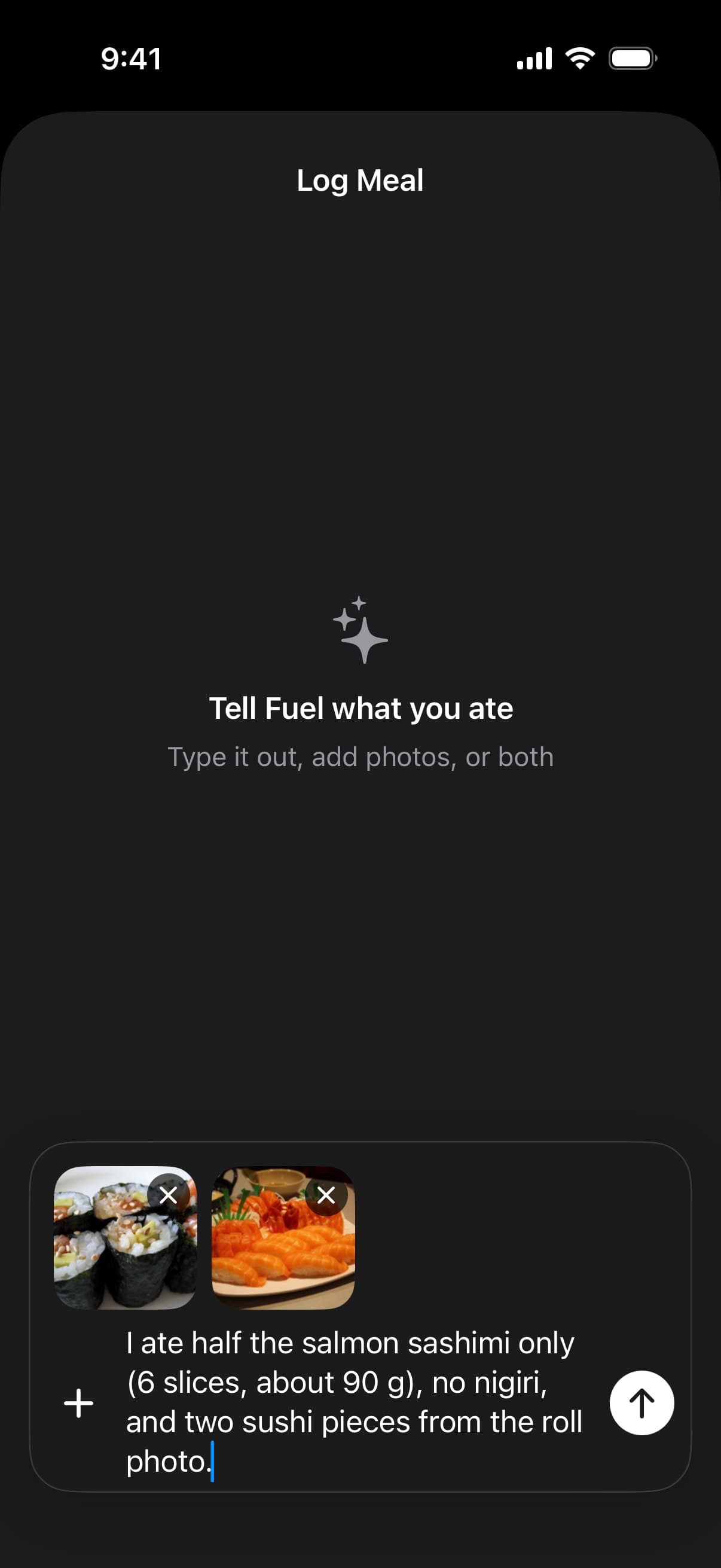
This screenshot comes from Fuel's 2.7 help pages. It shows the meal composer with two photos and a note about what was eaten, and the estimate it produces still needs your review. In Fuel, Edit Result lets you describe a correction before you save. Proto's photo notes and Protein Pal's editable AI estimates follow the same idea. At a chain restaurant, the published nutrition menu gives you numbers to check the estimate against, and the Chipotle protein orders guide shows that approach for one chain.
06Free access and renewal prices
App Store prices below are from the US storefront in US dollars, checked October 20, 2026. MacrosFirst's labeled prices come from the developer's own post, dated below. Annual prices are charged once a year. Your region, account and purchase screen can show a different offer, so confirm the price in the app before you subscribe.
Fuel Pro is $24.99 a month or $149.99 a year on its App Store listing. Fuel Free allows 7 food entries per configured week, keeps the Food Library available, and shows the Recipe Library as a preview only.
Protein Pal's manual tracking is free. Its listing shows several purchases named "Protein Pal Pro" without billing periods, so check the price and term in the app.
Proto's basic tracking is free. Its listing catalogs Monthly Pro at $3.99 and $4.99, an Annual Subscription at $24.99 and $29.99, and Lifetime at $199.99. These are listed offers, so check which one your account's purchase screen shows. The seven-day trial applies to Pro Annual, and the developer says monthly plans bill immediately.
MacrosFirst keeps gram goals and barcode scanning free. Its App Store listing shows several Premium amounts without billing periods. The founder's comparison post, updated December 28, 2025, labels Premium at $11.99 a month or $79.99 a year. Its help page mentions a free trial without stating the length.
Cronometer Basic is free with no time limit and includes tracking, barcode scanning, custom meals and recipes. Gold removes ads, adds analysis tools, and costs $10.99 a month or $59.99 a year on its App Store listing.
07Run a normal day before you subscribe
Pick one ordinary day and log it in the app you are leaning toward. Set your protein target first. Log a familiar breakfast carefully, then relog it the next morning from favorites or recents and check that the portion is visible. Log a packaged snack from its label or barcode. Make dinner from groceries with known package weights, like the chicken and spinach above. Then eat one meal you have never logged before and work through the estimate.
After lunch, compare protein eaten and protein remaining in the app with what the widget shows. Change one ingredient in a saved meal and see whether you can do it without rebuilding the entry. If any of this felt like more work than the answer was worth, try a narrower app or stay with the one you have.
If you want remaining protein next to your other macros and advice on the next meal, run that day in Fuel. Log today's meals in Fuel and see your protein progress. Set your protein target before breakfast, and by dinner the remaining figure tells you how much protein the last meal needs to cover.