
Every coach who adds nutrition to their practice faces the same moment. A client finishes a training block, looks great on paper, and stalls because they are eating 400 fewer calories of protein than they think. Or overeating fat by 30 grams a day from cooking oil they never log. The training program is sound. The nutrition data is not.
That gap is where coaching either grows or stays stuck as a training-only service. The nutrition coaching market is projected to reach $6.5 billion by 2025 with 16% annual growth. Clients increasingly expect their coach to address food alongside training. Coaches who can deliver that service keep clients longer, charge more per month, and build a practice that compounds instead of trading hours for sessions.
01Why coaches are adding nutrition tracking
The math is straightforward. A personal training client who also tracks nutrition with you stays longer, sees faster results, and refers more people. Training alone can get someone stronger. Training plus reliable nutrition data can get someone leaner, stronger, and visibly different in ways that create word-of-mouth.
Three things changed in the last two years that made this more urgent.
First, clients started expecting it. The rise of AI-powered nutrition apps, GLP-1 medications, and mainstream macro awareness means your average client walks in already thinking about protein targets and calorie deficits. If you cannot speak to that, someone else will.
Second, MyFitnessPal moved barcode scanning behind a paywall. Coaches who had told every client "just use MFP" suddenly needed an alternative. That disruption forced a real evaluation of what tools actually work for a coach-client relationship, and many coaches realized they had been recommending a tool they had never seriously evaluated.
Third, the tools got better. Five years ago, asking a client to track macros meant asking them to do data entry. In 2026, photo logging, voice logging, and AI-assisted capture have reduced the friction enough that clients who previously refused to track will now do it if the app makes it easy.
The result is that nutrition coaching is no longer a separate business. It is a natural extension of any training practice. The question is how to do it well.
02Nutrition scope of practice for coaches
Scope of practice determines what nutrition guidance you can legally provide based on your credentials and your state or country.
The anxiety around scope of practice stops many personal trainers from offering any nutrition guidance at all. That is a mistake. You do not need to be a registered dietitian to help a client track macros, set protein targets, or build a meal prep routine. But you do need to know where the lines are.
The general framework
| Credential level | What you can generally do | What you should refer out |
|---|---|---|
| Certified personal trainer (ACE, NASM, ISSA, NSCA) | General nutrition education. Help clients understand macros, set calorie and protein targets for body composition goals, recommend whole foods, build meal templates, assist with food logging and tracking workflows. | Medical nutrition therapy. Meal plans for diagnosed conditions (diabetes, kidney disease, eating disorders). Specific supplement protocols for clinical conditions. Anything that requires interpreting bloodwork or lab results for treatment. |
| Nutrition coach certification (PN L1, ISSA Nutrition, NASM CNC) | Everything above, plus structured coaching programs, behavior change frameworks, more detailed macro periodization, and formal nutrition assessments within the certification scope. | Same referral points. A nutrition coaching certification expands your confidence and toolkit but does not change the legal boundary around medical nutrition therapy in most jurisdictions. |
| Registered Dietitian (RD/RDN) or Licensed Dietitian Nutritionist (LDN) | Full scope including medical nutrition therapy, clinical meal planning, condition-specific protocols, and integration with medical teams. | Outside the nutrition domain. Training programming, physical therapy, psychological counseling. |
State-by-state variation matters
In the United States, scope of practice is regulated at the state level. Some states have strict "title protection" laws where only licensed professionals can call themselves a nutritionist or dietitian. Other states have broader "practice protection" laws that restrict who can provide any form of individualized nutrition counseling.
The practical rule: know your state. If you hold a personal training certification and you are helping clients with general nutrition education and macro tracking, you are almost certainly fine in every state. If you are writing clinical meal plans for clients with diagnosed medical conditions, you are in territory that requires licensure in most states.
When in doubt, frame your work as education and coaching rather than prescription and treatment. "Here is how to set up macro tracking for your body composition goal" is coaching. "Here is a meal plan to manage your Type 2 diabetes" is medical nutrition therapy.
The practical approach
Build a referral network. Know one or two registered dietitians in your area (or who work virtually) and refer clients to them when the situation calls for it. That referral makes you look more professional, protects you legally, and often comes back as a return referral when the RD has clients who need training.
For a deeper look at how coaching apps handle this spectrum, see The Best Nutrition Coaching Apps.
03Choosing a tracking tool for your clients
The tool your clients use determines whether you get usable data or noise. This is the decision that shapes your entire coaching workflow, so it is worth evaluating carefully.
What coaches actually need from a tracking app
Most comparison guides evaluate apps from the user perspective. Coaches need to evaluate from both sides: will the client stick with it, and will the data be useful for programming decisions?
Clients who find logging tedious will stop within a week. Logging speed and friction is the first filter. Look for photo logging, voice logging, AI-assisted capture, barcode scanning, and saved meals. The fewer taps to log a meal, the higher the compliance rate.
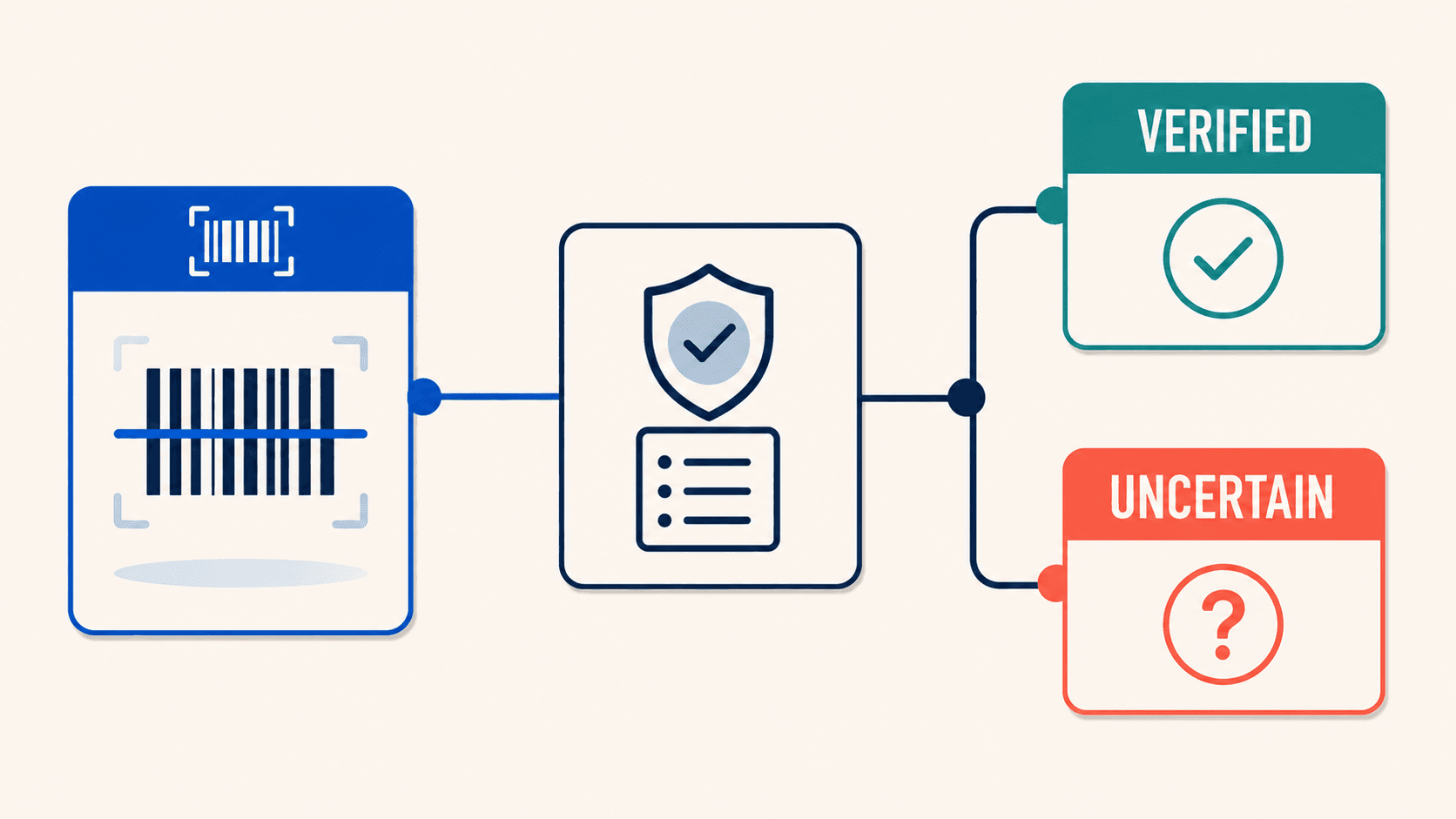
Food database accuracy is the second filter. If the database returns wrong numbers, your macro programming is based on fiction. A client who logs 150g protein might actually be eating 110g. Verified entries, branded food coverage, and restaurant data matter. See our food database accuracy audit for what to watch for.
You need to set specific protein, carb, and fat targets per client, in grams. Some clients need different targets for training and rest days. The app should let you adjust targets over time as the client progresses.
You also need to see whether the client is actually hitting targets, not just whether they logged. Weekly adherence summaries, macro averages over time, and weight trend data are the signals that matter.
The app has to feel good to use. An app that feels like homework will kill compliance faster than any other factor. Clean interface, fast performance, helpful feedback, low cognitive load.
Finally, consider how easily you can review client data and provide feedback without building a separate spreadsheet workflow. Dashboard views, export options, and the ability to see trends at a glance make the difference.
The tools worth evaluating
Fuel
Fuel is the strongest option for coaches whose clients wear an Apple Watch and want their activity data feeding directly into their nutrition targets.
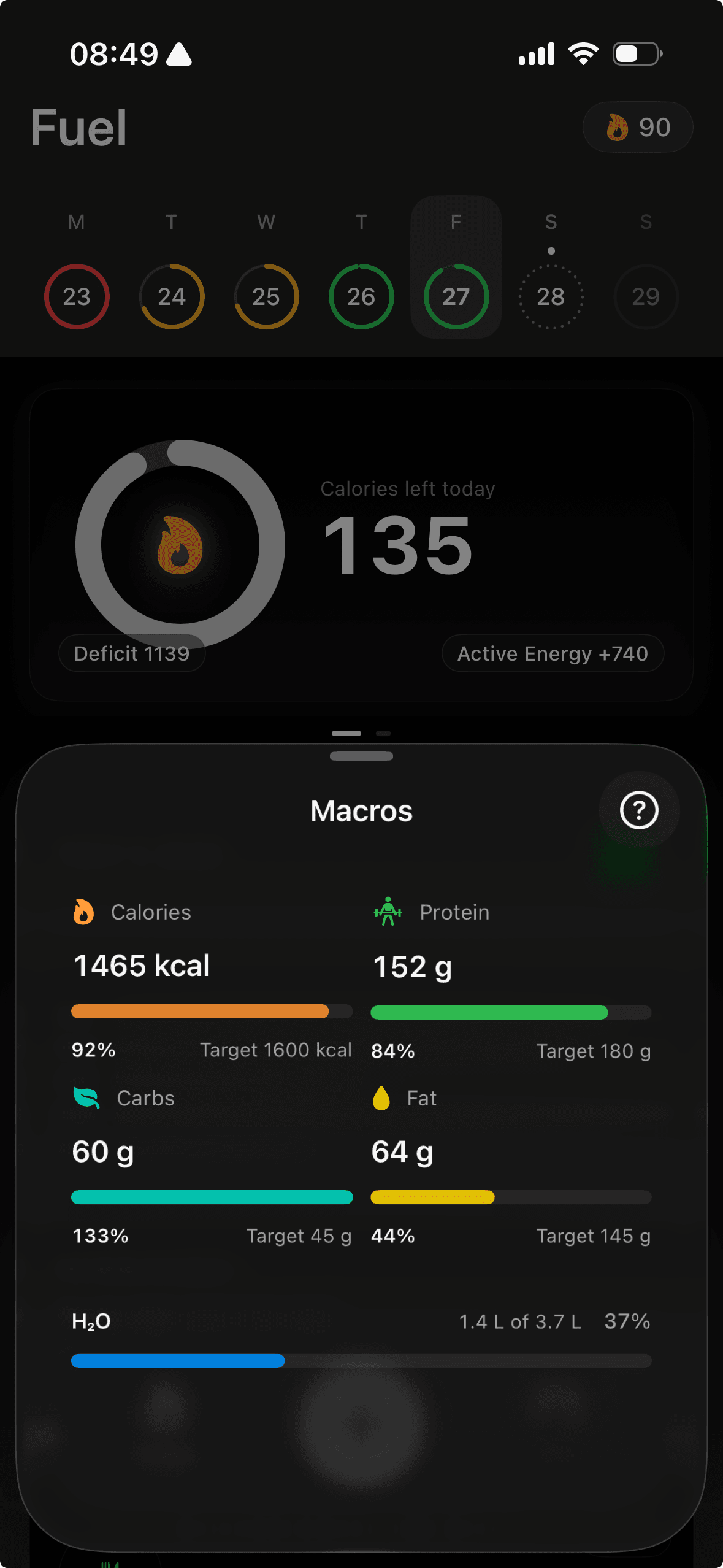
The app pulls movement, training, and recovery data from Apple Health and uses it to adjust calorie and macro targets daily, which means your client's plan responds to a heavy training week or a rest day without you having to manually recalculate.
The daily health grade gives clients a real-time signal on where they stand, and the weekly coaching review synthesizes the full picture (adherence, trends, what to focus on next) automatically. That weekly review is the feature that saves coaches the most time.
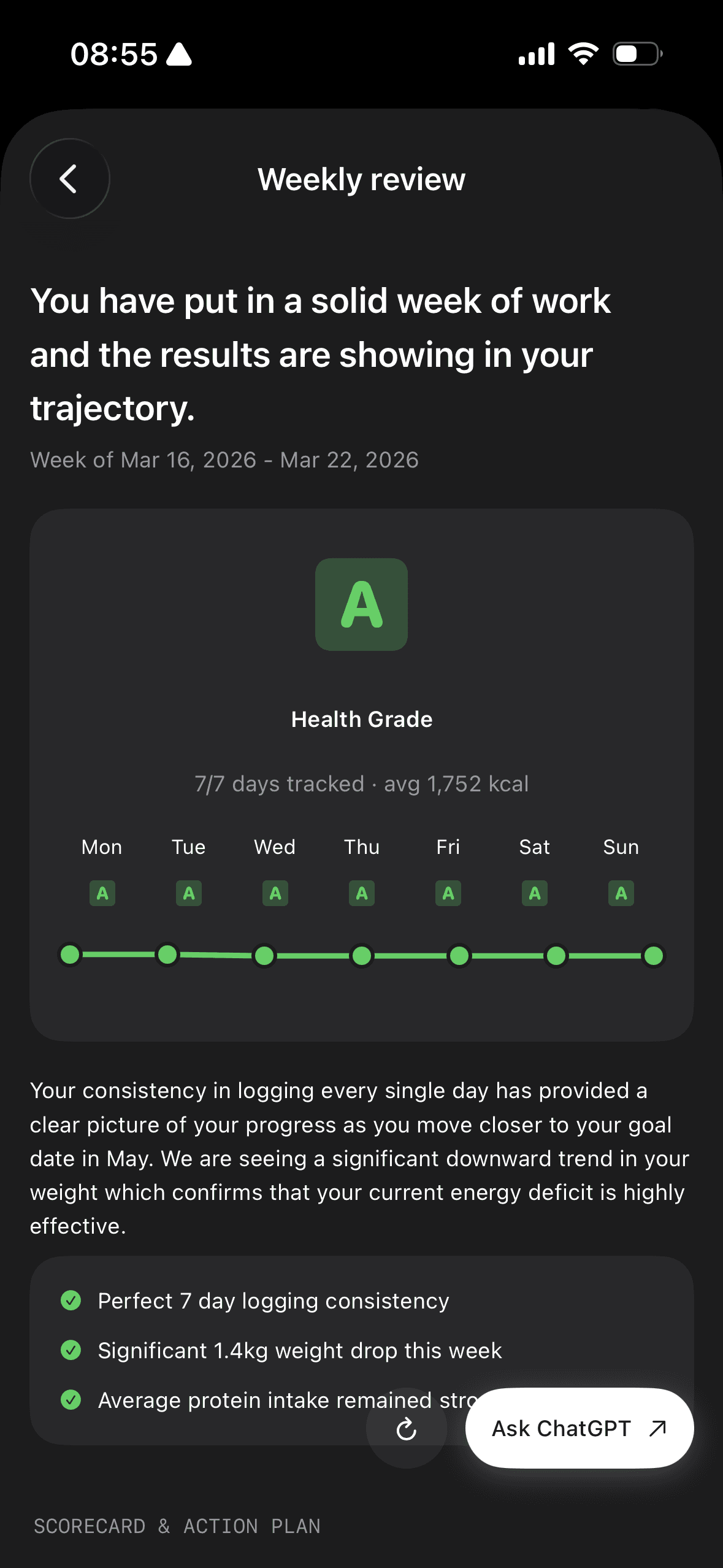
Instead of writing individual check-in summaries for every client, the app generates a structured review from their actual data. You can focus your coaching hours on the clients and conversations where your judgment matters most. Fuel is also HIPAA compliant, which matters for RDs and coaches working within clinical or healthcare-adjacent settings. For a full breakdown of how Fuel's coaching loop works, see The Best Nutrition Coaching Apps.
MyFitnessPal
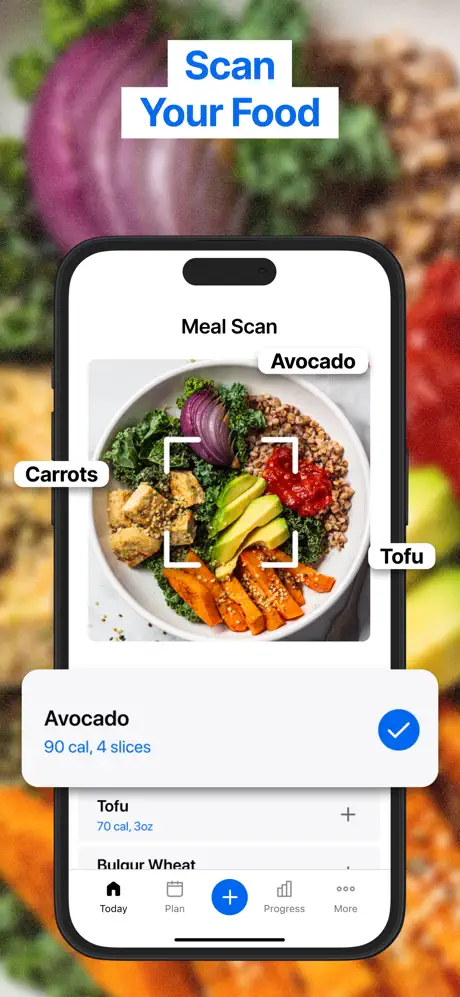
MyFitnessPal still has the largest food database, which makes it the path of least resistance when clients already use it. The practical problem for coaches is that barcode scanning is locked behind Premium, user-submitted entries vary in quality, and mid-log ads disrupt the workflow. Wearable sync also has a documented double-counting issue where workout calories and step-based adjustments overlap. If your clients are already logging in MFP and resistant to switching, you can make it work. If you are starting fresh, the database quality and ad issues create coaching overhead that other apps avoid. See our MyFitnessPal review for the full breakdown.
Cronometer
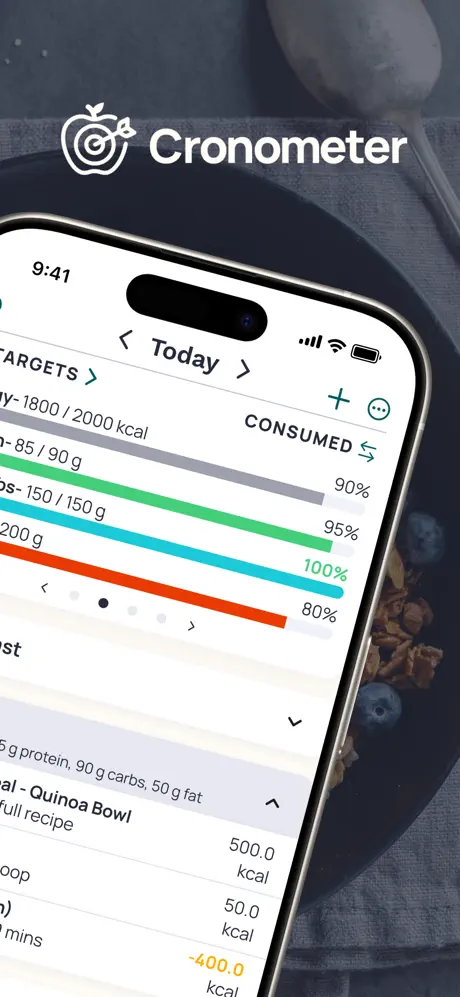
Cronometer has the strongest verified food database of any consumer app. Lab-analyzed entries are prioritized over user submissions, which means the numbers your client logs are more likely to be accurate out of the box. That matters most for coaches working with health-focused clients who need micronutrient visibility alongside macros. Cronometer Pro adds a multi-client dashboard and a professional directory where clients can discover your practice. The tradeoff is a smaller mainstream database (branded and restaurant foods are thinner than MFP) and an interface that is more analytical than approachable for beginners. See our Cronometer review.
MacroFactor
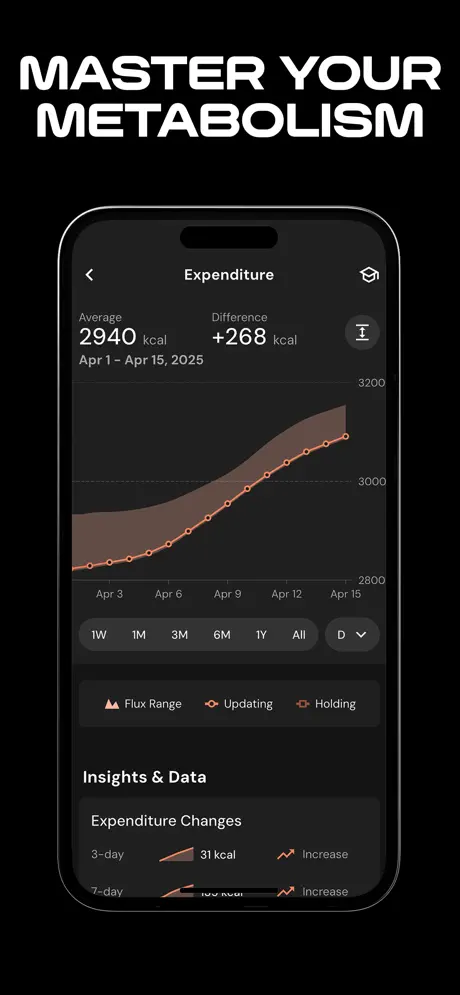
MacroFactor's defining feature is adaptive expenditure modeling. The app estimates your client's actual energy expenditure from logged intake and body weight trends, then recalibrates continuously. That is genuinely useful for setting accurate calorie targets, especially for body composition clients. The limitation for coaches is that there is no coach portal or client management layer. Your clients track in the app and you review by having them export data or share screenshots. Database coverage is strong for North American branded products but has significant gaps outside that market. See our MacroFactor review.
Carbon Diet Coach
Carbon is built around an algorithm that adjusts macros based on client progress, backed by Layne Norton's methodology. For coaches running straightforward fat-loss programs, the algorithm can reduce the overhead of manual macro adjustments. The tension is that the algorithm makes the programming decisions, which can conflict with your coaching judgment when the client's situation is more nuanced than the model accounts for. Coach-specific tools are limited.
Practice Better and Cronometer Pro
For RDs and health coaches who need HIPAA-aware workflows, appointment scheduling, clinical documentation, and insurance billing, Practice Better and Cronometer Pro are the standard platforms. They are designed for running a clinical nutrition practice. The setup is more complex and the price point is higher, but the compliance and practice management features justify it when clinical requirements are real.
At a glance
| App | Best for coaches who... | Pricing |
|---|---|---|
| Fuel | Have Apple Watch clients and want activity-aware targets, daily grades, and automated weekly coaching reviews that reduce check-in overhead | Free + Pro |
| MyFitnessPal | Have clients already using it and need the largest food database | Free + Premium |
| Cronometer | Need micronutrient precision, verified data, or a Pro coach dashboard | Free + Gold / Pro |
| MacroFactor | Want adaptive expenditure modeling for body composition clients | Subscription only |
| Carbon Diet Coach | Want algorithm-driven macro adjustments for fat-loss clients | Subscription only |
| Practice Better | Run a clinical practice and need HIPAA-aware workflows | Professional tier |
Which tool fits your coaching context
Personal trainers adding nutrition for the first time
Logging compliance is the constraint, not feature depth. Fuel works well here because the AI logging reduces friction and the automated daily and weekly reviews give clients coaching feedback without requiring you to write individual check-ins for every client. MyFitnessPal works if clients already use it, but be prepared to deal with database quality issues and the barcode paywall.
Dedicated nutrition coaches with 20 or more clients
You need visibility across your roster. Cronometer Pro gives you a multi-client dashboard. Practice Better and Healthie offer full practice management. The tradeoff is complexity and cost. If your clients are generally healthy and focused on body composition, a consumer app with strong self-coaching features (like Fuel) can reduce your check-in workload significantly.
RDs running a clinical practice
Cronometer Pro or Practice Better are the standard choices. HIPAA considerations, clinical documentation, and insurance billing integration matter more than logging speed.
Coaches working with athletes or physique competitors
Database accuracy and macro precision matter most. Cronometer's verified data is the strongest here. Fuel's adaptive plan and weekly coaching loop work well for athletes who need structure without daily hand-holding. MacroFactor's expenditure modeling is useful for setting accurate calorie targets.
04Client macro tracking setup playbook
Once you have chosen a tool, the setup process determines whether the client sticks with tracking or abandons it by day four.
Step 1: Set the targets before the client opens the app
Do not let clients set their own macro targets during app onboarding. Most onboarding questionnaires are generic and will set targets that conflict with your coaching plan. Calculate the targets yourself based on your assessment, then tell the client exactly what to enter.
| Client goal | Protein target rule of thumb | Fat target rule of thumb | Carb target | Calorie approach |
|---|---|---|---|---|
| Fat loss with muscle preservation | 1.6 to 2.2 g per kg bodyweight | 0.7 to 1.0 g per kg bodyweight | Fill remaining calories | Moderate deficit, 300 to 500 kcal below maintenance |
| Muscle gain (lean bulk) | 1.6 to 2.2 g per kg bodyweight | 0.8 to 1.2 g per kg bodyweight | Fill remaining calories | Small surplus, 200 to 300 kcal above maintenance |
| Body recomposition | 2.0 to 2.4 g per kg bodyweight | 0.8 to 1.0 g per kg bodyweight | Fill remaining calories | Near maintenance or slight deficit |
| General health and awareness | 1.2 to 1.6 g per kg bodyweight | 0.8 to 1.2 g per kg bodyweight | Flexible | Maintenance or intuitive |
| GLP-1 medication support | 2.0 to 2.4 g per kg bodyweight (protein floor is critical) | 0.7 to 1.0 g per kg bodyweight | Fill remaining calories | Often reduced appetite makes deficit natural. Focus on protein floor. |
For the science behind protein targets during GLP-1 use, see How to Preserve Muscle on GLP-1 Medications and Protein Targets and Training Strategy on Semaglutide and Retatrutide.
Step 2: Build the first week of meals together
The number one reason clients abandon tracking is that the first three days feel overwhelming. They open the app, search for "chicken breast," see 40 results, pick the wrong one, and feel like the whole system is unreliable.
Prevent this by building a starter meal library during your first coaching session.
- Ask the client to list 10 to 15 foods they eat most often.
- Search for each food together in the app and select the correct entry.
- Save each entry as a favorite or frequent food.
- Build two or three full-day meal templates from these foods that hit the macro targets.
This takes 15 to 20 minutes. It saves the client hours of frustration over the following weeks. The goal is that by day two, the client can log most meals by tapping saved foods rather than searching the database from scratch.
Step 3: Set the check-in cadence
| Check-in type | Frequency | What you review | What the client does |
|---|---|---|---|
| Quick compliance check | Daily (automated or self-serve) | Did the client log? Are they in the ballpark on protein? | Log meals. Review their daily summary or grade. |
| Detailed review | Weekly | Macro averages versus targets. Weight trend. Adherence percentage. Meal timing patterns. Problem spots. | Complete a brief check-in form or review their weekly summary. |
| Target adjustment | Biweekly or monthly | Progress toward goal. Whether targets need to move based on real data. Lifestyle changes. | Report how the targets feel. Flag any issues with hunger, energy, or compliance. |
| Full reassessment | Quarterly | Goal review. New body composition data if available. Program redesign. | Come prepared to discuss what is working and what needs to change. |
The key insight is that weekly check-ins are where coaching actually happens. Daily check-ins should be automated or self-serve. If you are writing individual daily messages to every client, you will burn out before you reach 20 clients.
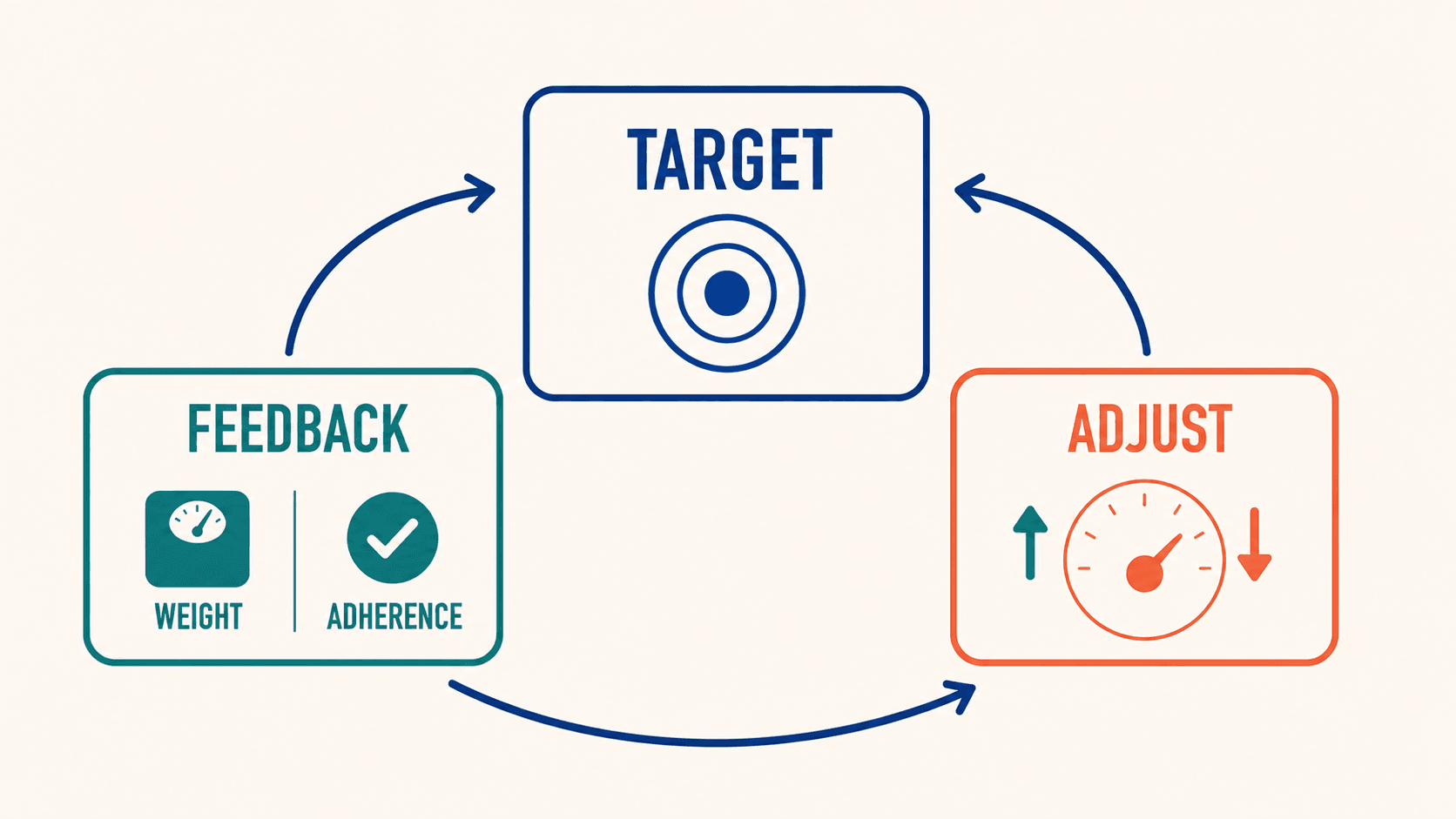
Apps with built-in daily feedback and weekly reviews (like Fuel's daily health grade and weekly coaching synthesis) can handle the daily and weekly touchpoints automatically. That frees your time for the biweekly and quarterly conversations where your expertise matters most.
Step 4: Teach the "good enough" standard
New trackers fall into one of two traps. They either obsess over precision and burn out, or they estimate everything loosely and the data becomes useless.
Set the standard explicitly: weigh or measure the five to eight foods that appear most often and that have the highest calorie density (oils, nut butters, rice, pasta, cheese, ground meat). Estimate everything else. Log every meal, even if the estimate is rough. A rough log is infinitely more useful than a missing day.
For a deeper framework on which foods to measure and which to estimate, see Food Database Accuracy: Why Your Macro Numbers Drift and How to Audit Them.
05The client onboarding workflow that keeps compliance above 80%
Bad onboarding is the number one reason clients quit tracking. Here is a workflow that front-loads the friction so the daily experience feels easy.
Before the first session
Send the client a brief intake form that covers:
- Current eating habits (number of meals, typical foods, eating out frequency)
- Previous tracking experience (have they used an app before, and if so, what went wrong)
- Dietary preferences and restrictions
- Supplements and medications (especially GLP-1 medications, which change appetite patterns significantly)
- Goal in their own words
During the first session (15 to 20 minutes on nutrition setup)
- Walk through the app installation and account setup together.
- Enter the macro targets you calculated. Do not let the app's default questionnaire set these.
- Build the starter meal library (the 10 to 15 frequent foods exercise from above).
- Log one meal together in real time so the client sees the full workflow.
- Set expectations: "Log every meal for the first two weeks. Accuracy improves over time. The goal right now is consistency, not perfection."
Week one follow-up
Check in after day two and day five. The day-two check catches clients who got stuck during their first solo logging session. The day-five check catches clients who logged for three days and then quietly stopped.
If a client has not logged for two consecutive days in week one, that is your intervention signal. Call or message them directly. The fix is almost always a workflow problem (the app is confusing, they cannot find their foods, they do not know how to log a restaurant meal) rather than a motivation problem.
Week two to four
Shift from daily check-ins to weekly reviews. Review their macro averages against targets. Identify the one or two adjustments that will have the biggest impact. Keep the feedback specific and actionable.
"Your protein averaged 98g this week against a 140g target. The gap is mostly at lunch and snacks. Try adding a protein shake after your workout and switching your afternoon snack from fruit to Greek yogurt. That should close most of the gap without changing your dinner."
That kind of feedback is specific, uses their data, and gives them exactly two things to change. Avoid the temptation to fix everything at once.
06Food database accuracy checks for coaches
If the data your client logs is off by 20 to 30%, your programming decisions are based on fiction. For the underlying research on why database entries drift, see our food database accuracy audit.
The accuracy problem is systematic
Research shows that nutrition apps can overestimate energy intake by roughly 250 kcal for Western diets and underestimate by roughly 360 kcal for Asian diets. User-contributed database entries have wrong serving sizes, typos, and mismatched preparation states (raw logged as cooked). These are not random errors. They are systematic biases that compound over weeks and months.
For coaches, this means two things.
First, a client who says "I am eating 1,800 calories and not losing weight" might actually be eating 2,200 calories. The tracking app told them 1,800, but the database entries were wrong. Before you cut their calories further, audit the database entries for their most frequent foods.
Second, protein targets are especially vulnerable. A wrong chicken breast entry (raw versus cooked, bone-in versus boneless, different brands of pre-cooked products) can swing protein by 20 to 30 grams per day. That is the difference between a protein target that supports muscle preservation and one that does not.
The coach's audit checklist
Run this review once a month with each client, or anytime progress stalls unexpectedly.
| Audit step | What to check | Common findings |
|---|---|---|
| Pull up their 10 most-logged foods | Are the entries correct? Match the right preparation state, brand, and serving size? | Ground meat logged at wrong fat percentage. Rice logged as dry when eaten cooked. Generic "chicken" instead of the specific cut. |
| Check protein entries specifically | Is the protein source verified? Is the serving size realistic? | Protein bars logged as a different brand with 10g more protein. Chicken thigh logged as chicken breast. |
| Review restaurant and takeout meals | Are they using chain nutrition data or guessing with generic entries? | Generic "burrito bowl" at 450 kcal when the actual meal is closer to 800 kcal. |
| Compare logged intake to weight trend | Does the math add up? If the log says 500 kcal deficit but weight is flat for two weeks, something is off. | The log is missing 300 to 500 kcal per day from cooking oils, sauces, and snacks that never get entered. |
| Check AI-logged meals | Did the client accept AI estimates without editing? | Photo logging caught the food but missed the cooking oil, dressing, or portion size. The client accepted the first estimate. |
What to do when you find errors
Do not make it a guilt conversation. Frame it as calibration. "We found a few entries that were off. Once we fix these, your data will be more accurate and the plan will work better. This is normal. Everyone's database needs cleanup."
Fix the most-frequent entries first. If a client eats chicken breast five times a week and the entry is off by 50 kcal each time, that is 250 kcal per week of drift from one food. Fix five foods like that and the whole log shifts.
07Scaling from 10 to 100 clients without burning out
The practices that work with five clients break at twenty. The practices that work at twenty break at fifty. Scaling a nutrition coaching practice requires changing your workflows at each stage, not just working harder.
The scaling framework
| Client count | Primary bottleneck | Solution | Tool requirement |
|---|---|---|---|
| 1 to 10 | Building the service. Learning the workflow. Getting initial results. | Manual, high-touch coaching is fine. Write individual check-ins. Review every log personally. | Any tracking app works. You have time to review everything. |
| 10 to 25 | Time per client. You cannot write detailed weekly reviews for 25 people. | Standardize your check-in templates. Batch your reviews into two sessions per week. Use apps with built-in coaching feedback to offload daily touchpoints. | Apps with automated feedback (daily grades, weekly summaries) save hours. Fuel's coaching loop handles daily and weekly feedback automatically. |
| 25 to 50 | Review overhead and response time. Clients start waiting longer for feedback. | Tier your service levels. Premium clients get detailed reviews. Standard clients get template-based feedback with data highlights. Use group check-ins for common issues. | Coach dashboard tools (Cronometer Pro, Practice Better) or consumer apps with strong self-coaching that reduce the need for manual review. |
| 50 to 100 | Operations. Scheduling, billing, onboarding, and content creation compete for your coaching hours. | Systematize onboarding with recorded walkthroughs and templated meal libraries. Build a content library for common questions. Consider hiring a part-time assistant for admin tasks. | Full practice management platform or a well-integrated stack. Automate everything that does not require your judgment. |
The tiered service model
Most coaches resist tiering because it feels like giving some clients less attention. In practice, tiering lets you give every client the right level of attention for their stage.
| Tier | What the client gets | What it costs them | Your time per client per week |
|---|---|---|---|
| Self-guided tracking | App access with your recommended settings and starter meal library. Monthly group Q and A. | Lowest price point. | 5 to 10 minutes (review flagged data only) |
| Standard coaching | Weekly macro review with written feedback. Biweekly target adjustments. Access to your template library. | Mid price point. | 15 to 20 minutes |
| Premium coaching | Everything in standard, plus biweekly video check-ins, custom meal planning, and priority messaging. | Highest price point. | 30 to 45 minutes |
The self-guided tier only works if the tracking app provides meaningful feedback on its own. An app that gives the client a daily grade, weekly review, and adaptive targets (like Fuel) turns the self-guided tier into a real service rather than just app access with your name on it.
When to raise prices
Raise prices when your roster is full and you have a waitlist. That tells you the market values your service at more than you are charging. Raise prices for new clients first. Grandfather existing clients at their current rate for 60 to 90 days, then transition them to the new pricing with advance notice.
The alternative to raising prices is moving clients down tiers. If you have 50 premium clients and no bandwidth, move the most self-sufficient clients to the standard tier and open premium slots at a higher price. This is better than capping your practice size.
08Coach weekly workflow for macro tracking
Here is what a well-run coaching practice looks like on a weekly basis once the systems are in place.
| Day | Task | Time |
|---|---|---|
| Monday | Batch review weekend check-ins and compliance data. Flag clients who missed multiple days. Send brief "welcome back to the week" messages to struggling clients. | 60 to 90 minutes |
| Tuesday and Wednesday | Individual client reviews. Write weekly feedback for standard and premium tier clients. Adjust targets for clients who need changes. | 30 to 60 minutes per session (batch 2 sessions per week) |
| Thursday | Group content. Record a short video or write a message for your client community addressing the most common question or pattern from the week. | 30 minutes |
| Friday | Admin. Onboard new clients. Update meal template library. Handle billing and scheduling. Review your own practice metrics (retention, compliance rates, revenue per client). | 60 minutes |
Total coaching and admin time: 6 to 10 hours per week, depending on roster size and tier mix. That leaves the rest of your working hours for training sessions, content creation, business development, or your own training.
09First week checklist for coach tracking
If you are a coach who has been thinking about adding nutrition tracking to your practice, the path forward is clear.
Start with one or two clients. Use them as your test cases for the onboarding workflow. Find the friction points before you scale.
Choose a tracking app that your clients will actually use daily. Logging compliance is the foundation. Everything else depends on it. If you want a tool that handles the daily coaching loop automatically so you can focus on the higher-level programming and client relationship, try Fuel.
Build your meal template library as you go. Every food you look up and verify once saves you time across every future client.
Set your scope of practice boundaries clearly from day one. Know what you can advise on, know when to refer out, and build relationships with RDs who can handle the clinical edge cases.
Then grow. The coaches who build a real nutrition service alongside their training practice end up with clients who stay longer, results that speak for themselves, and a business that compounds instead of plateauing.
For the consumer-facing comparison of coaching apps, see The Best Nutrition Coaching Apps (2026 Edition). For the macro tracking tool comparison, see The Best Macro Tracking Apps (2026 Edition). For the science behind tracking accuracy, see Food Database Accuracy: Why Your Macro Numbers Drift.
