Most tracking failures do not start with low discipline. They start with bad entries that look close enough to trust. A chicken thigh logged as raw when you ate it cooked, a restaurant bowl matched to the leanest generic entry in the search results, or a user-submitted barcode entry with the wrong serving size can move your daily totals enough to flatten progress without ever looking dramatic.
That is why food database accuracy deserves its own system. If your app returns the wrong numbers faster, you still get the wrong answer. The fix is not obsessive logging. The fix is learning which entries deserve scrutiny, which ones are fine to leave alone, and how to run a short weekly audit that keeps your calorie and macro totals inside a useful error band.
If you need the broader case for tracking despite imperfect data, start with Calorie Counting Accuracy. If you want a faster day-to-day workflow, pair this guide with Easy Ways to Log Food and Track Macros with AI. AI-first logging creates its own drift pattern because image recognition can identify the meal while still missing the calorie-dense details that decide the total.
01Macro errors hide in food databases
Self-reported intake has always been noisy. Lichtman and colleagues showed in 1992 that subjects with obesity underreported intake by about 47% when their logs were compared with energy expenditure measured by doubly labeled water.1 That finding matters here for one reason. Human recall is weak even before database quality enters the picture.
Database error is a separate layer. The modern version of that problem showed up in a 2024 Nutrients comparison of manual logging and AI-enabled image-recognition apps. Food recognition sometimes looked strong. Energy estimation did not. In that evaluation, manual food-logging apps overestimated energy intake for a Western diet by a mean of 1040 kJ, about 249 kcal, and underestimated it for an Asian diet by 1520 kJ, about 363 kcal.2 The interface is not the database. A fast search bar can still sit on top of bad nutrition data.
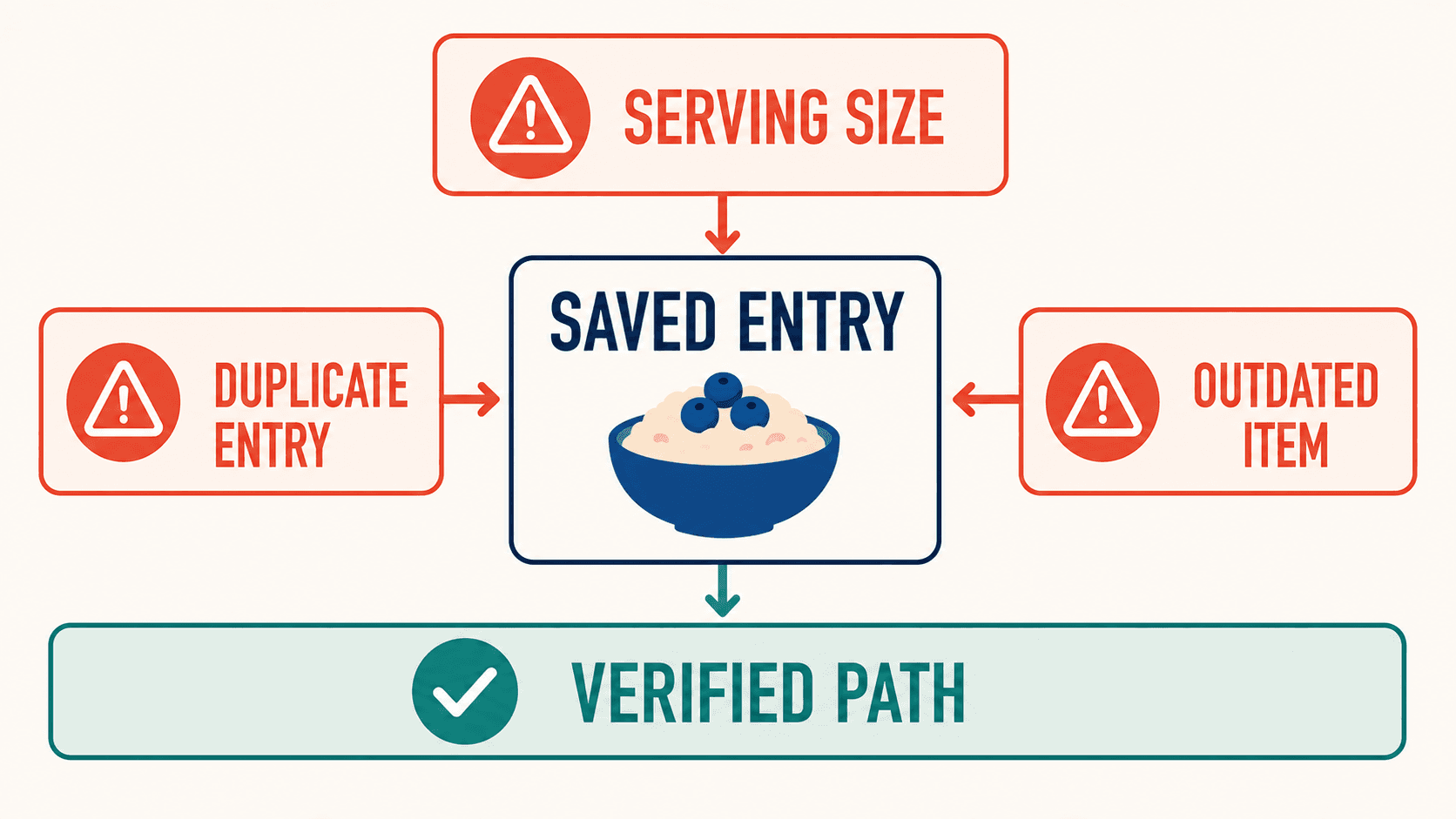
That is the practical reason people stall on an apparently clean log. The issue is often not one giant mistake. It is recurring low-grade drift in the foods they eat all the time.
02Sources of macro drift in logs
| Failure point | What usually goes wrong | Typical effect on your log | Best correction |
|---|---|---|---|
| User-generated entries | Wrong serving size, typo, or copied label | Calories and macros are structurally wrong every time | Prefer verified or brand-matched entries and save a corrected custom version |
| Raw versus cooked confusion | Chicken, rice, pasta, and oats entered in the wrong state | Protein and carbs can shift hard per serving | Match the state you weighed and keep it consistent |
| Restaurant matching | Generic search result used for a dish with more oil, sauce, or larger portions | Hidden calorie surplus and undercounted fat | Use published restaurant data or choose a conservative generic proxy |
| Recipe decomposition | Oils, dressings, and finishing sauces never get entered | Daily calories drift up without obvious volume change | Build the recipe from ingredients once and reuse it |
| Brand substitution | Similar product chosen instead of the exact one | Protein and fiber often look higher than reality | Scan the barcode or compare label macros before accepting the entry |
| Portion language | Cup, bowl, scoop, and piece mean different things across foods | Repeated estimation error | Use grams for staples and explicit household measures for the rest |
| AI photo logging | The image catches the food, not the hidden fat or edible portion | Mixed dishes look cleaner than they are | Treat AI results as drafts and edit oil, sauces, toppings, and portion size |
This is why a food database is not just a convenience feature. It decides whether your adherence data is worth interpreting.
03The five-minute weekly audit
Most people never audit their database. They just keep searching and hoping the top result is clean. A short weekly process fixes most of the damage.
| Step | What to do | Why it matters | What to do next |
|---|---|---|---|
| 1 | Pull up the 10 to 15 foods you logged most often this week | Recurring entries drive most of your totals | Mark anything with vague servings, duplicate entries, or odd math |
| 2 | Check packaged foods against the label or barcode | A wrong branded entry can distort protein, fiber, and calories fast | Replace with the exact branded entry and save it |
| 3 | Check staples against a trusted reference or your own usual weigh-in state | Raw versus cooked confusion compounds quietly | Rename or favorite the correct version |
| 4 | Review every restaurant or takeout entry | Restaurant meals are where hidden fats and size drift usually land | Swap in a more conservative match or create a custom proxy |
| 5 | Review body-weight trend against logged intake | This is the real quality check on whether the log is interpretable | Tighten the foods that most likely explain the gap |
The review matters most because it tells you whether the log is actually trustworthy. If the numbers say you are in a 500 kcal deficit and your two-week scale trend is flat, the log is probably missing intake, the expenditure estimate is wrong, or both. Trend analysis exists to catch that mismatch before frustration turns into random calorie cuts. If the cleaned-up log still shows a stalled trend, work through the Weight-Loss Plateau Decision Tree for Active Macro Trackers before changing the calorie target.
04Run the food audit in Fuel
Fuel is useful here because the audit can happen inside the same workflow you already use to log. You do not need one app for capture, a second app for restaurant estimates, and a spreadsheet for trend review. The point is still the same. Clean the recurring entries until the log matches reality. Fuel just gives you a tighter loop for doing it.
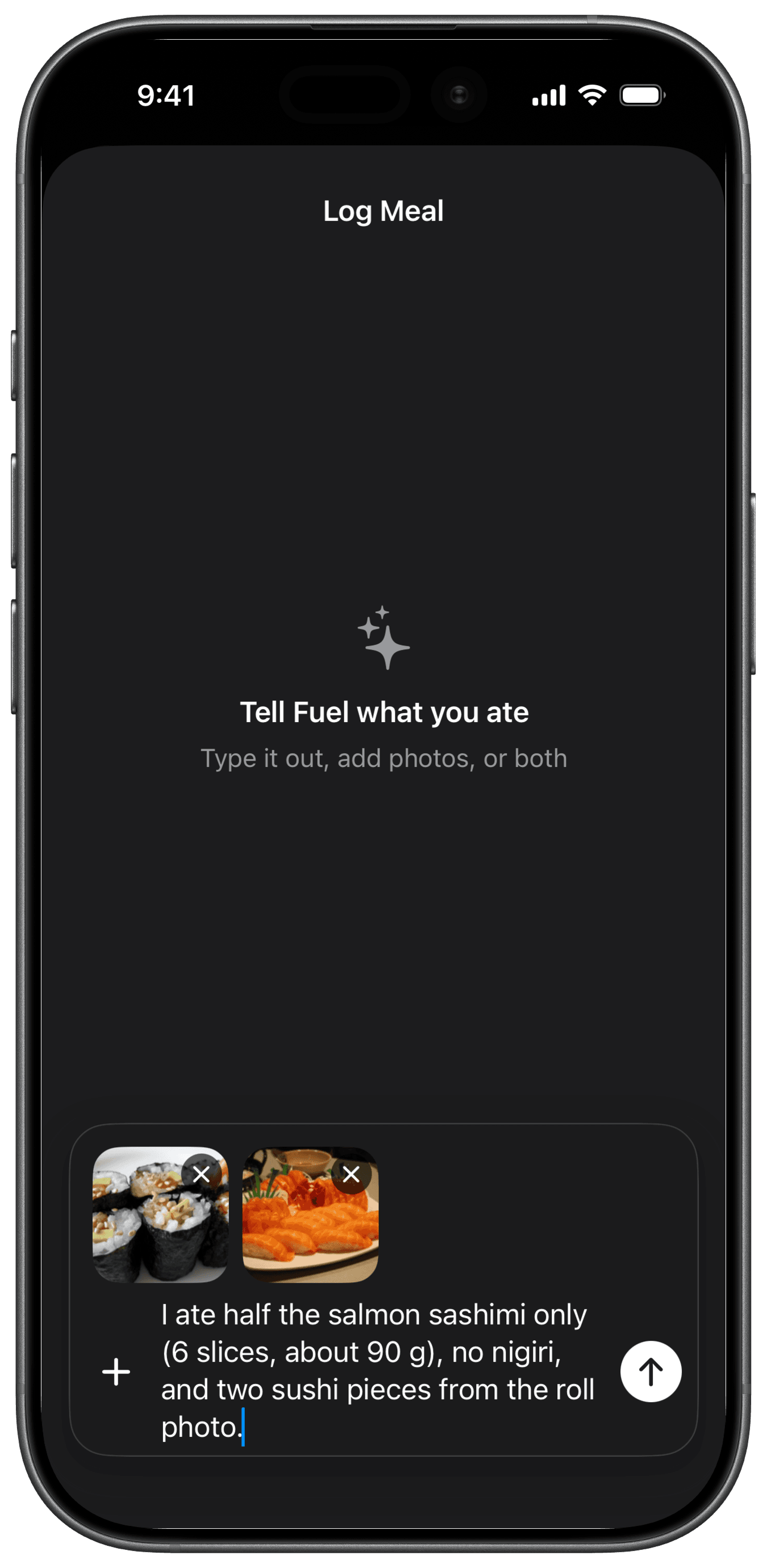
Start with quick log. If a meal is uncertain, log it from a photo, a text description, or the nutrition label, then correct the result before it becomes a repeat entry. Use Food Library when you want a manual serving-size check, need an offline fallback, or want to verify the exact entry you are about to reuse. The best reusable path is to save the corrected AI-logged food to favorites once it is right. Favorite foods stay editable later, so you can adjust macros or serving size without rebuilding the entry from scratch. Use recents when you need the fast repeat and favorites when you want the durable version. When the problem is restaurant drift, use Eat Out to scan the menu and choose the closest fit for your remaining budget instead of pretending a glossy bowl matches the leanest database result. Then close the loop with review. Daily review, weekly review, weight trend, and plan progress tell you whether the cleaned-up log now matches what your body weight and adherence data are actually showing.
05The highest-risk foods are boring, not exotic
People expect the hardest foods to be unusual meals. The biggest problems are often ordinary foods with multiple plausible entries.
| Food or meal type | Why the entry is risky | Better logging rule |
|---|---|---|
| Chicken breast or thigh | Raw and cooked entries can differ sharply by water loss | Weigh once in the state you eat it and save that default |
| Rice, pasta, oats, potatoes | Volume changes a lot with cooking method | Use grams when possible and avoid switching between dry and cooked entries |
| Ground meat | Fat percentage changes calories fast | Match the actual lean percentage on the pack |
| Protein bars and yogurts | Brand swaps change protein, fiber, and sugar alcohol totals | Scan the barcode instead of choosing the first search result |
| Salad bowls and stir-fries | Oils, dressings, nuts, cheese, and sauces disappear in generic logs | Build a saved meal or add the extras separately |
| Restaurant burritos and bowls | Portion size and hidden fats vary by worker and location | Use the chain nutrition data if it exists, then add a buffer for obvious extras |
| Smoothies and coffee drinks | Liquid calories and syrups hide in large servings | Log the exact size and add modifiers like syrup, whole milk, or nut butter explicitly |
| Family-style meals and takeout | Shared portions make recall messy | Estimate the plate share immediately and use the same proxy each time |
The common thread is density plus ambiguity. High-water foods with clear labels rarely break a cut. Dense foods with fuzzy portions do.
06Precision should match the goal
A person trying to preserve muscle on a hard cut needs a tighter error band than someone who just wants to build awareness around eating habits. Database work should follow that reality.
| Goal state | Good-enough standard | Where to spend effort |
|---|---|---|
| General awareness and habit building | Daily consistency matters more than exact totals | Log everything with the same method and review only obviously bad hits |
| Fat loss with moderate pace | Keep recurring staples accurate and tighten restaurant estimates | Audit breakfast, lunch, snacks, and high-fat add-ons |
| Aggressive cut or physique phase | Small recurring errors matter | Weigh staples, build custom recipes, and keep a short list of trusted entries |
| Muscle gain with appetite or time limits | Protein totals need to be credible, calorie excess does not need lab precision | Verify protein foods, shakes, and dense add-ons |
| Endurance fueling blocks | Carb totals around key sessions matter most | Lock down pre, intra, and post-training entries |
If you are still deciding whether to track calories or macros, Macros vs. Calories covers that decision. If you already track and the data still feels noisy, database quality is often the next constraint.
07Three audit rules that catch most bad entries
Match the entry to the state you measured
If you weighed chicken cooked, log cooked chicken. If you weighed rice dry before the pot, log dry rice. Most raw-versus-cooked mistakes happen because the name looks familiar enough to click. The magnitude is large enough to matter. A 150 g raw chicken breast entry is often around 165 to 180 kcal, while 150 g cooked chicken breast can land closer to 240 to 250 kcal because water loss concentrates the calories into less weight. Once you build a custom default for your usual staples, this problem drops sharply. For the full conversion factors, the direction each error runs, and the batch-cooking yield method, see Raw or Cooked? How to Weigh and Log Food So Your Macros Are Right.
Trust exact brands over generic lookalikes for packaged foods
A close match is often not close enough when the food is engineered to hit a certain macro profile. High-protein yogurt, wraps, granola, frozen meals, sauces, and bars can vary a lot by brand. That is why a delivery order like an Amazon Fresh high-protein grocery cart, a Sprouts haul for busy lifters, or a Trader Joe's protein staple run still needs label checks before those foods become defaults. One wrong substitute repeated four times per week is enough to create a fake plateau. The label check itself has its own failure points, since serving size and rounding rules can make an accurately-read panel still understate real intake, covered in How to Read a Nutrition Label for Accurate Macro Tracking.
Use conservative proxies for restaurant meals
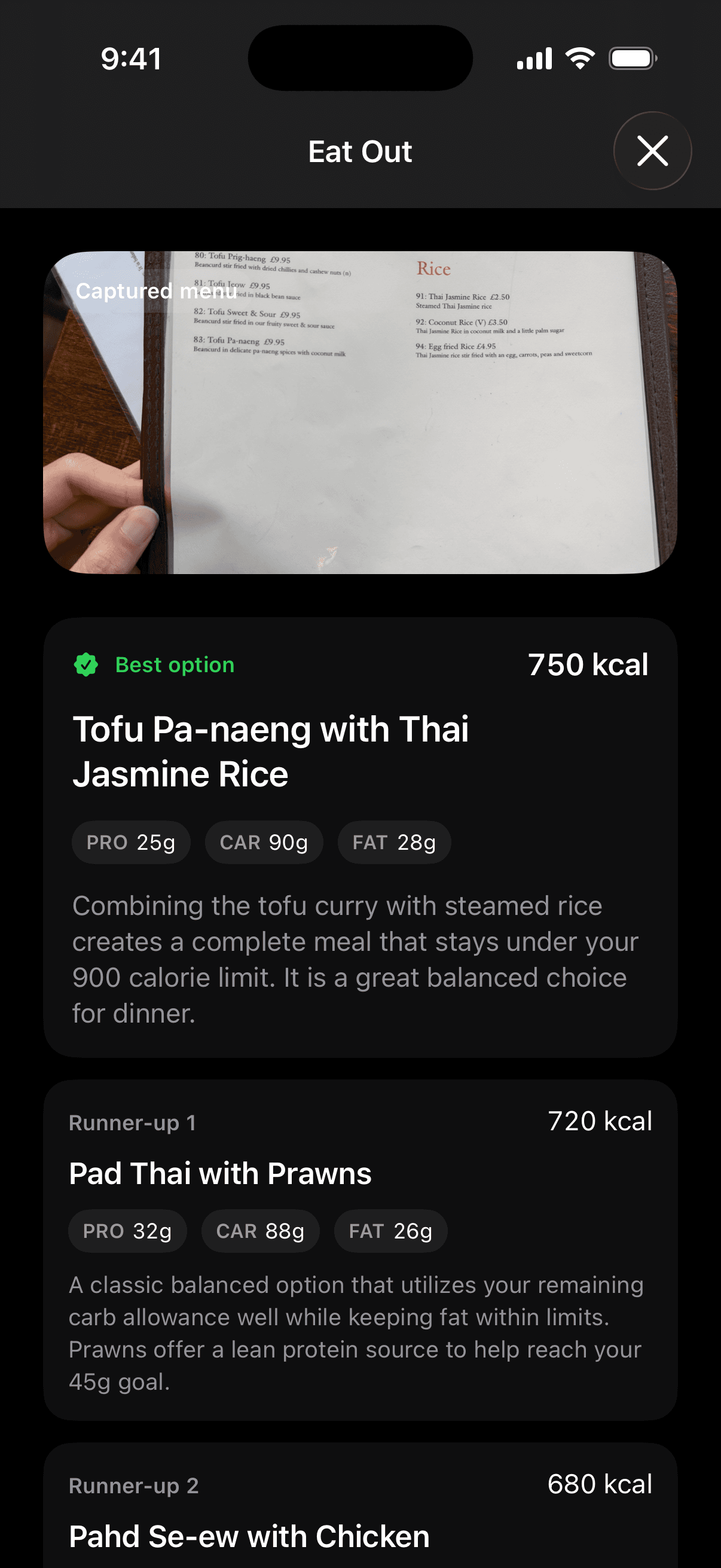
Restaurant logging should not chase imaginary precision. It should avoid systematic underestimation. If the meal looks glossy, oily, creamy, or oversized, the lean generic entry is rarely the right answer. That same rule applies to prepared foods without clean package labels, including a Whole Foods hot bar protein plate where oil, sauce, and by-weight portions decide the real total. Understanding Calories explains why visible food volume is a weak guide when fat density is high. In Fuel, this is the place to switch from generic search to Eat Out and let the menu scan narrow you to a best-fit option plus runner-ups before you log the meal.
08AI logging accuracy limits
AI logging is useful because it reduces friction. Friction is the main reason people stop tracking. It is still a draft system. The 2024 app evaluation found that food recognition could be strong while calorie estimation remained unreliable, especially for mixed dishes and culturally diverse foods.2 That fits real life. A photo can identify ramen, curry, burrito bowl, or acai bowl. It still cannot see how much oil stayed in the pan, how much dressing soaked into the greens, or whether the scoop of rice underneath the toppings was 140 grams or 260 grams.
Use AI to get to the right neighborhood fast. Then edit the parts the camera cannot know:
| If the meal has this feature | Assume the first pass is weak here | Edit this manually |
|---|---|---|
| Mixed dishes | Sauce and ingredient ratios | Add fats, toppings, and side portions |
| Fried foods | Oil absorption | Choose a more calorie-dense proxy |
| Bowls and salads | Dressing, nuts, seeds, cheese, avocado | Add dense extras separately |
| Coffee and smoothies | Liquid base, syrups, nut butters, full sugar | Match size and every add-in |
| Restaurant proteins | Cooking fat and final plated weight | Choose a higher-fat preparation if the dish looks rich |
That is why the best workflow is hybrid. Let the tool remove typing. Keep your judgment for the small number of decisions that actually move the totals.
Fuel is strongest here when you keep capture and correction in the same loop. Quick log gets the meal into the app quickly. Food Library gives you the cleaner serving-based fallback when the AI draft is too loose. Favorites and recents let you reuse the corrected version once the entry is right. That sequence is much more useful than re-searching the same uncertain food every week.
09The foods worth weighing
You do not need to turn your kitchen into a lab. You do need to know which foods are worth measuring because they create large errors fast.
| Always worth weighing during a cut | Often worth weighing | Usually fine to estimate once you know your portions |
|---|---|---|
| Oils and nut butters | Cooked grains and pasta | Non-starchy vegetables |
| Cereal and granola | Meat and fish portions | Fresh fruit with clear unit size |
| Cheese and trail mix | Greek yogurt and cottage cheese | Leafy greens |
| Ice cream and calorie-dense snacks | Potatoes and beans in repeat meals | Lean proteins in a saved meal you repeat often |
This is the same logic behind Food Scales. Measure the foods where a small visual miss creates a large calorie miss. Relax on foods where the error is smaller and the benefit of measurement is low.
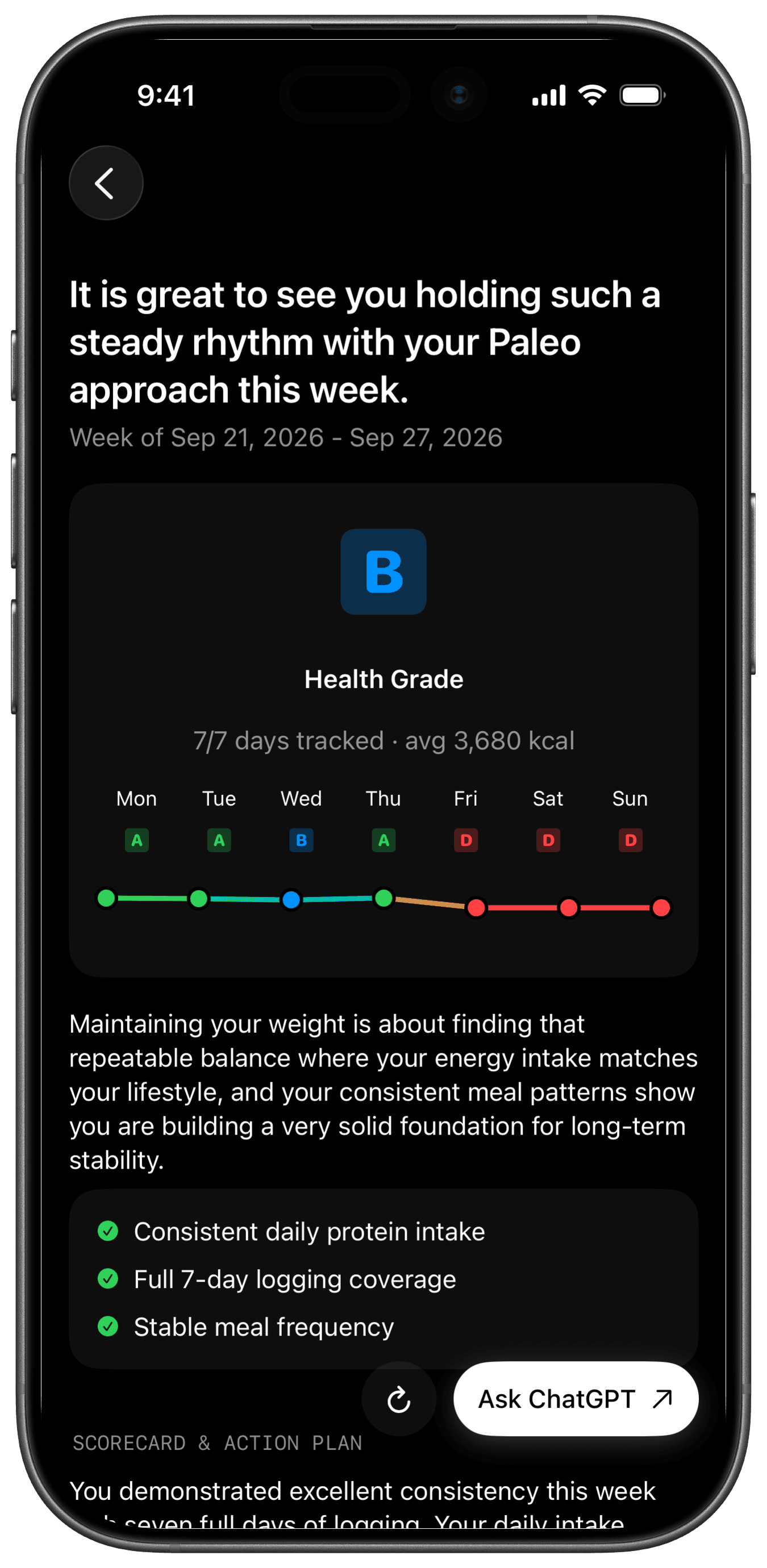
The last check still has to happen at the trend level. In Fuel, that means looking past the single meal and into the review surfaces that show whether the cleaned-up entries are producing believable outcomes. Daily review is useful for catching yesterday's obvious misses. Weekly review is where adherence patterns, action steps, and weight trajectory become easier to judge together. Plan progress gives you the longer arc so you can decide whether the issue is entry quality, calorie targets, or simple impatience.
10A clean database beats a perfect database
The goal is not to verify every strawberry. The goal is to remove repeatable errors from the foods that shape your weekly totals. Once your regular breakfast, lunch, protein snacks, restaurant defaults, bulk meal-prep defaults like Costco macro-tracking foods, and recurring recipe entries are clean, the whole log gets better without much extra work.
That is also why the best apps do more than search. The Best Macro Tracking Apps matters because database quality, barcode reliability, edit speed, and saved-meal workflows decide whether you can keep the system clean under real conditions. If the bigger question is whether the AI draft itself is trustworthy before the database cleanup even starts, How Accurate Is AI Food Logging? breaks down the benchmark ranges and the failure modes that matter most.
If your log is consistent and your weight trend still does not match the predicted result, audit the database, tighten the recurring entries, and look at the restaurant meals, oils, and brand substitutions that feel too small to matter. In Fuel, this is where plan progress and your weight-trend views become useful instead of decorative. Once the recurring entries are clean, the log becomes interpretable and the trend becomes trustworthy.
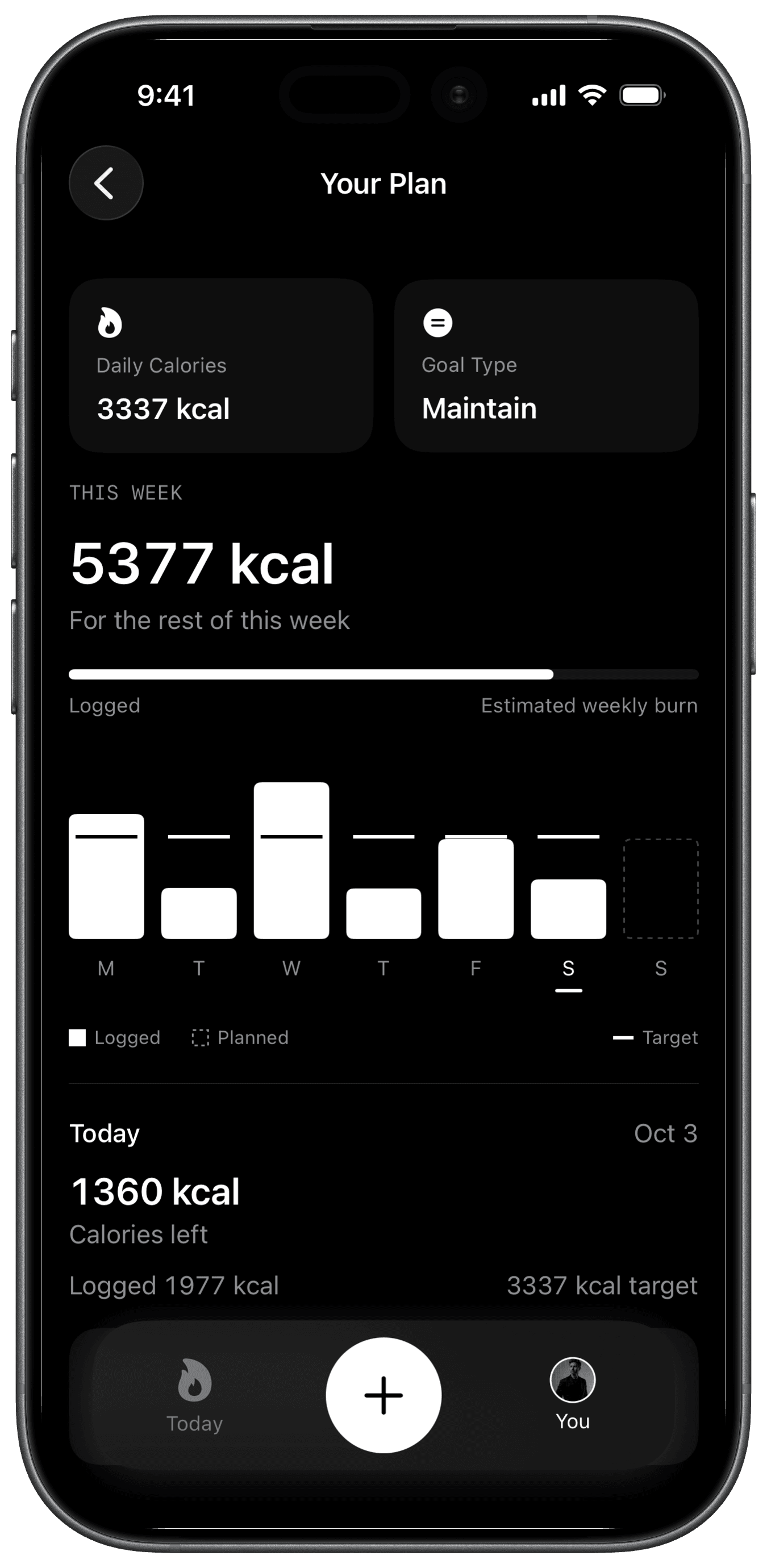
If you want the prevention layer after the audit, that is where Coach Day Plan and Next Meal Coach fit. They do not replace the cleanup work. They just make it easier to stop the same drift from rebuilding next week.
Footnotes
Lichtman SW, Pisarska K, Berman ER, et al. Discrepancy between self-reported and actual caloric intake and exercise in obese subjects. N Engl J Med. 1992;327(27):1893-1898.
Back to textLi X, Yin A, Choi HY, Chan V, Allman-Farinelli M, Chen J. Evaluating the quality and comparative validity of manual food logging and artificial intelligence-enabled food image recognition in apps for nutrition care. Nutrients. 2024;16(15):2573. DOI
Back to textBack to text 2