
App Comparison
Cal AI vs MacroFactor
Fuel Nutrition Team • March 22, 2026
Cal AI

MacroFactor

Core approach
Food logging
Coaching
Learning curve
Data accuracy
Free tier
Apple Watch
Target audience
Price
Cal AI and MacroFactor sit at opposite ends of the nutrition tracking spectrum. Cal AI optimizes for speed and accessibility — snap a photo, get calories, move on. MacroFactor optimizes for scientific rigor — log precisely, weigh yourself consistently, and receive adaptive coaching based on your body's real energy expenditure. They serve fundamentally different users with fundamentally different goals, and choosing between them is really a question of how seriously you approach nutrition tracking.
Key Takeaways
- Cal AI offers the fastest logging experience but produces unreliable AI estimates with no coaching layer and corrections that do not persist. - MacroFactor provides the most scientifically rigorous adaptive coaching in the category, recalibrating your targets from actual weight trends and intake data. - The trade-off is accessibility vs depth: Cal AI is easier to start; MacroFactor rewards committed trackers with genuinely intelligent goal adjustment.
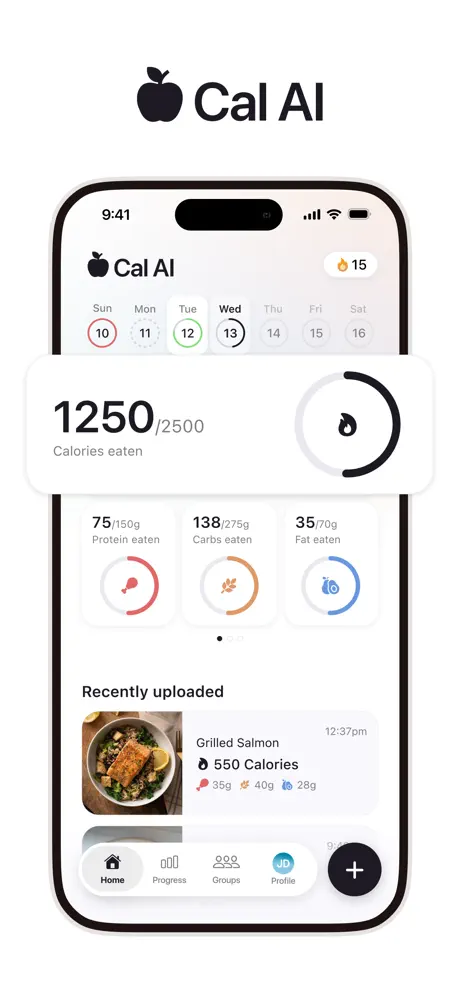
Cal AI is a photo-first calorie tracking app that uses artificial intelligence to estimate macronutrients from pictures of your food. The premise is maximum speed: no database searching, no barcode scanning, just point your camera and get numbers. Cal AI was acquired by MyFitnessPal in December 2025 and continues operating as a separate product. It targets casual users who would not track at all if it required traditional manual logging. The accuracy concerns are well-documented — frequent misidentifications, incorrect portion estimates, non-persistent corrections, and macro math errors — but the speed of input is unmatched in the category.
MacroFactor is a macro tracking app built around an adaptive expenditure model that recalibrates your calorie and macro targets based on your actual body weight trends and logged food intake. Rather than giving you a static calorie target from a formula, MacroFactor calculates your real energy expenditure over time and adjusts recommendations accordingly. The app uses database search and barcode scanning for food logging and acknowledges that its learning curve is steep — the onboarding even warns that the first week may feel "annoying." At $11.99/month with no free tier, MacroFactor targets serious trackers who are committed to consistent, precise logging.
Cal AI removes all friction from the logging step. Photograph your food, get estimates. The entire interaction takes under five seconds. No searching, no selecting, no portion adjustment. For users who eat out frequently, cook varied meals, or simply find manual logging tedious, the appeal is obvious. The AI does the work — poorly, often, but quickly.
MacroFactor requires traditional logging effort: type a food name, scroll through results, select an entry, adjust the serving size. Barcode scanning helps for packaged foods. The interface is functional but not designed for speed — it prioritizes data accuracy over input velocity. Logging a full day's meals in MacroFactor takes meaningfully more time and attention than in Cal AI. The app acknowledges this trade-off directly and bets that the payoff from its adaptive coaching justifies the extra effort.
Winner: Cal AI — for raw logging speed. MacroFactor requires substantially more effort per meal.
This is MacroFactor's defining category and the widest gap between these two apps. MacroFactor's adaptive expenditure model is unique in consumer nutrition tracking. The app collects your daily food intake and body weight over time, then calculates your actual total daily energy expenditure (TDEE) from this real-world data — not from a formula that estimates based on age, height, weight, and activity level. As it accumulates data, it continuously adjusts your calorie and macro targets to align with your stated goals (fat loss, maintenance, or muscle gain).
This means MacroFactor gets smarter the more you use it. If your weight loss stalls despite hitting your calorie target, MacroFactor recognizes that your actual expenditure is lower than initially estimated and adjusts downward. If you are losing weight faster than planned, it adjusts upward to prevent excessive restriction. No other mainstream tracker does this.
Cal AI provides a static calorie target set during onboarding. It does not adapt, does not learn from your progress, and does not adjust based on outcomes. There is no coaching layer whatsoever — just a number and a camera.
Winner: MacroFactor — by a categorical margin. Its adaptive coaching is the most scientifically rigorous in the consumer tracking space.
Cal AI's accuracy problems are well-documented: the AI misidentifies dishes, produces wrong macro splits, and makes basic arithmetic errors where macro grams do not sum to the stated calorie total. Corrections are available but do not persist between sessions, which means every meal is a fresh opportunity for error. There is no underlying food database — all data comes from AI interpretation of photographs. You cannot look up a food by name, cross-reference against known nutritional data, or fall back to manual search when the AI gets things wrong.
MacroFactor uses a crowd-sourced food database with barcode scanning. Within North America, coverage is adequate for most common foods, packaged products, and chain restaurant items. The data is not USDA-verified — Cronometer holds that distinction — but it is substantially more reliable than AI photo estimates, and you can inspect and verify entries before logging them. The significant limitation is geographic: MacroFactor's database has meaningful gaps outside North America. European and Asian users report extensive manual entry requirements, with some describing the app as "effectively unusable" without creating custom foods for the majority of their diet. This is a material limitation for international users, travelers, or anyone who regularly eats cuisine not well-represented in a North American database.
Winner: MacroFactor — within North America. Cal AI's AI estimates are unreliable everywhere; MacroFactor is solid in its core market but genuinely weak internationally.
Cal AI has essentially no learning curve. Download the app, point your camera at food, get numbers. The onboarding includes a questionnaire to set your calorie target, but the daily interaction is intuitive from the first use. Anyone who can take a photo can use Cal AI. There are no complex settings to configure, no concepts to learn, and no calibration period. You get value — however approximate — from the very first meal you log.
MacroFactor's learning curve is steep enough that the app itself warns you about it. The expenditure model needs roughly two weeks of consistent daily data — both food logging and body weight check-ins — before it produces useful, personalized recommendations. During that initial period, the app operates on generic estimates not much better than any other tracker's static targets. The interface has more screens, more settings, and more concepts to understand: expenditure calculations, adherence metrics, check-in weight smoothing algorithms, and macro program customization. MacroFactor's own documentation acknowledges the first week feels "annoying at first" — a remarkably honest admission that pays off once the adaptive engine has enough data to start delivering personalized coaching. The payoff is real, but it requires a level of patience and commitment that many casual users will not sustain.
Winner: Cal AI — for ease of getting started. MacroFactor's value requires patience, commitment, and two weeks of consistent use before the adaptive engine delivers on its promise.
Neither app is especially strong across the full Apple ecosystem, which is an increasingly notable gap as wrist-based health tracking becomes more central to how users manage their daily wellness data. Cal AI's Apple Watch app exists but is described by users as non-functional — it fails to load, crashes, or displays stale data that does not reflect recent logging activity. Apple Health integration is partial: water syncs but food and macro data does not flow between Cal AI and the Health app.
MacroFactor now offers an Apple Watch app with core food logging, nutrition overview, and weight tracking. Apple Health integration is still limited but strategically useful: MacroFactor can import body weight data from Apple Health, which feeds directly into its adaptive expenditure model. This is a meaningful integration for users who weigh themselves on a smart scale that syncs to Apple Health, as it automates one of the key data inputs MacroFactor needs. However, comprehensive bidirectional nutrition data sync is not available.
For users who expect their nutrition tracker to participate fully in the wrist-to-phone-to-Health pipeline, neither app is especially strong. Between these two, MacroFactor is now clearly more usable on the wrist.
Winner: MacroFactor — neither is deep in the Apple ecosystem, but MacroFactor now offers real Watch utility while Cal AI's Watch app is still described as unreliable.
Cal AI is a free download, but it has a hard paywall during onboarding and there is no access to the app otherwise. In current testing, the annual offer shown varies between $19.99/year and $29.99/year. For that subscription, you get photo logging and a static calorie target — nothing more.
MacroFactor costs $11.99/month with no free tier and no trial period. You are paying from day one, before the adaptive expenditure model has accumulated enough data to demonstrate its value. This is a significant ask, and it means you are taking MacroFactor's coaching promise on faith for the first two weeks while the algorithm calibrates. However, once the adaptive expenditure model is working — and user reports confirm that it does work for consistent trackers — the coaching intelligence justifies the premium. The value proposition is not about feature count; it is about receiving coaching that gets measurably more accurate and personalized over time based on your real metabolic data.
Winner: MacroFactor — for users who will commit to consistent tracking, the adaptive coaching provides tangible value that justifies the higher price. For casual users, neither price point delivers compelling value.
Choose Cal AI if you are a casual tracker who wants rough calorie awareness without committing to detailed logging. Cal AI's speed removes the biggest barrier to tracking, and for users who would otherwise not track at all, approximate data is better than no data. Just understand that the numbers are estimates — sometimes significantly wrong ones — and do not make precise dietary decisions based on Cal AI's output. Cal AI is a starting point, not a destination. If it builds a tracking habit and you later want more precision, graduating to a more capable tracker is a natural progression.
Choose MacroFactor if you are a serious tracker committed to logging every meal and weighing yourself regularly. MacroFactor rewards consistency with the most intelligent adaptive coaching available in consumer nutrition tracking. It is the right tool for bodybuilders, competitive athletes, people in active cut or bulk phases, or anyone pursuing a specific body composition goal with precision. The learning curve is real, the price is premium at $11.99/month with no free tier, and the database has geographic limitations that affect international users. But nothing else in the market matches its coaching intelligence. If you are willing to invest the effort, MacroFactor is the only tracker that uses your data to make genuinely personalized, continuously adapting recommendations.
These apps are not really competitors — they serve different people at different points in their nutrition journey. Cal AI is a simple entry point to calorie awareness. It is fast and straightforward, but its accuracy problems and lack of coaching mean it provides limited long-term value for anyone with specific nutritional goals.
MacroFactor is a high-commitment precision tool. It demands consistent effort — daily logging, regular weigh-ins, patience through the learning curve — and rewards that effort with adaptive coaching that no competitor matches. For serious trackers in North America willing to pay $11.99/month from day one, MacroFactor is categorically superior.
Neither app offers a free tier that lets you evaluate the core value proposition without paying. MacroFactor now has a Watch app, but neither product delivers the kind of full Apple ecosystem experience that would make the wrist a defining reason to choose it.
Looking for photo-speed logging with adaptive coaching that works globally? Fuel combines correctable AI logging with a daily coaching loop, full Apple Watch support, and a free tier that lets you experience the value before committing.
MacroFactor tracks your logged food intake against your body weight over time and calculates your actual energy expenditure. It then adjusts your calorie and macro targets based on this real data, rather than relying on static formulas. No other mainstream tracker offers this level of adaptive coaching.
No. Cal AI's photo estimates are too unreliable for precise macro tracking. Corrections don't persist, macro math contains errors, and there is no coaching layer. It is better suited for rough calorie awareness than precise nutritional management.
MacroFactor's food database has significant gaps outside North America. European and Asian users report the app as difficult to use without extensive manual entry. Within North America, coverage is adequate for most foods.
MacroFactor positions itself as a premium tool for serious trackers and prices accordingly at $11.99/mo. The app's adaptive expenditure model requires consistent use to function, which may explain the all-or-nothing pricing approach.
Cal AI has a lower barrier to entry — just take photos. MacroFactor has a steeper learning curve but provides vastly more value for users who commit to consistent tracking. The best choice depends on whether you prioritize ease of starting or depth of guidance.