
Key Takeaways
Cal AI is the cautionary tale for AI nutrition tracking. A 150-influencer marketing engine pushed a product where the only thing that works at scale is the barcode scanner, which runs on FatSecret's database rather than anything Cal AI built. Photo recognition fails by 25 to 50 percent on mixed dishes. The Apple Watch app does not work. Apple Health sync skips food entries. The Firebase backend leaked 3.2 million user records. Apple removed the app for deceptive billing in April 2026. The in-app support agent cannot issue refunds. Fuel is the opposite bet. Every layer is built in-house, every correction persists, every dimension is coached, food data is stored on-device by default, and the price is published. Cal AI gave AI nutrition tracking a bad name. Fuel is what the category should mean.
01About Fuel
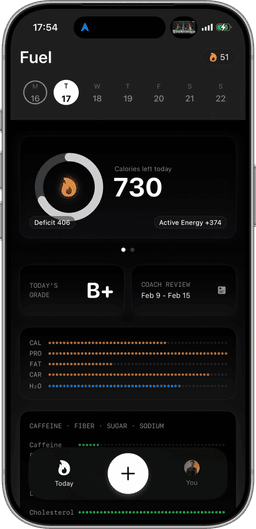
Fuel is an AI-powered nutrition coaching app built for the Apple ecosystem. You log meals by photographing the nutrition label, describing what you ate in text, or speaking it aloud, then refine with natural language corrections like "that was grilled not fried" or "add a tablespoon of olive oil." A daily health score tracks five dimensions in real time: calorie pacing, macro quality, micronutrient coverage, limits, and movement. A personalized morning recap reviews yesterday and sets today's focus. A weekly review delivers an explicit action plan. A living plan timeline recalculates your goal date based on actual adherence. Data is stored on-device by default, there are no ads, and a full Apple Watch companion app makes logging possible from your wrist. The free tier includes a coached week plus 7 meals per week. Pro is $24.99/month.
02About Cal AI
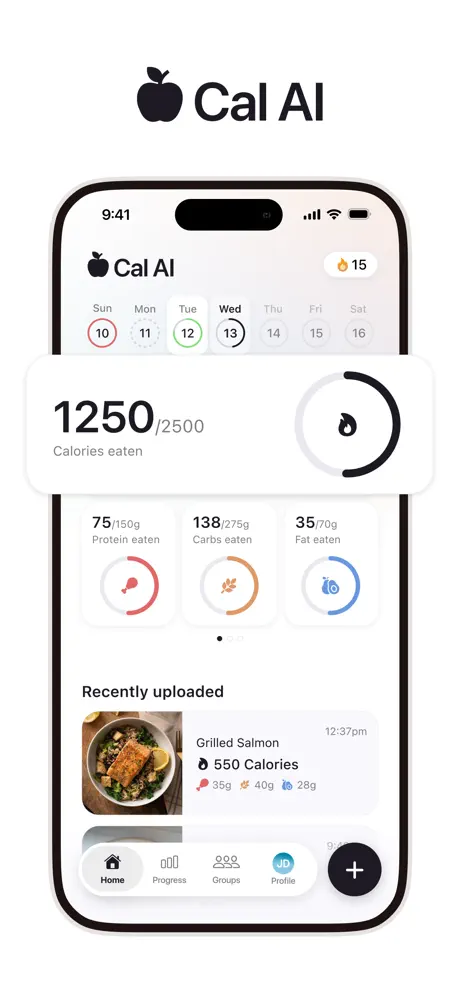
Cal AI is a photo-based calorie tracking app that markets itself as the fastest way to log meals. You photograph your plate and the AI estimates calories and macros. Barcode scanning is also available for packaged foods. The app provides a basic calorie target but no coaching layer, no adaptive goals, and no daily feedback beyond raw numbers. Its Apple Watch app exists in name but is widely reported as non-functional. Apple Health sync is partial, covering water but not food. Cal AI is a free download, but it has a hard paywall during onboarding and there is no access to the app otherwise. Pricing is dynamic and A/B tested during onboarding rather than published anywhere, with reported tiers including a $5.99 weekly plan, $29.99 and $49.99 annual plans, and a $59.99 family plan. In December 2025, Cal AI was acquired by MyFitnessPal. In March 2026, an unauthenticated Firebase backend with 4-digit account PINs leaked 3.2 million user records. In April 2026, Apple removed the app from the App Store for deceptive billing, then reinstated it after the developer redesigned the subscription flow.
03Cal AI in-house tools vs borrowed database
There is a useful way to read Cal AI's product. Separate what the company built from what it borrowed, then look at what works in each pile.
The borrowed pile is short. Barcode scanning runs against FatSecret's nutrition database, which is why it returns accurate values for packaged foods. That accuracy is FatSecret's accuracy. Strip the FatSecret dependency out and the scanner stops returning anything useful.
The in-house pile is everything else, and it is where the product breaks down. Photo recognition fails by 25 to 50 percent on mixed dishes. Corrections do not persist between scans. The Apple Watch app is widely reported as non-functional. Apple Health sync covers water and ignores food. Macro arithmetic produces values that do not add up to the stated calorie total. The Firebase backend that stored 3.2 million user records was unauthenticated, with 4-digit PINs and no rate limiting. The billing flow was deceptive enough that Apple pulled the app from the App Store. The in-app support agent cannot issue refunds.
What Cal AI did build at world-class quality is the marketing engine. Roughly 150 active influencers, more than $1 million per month in Meta and TikTok ad spend, an affiliate program that paid creators per install, and around $30 million in 2025 revenue. The growth is real. The product underneath the growth is the stack of failures listed above. Cal AI is a marketing-led company with a borrowed barcode scanner and a long list of in-house features that do not work.
Fuel inverts the priority order. Every layer is built in-house. The photo, voice, and text logging. The natural language correction system. The Apple Watch app. The bidirectional Apple Health sync. The macro and micronutrient calculations. The on-device storage architecture. The daily and weekly coaching loop. The support team. There is no FatSecret dependency to lean on, and no marketing engine compensating for a weak product. The product is the strategy.
Winner: Fuel. Every layer built and owned in-house, not a thin in-house stack of failures wrapped around a borrowed barcode database and a 150-influencer marketing engine.
04Photo Logging Accuracy
Both apps photograph your meal and return an estimate. The critical difference is what happens when that estimate is wrong. With Cal AI, it's wrong often. Independent testing puts the variance on mixed dishes between 25 and 50 percent, almost always toward underestimation. In Lifehacker's review, Cal AI identified a Pink Lady apple as tikka masala on the first attempt, and on a separate test estimated the same apple at 80 calories against an actual value closer to 120, a 33 percent underestimate on a single whole food with a kitchen scale visible in the frame. Users report the AI misidentifying dishes entirely: a bowl of pho tagged as ramen with wildly different macros, a grilled chicken salad estimated as a Caesar with croutons, or portion sizes defaulting to generic "average" amounts that bear no relation to what's on the plate. The photo recognition treats every meal as a first encounter, with no learning from past corrections.
Fuel's photo recognition covers the same ground but builds correctability into the workflow. After the initial scan, you refine in natural language: "that was 150g not 200g," "remove the cheese," "add olive oil," "that was brown rice not white." The corrections are immediate and permanent. The entry reflects what you actually ate. For packaged foods, photographing the nutrition label gives you the manufacturer's exact numbers without relying on a barcode database. Photos are a useful shorthand for a meal, but they'll never convey hidden ingredients or precise weights. Correctability is what makes photo logging trustworthy.
Winner: Fuel. Photo recognition paired with natural language corrections that persist beats a system where every scan is a fresh guess.
05Corrections & Learning
This is the single most revealing difference between the two apps. Cal AI's corrections don't stick. Users report correcting a scan, then scanning the same item the next day and receiving a completely different wrong result. The system treats every interaction as isolated. It doesn't learn from your edits, doesn't remember your preferences, and doesn't build a model of what you eat. Essentially, you're re-teaching the app every single time.
Fuel's correction system is designed to learn from every edit. When you tell Fuel "that was 150g not 200g," the correction applies immediately and the context is retained. Your entries reflect reality, not the AI's first guess. Over time, the system understands your meals, your portions, and your preferences. This is the difference between a camera that estimates and a system that listens.
Winner: Fuel. Corrections that persist and inform future entries, not corrections that vanish after every session.
06Coaching style and daily feedback
Cal AI provides a calorie target. That's the extent of its coaching. There's no daily health score, no morning recap, no weekly review, no action plan, and no adaptive goal adjustment. You photograph meals, see a calorie number, and figure out the rest yourself. If you overeat for three days straight, Cal AI doesn't tell you what happened or what to change. It just shows a number.
Fuel is a coaching system. A live daily health score tracks five dimensions (calorie pacing, macro quality, micronutrient coverage, limits, and movement) so you see your nutritional picture in real time beyond a calorie count. A personalized morning recap tells you how yesterday landed and what to prioritize today. A weekly review analyzes your patterns and delivers an explicit action plan: eat more protein at breakfast, reduce evening snacking, increase vegetable servings at lunch. A living plan timeline recalculates your goal date based on real adherence, so you always know where you stand. The gap between these two products is structural.
Winner: Fuel. A five-dimension coaching loop with daily and weekly feedback, not a static calorie target.
07Apple Watch Experience
Cal AI lists an Apple Watch app, but user reviews paint a consistent picture: it doesn't work. Launches fail, data doesn't sync, and the interface is essentially non-functional. For users who rely on their Watch throughout the day, this is a dealbreaker disguised as a feature checkbox.
Fuel's Apple Watch app is a full companion. You can quick-log meals from your wrist, access favorites, track your calories ring, log water, and maintain streaks, all without reaching for your phone. The Watch app syncs reliably with the main app and reflects your daily health score in real time. For Apple ecosystem users, the Watch is often the most convenient surface for logging, and Fuel treats it as a first-class experience.
Winner: Fuel. A full, functional Watch companion, not a Watch app that users report doesn't work.
08Apple Health Integration
Cal AI's Apple Health sync is partial at best. Water entries sync, but food entries do not, even when all permissions are properly enabled. This means your nutrition data lives in a silo, invisible to Apple Health and any other app that reads from it. For users who want a unified health dashboard, Cal AI creates a gap rather than filling it.
Fuel's Apple Health sync is fully bidirectional. Fuel reads activity, workouts, and movement data from Apple Health and writes food, nutrients, liquids, and workouts back. Your nutrition data appears in the Health app alongside sleep, exercise, and vitals. There's no re-import gap, no missing categories, and no double-counting. If you use Apple Health as your central health record (and increasingly, that's the point of the platform), Fuel is the only one of these two apps that actually participates.
Winner: Fuel. Full bidirectional sync for all data categories, not water-only sync that ignores food entirely.
09Privacy & Security
On March 9, 2026, a hacker posted a 14.59 GB dump on BreachForums containing more than 3.2 million Cal AI user records. The reported attack vector was an unauthenticated Google Firebase backend, with the subscription table readable without credentials and account PINs that were 4 digits with no rate limiting, no CAPTCHA, and no lockout. The exposed fields include full names, email addresses, dates of birth, gender, height and weight, social media profiles, meal logs with timestamps, and subscription details. Roughly 1.2 million of the exposed email addresses used Apple's private relay, which means a meaningful share of the affected users had specifically opted into stronger privacy protections that the backend then failed to honor. At least one record belongs to a user born in 2014, indicating COPPA exposure on top of GDPR.
Fuel takes a different posture on data. Food logs, photos, and personal details stay on the device by default, with no central account database that can be exfiltrated through an unauthenticated query. There is no PIN-protected subscription endpoint to brute force. The architecture is designed so that the worst case for a breach is structurally bounded, rather than an open Firebase table containing the entire user base.
Winner: Fuel. On-device storage by default, not an unauthenticated cloud backend that leaked 3.2 million records.
10Macro Math & Data Integrity
Accuracy in a nutrition tracker is about more than food identification. It's about the arithmetic. Cal AI users report persistent macro math errors: protein, carbs, and fat values that don't add up to the stated calorie total, doubled values on re-scans, and portion estimates that change without explanation between identical meals. When the basic math is unreliable, every decision built on that data is compromised.
Fuel's macro calculations are accurate and verifiable. When you photograph a nutrition label, the values match the label. When you log a described meal, the macro split reflects established nutritional data for those ingredients. And because you can correct entries in natural language, any discrepancy is fixable in seconds. Trust in your data is the foundation of every nutrition app. Without it, you're tracking noise.
Winner: Fuel. Verifiable arithmetic and correctable entries, not documented math errors and inconsistent values.
11Onboarding & Pricing
Cal AI's onboarding is a source of frustration across user reviews. The app requires a lengthy, invasive questionnaire covering personal details that feel disconnected from calorie tracking before revealing its paywall. Users describe the experience as manipulative: answer dozens of questions, receive a "personalized plan," and then discover you need to pay to access it. The value proposition is unclear until after you've invested significant time.
The pricing on the other side of that questionnaire is opaque. There is no fixed price list on the App Store listing or the Cal AI website. Reported tiers include a $5.99 weekly plan, $29.99 and $49.99 annual plans seen on different days and flows, and a $59.99 family plan, with the price you actually see depending on your onboarding answers, your device, and the cohort the company is currently testing. In April 2026, Apple removed Cal AI from the App Store for multiple App Review Guideline violations, including bypassing in-app purchases with an embedded Stripe checkout, displaying weekly calculated pricing more prominently than the actual billed amount, using a free-trial toggle that did not make automatic renewal clear, and prompting users who declined the first subscription with a second different subscription flow. The app was reinstated after the developer redesigned the billing flow.
Fuel's onboarding demonstrates value before asking for payment. The free tier includes one full coached week with daily and weekly reviews, AI logging for up to 7 meals per week, and a preview of plan progress. You experience the complete system (health score, morning recap, weekly action plan) before deciding whether Pro at $24.99/month is worth it. The price is published on the website and the App Store and is the same price for every user, with no A/B tested onboarding tier.
Winner: Fuel. Published flat pricing with a free coached week, not dynamic A/B tested pricing behind an invasive questionnaire and an App Store removal for deceptive billing.
12Support & Refunds
When Cal AI estimates wrong, charges a price you did not expect, or fails to deliver a feature, the path to resolution runs through an in-app AI agent that cannot issue refunds. Users describing the experience on Reddit, TikTok, and the App Store report a loop of automated replies that ends with a recommendation to file an Apple report-a-problem ticket or a credit card chargeback. The structural problem is that Cal AI's support layer is built to deflect refund requests rather than process them, which compounds the billing concerns that drove the App Store removal.
Fuel routes support through a real coaching team and handles refunds directly. There is no AI deflection layer between the user and a resolution. The same coaching surface that delivers your morning recap, weekly review, and action plan is staffed by people who can answer questions and handle billing issues without bouncing the request to Apple.
Winner: Fuel. Direct human support and refund handling, not an AI bot loop that pushes refund disputes to Apple and credit card chargebacks.
13Ownership risk and product direction
In December 2025, MyFitnessPal announced its acquisition of Cal AI. The app continues operating independently for now, but feature decisions, data handling, and product direction now pass through a much larger organization with its own priorities. For Cal AI users, this introduces real uncertainty: Will the app maintain its identity? Will data policies change? Will features be merged into MyFitnessPal or sunset? These are not hypothetical concerns. They are the documented pattern of app acquisitions.
Fuel is and remains independent. No parent company, no acquisition, no external stakeholders dictating product direction. The road map is set by the team that built the app. For users investing time and data into a nutrition system, independence means your app's future isn't subject to someone else's quarterly targets.
Winner: Fuel. Independent ownership with a clear road map, not acquisition uncertainty under MyFitnessPal.
14Disordered eating risk signals
Systematic underestimation of 25 to 50 percent on common meals is not a neutral error. For someone running a deliberate calorie deficit it lengthens the deficit. For people with restrictive eating patterns or histories of disordered eating it reinforces under-eating with a confident-looking number on a screen. Cal AI ships with no goal-setting safeguards, no minimum calorie floor for adult users, and no friction around aggressive weight-loss targets. The 2014 birth year that surfaced in the breach also indicates the user base includes minors, and there is no age-aware coaching layer in place.
Fuel's coaching layer is designed for the opposite outcome. The five-dimension daily health score covers movement and nutritional limits alongside calorie pacing, so the app surfaces the cost of under-eating rather than rewarding it. The morning recap and weekly review flag patterns that would otherwise go unnoticed, and the plan timeline pushes back when goal targets are set too aggressively. The product is built around a coaching relationship, with the assumption that the person logging meals deserves more than a raw calorie estimate.
Winner: Fuel. Five-dimension coaching with safeguards, not a raw calorie target with no floor or pattern detection.
15Who should pick Fuel vs Cal AI
Choose Fuel if you want a nutrition coaching system built layer by layer in-house, with photo logging you can actually correct in natural language, an Apple Watch app that works, bidirectional Apple Health sync that includes food, on-device storage that cannot leak from a misconfigured cloud table, published flat pricing, and a support team staffed by humans rather than a deflection bot. Fuel is built for users who expect their nutrition app to take their data, their goals, and their privacy seriously.
Choose Cal AI if there is a specific reason you have to. The list of reasons not to is long: 25 to 50 percent underestimation on mixed dishes, a non-functional Apple Watch app, partial Apple Health sync, documented macro math errors, a 3.2 million record breach driven by an unauthenticated Firebase backend, an April 2026 App Store removal for deceptive billing, dynamic A/B tested pricing that hides what you actually pay, an AI support bot that cannot issue refunds, and a December 2025 acquisition by MyFitnessPal. The barcode scanner works because it runs on FatSecret. Almost nothing else in the product does.
16Final pick based on your priority
Cal AI identified something real: people want to photograph their meal and get a calorie count without searching a database. The instinct is correct. The execution falls short on nearly every dimension that matters. Photo recognition that misidentifies dishes by 25 to 50 percent on mixed meals, with a Pink Lady apple returning tikka masala in a published review. Corrections that don't persist. An Apple Watch app that doesn't function. Apple Health sync that skips food data entirely. Macro math with documented arithmetic errors. A 3.2 million record data breach driven by an unauthenticated Firebase backend with 4-digit PINs. An April 2026 App Store removal for deceptive billing. Dynamic pricing that A/B tests what you pay against your onboarding answers. A support layer built on an AI bot that cannot issue refunds. An onboarding flow designed to extract commitment before demonstrating value. And acquisition by MyFitnessPal, a company with its own troubled history of paywalls, ads, and data practices, casting the product's future into genuine uncertainty.
The cost of all this falls on more than just Cal AI's own users. When the most-marketed AI calorie tracker in the App Store gets fundamentals wrong by 25 to 50 percent, leaks 3.2 million records from an unauthenticated Firebase table, and gets pulled by Apple for deceptive billing, the entire category of AI-powered nutrition takes the hit. Every legitimate AI food logging app now has to defend itself against the assumption that AI nutrition tracking is unreliable, intrusive, and disposable. Cal AI's marketing engine made it the face of the category. The product underneath made the category look bad.
Fuel starts from the same photo-first premise and builds the system that Cal AI promised and never delivered. Photo, voice, and text logging with natural language corrections that actually stick. A daily health score across five dimensions. A morning recap and weekly review with an explicit action plan. A living plan timeline that adapts to reality. A full Apple Watch companion app. Bidirectional Apple Health sync. On-device data storage. No ads. Published flat pricing. A human coaching team that handles refunds. An independent company with no acquisition overhang. The free tier lets you experience all of it before spending a dollar. For users who tried Cal AI hoping for effortless nutrition tracking and found unreliable estimates with no way to fix them, Fuel is the app Cal AI should have been. For the broader question of whether AI can be trusted with your food data and your goals, Fuel is the proof that the answer is yes when the product is the strategy.
Frequently Asked Questions
Is Fuel or Cal AI more accurate for photo logging?
Both apps use AI to estimate nutrition from meal photos, but accuracy depends on what happens after the scan. Cal AI frequently misidentifies dishes and assigns incorrect portions, and corrections don't persist between scans. Fuel lets you refine any entry with natural language ('that was 150g not 200g,' 'add olive oil') and the correction sticks permanently.
Does Cal AI work with Apple Watch?
Cal AI offers an Apple Watch app, but users widely report it doesn't function properly. Fuel's Apple Watch app is a full companion with quick log, favorites, a calories ring, water tracking, and streaks.
Does Cal AI sync with Apple Health?
Cal AI's Apple Health sync is limited. Water entries sync but food entries do not, even when permissions are enabled. Fuel provides full bidirectional sync, reading activity data and writing food, nutrients, liquids, and workouts back to Apple Health.
Is there a free version of Fuel?
Yes. Fuel's free tier includes one full coached week with daily and weekly reviews, AI logging for up to 7 meals per week, and a preview of plan progress. No payment information is required to start.
What happened to Cal AI after the MyFitnessPal acquisition?
MyFitnessPal acquired Cal AI in December 2025. The app continues operating for now, but feature decisions pass through a larger organization and the long-term road map is uncertain. Fuel remains fully independent.
Which app is better for weight loss coaching?
Cal AI provides a basic calorie target but no coaching layer. Fuel offers a daily health score across five dimensions, a personalized morning recap, a weekly review with an explicit action plan, and a living plan timeline that recalculates your goal date based on real adherence.
Was Cal AI involved in a data breach?
Yes. On March 9, 2026, a 14.59 GB dump containing more than 3.2 million Cal AI user records was posted on BreachForums. The reported attack vector was an unauthenticated Google Firebase backend with 4-digit account PINs, no rate limiting, and no lockout. Exposed fields included names, emails, dates of birth, height and weight, social media profiles, meal logs, and subscription details. Fuel stores food data on-device by default, with no central account database that can be exfiltrated through an unauthenticated query.
Why was Cal AI removed from the App Store in April 2026?
Apple removed Cal AI for multiple App Review Guideline violations, including bypassing in-app purchases with an embedded Stripe checkout, displaying weekly calculated pricing more prominently than the actual billed amount, using a free-trial toggle that obscured automatic renewal, and prompting users who declined the first subscription with a second different subscription flow. The app was reinstated after the developer redesigned the billing flow.
How much does Cal AI actually cost?
Pricing is dynamic and A/B tested during onboarding rather than published on the website or App Store. Reported tiers include a $5.99 weekly plan, $29.99 and $49.99 annual plans seen on different days and flows, and a $59.99 family plan, with the price you actually see depending on your onboarding answers, your device, and the cohort the company is currently testing. Fuel publishes a single $24.99/month Pro tier on the website and the App Store.