
Key Takeaways
Lifesum and Fuel both use AI for food logging, but the execution diverges sharply. Lifesum's AI pivot stripped out corrections, broke meal structure, and introduced instability that persists across updates. Fuel treats AI as a tool the user controls: correctable, structured, and backed by a coaching loop that turns daily data into weekly action. If you want AI that speeds you up without taking away control, Fuel is the clear choice.
01About Fuel
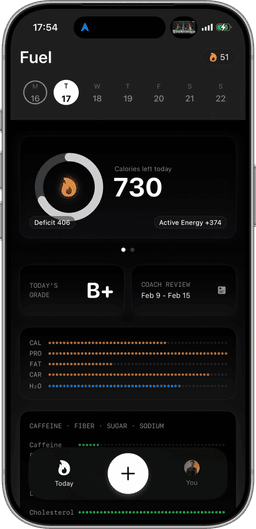
Fuel is an AI-powered nutrition coaching app designed for the Apple ecosystem. You log meals by photographing a nutrition label, describing what you ate in plain text, or speaking it aloud, then refine with natural language corrections until the entry reflects what you actually ate. A daily health score tracks five dimensions in real time: calorie pacing, macro quality, micronutrient coverage, limits, and movement. Every morning, a personalized recap reviews the previous day and highlights what to focus on. Every week, a review delivers an explicit action plan based on your actual patterns. A living plan timeline recalculates your goal date from real adherence, not a static projection. Data stays on-device by default, there are no ads on any tier, and a full Apple Watch companion app puts logging and tracking on your wrist. Fuel Pro is $24.99/month, and the free tier includes a full coached week and 7 AI-logged meals per week.
02About Lifesum
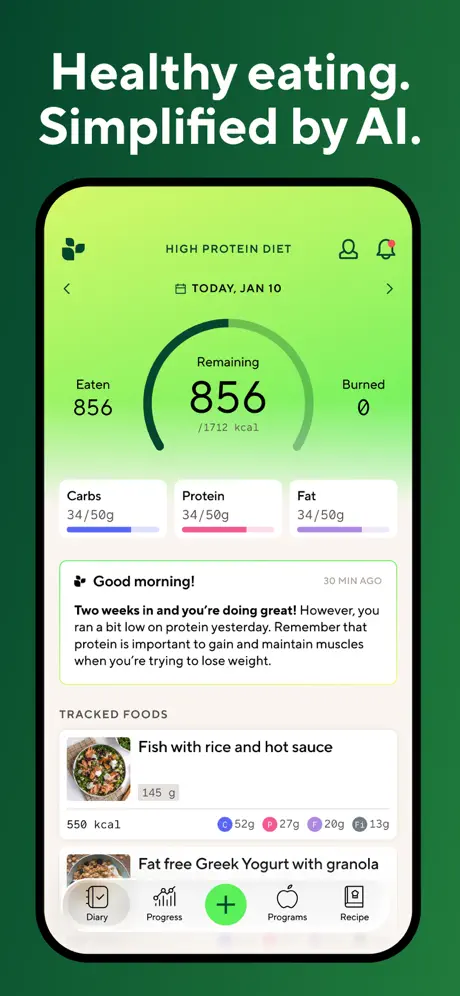
Lifesum is a calorie tracking app that originally built its reputation on clean design, structured meal slots, and a library of diet plans and recipes. In 2025 it pivoted to AI-powered text logging, a move that, according to widespread user feedback, removed more than it added. The AI update stripped the ability to correct entries, replaced structured meal slots with a flat list that mis-assigns meals to the wrong time of day, and introduced instability where the AI tracker breaks after updates or reverts to old behavior without explanation. Diet plans (keto, Mediterranean, intermittent fasting, and others) and the recipe library remain the core value proposition, but both are locked behind the $9.99/month Premium subscription. There is no Apple Watch app and no daily coaching layer. The free tier functions as a basic calorie counter with most features gated.
03AI meal logging methods
Lifesum's AI text logger was pitched as a modernization of food logging: type what you ate and let the AI handle the rest. The problem is what happened next. User reviews consistently describe accuracy issues. The AI misidentifies portions, conflates similar foods, and produces entries that don't reflect what was actually eaten. A user logging "two eggs and toast with butter" might get calorie numbers that don't match any reasonable portion, with no way to see or adjust the underlying assumptions. More critically, the update that introduced AI logging removed the ability to correct entries after the fact. If the AI gets it wrong, the data stays wrong. For a nutrition app, uncorrectable inaccuracy undermines the entire point of tracking. You're building a dietary record you can't trust and can't fix.
Fuel's AI logging supports three input modes (photo, voice, and text) and every entry is fully correctable with natural language. "That was 150g not 200g." "Add olive oil." "That was grilled, not fried." "Actually, I had two slices, not three." The correction model is conversational: you refine until the entry is right, and the system learns from your edits. Corrections persist across sessions, so the same refinement doesn't need to happen twice. For packaged foods, photographing the nutrition label pulls the manufacturer's exact numbers, with no database lookup and no crowd-sourced guesswork. For restaurant meals or home cooking, voice logging lets you describe the meal naturally and then adjust in seconds.
Winner: Fuel. Correctable AI logging across three input modes vs. text-only AI with corrections removed.
04Meal Structure
Lifesum's pre-AI interface organized food into clear meal slots (breakfast, lunch, dinner, snacks) with per-meal calorie breakdowns visible at a glance. The AI update replaced this with a flat chronological list. The result: meals get assigned to the wrong slots, per-meal calorie visibility disappeared, and users lost the ability to see how individual meals contributed to their daily total. Multiple reviews describe the change as "fixing something that wasn't broken." For users who relied on meal-level structure to manage portions and pacing, the update removed a core workflow without replacing it.
Fuel maintains clear meal structure with per-meal calorie and macro visibility in the daily view. Each meal slot shows exactly where you stand, beyond just the running daily total. You always know whether lunch put you ahead of pace or whether dinner has room for flexibility. This granularity matters because daily totals alone hide the distribution problems that stall progress. A 2,000-calorie day looks identical whether it was four balanced meals or a 300-calorie morning followed by a 1,700-calorie dinner, but the metabolic and behavioral implications are different.
Winner: Fuel. Structured meal slots with per-meal visibility vs. a flat list that mis-assigns meals.
05Stability after major app updates
Software updates should improve the product. Lifesum's AI rollout did the opposite for many users. The AI food tracker has been reported breaking entirely after updates. Entries stop saving, the tracker reverts to pre-AI behavior without explanation, and features appear and disappear between versions. This is not a one-time launch bug. The instability is a recurring theme in app store reviews months after the initial release. Users describe updating the app and finding that a feature they relied on yesterday no longer exists today, with no changelog or communication explaining the change.
Fuel is built as a daily-use tool first, which means stability is non-negotiable. The experience is consistent across updates, with no features disappearing, no silent reversions, and no AI tracker that works one week and breaks the next. When new capabilities ship, they're additive. Your existing data, corrections, meal structure, and coaching history carry forward. On-device data storage means there's no server-side change that can silently alter your tracking experience between app opens. For a daily-use health app, this predictability matters more than most features. If you can't trust the tool to behave the same way tomorrow as it did today, the habit breaks down.
Winner: Fuel. Consistent updates that add without removing vs. an AI rollout that breaks and reverts unpredictably.
06Coaching style and daily feedback
Lifesum's coaching model is content-based: diet plans (keto, Mediterranean, high-protein, intermittent fasting) and a recipe library that suggests meals aligned with your selected plan. These are useful as starting frameworks, but they're static. They don't adapt based on what you actually eat, and they don't provide daily feedback on your behavior. There's no daily health score, no morning recap, no weekly review. If you go off-plan for three days, Lifesum doesn't tell you what happened or what to adjust. The plans exist behind the Premium paywall, and the free tier includes none of them.
Fuel's coaching is a multi-touchpoint daily loop. A live health score updates in real time across five dimensions: calorie pacing, macro balance, micronutrient coverage, limits (sodium, added sugar, saturated fat), and movement. A personalized morning recap reviews yesterday's score and tells you what to focus on today. A weekly review with an explicit action plan identifies patterns from the past seven days and gives you specific changes for the next seven. A living plan timeline recalculates your projected goal date based on actual adherence, so you always know how real behavior, rather than theoretical compliance, is affecting your trajectory. The coaching is included in both the free tier (for the first week) and Pro.
Winner: Fuel. An adaptive daily coaching loop vs. static diet plans locked behind a subscription.
07Apple Watch & Health Integration
Lifesum does not offer an Apple Watch app. For users who want to log or check progress from their wrist, this is a gap with no workaround. Apple Health integration exists but is basic. Lifesum reads and writes limited data without the bidirectional depth that keeps your health dashboard accurate across apps.
Fuel provides a full Apple Watch companion app: quick-log meals, access favorites, track a calories ring, log water, and view streaks, all from the wrist. Apple Health sync is fully bidirectional: Fuel reads activity, exercise, and body metrics, and writes food, nutrients, liquids, and workouts back. This means your Apple Health dashboard reflects a complete picture without manual reconciliation. No double-counting, no missing data categories, no sync gaps.
Winner: Fuel. Full Watch companion app and bidirectional Health sync vs. no Watch app and basic sync.
08Privacy & Ads
Lifesum's free tier includes ads, and user data is processed server-side. The Premium subscription removes ads but doesn't change the underlying data architecture. For users sensitive to how their dietary data is stored and used, the cloud-based model means trusting Lifesum's infrastructure and privacy policy with detailed information about what you eat every day.
Fuel stores data on-device by default. There are no ads on any tier, free or Pro. Your dietary data isn't processed through ad-targeting infrastructure or stored on servers you don't control. For an app category that captures some of the most personal health data imaginable, the architectural difference matters. Privacy is the default in Fuel rather than a toggle in settings.
Winner: Fuel. On-device storage with no ads vs. cloud-based with ads on the free tier.
09Free tiers and paid walls
Lifesum Premium is $9.99/month, significantly less than Fuel Pro's $24.99/month. That price gap is real and matters for budget-conscious users. However, what each subscription includes differs substantially. Lifesum's free tier is a basic calorie counter: diet plans, recipes, detailed nutrients, and most differentiated features are locked. Premium unlocks the content library, but you still get no coaching, no Apple Watch, no correctable AI, and no daily feedback loop.
Fuel's free tier includes one full coached week with daily health scores, morning recaps, and a weekly review, plus AI logging for 7 meals per week ongoing. You can evaluate the complete coaching system before spending anything. Pro at $24.99/month unlocks unlimited logging, continuous coaching, and the full feature set. There are no ads on either tier. The price is higher, but the product you're paying for is categorically different. The product is coaching rather than content access.
Winner: Tie. Lifesum is cheaper at $9.99/mo. Fuel's $24.99/mo includes coaching, Watch support, and no ads. The better value depends on whether you need a calorie counter or a coaching system.
10Who should pick Fuel vs Lifesum
Choose Fuel if you want AI logging you can actually correct, a daily coaching loop that adapts to your real behavior, full Apple Watch integration, and an app that doesn't break between updates. Fuel is especially strong for users who tried Lifesum's AI update and found themselves unable to fix wrong entries, missing their meal structure, or dealing with a tracker that works inconsistently. If you care about privacy and want no ads, Fuel is built for you. The living plan timeline and weekly action plans make it particularly valuable for users pursuing specific goals like weight loss, body composition changes, or nutrient optimization, who need the system to adapt as they do.
Choose Lifesum if you want a lower-cost subscription with structured diet plans and a recipe library, and you don't need Apple Watch support, correctable AI, or a daily coaching layer. Lifesum's content library, including keto plans, Mediterranean guides, and recipe suggestions, remains useful for users who want meal inspiration alongside basic tracking and who can tolerate the AI logging limitations. If you primarily use Lifesum for its recipes and meal ideas rather than precise tracking, the value proposition still holds at $9.99/month.
11Final pick based on your priority
Lifesum had a genuinely good product before its AI pivot. Structured meal slots, clean design, and a content library that gave users both tracking and inspiration. The decision to replace the logging system with an AI tracker that can't be corrected, breaks across updates, and strips meal structure was a product regression that user reviews have documented extensively. The content library behind Premium still has value, and the $9.99/month price point is accessible, but the daily tracking experience, the part of a nutrition app you use multiple times a day, is less reliable than it was before the update.
Fuel takes the opposite approach to AI in nutrition. The AI accelerates logging across photo, voice, and text while the user stays in control. Every entry is correctable with natural language. Meal structure is preserved with per-meal visibility. A daily health score, morning recap, and weekly action plan turn raw data into behavior change. A full Apple Watch app and bidirectional Apple Health sync keep you connected across the Apple ecosystem. Data lives on-device, and there are no ads.
The price difference is real, $24.99 versus $9.99 per month. But the products serve different needs. Lifesum at its best is a calorie counter with diet-plan content. Fuel is a coaching system that compounds daily. For users who want AI that helps without removing control, and a tracking experience that improves rather than regresses between updates, Fuel is the stronger choice.
Frequently Asked Questions
Is Fuel or Lifesum better for weight loss?
Both apps support calorie tracking for weight loss, but they approach it differently. Lifesum provides a calorie target with diet plans and recipes behind its Premium subscription. Fuel adds a daily health score, morning recap, weekly review with action plans, and a living plan timeline that recalculates your goal date based on real adherence, turning tracking into active coaching.
Can you correct AI food entries in Lifesum?
As of Lifesum's AI update, the ability to correct AI-generated food entries was removed. Users report that inaccurate entries can't be refined after logging. Fuel's AI logging is fully correctable. You refine entries with natural language ('that was 150g not 200g,' 'add olive oil') and corrections persist.
Does Lifesum have an Apple Watch app?
No. Lifesum does not offer an Apple Watch app. Fuel provides a full Apple Watch companion app with quick log, favorites, a calories ring, water tracking, and streaks.
How much does Lifesum Premium cost?
Lifesum Premium costs $9.99/month. Key features locked behind it include diet plans, recipes, and detailed nutrient tracking. Fuel Pro is $24.99/month but includes AI coaching, no ads, full Apple Watch support, and correctable AI logging.
Is there a free version of Fuel?
Yes. Fuel's free tier includes one full coached week with daily and weekly reviews, AI logging for up to 7 meals per week, and a preview of plan progress, enough to evaluate the full system before subscribing.
Why did Lifesum remove meal slots?
Lifesum replaced its structured meal slots with a flat list as part of an AI-focused update. Users report that meals now get mis-assigned to the wrong time slots and per-meal calorie breakdowns are no longer visible. Fuel maintains clear meal structure with per-meal calorie visibility in the daily view.