App Comparison

Cal AI vs Lose It!

Fuel Nutrition Team • March 22, 2026

Cal AI

3/ 10
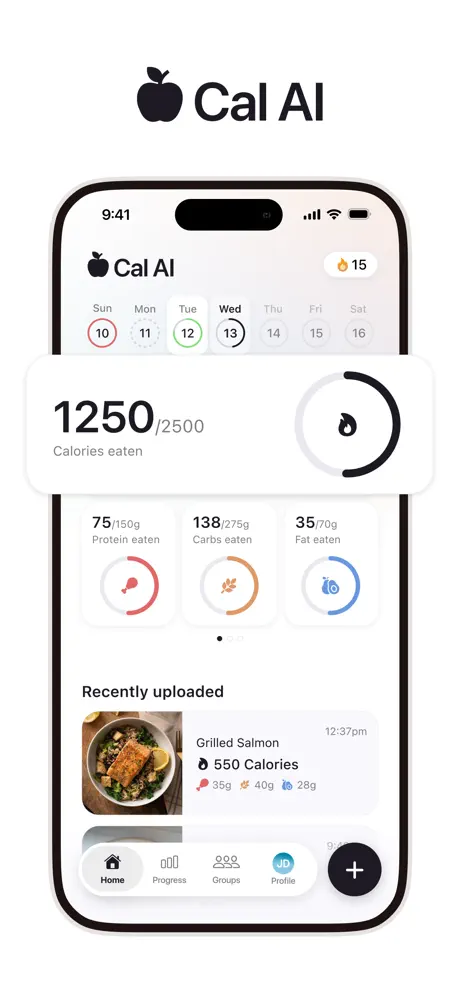
Cal AI screenshot
VS

Lose It!

6/ 10
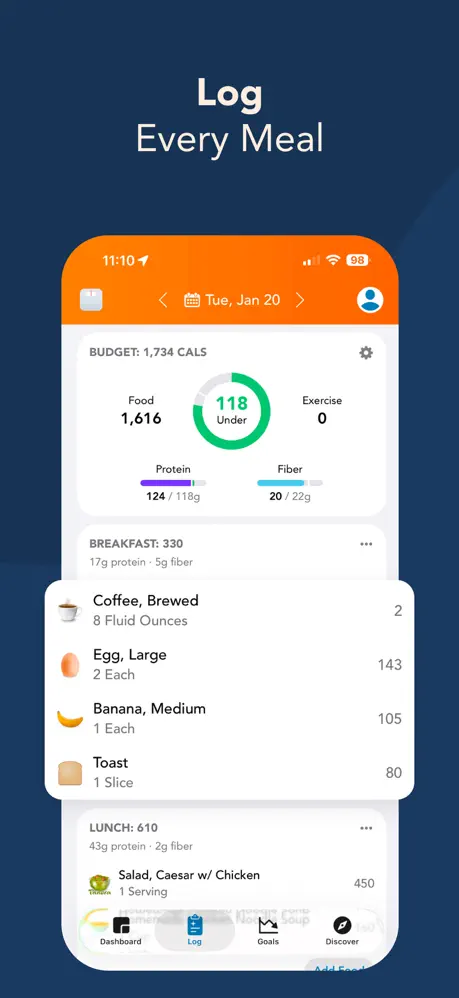
Lose It! screenshot

Feature comparison

Feature
Cal AI
Lose It!

Core approach

Cal AIPhoto AI calorie estimation
Lose It!Manual calorie counting with friendly UX

Food logging

Cal AIPhoto snap — accuracy questioned
Lose It!Database search + free barcode scanning

Database

Cal AINo traditional database — AI estimates only
Lose It!Large crowd-sourced database

Barcode scanning

Cal AINot a primary feature
Lose It!Free — a key differentiator

UX design

Cal AIMinimal — camera-focused
Lose It!Clean, friendly, fast food search

Upsell pressure

Cal AIStandard subscription prompt
Lose It!Constant discount timers and banners

Apple Watch

Cal AIDescribed as non-functional
Lose It!Basic integration

Coaching

Cal AIBasic calorie target
Lose It!Static calorie target

Price

Cal AIFree download, but hard-paywalled during onboarding; no app access otherwise; $19.99-$29.99/year in current testing
Lose It!Free tier + $39.99/year Premium

Pros & Cons

Cal AI

  • Fastest logging method — just snap a photo
  • No need to search databases or scan barcodes
  • Minimal learning curve
  • AI frequently misidentifies dishes and portions
  • Corrections don't persist between sessions
  • No barcode scanning, recipes, or food database
  • Apple Watch described as non-functional
  • Macro math errors reported

Lose It!

  • Free barcode scanning — a key differentiator
  • Large crowd-sourced food database
  • Clean, friendly, approachable interface
  • Affordable at $39.99/year Premium
  • Basic Apple Watch integration available
  • Aggressive upsell pressure with discount timers and banners
  • Crowd-sourced database has accuracy variations
  • No coaching or adaptive goals
  • Static calorie target only

Cal AI and Lose It! represent two different bets on what makes calorie tracking sustainable: eliminating friction through AI photos versus making manual tracking so approachable that friction barely matters. Both are calorie counters without coaching — the fundamental difference is how food gets into the app and what the daily experience feels like.

Key Takeaways

- Cal AI is faster to log but produces AI estimates that users describe as frequently inaccurate, with corrections that do not persist. - Lose It! is one of the friendliest calorie trackers available with free barcode scanning and an affordable Premium tier, but aggressive upsell pressure mars the experience. - Neither app offers coaching, adaptive goals, or meaningful guidance beyond a static calorie target.

What is Cal AI?

Cal AI is a photo-first calorie tracking app that uses AI to estimate macronutrients from pictures of your food. The entire product is built around the camera-to-calories pipeline: snap a photo, get numbers, move on. Cal AI was acquired by MyFitnessPal in December 2025 and continues operating independently. It appeals to users who find manual food logging tedious enough to abandon entirely, offering the fastest possible input at the cost of accuracy. Users report frequent misidentifications, incorrect portion estimates, non-persistent corrections, and basic arithmetic errors in the macro math.

What is Lose It!?

Lose It! is a calorie tracking app known for its clean, friendly interface and approachable design. It uses database search and free barcode scanning for food logging, backed by a large crowd-sourced food database. Lose It! has been around since 2008 and has built a loyal user base through consistent usability. Premium at $39.99/year is among the most affordable paid tiers in the category. The main complaints are aggressive upsell pressure on the free tier — discount timers, persistent banners, and nudges on every surface — and a crowd-sourced database where accuracy varies from entry to entry.

Logging Speed and Method

Cal AI is undeniably faster for the initial log. Point your camera at a plate, tap once, and calorie and macro estimates appear in seconds. No typing, no scrolling through search results, no scanning barcodes. For users who eat three to five meals per day, that speed advantage compounds — potentially saving minutes of daily logging time. The problem is downstream: the AI estimates are unreliable. Users report wrong foods identified from photos, wrong macro splits, and calorie totals that shift when the same meal is photographed from a slightly different angle or in different lighting. Corrections are available but do not carry forward to future sessions, so recurring meals produce the same recurring errors that require the same manual corrections every time.

Lose It!'s approach requires more effort per entry but produces more intentional results. You type a food name, select from search results, verify the nutritional data, and adjust the serving size to match what you actually ate. Barcode scanning speeds this up considerably for packaged foods — and unlike many competitors including MyFitnessPal, barcode scanning is free on Lose It!, available even without a Premium subscription. This is a genuine differentiator. The crowd-sourced database is large enough that common foods, brand-name products, and chain restaurant meals are almost always available, though accuracy varies between entries. Some community-submitted items have incorrect data, so a quick verification against the package label is advisable when logging a food for the first time.

Winner: Cal AI — for raw speed. But Lose It!'s free barcode scanning narrows the gap significantly for packaged foods, where scanning is nearly as fast as photographing.

Food Database and Data Quality

This comparison highlights the fundamental trade-off between Cal AI's approach and traditional tracking. Cal AI has no traditional food database. Everything runs through AI photo estimation, which means there is no way to look up a food by name, browse entries, or verify nutritional data against a known source. The numbers come from the AI's interpretation of your photo, period. If you want to log a food the AI has not seen or consistently misidentifies, there is no fallback — you cannot manually search for the correct entry because there is no database to search.

Lose It! maintains a large crowd-sourced database that includes brand-name products, restaurant meals, generic ingredients, and user-submitted entries. The database is not verified against institutional sources like the USDA — accuracy varies entry to entry, and duplicates with conflicting data are common. A single food might have three entries with different calorie counts, and there is no clear way to know which is correct without checking the package label yourself. But the data is at least inspectable. You can see what you are logging, compare multiple entries for the same food, and choose the one that best matches your actual portion and product. This transparency is a meaningful advantage over an AI black box that offers no visibility into how it reached its estimate.

Winner: Lose It! — a searchable, inspectable database with free barcode scanning provides more reliable and verifiable data than AI photo estimates.

Daily User Experience

Lose It! is one of the most pleasant calorie trackers to use day to day. The interface is clean, the color palette is welcoming, and interactions are fast. Onboarding is straightforward. The food diary view is easy to scan, and daily calorie remaining is always visible. Lose It! has invested heavily in making calorie counting feel approachable rather than clinical, and it shows.

The counterweight to this polish is relentless upsell pressure. The free tier surfaces discount timers, upgrade banners, and promotional nudges on nearly every screen. Some users report these interruptions as aggressive enough to undermine the otherwise pleasant experience. Upgrading to Premium ($39.99/year) removes the ads, but the constant sales pressure on the free tier is a notable friction point.

Cal AI's daily experience is simpler and less cluttered. The interface is essentially a camera with a calorie display. There are no ads, no upgrade timers, and no visual noise beyond the core logging flow. But there is also less capability — no food search, no database browsing, no barcode scanner to fall back on. The simplicity is both a feature and a limitation.

Winner: Tie — Lose It! is more polished but the upsell pressure is aggressive; Cal AI is cleaner but offers less functionality.

Apple Ecosystem Integration

This is one area where Lose It! has a clear, if modest, advantage. Lose It! offers a basic Apple Watch app that lets you view your daily calorie summary and log water from your wrist. It is not a full logging experience, but it provides at-a-glance access to your tracking data without pulling out your phone. Apple Health integration works for syncing calorie data and step counts.

Cal AI's Apple Watch app is consistently described by users as non-functional. It either fails to load, displays outdated data, or crashes. Apple Health integration is partial — water syncs but food data does not flow between Cal AI and Apple Health. For users who expect their nutrition tracker to participate in the broader Apple Health ecosystem, Cal AI falls short.

Winner: Lose It! — basic Apple Watch integration and functional Apple Health sync is meaningfully better than a non-functional Watch app and partial Health sync.

Coaching and Goal Adjustment

Neither app offers coaching in any meaningful sense. Both provide a static calorie target set during onboarding — Cal AI based on basic body metrics, Lose It! based on similar inputs plus a goal weight and target timeline. Neither app adapts that target based on your actual progress, adherence patterns, or metabolic feedback. Neither offers meal suggestions, nutritional guidance, behavioral coaching, or proactive alerts when your eating patterns diverge from your goals.

If you consistently miss your calorie target for weeks, neither app will tell you why or suggest adjustments. If your weight loss stalls at a plateau, neither app will recalibrate your daily budget. If you are consistently under-eating protein or over-eating sugar, neither app will flag the pattern. They are logging tools, not coaching tools, and the intelligence stops at displaying the numbers you entered against a static goal. For users who need guidance — not just a place to record data — both apps leave a significant gap.

Winner: Tie — neither offers any meaningful coaching or adaptive goal adjustment.

Pricing and Value

Lose It! offers one of the best value propositions in calorie tracking. The free tier includes full database search, free barcode scanning, a daily calorie budget, and the core tracking experience. Premium at $39.99/year — roughly $3.33/month — removes ads and adds features like macronutrient tracking, meal planning, and premium insights. For budget-conscious users, this is hard to beat.

Cal AI is a free download, but it has a hard paywall during onboarding and there is no access to the app otherwise. In current testing, the annual offer shown varies between $19.99/year and $29.99/year, which is cheaper than Lose It! Premium on paper but far worse in value. For that price, you get photo logging and a calorie target — no database, no barcode scanning, no meal planning, no community features. The paywall appears after a lengthy onboarding questionnaire that collects extensive personal information before revealing pricing, and the value proposition is narrower than any competitor: you are paying exclusively for AI-powered speed, not breadth of features or data quality.

Winner: Lose It! — a free tier with free barcode scanning plus one of the lowest Premium prices in the category makes it the clear value leader.

Who Should Choose Cal AI vs Lose It!

Choose Cal AI if you genuinely will not track without photo logging. If the act of typing a food name or scanning a barcode is enough to make you abandon tracking entirely, Cal AI's point-and-shoot approach removes that barrier completely. Accept that the numbers are approximate — sometimes significantly so — and use Cal AI for rough calorie awareness rather than precise nutritional management. Cal AI works best as a habit-building tool: getting used to thinking about what you eat, even if the specific numbers are not accurate enough for detailed planning.

Choose Lose It! if you want a proven, approachable calorie tracker that balances ease of use with reasonable accuracy at a budget-friendly price. Free barcode scanning, a large food database, and one of the friendliest interfaces in the category make Lose It! one of the most sustainable daily trackers for general calorie counting. The upsell pressure on the free tier is genuinely annoying, but the Premium subscription at $39.99/year — roughly $3.33/month — is affordable enough to resolve that friction and unlock the full feature set. Lose It! is the better tool for anyone willing to spend 15-30 seconds per meal instead of 5 seconds and who values data they can inspect and verify over AI estimates they cannot.

Verdict

For the majority of calorie-counting use cases, Lose It! is the more practical and sustainable daily tool. Its combination of free barcode scanning, a large searchable food database, and a genuinely pleasant interface makes it one of the most accessible options for long-term daily tracking. The crowd-sourced data is not perfect, and the upsell pressure is aggressive, but the core experience is reliable and affordable at $39.99/year.

Cal AI is faster, and for some users that speed difference is the difference between tracking and not tracking. But the accuracy problems are substantial — AI estimates that are frequently wrong, corrections that do not persist, and macro math errors — and they limit how useful that speed actually is for making dietary decisions. The December 2025 acquisition by MyFitnessPal also adds uncertainty about Cal AI's future direction.

Neither app offers coaching, adaptive goals, or guidance beyond a static calorie target. Both leave the interpretation and application of your data entirely up to you.

Looking for AI-powered logging with the reliability of a proven tracker, plus actual coaching? Fuel combines correctable AI logging with daily and weekly coaching, full Apple Watch support, and zero ads or upsell timers.

Frequently Asked Questions

Is Cal AI or Lose It! more accurate?

Lose It! is generally more accurate because you select specific food entries from a database rather than relying on AI photo estimates. However, Lose It!'s crowd-sourced database has accuracy variations between entries, so verification is still recommended.

Does Lose It! have photo logging?

Lose It! has experimented with photo-based features but its core logging uses manual database search and barcode scanning. Cal AI is built entirely around photo-based AI estimation.

Why does Lose It! have so many ads and upsells?

Lose It! uses a freemium model where the free tier is supported by ads and upsell prompts. Users report persistent discount timers, banners, and nudges on every screen. The Premium subscription ($39.99/year) removes ads.

Which app is cheaper?

Cal AI's annual pricing in current testing is lower than Lose It! Premium at $39.99/year, but Cal AI is inaccessible without paying and offers far less value for the money.

Can I use barcode scanning in Cal AI?

Cal AI is not built around barcode scanning. Its primary input method is photo-based AI estimation. Lose It! offers free barcode scanning as a core feature available even on the free tier.