App Comparison
Cal AI vs Cronometer
Fuel Nutrition Team • March 22, 2026
Cal AI

Cronometer

Food logging
Database source
Micronutrient tracking
Corrections
Apple Watch
Apple Health sync
Price
Macro math
Cal AI and Cronometer sit at opposite ends of the nutrition tracking spectrum. Cal AI bets everything on speed — photograph your meal and let AI estimate the macros in seconds. Cronometer bets everything on accuracy — a database built on verified institutional sources that prioritizes getting every number right, down to individual amino acids and trace minerals. The question is which trade-off matters more to the way you actually track food every day.
Key Takeaways
- Cal AI is the fastest way to log a meal but produces AI estimates that users describe as unreliable, with corrections that do not persist. - Cronometer offers the most accurate nutritional data in the category, backed by USDA-verified sources and 80+ micronutrient tracking. - Neither app offers coaching, adaptive goals, or a functional Apple Watch experience.
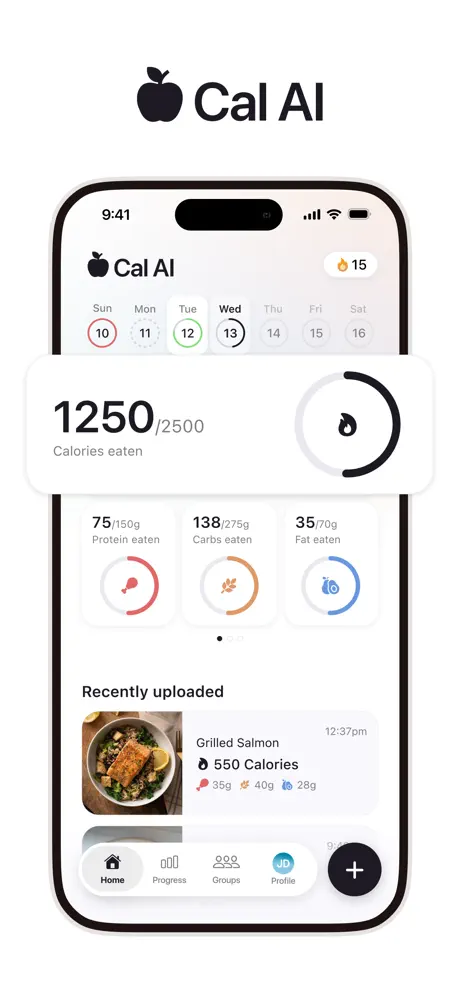
Cal AI is a photo-first calorie tracking app that uses artificial intelligence to estimate macronutrients from pictures of your food. The premise is simple: skip the manual logging, skip the barcode scanning, just take a picture and get your numbers. Cal AI was acquired by MyFitnessPal in December 2025 and continues operating independently. The app targets users who find traditional food logging too tedious, though widespread user reports of misidentified dishes, incorrect portion estimates, and basic macro math errors raise questions about whether speed without accuracy is a meaningful advantage.
Cronometer is a nutrition tracker built on the USDA National Nutrient Database and other verified institutional sources. It is the gold standard for data accuracy in the consumer tracking space, offering detailed tracking of 80+ micronutrients — including full amino acid profiles, B vitamins, selenium, manganese, and trace minerals that no competitor tracks. Cronometer uses manual search and barcode scanning for food logging. At $5.49/month for Gold, it targets users who care deeply about nutritional precision, from athletes monitoring micronutrient intake to people managing specific health conditions through diet.
This is the category where the gap between these two apps is widest. Cronometer's database is sourced from the USDA National Nutrient Database, the Canadian Nutrient File, and other institutional references. Each entry is verified against published research. When Cronometer tells you a serving of salmon contains 22 grams of protein and 4.4 micrograms of B12, those numbers trace back to laboratory analysis. This institutional foundation means Cronometer's data is not just crowd-sourced guesswork — it is as close to ground truth as a consumer app can get.
Cal AI's data comes from AI interpretation of photographs. The AI estimates what food is in the image, guesses the portion size, and returns approximate macro values. Users report fundamental accuracy problems: the AI confuses similar-looking dishes, assigns calorie counts that vary wildly for the same meal photographed at different angles, and produces macro breakdowns where protein, fat, and carb grams do not add up to the stated calorie total. There is no verified database behind these estimates — the numbers are probabilistic guesses.
Winner: Cronometer — by a substantial margin. No app in the category matches Cronometer's data rigor.
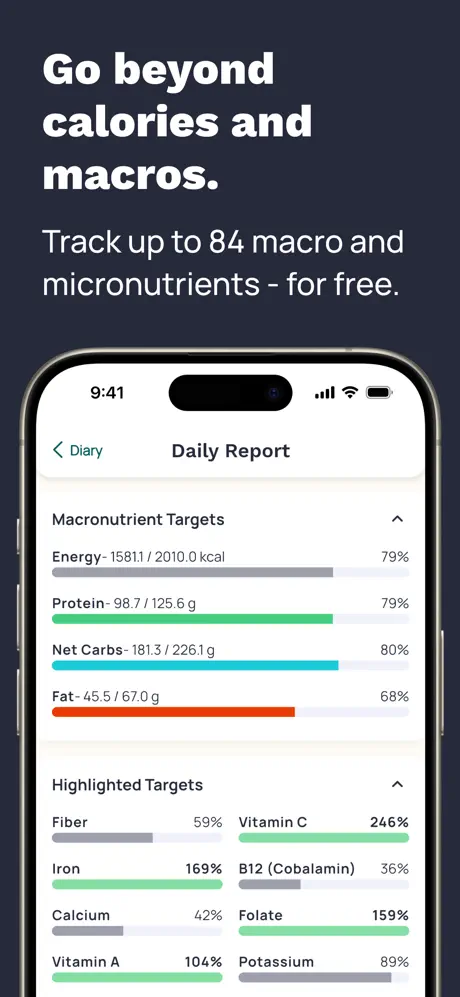
Cronometer's micronutrient tracking is unmatched in the consumer tracking space. The app displays detailed data on over 80 nutrients, organized into clear categories: vitamins, minerals, amino acids, fatty acids, and more. You can see whether you are meeting your daily targets for vitamin D, iron, zinc, omega-3 fatty acids, individual B vitamins, and trace minerals like selenium and manganese. The interface shows percentage of daily targets met for each nutrient, making it immediately visible where your diet has gaps. For users managing health conditions — iron deficiency, vitamin D supplementation, or thyroid-related selenium intake — monitoring supplement effectiveness, or optimizing athletic nutrition down to individual amino acids, this level of detail is genuinely valuable and unavailable in any competing consumer app.
Cal AI does not track micronutrients at all. The app displays calories and basic macros — protein, fat, and carbohydrates — from photo estimates, and even those are unreliable. There is no vitamin tracking, no mineral tracking, no amino acid profiles, and no way to add this data manually. If your nutritional goals extend beyond macro ratios — if you care about whether you are getting enough B12, hitting your calcium target, or balancing your omega-3 to omega-6 ratio — Cal AI provides zero visibility. The gap is not just a feature difference; it reflects fundamentally different philosophies about what nutrition tracking should accomplish.
Winner: Cronometer — this is not a close comparison. Cronometer is the only mainstream consumer tracker with this depth of micronutrient data.
Cal AI wins on speed by a wide margin. Taking a photo is faster than typing a food name, scrolling through search results, selecting an entry, and adjusting the serving size. For users who log three to five times per day, those saved seconds add up. The entire interaction takes under five seconds when it works — no other tracker comes close to that input speed.
The problem is what happens after the snap. If the AI estimate is wrong — and users report it frequently is — you need to manually correct the entry. Those corrections do not persist: photograph the same bowl of oatmeal tomorrow and you will get a fresh wrong estimate. Over time, the speed advantage erodes as you spend time correcting recurring errors that the app does not learn from.
Cronometer's logging is slower but predictable. Search for a food, select it, adjust the serving size. The interface is functional but not flashy — some users find it dated compared to newer apps. Barcode scanning works and returns verified data. The trade-off: more taps per meal, but each logged entry is grounded in verified nutritional data rather than an AI guess.
Winner: Cal AI — for raw input speed, though the accuracy trade-off is significant.
Neither app provides a strong Apple ecosystem experience, and this is worth noting for users who rely on wrist-based tracking or cross-app health data.
Cal AI's Apple Watch app is consistently described by users as non-functional — it either fails to launch, displays stale data, or crashes on load. Apple Health integration is partial: water intake syncs to Apple Health, but food and macro data does not flow in either direction. This means other health apps that could benefit from your nutrition data — workout planners, sleep trackers, health dashboards — cannot access what Cal AI logs.
Cronometer has no Apple Watch app. Apple Health sync exists but has known re-import gaps. If you delete data and attempt to restore it through Apple Health backfill, some entries may not recover. The sync is one-directional for certain data types. Cronometer's web app provides a desktop alternative, but the mobile-to-watch-to-Health pipeline that many users expect in 2026 is not fully realized.
Winner: Tie — both fall short of modern Apple ecosystem expectations, with different specific gaps.
Neither Cal AI nor Cronometer offers coaching in any meaningful sense. Cal AI provides a static calorie target set during onboarding based on basic body metrics and a stated goal. It does not adjust that target over time, does not respond to your adherence patterns, and provides no guidance on how to hit the target it sets. The coaching experience begins and ends with a number on a screen.
Cronometer offers more customizable targets — you can set individual goals for macros, vitamins, minerals, and specific micronutrients — but provides no guidance on what those targets should be or how to adjust them as your diet or health needs change. Cronometer is a powerful display tool for users who already know what they want to track. If you are working with a dietitian or doctor who specifies nutrient targets, Cronometer is an excellent way to monitor compliance. But the app itself offers no proactive intelligence — it does not flag persistent deficiencies, suggest adjustments, or adapt to your patterns.
Neither app adapts to your progress. If you consistently undershoot your protein target or miss your iron intake for weeks, neither app will proactively alert you or suggest dietary changes. They are data-display tools, not coaching tools. You log your food, they show you numbers, and the interpretation is entirely up to you.
Winner: Tie — neither provides coaching, though Cronometer's detailed custom targets for 80+ nutrients give health-focused users more to work with.
Cal AI is a free download, but it has a hard paywall during onboarding and there is no access to the app otherwise. In current testing, the annual offer shown ranges from $19.99/year to $29.99/year. Even at that lower nominal price, it offers less value than Cronometer's free tier. For that price, you get photo-based logging and a calorie target — no micronutrient data, no verified database, no additional features.
Cronometer offers a functional free tier with core tracking features, including its defining feature: verified micronutrient tracking for 80+ nutrients. The free tier alone provides more nutritional depth than Cal AI's paid subscription. The Gold subscription at $5.49/month adds custom charts, food timestamps, an ad-free experience, and priority support. Given that the free tier already includes the feature that makes Cronometer unique — verified, institutional-grade micronutrient tracking — the value proposition is strong at both price points. Users can evaluate whether Cronometer's data depth fits their needs without spending anything.
Winner: Cronometer — a more generous free tier and lower subscription price with significantly more functionality.
Choose Cal AI if logging speed is your absolute top priority and you are comfortable with approximate numbers. Cal AI suits casual calorie awareness — users who want a rough sense of daily intake and would not track at all if it required more effort. It is not the right tool for precise nutritional management, health condition monitoring, or any situation where data accuracy materially affects outcomes. If you just want to know whether today was a 1,500-calorie day or a 3,000-calorie day, Cal AI can give you that ballpark — just do not build a detailed nutrition plan around its estimates.
Choose Cronometer if nutritional accuracy matters to you. Whether you are tracking micronutrients for a health condition, monitoring supplement effectiveness, optimizing athletic nutrition, or simply want to trust the numbers on your screen, Cronometer is the most accurate consumer tracker available. The logging is slower, but every entry carries the weight of verified institutional data rather than an AI guess. Cronometer is particularly well-suited for users working with healthcare providers who need accurate dietary records, people managing conditions affected by specific nutrient intake, and anyone who treats nutrition as a data-driven practice. If you are the kind of person who reads nutrition labels and wants that level of precision in a tracking app, Cronometer is the only mainstream option that delivers.
This is a comparison between speed and substance, and the right choice depends entirely on what you need from a nutrition tracker. If you just want a fast, rough calorie estimate and have no need for micronutrient data, Cal AI gets food into the log faster than anything else — but the accuracy issues are real and persistent, and the December 2025 acquisition by MyFitnessPal adds road map uncertainty.
If accuracy is your priority — and for most serious tracking use cases it should be — Cronometer is in a class of its own. No other consumer app offers USDA-verified data with 80+ micronutrient tracking at $5.49/month. The logging is slower and the interface is not the prettiest, but the numbers are right. For users managing health conditions, tracking specific nutrient deficiencies, or optimizing athletic performance, Cronometer is the only mainstream option that takes data seriously.
Neither app offers coaching or a functional Apple Watch experience. Both leave the interpretation of your data entirely to you.
Looking for a tracker that combines fast AI logging with verified accuracy and a coaching loop? Fuel delivers correctable photo logging, full Apple Watch and Health integration, and daily coaching that turns your nutrition data into actionable guidance.
Yes, significantly. Cronometer draws its data from the USDA National Nutrient Database and other verified institutional sources. Cal AI relies on AI photo estimation, which users report as frequently inaccurate with misidentified dishes and math errors.
No. Cal AI tracks calories and basic macros (protein, fat, carbs) from photo estimates. It does not provide micronutrient data. Cronometer tracks 80+ micronutrients including full amino acid profiles, vitamins, and minerals.
Cronometer offers a free tier with core tracking features. The Gold subscription at $5.49/mo adds features like custom charts, food timestamp tracking, and an ad-free experience.
Neither. Cal AI's Apple Watch app is described as non-functional by users. Cronometer does not have an Apple Watch app at all.
There is no direct integration between them. Some users photograph meals with Cal AI for speed and cross-reference with Cronometer for accuracy, but this doubles the work and defeats the purpose of streamlined tracking.