



If you can tune out the relentless Premium push, the discount timers, the persistent banners, and the nudges baked into every surface, Lose It! is genuinely one of the more pleasant calorie-logging experiences available. The design is clean, the food search is fast, and the onboarding does not ask much of you. The trouble is that the three things that actually determine whether a tracker is useful, database accuracy, AI logging quality, and sustainable motivation, are exactly where Lose It! runs into trouble. A crowd-sourced database means entries are only as reliable as whoever submitted them, the Snap It camera misidentifies roughly one in three photos according to the ai-food-tracker.com benchmark, and a progress UX built around legacy records can actively work against the people trying to move forward.
01Lose It in 2026 after the Premium paywall shift
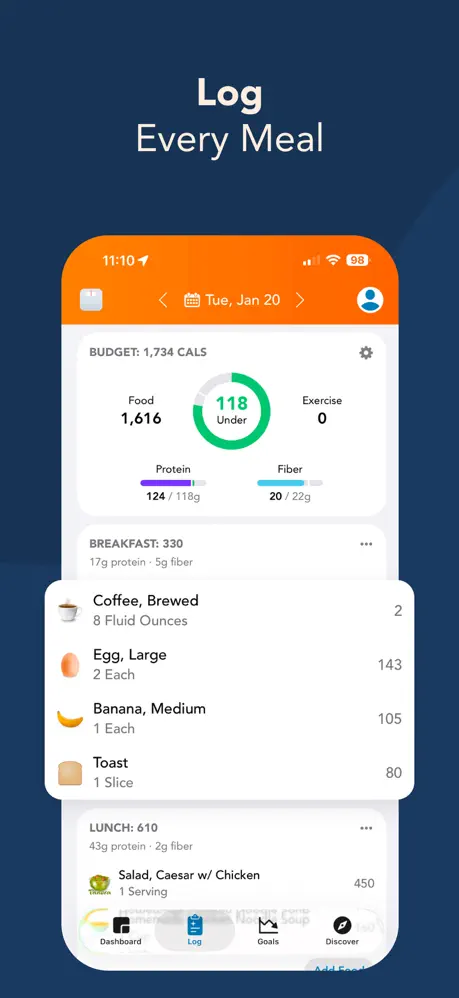
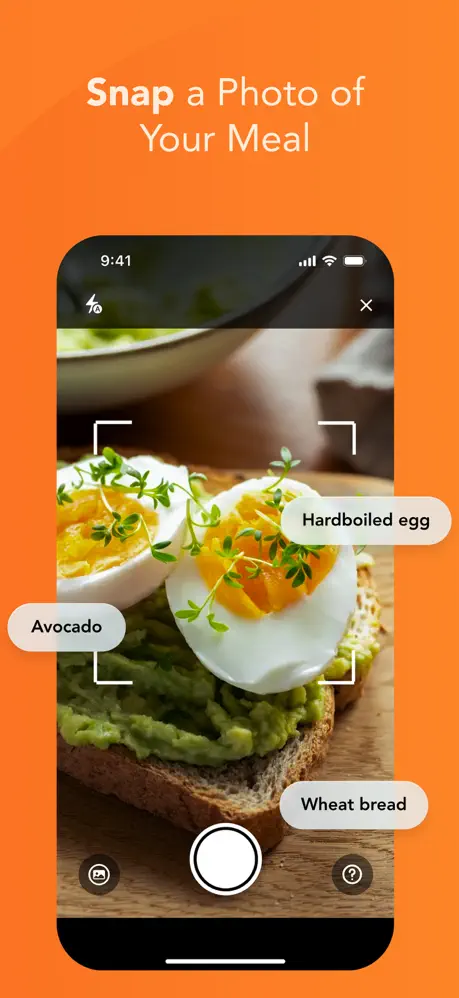
Lose It! launched in 2008 as an early calorie counter and has spent the last decade adding AI features on top of the original calorie-budget metaphor. The 2026 build pairs a manual food diary with three logging shortcuts. Snap It uses on-device computer vision to identify a plate from a photo. Scan It reads a barcode and pulls the matching label entry. Say It accepts a voice description and parses it into a logged meal. The catch is that the 2026 paywall shift moved Snap It, Scan It, custom macro targets, and the Patterns insights engine behind Premium for new free accounts, leaving the free tier as a calorie-only diary with a 25-entry per day cap and a shallow Google Fit pipe.
02Snap It accuracy is the headline failure mode
The independent ai-food-tracker.com benchmark measures Snap It at a 68.7% identification rate, a ±22% portion mean absolute percentage error, and 11.2 second median latency. That means roughly one plate in three is misidentified or unrecognized, the portion estimate on a 600 kcal meal can swing between 468 and 732 kcal, and the camera takes about four times as long as the fastest competitor to return a result. For a feature that sits behind the Premium paywall and is positioned as the primary reason to upgrade, those numbers are uncomfortable. The category coverage score is the strongest component at 8.2 out of 10, so single-ingredient items like a banana or a grilled chicken breast are handled well. Mixed plates, layered bowls, and anything with sauces are where the error compounds.
03Gamification stack is the actual differentiator
Where Lose It! genuinely shines is the engagement layer. The streaks, badges, Milestone Challenges, and community group challenges are well-tuned and they keep casual users coming back day after day. The TryGaya review calls gamification a defining feature, and the fruit milestones, group challenges, and badge cabinet do work. Streaks reward consecutive logging days, badges mark cumulative milestones like ten pounds lost or one hundred days logged, and Milestone Challenges add bounded multi-week goals with social leaderboards. The flip side is that the streak mechanic is brittle. Users who break a streak often disengage entirely rather than restart, and the LOSE IT randomized controlled trial found that gamification improved behavioral outcomes like step counts without producing matching psychological effects, which is a polite way of saying the engagement is real but the underlying motivation is not always durable.
04Patterns insights engine
Premium unlocks the Patterns engine, which surfaces correlations the diary alone cannot. The Wednesday evening overshoot alert is a real pattern that fires when the engine detects repeated midweek calorie spikes, and the Positive Pattern alerts call out which meals correlate with lower intake the rest of the day. This is the most useful behavioral feedback Lose It! produces, and it is gated behind Premium. The free tier sees the totals but never sees the why. Combined with the macro and micronutrient gates, the message is clear. The free product is a logging surface and the insights live behind the subscription.
05Pricing in 2026
Pricing per the NutriScan breakdown and the FitBudd review. Premium is $9.99 monthly, $39.99 annual which works out to about $3.33 per month, and a one-time Lifetime purchase at $189.99 for new users that climbs to $249.99 for existing subscribers and $299.99 at full sticker. Family Sharing is supported through Apple for up to six members on iOS purchases, and Google Play has no equivalent family option. Black Friday and New Year promotions occasionally drop the Lifetime tier into the $149.99 range.
06Free tier limits
The free tier accepts up to 25 diary entries per day before it stops logging, which is enough for a typical single-eater day but tight for anyone who logs by ingredient or who eats four to five meals plus snacks. Macro totals are visible at end of day but custom macro targets are Premium. More than twenty additional nutrients, including fiber, sodium, sugar, cholesterol, and the vitamin and mineral panel, are locked behind Premium per the FitBudd Premium review. Wearable integration on the free tier is basic one-way HealthKit on iOS and a thin Google Fit connection on Android, and the deeper Apple Watch, Garmin, and Fitbit pipelines require Premium.
07Macro math is the quiet failure
The FeastGood review documented a calibration problem that the app has not fixed. A 1,902 kcal target generated a macro split totaling 1,854 kcal, a 48 kcal gap that the app does not flag. The app also lets users save macro targets that total 2,630 kcal against the same 1,902 kcal calorie goal with no warning, which means the macro screen and the calorie screen can disagree by more than 700 kcal and the user has no way to know. Protein recommendations skew low for active users, with the FeastGood reviewer flagging a 72 g target for a 160 lb active person where 160 g would be appropriate. The default exercise behavior adds logged calories back into the daily budget, which works against a deficit unless the user manually toggles Exclude From Total on every workout entry.
08How Fuel avoids Snap It and macro math failures
Fuel replaces the database problem at the root. There is no crowd-sourced entry to misplace a decimal or pick the wrong unit. You log by photo, label, voice, or text, and you correct with natural language until the result is right. The portion swing on a single plate matters, and a ±22% Snap It error on a 600 kcal meal is a 264 kcal range that a Fuel user resolves in a sentence. The tracking layer is part of a coaching architecture. A live daily health score with five-dimensional breakdowns, a personalized morning recap, and an in-depth weekly review with an explicit action plan give you a multi-touchpoint feedback loop that goes well beyond hit your calories today. Macro and micronutrient targets are first-class from day one, not a paywall upgrade, and the free tier includes a full weekly coaching cycle so you can experience the loop without a discount timer.
09Who should choose Lose It
Lose It! is a competent, gamified surface-level tracker that the 2026 paywall shift turned into a calorie-only free product with a Premium upsell on every useful feature. The streaks, badges, and Milestone Challenges are genuinely well-designed and they do keep casual trackers coming back, but the Snap It camera misidentifies one plate in three, the macro math does not balance, and the exercise default works against the deficit the app exists to create.
Lose It! is best for casual trackers who like challenges and respond to streaks and badges, who are willing to pay $39.99 a year for the AI logging and Patterns insights, and whose plates are simple enough that the 68.7% Snap It identification rate is not a daily friction point.
Fuel is built for Apple users who want the best AI in food logging, which means photographing a meal or label, describing it in voice or text, and correcting it with natural language until the result is right. You get a real coach throughout the day, a live daily health score with five-dimensional breakdowns, a morning recap, and an in-depth weekly review with an explicit action plan rather than a streak counter. The coaching loop is a more durable motivator than challenge streaks because it adapts to what your body and behavior actually did this week, the Apple ecosystem integration is deep, and processing happens on-device for privacy. Try Fuel to see the difference between a tracker that gates the insights and a coach that delivers them every day.


