
Key Takeaways
Lose It! and MyFitnessPal are the two most popular mainstream calorie trackers and the most common comparison in the nutrition app space. Both use crowd-sourced databases, both offer free tiers, and both stop at calorie counting with no coaching. The differences are pricing, barcode access, database scale, and which flavor of aggressive monetization you find less objectionable. Lose It! is six times cheaper and includes free barcode scanning. MyFitnessPal has six times more food entries.
01About Lose It!
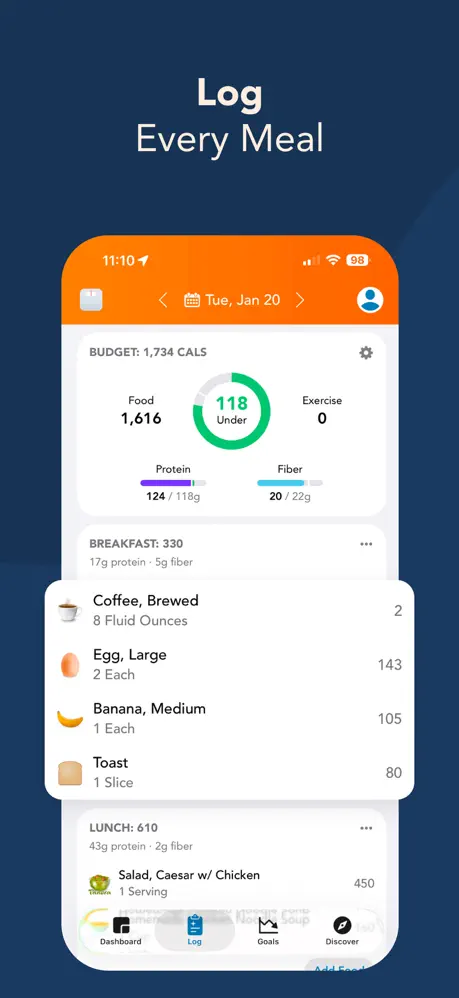
Lose It! is one of the longest-running calorie tracking apps, designed from the ground up for approachability. The onboarding is minimal, the interface is clean and friendly, and the core workflow is fast: search the food database, scan a barcode, log your meal, stay under your target. Barcode scanning is free, a critical differentiator in a category where the leading competitor paywalls it.
At $39.99/year for Premium, Lose It! is among the most affordable tracking apps available. The free tier is functional but comes with relentless upsell pressure: discount timers, persistent banners, and promotional nudges on nearly every screen. The app offers no coaching, no adaptive goals, and no AI features. It is a calorie counter that does its job cleanly and affordably, and does not pretend to be anything more.
02About MyFitnessPal
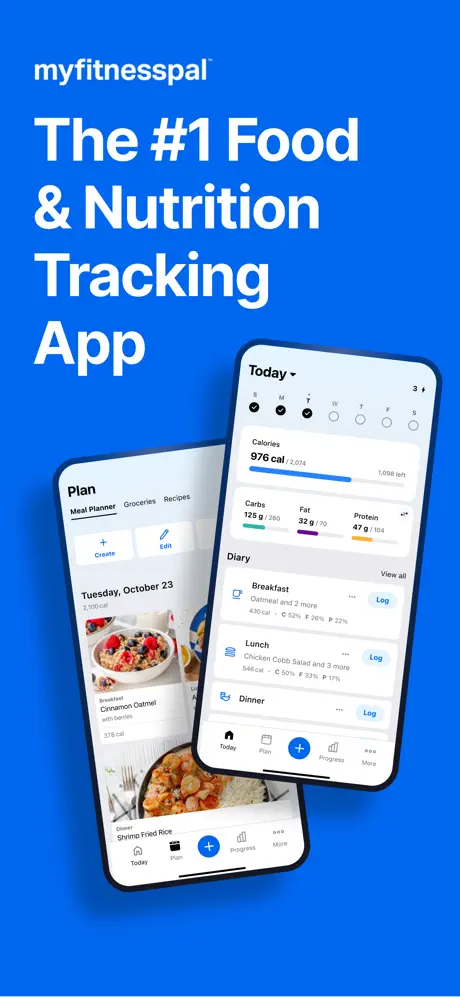
MyFitnessPal is the most widely recognized calorie tracking app in the world. Its 14-million-entry crowd-sourced food database is the largest in the category, and its brand recognition means most people's first experience with calorie tracking starts here. The database covers branded products, restaurant meals, generic ingredients, and international items at a scale no competitor matches.
The business model has shifted substantially. Barcode scanning, the most practical daily logging shortcut, is now locked behind a $19.99/month Premium subscription. The free tier is cluttered with intrusive advertisements, including graphic food imagery that appears directly in the food log. Despite the premium price, MyFitnessPal offers no coaching, no adaptive goals, and no AI-powered logging. It is a database with a subscription, and the subscription primarily buys convenience features and an ad-free experience.
03Barcode scanning coverage and access
This single feature comparison encapsulates the core trade-off.
Lose It! includes barcode scanning for free. Every user, on every tier, can scan packaged foods and get instant logging. For the majority of daily meals that involve packaged ingredients, this shortcut saves minutes per day and eliminates the friction of manual searching.
MyFitnessPal locks barcode scanning behind $19.99/month. Free-tier users must manually search the database for every packaged food, a process that is functional but dramatically slower and more error-prone (you must identify the correct entry among duplicates). This paywall transforms the daily experience: the difference between scanning a barcode in two seconds and manually searching for three minutes per meal compounds across every day of use.
Winner: Lose It! Free barcode scanning is the single biggest daily convenience advantage in this comparison.
04Database Size & Coverage
MyFitnessPal's 14-million-entry database is the largest in the category by a significant margin. If you eat a wide variety of branded foods, restaurant meals, or international products, MFP's coverage is the category leader. The scale also provides natural redundancy: multiple entries for the same product let you cross-reference and identify the most accurate one.
Lose It!'s database is substantial but smaller. Coverage is generally strong for North American branded foods, but gaps appear more frequently for international products, niche brands, and restaurant meals. Users report wrong portions, implausible calorie counts, and inconsistent serving-size options.
Both databases are crowd-sourced, which means neither guarantees accuracy. The difference is coverage depth: MyFitnessPal has more entries to choose from, which increases the probability of finding what you need and finding an accurate version of it.
Winner: MyFitnessPal The largest food database means better coverage and more cross-referencing options.
05Free tiers and paid walls
The cost comparison is stark. Lose It! Premium costs $39.99/year. MyFitnessPal Premium costs $19.99/month ($239.88/year). Lose It! is roughly one-sixth the annual price.
Both apps provide functional free tiers. Both lock meaningful features behind their subscriptions. But the gap between $40/year and $240/year is difficult to justify when neither app offers coaching, adaptive goals, or AI features. The core product in both cases is a crowd-sourced calorie counter with a barcode scanner.
For users who would pay for either, Lose It! delivers comparable daily value at a fraction of the cost.
Winner: Lose It! $39.99/year versus $239.88/year for similar core functionality.
06Ads upsells and free-tier locks
Both apps monetize their free tiers aggressively, but the character of that aggression differs.
Lose It! uses upsell pressure. Discount timers count down on-screen. Banners persist across sessions. Nudges to upgrade appear on the dashboard, in the food log, and in settings. You always know what is free and what costs extra, but the pressure to pay never lets up. It is annoying in the way a persistent salesperson is annoying, tiresome but transparent.
MyFitnessPal uses display advertising. Graphic food imagery from advertisers appears directly in your food log feed. Banner ads occupy screen real estate throughout the app. The visual intrusion is qualitatively different from upsell prompts. You are seeing ads for other products while trying to track your nutrition.
Winner: Lose It! Upsell pressure is annoying but at least it is about the product you are using. Graphic food ads in a calorie tracker are contextually hostile.
07Day-to-day UI friction
Lose It!'s interface is clean, friendly, and fast. Food search returns relevant results quickly. The daily dashboard is easy to scan. The design prioritizes approachability without sacrificing functionality. The app works consistently. Core features do not break between updates, and the daily workflow is reliable.
MyFitnessPal's interface is functional but feels dated in places. The food search benefits from database scale but presents too many duplicate entries, making selection slower. The dashboard is information-dense but not as immediately scannable as Lose It!'s. The app is generally stable, though users report occasional sync issues with third-party wearables.
Winner: Lose It! Cleaner design, faster daily workflow, and more approachable interface.
08Gaps shared by both apps
Neither Lose It! nor MyFitnessPal offers coaching, adaptive goal adjustment, AI-powered logging, meaningful micronutrient tracking, or a compelling Apple Watch experience. Both assign a static calorie target at onboarding and never revisit it. Neither tells you what to change based on your actual patterns. Neither evolves with your progress.
Both have basic Apple Watch integration but nothing approaching a full companion app. Both require Premium subscriptions for micronutrient views that remain shallow even when unlocked. Both count calories, and only count calories.
09Who should pick Lose It! vs MyFitnessPal
Choose Lose It! if you want the most affordable, approachable calorie tracking experience with free barcode scanning. At $39.99/year, one-sixth of MFP's price, Lose It! delivers a clean daily experience that covers the fundamentals reliably. Tolerate the upsell pressure and accept the smaller database as the trade-off for value and convenience.
Choose MyFitnessPal if food database coverage is your non-negotiable priority. The 14-million-entry database covers more foods, more brands, and more restaurants than any competitor. If you eat a wide variety of foods and need to find them, MFP's scale is unmatched. Be prepared for $19.99/month to unlock barcode scanning or for an ad-heavy free tier if you choose not to pay.
10Final pick based on your priority
Lose It! offers a friendlier daily experience at one-sixth the premium price with free barcode scanning. MyFitnessPal offers the largest food database, which matters when coverage is your top priority. Both are crowd-sourced calorie counters without coaching, and the differentiation comes down to whether you value database scale or daily value more.
Neither app will tell you what to do with your calorie data. Neither adapts. Neither coaches. They count and stop there.
Ready for tracking that goes beyond counting calories? Fuel replaces database dependency with AI logging, adds daily and weekly coaching, and works natively with Apple Watch. No ads, no upsell timers.
Frequently Asked Questions
Is Lose It! or MyFitnessPal better for weight loss?
Both apps can support weight loss through calorie tracking, but neither offers coaching or adaptive goals. Lose It! provides free barcode scanning and a friendlier daily experience at $39.99/year. MyFitnessPal provides the largest food database but charges $19.99/mo for barcode scanning. The better choice depends on whether database coverage or daily value matters more to you.
Why is MyFitnessPal so expensive?
MyFitnessPal Premium costs $19.99/month ($239.88/year), which is among the highest prices in the calorie tracking category. The premium unlocks barcode scanning, food verification, and an ad-free experience. The price reflects MyFitnessPal's market position and brand recognition rather than unique coaching or AI features.
Does Lose It! have a good food database?
Lose It!'s database is large and covers most North American branded foods, but it is smaller than MyFitnessPal's 14M+ entries. Users report wrong portions, implausible calorie counts, and inconsistent serving sizes. Like all crowd-sourced databases, accuracy requires user verification on every entry.
Which app has fewer ads?
Both apps monetize their free tiers aggressively but differently. Lose It! uses upsell pressure (discount timers, persistent banners, nudges). MyFitnessPal serves intrusive display ads, including graphic food imagery in the log feed. Lose It!'s approach is more annoying. MyFitnessPal's is more visually disruptive.
Do either app offer coaching?
Neither Lose It! nor MyFitnessPal offers coaching, adaptive goal adjustment, or a daily feedback loop. Both provide a static calorie target set at onboarding and leave execution to the user. Neither app tells you what to change based on your actual behavior or progress.