

Key Takeaways
Lose It! and MacroFactor serve fundamentally different users. Lose It! is designed for people who want the simplest possible calorie counter at the lowest price. MacroFactor is designed for people who want the most scientifically rigorous macro coaching system available. Lose It! is approachable, affordable, and static. MacroFactor is demanding, premium-priced, and adaptive. The right choice depends entirely on how serious you are about data-driven nutrition.
01About Lose It!
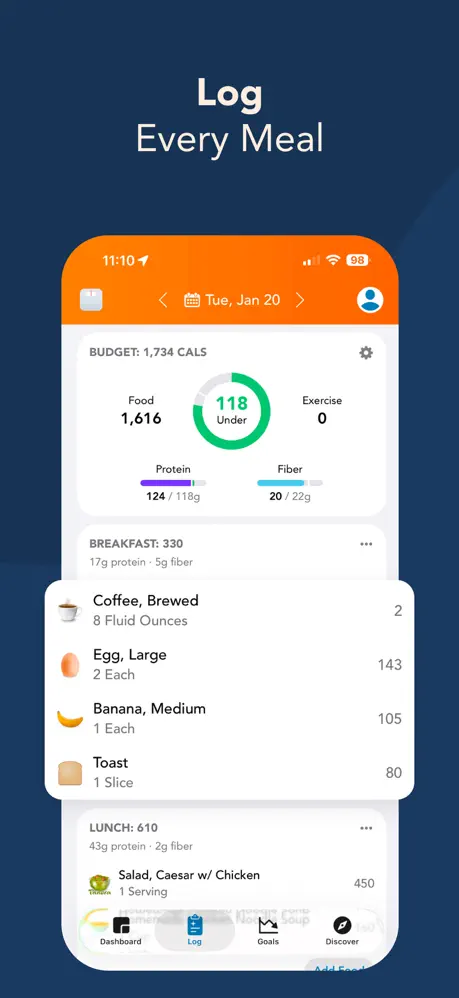
Lose It! is one of the longest-running and most approachable calorie tracking apps available. The onboarding is minimal, the design is clean, and the daily workflow is straightforward: search the food database, scan a barcode, log your meal, stay under your calorie target. Barcode scanning is free, a meaningful differentiator in a category where competitors increasingly paywall it.
The app serves beginners and casual trackers well. The learning curve is nearly flat, the interface is friendly, and the $39.99/year Premium price is among the lowest in the category. The trade-offs are depth and monetization: Lose It! assigns a static calorie target at onboarding and never revisits it, the crowd-sourced database has accuracy issues (wrong portions, implausible entries), and the upsell pressure is relentless. Discount timers, persistent banners, and promotional nudges appear on nearly every screen.
02About MacroFactor
MacroFactor is a macro tracking and coaching app built by the team behind Stronger By Science. Its defining feature is an adaptive expenditure model: the app tracks your logged intake alongside your body weight trends, models your actual energy expenditure, and continuously recalibrates your macro targets based on how your body responds.
This is fundamentally different from a static calorie target. MacroFactor adapts. If you plateau, your targets shift down. If you are losing faster than expected, they adjust up. The model converges on your real metabolic rate over time, giving you targets grounded in data rather than formulas. The learning curve is steeper. Fans acknowledge the onboarding is "annoying at first." There is no free tier ($11.99/month from day one). MacroFactor expects committed, data-literate users and builds its entire product for that audience.
03Coaching style and daily feedback
This is the key differentiator and the reason these apps serve different audiences.
Lose It! gives you a calorie target at onboarding and never revisits it. If your activity level changes, if you plateau, if your metabolism adapts to your deficit, the target stays the same. You adjust manually based on your own judgment, or you do not adjust at all. There is no feedback loop, no adaptation algorithm, and no coaching layer. Lose It! counts. It does not coach.
MacroFactor continuously models your actual energy expenditure from real intake and weight data. The expenditure model updates weekly, macro targets recalibrate automatically, and the system tells you with data whether your current approach is working. Users report that watching their expenditure model converge on reality is one of the most valuable experiences in fitness tracking. It is the closest thing to a data-driven dietitian in app form.
Winner: MacroFactor. Adaptive expenditure coaching is categorically different from a static calorie target.
04Ease of first week vs steep setup
Lose It! is designed for people who have never tracked calories before. Download, enter your goal, start scanning. The interface communicates immediately, the food search is fast, and the daily workflow takes seconds. You do not need to understand macros, energy expenditure, or metabolic adaptation. You just need to eat under a number.
MacroFactor requires engagement. The onboarding questionnaire is detailed. The interface presents more data than a casual user wants. Understanding how the expenditure model works takes time. Even dedicated fans describe the initial experience as confusing. The payoff comes weeks later, when the model has enough data to produce genuinely personalized targets. That patience barrier is real.
Winner: Lose It! Minimal learning curve and instant usability for anyone starting from zero.
05Database & Food Logging
Both apps rely on crowd-sourced food databases, and both have accuracy problems.
Lose It!'s database has wrong portions, implausible entries (a single grape logged as 500 calories), and inconsistent serving-size options. Barcode scanning is free, which provides daily convenience, and the food search is fast. The database is large enough for most North American branded foods. Accuracy requires user verification on every entry.
MacroFactor's database is generally more reliable within its coverage area. Entries tend to match labels more consistently. Barcode scanning works well for North American products. The critical limitation is geographic: outside North America, coverage drops substantially. EU and international users report that many local products are simply missing, making daily logging difficult or impossible. The adaptive coaching model still works, but it depends on accurate logging. Accurate logging depends on finding your foods.
Winner: Lose It! Free barcode scanning and broader usability, despite accuracy variance. MacroFactor's geographic gaps are a harder limitation than database noise.
06Ads upsells and free-tier locks
Lose It! Premium costs $39.99/year. MacroFactor costs $11.99/month ($143.88/year). MacroFactor is roughly 3.6 times the annual price.
The monetization experience is also fundamentally different. Lose It!'s free tier is functional but aggressively upsell-driven: discount timers count down, banners persist, nudges appear everywhere. You know you are being sold to at every moment. It is annoying but transparent.
MacroFactor has no free tier and no upsells. You pay $11.99/month from the first interaction or you do not use the app. There are no ads, no timers, no banners. The paywall is complete and honest.
Winner: Lose It! $39.99/year with a functional free tier is dramatically more accessible, even with the upsell pressure.
07Apple Watch logging and Health sync
Lose It! offers basic Apple Watch integration. Log food and check your remaining calorie budget from your wrist. It is not a full companion experience, but it provides at-a-glance utility.
MacroFactor now has a Watch app with core logging and weight tracking, but the broader experience is still more limited than full companion products.
Winner: Lose It! Basic Watch integration versus none.
08Who should pick Lose It! vs MacroFactor
Choose Lose It! if you want the simplest, most affordable entry point to calorie counting. Free barcode scanning, clean design, minimal learning curve, and $39.99/year pricing make Lose It! the easiest starting place for anyone new to tracking or anyone who wants basic calorie accountability without scientific depth. Accept the static target, the upsell pressure, and the database accuracy issues as the trade-off for accessibility and value.
Choose MacroFactor if you are a serious macro tracker who wants scientifically grounded adaptive coaching. If you are in North America, willing to pay $11.99/month upfront, and ready to engage with a more demanding product, MacroFactor's expenditure model delivers data-driven adaptation that no other calorie counter provides. It is designed for committed users who value rigor.
09Final pick based on your priority
Lose It! is the accessible starting point: affordable, approachable, and reliable for basic calorie counting. MacroFactor is the scientific endpoint: rigorous, adaptive, and demanding for serious macro tracking. They serve different users at different stages of their nutrition journey.
The gap between them is significant: from static counting to adaptive coaching. This is where most users need help. Lose It! does not grow with you. MacroFactor expects you to arrive already committed.
Looking for adaptive coaching that works globally, with a free trial and no upsell pressure? Fuel delivers AI logging without database dependency, a living plan timeline, and daily coaching. Get a full coached week free.
Frequently Asked Questions
What makes MacroFactor's coaching adaptive?
MacroFactor tracks your logged food intake alongside your body weight trends, then models your actual total daily energy expenditure rather than a formula estimate. As your body responds to your diet, the model recalibrates and adjusts your macro targets accordingly. If you plateau, targets shift. If you lose faster than expected, they shift again. This continuous recalibration is unique in the category.
Is Lose It! good enough for weight loss?
Lose It! provides a calorie target and reliable logging tools, which is sufficient for many people to lose weight. The limitation is that the target never adapts. If your metabolism changes, your activity level shifts, or you plateau, you adjust manually or not at all. For straightforward calorie restriction, it works. For data-driven adaptation, it does not.
How much more expensive is MacroFactor?
MacroFactor costs $11.99/month ($143.88/year) with no free tier. Lose It! Premium costs $39.99/year. MacroFactor is roughly 3.6x the annual price. The cost difference reflects the depth gap. MacroFactor provides adaptive coaching. Lose It! provides a static calorie target.
Does MacroFactor work outside North America?
MacroFactor's food database has significant coverage gaps outside North America. EU and international users report that many local products are missing, making daily logging frustrating. The adaptive coaching model still functions, but the logging experience is compromised.
Which app has an Apple Watch app?
Lose It! offers basic Apple Watch integration for logging and calorie checking. MacroFactor now has a Watch app with core logging and weight tracking. Neither provides a comprehensive Watch companion experience.