
Key Takeaways
Lifesum pivoted to AI-powered logging with lifestyle features. Lose It! stayed the course as a simple, affordable calorie counter. The pivot makes this a comparison between forward-looking instability and proven reliability. Lose It! is three times cheaper and meaningfully more stable. Lifesum offers broader features but cannot guarantee they will work consistently.
01About Lifesum
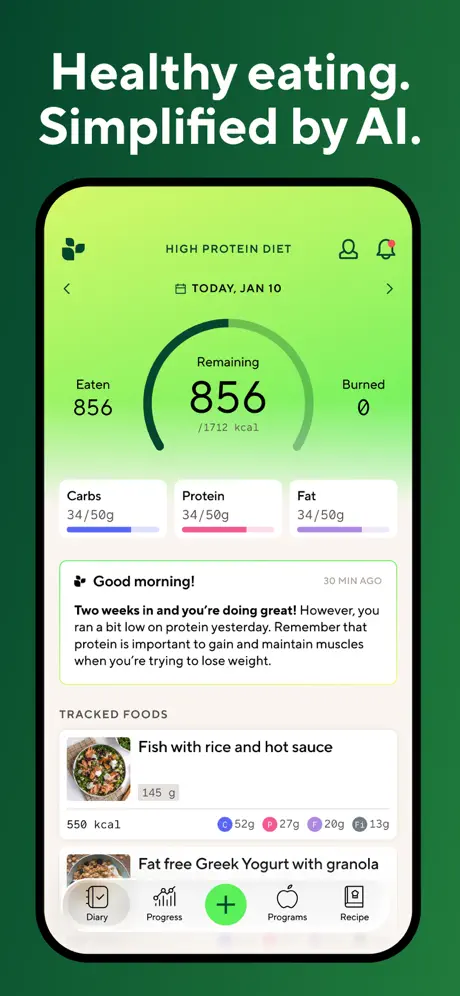
Lifesum is a Stockholm-based nutrition app that made a significant strategic pivot in recent updates: it replaced its traditional food logging system with AI-powered text input. The idea is compelling. Describe what you ate in natural language and the AI estimates the nutritional content. The app also offers diet plans (keto, intermittent fasting, Mediterranean, and others), a recipe library, and a Life Score gamification system that rates your overall wellness.
The problem is execution. The AI pivot removed the ability to correct inaccurate entries. Structured meal slots were replaced with a flat list that frequently mis-assigns foods to the wrong meals. The tracker breaks after updates, with features reverting to previous behavior without explanation. Paid users report being unable to add foods at all during certain periods. What was a reliable lifestyle tracker became unpredictable, and the $9.99/month Premium price tag now buys access to features that may not work as described on any given day.
02About Lose It!
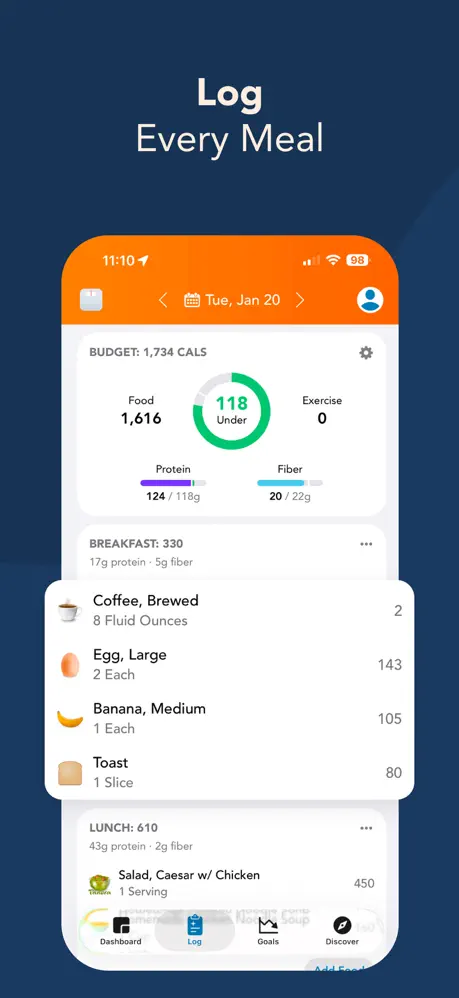
Lose It! is one of the longest-running and most approachable calorie trackers available. The core experience is simple: search the food database, scan a barcode, log your meal, and stay under your calorie target. The interface is clean, the onboarding is fast, and the food search is responsive. At $39.99/year for Premium, it is among the most affordable tracking apps in the category.
Lose It!'s trade-offs are about depth and monetization. The app offers no coaching, no adaptive goals, no diet plans, and no AI logging. The crowd-sourced database has accuracy issues (wrong portions, implausible entries, and inconsistent serving sizes). And the upsell pressure is relentless: discount timers, persistent banners, and promotional nudges appear on nearly every screen. The free tier works but is designed to make you feel like you are missing critical functionality until you pay.
03How each app handles food logging
Lose It! uses traditional database search with free barcode scanning. The food search is fast, results are generally relevant, and the daily logging workflow is reliable. You see exactly what you are logging (the entry, the serving size, the macros) and can adjust before confirming. Barcode scanning works without a subscription, which is a meaningful daily advantage over apps that paywall it.
Lifesum's AI text logging is newer and theoretically faster. Describe what you ate and the AI generates a nutritional estimate. When it works, it is genuinely quicker than searching a database. The problems are significant: accuracy is questioned across user reports, the ability to correct AI-generated entries was removed during the pivot, and the flat meal list that replaced structured slots regularly assigns foods to the wrong meal. You cannot verify what the AI logged with the same confidence that a traditional database entry provides.
The loss of corrections is the critical issue. Every AI system makes errors. The question is whether you can fix them. Lifesum removed that ability, which means an inaccurate AI estimate becomes your permanent record for that meal.
Winner: Lose It! Verifiable database entries with free barcode scanning beat unverifiable AI estimates that cannot be corrected.
04Crashes and day-to-day stability
Lose It! is the more reliable daily tool by a wide margin. Core tracking features work consistently across updates. The food search returns results, barcode scanning resolves, and logged entries persist. The app does what it promises each time you open it.
Lifesum's AI pivot introduced material instability. The tracker breaks after updates (sometimes reverting to pre-pivot behavior, sometimes losing functionality entirely). Paid users report periods where food entry simply fails. The AI logging accuracy fluctuates between updates with no communication about what changed. For a tool you rely on multiple times daily, this unpredictability is a serious problem.
Both apps handle post-update transitions, but Lifesum's are fundamentally disruptive while Lose It!'s are routine.
Winner: Lose It! Consistent daily reliability, unpredictable post-update breakage.
05Plans and extras outside tracking
Lifesum offers meaningfully more breadth. Diet plans cover popular approaches (keto, Mediterranean, intermittent fasting, and others). A recipe library provides meal ideas aligned with your chosen plan. The Life Score system gamifies overall wellness by scoring your food quality, hydration, and activity. These features are all behind the Premium subscription, but they exist.
Lose It! is tracking-focused. There are no diet plans, no recipe library, no lifestyle scoring, and no structured approach to eating beyond calorie math. What Lose It! does, it does reliably. But what it does is narrow.
For users who want guidance on what to eat (beyond how much), Lifesum's broader feature set is genuinely appealing. The question is whether those features work reliably enough to justify three times the price.
Winner: Lifesum Diet plans, recipes, and lifestyle scoring provide genuine breadth that Lose It! does not attempt.
06Upsell Pressure & Monetization
Both apps push you to pay, but in different ways.
Lose It! is transparent about its upsell strategy and relentless in execution. Discount timers count down on-screen. Banners persist across sessions. Promotional nudges appear in the food log, the dashboard, and the settings. You always know what is free and what costs extra, but the pressure to upgrade never lets up.
Lifesum's monetization is more traditional subscription prompting. Premium features are gated and the app makes clear what requires payment. The upsell pressure is less aggressive than Lose It!'s, but the underlying value proposition is shakier. You are paying for features that may break after the next update.
Winner: Draw Lose It! is more aggressive but transparent. Lifesum is subtler but you risk paying for unstable features.
07Free tiers and paid walls
The cost difference is stark. Lose It! Premium is $39.99/year. Lifesum Premium is $9.99/month, which works out to $119.88/year. Lose It! is roughly one-third the annual cost.
For basic calorie tracking, the value proposition strongly favors Lose It!. For users who would actively use Lifesum's diet plans, recipes, and Life Score system and can tolerate the instability, the premium may be justifiable. But the price gap means Lifesum needs to deliver meaningfully more, and the reliability issues make that a harder argument.
Winner: Lose It! $39.99/year versus $119.88/year for similar core tracking, with better daily reliability.
08Apple Watch logging and Health sync
Lose It! offers basic Apple Watch integration. You can log food and check your remaining calorie budget from your wrist. It is not a full companion experience, but it exists.
Lifesum has no Apple Watch app at all. If wrist-based logging or at-a-glance calorie checking matters to you, Lifesum is not an option.
Winner: Lose It! Basic Watch integration versus none.
09Who should pick Lifesum vs Lose It!
Choose Lifesum if you want AI-powered text logging, diet plans, and lifestyle features. You are willing to accept the instability that the AI pivot introduced. Lifesum's broader feature set appeals to users who want more than pure calorie counting and are comfortable paying a higher price for a more ambitious (if less reliable) product. If you actively use diet plans and recipes, the premium may deliver enough value.
Choose Lose It! if you want reliable, affordable calorie tracking that works every day without surprises. Free barcode scanning, a clean interface, and $39.99/year pricing make Lose It! the straightforward choice for budget-conscious users whose primary need is consistent daily logging. The upsell pressure and the lack of coaching are the trade-off for stability and value.
10Final pick based on your priority
Lose It! is the safer daily bet: reliable, affordable, and honest about what it is (a simple calorie counter). Lifesum is the more ambitious product: AI logging, diet plans, and lifestyle features that could be genuinely valuable if the execution stabilized. Today, the instability and triple price tag make it a harder recommendation for users whose primary need is dependable daily tracking.
Neither app offers coaching or adaptive goals. Neither adjusts your targets based on your actual progress. Both are tracking tools, not coaching systems.
Looking for AI logging that actually works, with coaching built in? Fuel combines correctable AI logging with adaptive coaching, Apple Watch support, and a stable daily experience. No upsell timers, no AI regressions.
Frequently Asked Questions
Is Lifesum's AI logging accurate?
Lifesum's AI text logging lets you describe food in natural language, but accuracy has been widely questioned since the pivot. More critically, the ability to correct AI-generated entries was removed in the update, meaning you cannot fix inaccurate estimates. Users report the flat meal list also mis-assigns foods to wrong meal slots.
How much cheaper is Lose It! than Lifesum?
Lose It! Premium costs $39.99/year. Lifesum Premium costs $9.99/month ($119.88/year). Lose It! is roughly one-third the annual cost of Lifesum. A significant gap for apps that serve similar basic tracking needs.
Does Lose It! have an Apple Watch app?
Lose It! offers basic Apple Watch integration for logging. Lifesum does not have an Apple Watch app at all. Neither provides a full companion Watch experience.
Do either app offer coaching?
Neither Lifesum nor Lose It! offers adaptive coaching or a daily feedback loop. Lifesum provides diet plans and recipes behind its subscription, but these are static content. They do not adjust based on your progress or behavior.
Which app is more stable day to day?
Lose It! is significantly more stable. Core features work consistently across updates. Lifesum's AI pivot introduced instability. The tracker breaks after updates, behavior reverts without explanation, and paid users report being unable to add foods.