App Comparison

Cronometer vs MacroFactor

Fuel Nutrition Team • March 22, 2026

Cronometer

8/ 10
Cronometer screenshot
VS

MacroFactor

7/ 10
MacroFactor screenshot

Feature comparison

Feature
Cronometer
MacroFactor

Core strength

CronometerMicronutrient completeness — USDA-verified, 80+ nutrients
MacroFactorAdaptive expenditure modeling — recalibrates from weight trends

Database source

CronometerUSDA National Nutrient Database + institutional sources
MacroFactorCrowd-sourced with regional coverage gaps

Coaching

CronometerNone — data display only
MacroFactorAdaptive targets based on real expenditure

Global usability

CronometerWorks well globally — institutional data
MacroFactorWeak outside North America — EU barcodes unsupported

Micronutrients

CronometerBest-in-class — full amino acid profiles
MacroFactorStandard macro tracking only

Apple Watch

CronometerNot available
MacroFactorCore Watch app with logging and weight tracking

Free tier

CronometerFree tier available
MacroFactorNo free tier — fully paywalled from day one

Learning curve

CronometerModerate — data-dense interface
MacroFactorSteeper — acknowledged as 'annoying at first'

Price

CronometerFree tier + $5.49/mo Gold
MacroFactor$11.99/mo (no free tier)

Pros & Cons

Cronometer

  • USDA-verified database — institutional-grade accuracy for every entry
  • 80+ micronutrients including amino acids and trace minerals
  • Free barcode scanning returns verified data
  • Meaningful free tier available
  • Works well globally — not dependent on regional barcode coverage
  • No coaching or adaptive goal adjustment
  • No Apple Watch app
  • Daily Report scroll-resets on every interaction
  • Shows consumed totals only — manual subtraction for remaining

MacroFactor

  • Adaptive expenditure model recalibrates targets from weight trends
  • Scientifically rigorous coaching approach
  • Barcode scanning with large food database
  • Clean interface designed for macro-focused users
  • No free tier — fully paywalled at $11.99/mo from day one
  • Crowd-sourced database weak outside North America
  • No Apple Watch app
  • No micronutrient tracking beyond macros
  • Steep learning curve acknowledged by developers

Key Takeaways Cronometer and MacroFactor are two of the most serious nutrition tools available, but they solve different problems. Cronometer offers the best food-level data accuracy with 80+ verified micronutrients. MacroFactor offers the most scientifically rigorous adaptive coaching, recalibrating targets from your real expenditure. The choice depends on whether you value data precision or intelligent goal adjustment.

What Is Cronometer?

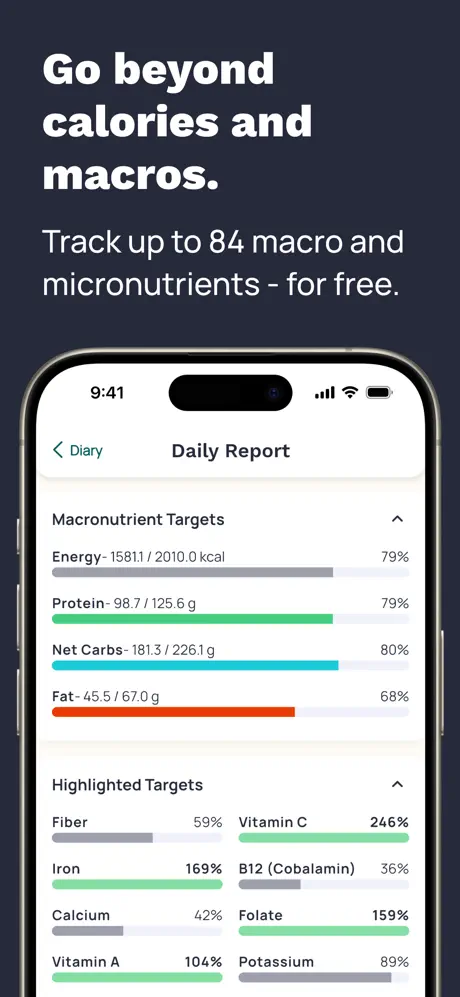
Cronometer is a nutrition tracking app built on the USDA National Nutrient Database and other verified institutional sources. It is the category leader in per-entry data accuracy and micronutrient depth. Every food entry has been verified against published nutritional research, and the app tracks over 80 micronutrients — including full amino acid profiles, individual B vitamins, trace minerals like selenium and manganese, omega fatty acid breakdowns, and vitamins from A through K.

The app offers free barcode scanning that pulls from its verified database, a functional free tier, and a Gold subscription at $5.49 per month for enhanced reporting. There are no ads. The interface is data-dense and functional, built for users who want to see every number rather than a simplified summary.

Cronometer's core limitation is that it stops at data display. It shows you exactly what you consumed — verified and comprehensive — but offers no interpretation, no adaptive goals, and no coaching. You get the most accurate picture of your diet available in a consumer app, and then you decide what to do with it. There is no Apple Watch app, the Daily Report scroll-resets on interaction, and consumed totals are shown without remaining calculations.

What Is MacroFactor?

MacroFactor is a macro tracking and coaching app built by the team behind Stronger By Science, a respected resource in evidence-based fitness. Its defining feature is an adaptive expenditure model: the app tracks your logged food intake and body weight over time, calculates your actual total daily energy expenditure (TDEE) from those data points, and automatically adjusts your calorie and macro targets to keep you progressing toward your goal.

This adaptive approach is genuinely differentiated. Most nutrition apps set a static target and never adjust it. MacroFactor's system continuously recalibrates — if your weight loss stalls, it adjusts your targets based on what the data says your body is actually doing, not what an equation predicted it would do. The science behind this approach is well-documented and the implementation is thoughtful.

MacroFactor uses a crowd-sourced food database with barcode scanning. The interface is clean but has a learning curve — the developers themselves acknowledge it can feel "annoying at first" before you understand the system. There is no free tier. The app costs $11.99 per month from the moment you download it, with no trial period. MacroFactor now has an Apple Watch app with core logging and weight tracking, though the wrist experience is still relatively narrow.

Data Accuracy: Individual Entries

Winner: Cronometer

At the individual food entry level, Cronometer's data is more trustworthy. Every entry comes from USDA-verified or equivalent institutional sources with laboratory-measured nutritional values. When Cronometer says a large egg contains 6.3 grams of protein, that number has been validated by the same sources that clinical nutrition research relies on.

MacroFactor's crowd-sourced database is adequate for many common foods, particularly in North America where barcode coverage is strongest. But crowd-sourced data inherently varies in accuracy. Some entries will be precise, others will have incorrect serving sizes, outdated formulations, or incomplete macronutrient data. For individual entries on a given day, Cronometer will consistently give you more accurate numbers.

MacroFactor's counter-argument is built into its design philosophy: individual entry accuracy matters less when the system self-corrects at the trend level. This is a valid point, but it applies to calorie and macro targets — not to micronutrient tracking, where per-entry accuracy is the only path to useful data.

There is also a consistency dimension. Cronometer's verified entries remain the same over time — the data for a food you logged three months ago is identical to the data for the same food today. In a crowd-sourced database, entries can be modified by other users, and the specific entry you select from search results may differ from the one you chose previously. For longitudinal tracking, verified consistency matters.

Adaptive Coaching and Goal Intelligence

Winner: MacroFactor

This is MacroFactor's decisive advantage, and it is substantial. The adaptive expenditure model does something no other mainstream nutrition app does: it tells you the truth about your metabolism based on observed data rather than estimated equations.

Most apps calculate your TDEE from a formula (height, weight, age, activity level) and set a static target. MacroFactor starts with an estimate but then continuously updates it based on what actually happens — your logged food and your weight trend. If the formula said you burn 2,400 calories but your weight data shows you are actually burning 2,100, MacroFactor adjusts. This is scientifically rigorous and practically valuable, especially for users whose metabolisms do not conform to standard predictions.

Cronometer offers nothing in this space. It sets no adaptive targets, provides no expenditure modeling, and does not adjust goals based on your progress. You set a target manually, and Cronometer shows you how your intake compares to that static number. The interpretation, adjustment, and decision-making are entirely on you.

For users who want their app to actively guide their nutritional strategy rather than just display data, MacroFactor is meaningfully more capable.

The practical value is clearest during plateaus. When a traditional calorie calculator says you should be losing weight at your current intake but the scale disagrees, MacroFactor can tell you what is actually happening metabolically and adjust accordingly. Cronometer would show you the same static data and leave you to troubleshoot on your own. For users pursuing specific body composition goals, this adaptive intelligence is genuinely transformative.

Micronutrient Tracking

Winner: Cronometer

MacroFactor does not track micronutrients. It focuses exclusively on calories and macronutrients — protein, carbohydrates, and fat. There is no vitamin tracking, no mineral visibility, no amino acid profiles, and no fatty acid breakdowns.

Cronometer tracks over 80 micronutrients with verified accuracy. For users who care about selenium intake, B12 levels, zinc-to-copper ratios, amino acid completeness, or any nutritional dimension beyond macros, Cronometer is the only option between these two. This is not a minor feature gap — for health-focused users, micronutrient tracking is often the primary reason for using a nutrition app at all.

If you are managing a plant-based diet and need to monitor B12 and iron, if you are tracking amino acid completeness for athletic recovery, or if you want to ensure adequate selenium and zinc intake for immune health, Cronometer provides that visibility with verified data. MacroFactor cannot tell you anything about these dimensions of your nutrition.

Global Usability

Winner: Cronometer

Cronometer's institutional database works well regardless of where you live because it does not depend on regional barcode coverage. USDA data covers whole foods globally — a chicken breast is a chicken breast whether you buy it in Toronto or Tokyo.

MacroFactor's crowd-sourced database has significant coverage gaps outside North America. European users report that local brands are rarely in the database, barcodes for EU products frequently return no results, and the app becomes heavily reliant on manual entry. For users in Asia, Africa, South America, or Europe, MacroFactor's database limitations can make the app substantially less useful.

This is a meaningful differentiator for anyone outside the United States and Canada. MacroFactor's adaptive coaching is excellent, but it depends on consistent logging — and consistent logging is harder when most of your foods require manual entry.

The geographic limitation also affects travelers. If you spend time in different countries, Cronometer's institutional data remains useful regardless of location. MacroFactor's database coverage will shift dramatically depending on which country you are eating in, creating gaps in an adaptive system that depends on consistent data to function properly.

Learning Curve and Onboarding

Winner: Context-dependent

Neither app is simple to use. Cronometer's interface is data-dense, with 80+ nutrients competing for screen space and a logging flow that requires careful portion selection. The learning curve is moderate — most users can figure it out within a few sessions, but the interface never becomes what anyone would call intuitive.

MacroFactor's learning curve is steeper, and the developers acknowledge it. The expenditure model takes two to three weeks of consistent logging and weigh-ins before it has enough data to provide accurate adaptive targets. During that initial period, the app is essentially a standard macro tracker. Understanding what the expenditure graph means, how to interpret the trend data, and when to trust the system over your instincts takes time.

Both apps reward patience. MacroFactor becomes more valuable the longer you use it as the expenditure model matures and its recommendations become more personalized. Cronometer delivers full value from day one but never becomes easier — the interface does not adapt to your patterns or simplify over time.

For users who want quick results, Cronometer is immediately useful. For users who are willing to invest several weeks before the app reaches its potential, MacroFactor's payoff grows with consistent use.

Pricing and Access

Winner: Cronometer

Cronometer offers a meaningful free tier that includes verified data, micronutrient tracking, and barcode scanning. Gold at $5.49 per month adds enhanced reporting but is not required for core functionality.

MacroFactor has no free tier. From the moment you download the app, you pay $11.99 per month. There is no trial period, no limited free version, and no way to evaluate the product before committing. For an app whose core value proposition — adaptive expenditure modeling — takes weeks to demonstrate, asking for full payment from day one is a significant barrier.

The price difference is also meaningful over time. Cronometer Gold costs $65.88 per year. MacroFactor costs $143.88 per year — more than double — without a free tier to fall back on.

For users who are unsure which approach they need, Cronometer's free tier allows extended evaluation at no cost. MacroFactor requires a financial commitment before you know whether its adaptive approach suits your workflow and goals. This asymmetry in risk makes Cronometer the safer first choice for users who are exploring their options.

Who Should Choose Cronometer

Cronometer is the right choice if micronutrient tracking matters to you — if you care about more than just calories and macros. It is also the right choice if you live outside North America and need a database that works globally, if you want a free tier to start with, or if you are a self-directed user who can interpret data and set your own goals. Cronometer gives you the most accurate nutritional picture available and trusts you to act on it.

Who Should Choose MacroFactor

MacroFactor is the right choice if adaptive coaching is what you need most — if you want your calorie and macro targets to adjust based on what your body is actually doing rather than what an equation predicts. It is best suited for users in North America who focus primarily on macros and calories, who are willing to pay from day one, and who will log consistently for the weeks required to let the adaptive model mature. The science behind MacroFactor is genuinely impressive, and for the right user it delivers something no other app can.

Verdict

Cronometer and MacroFactor are both excellent tools with genuinely different strengths. Cronometer gives you the best data at the food level — verified, comprehensive, and globally usable. MacroFactor gives you the best coaching intelligence — adaptive, science-backed, and continuously improving. Choosing between them means deciding whether you need perfect data or intelligent guidance. Some users will wish they could have both — verified food-level accuracy combined with adaptive expenditure modeling — but that combination does not exist in either product today.

Neither app has an Apple Watch app. Both have meaningful learning curves. And neither combines data accuracy with adaptive coaching in a single product. If you want reliable data, adaptive planning, Apple Watch support, and a coaching loop that guides your daily decisions, Fuel brings those pieces together — precision and guidance without having to choose between them.