App Comparison
Cronometer vs Lose It!
Fuel Nutrition Team • March 22, 2026
Cronometer

Lose It!

Database source
Micronutrient tracking
Upsell pressure
Daily UX
Barcode scanning
Apple Watch
Coaching
Price
Key Takeaways Cronometer delivers USDA-verified data with 80+ micronutrients and no upsell pressure. Lose It! offers the friendliest calorie counting experience in the category but relies on inaccurate crowd-sourced data and wraps the free tier in aggressive monetization. Cronometer wins on data trust; Lose It! wins on daily approachability.
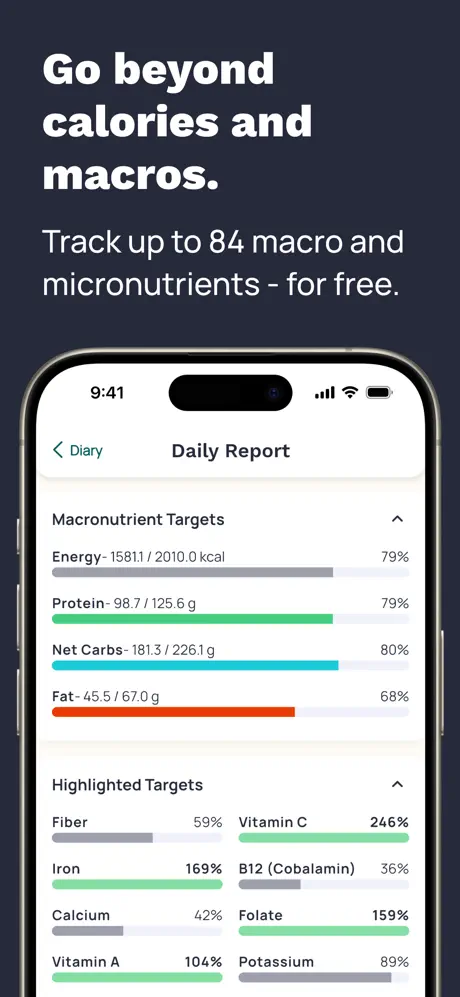
Cronometer is a nutrition tracking app built on the USDA National Nutrient Database and verified institutional sources. It is widely regarded as the most data-accurate consumer nutrition tracker available. Every entry in Cronometer's database has been verified against published nutritional research, and the app tracks over 80 micronutrients — including full amino acid profiles, individual B vitamins, trace minerals like selenium and manganese, and fatty acid breakdowns.
The app offers free barcode scanning that returns verified data, a usable free tier, and a Gold subscription at $5.49 per month for advanced reporting features. There are no ads in the free tier and minimal upsell pressure. The interface is functional and data-dense — designed for users who want precision rather than visual polish.
Cronometer's limitations are consistent: no Apple Watch app, no coaching or adaptive goals, a Daily Report that scroll-resets on every interaction, and a display model that only shows consumed totals without calculating what remains toward your targets. You get the most trustworthy numbers in the category, but you do the interpretation yourself.
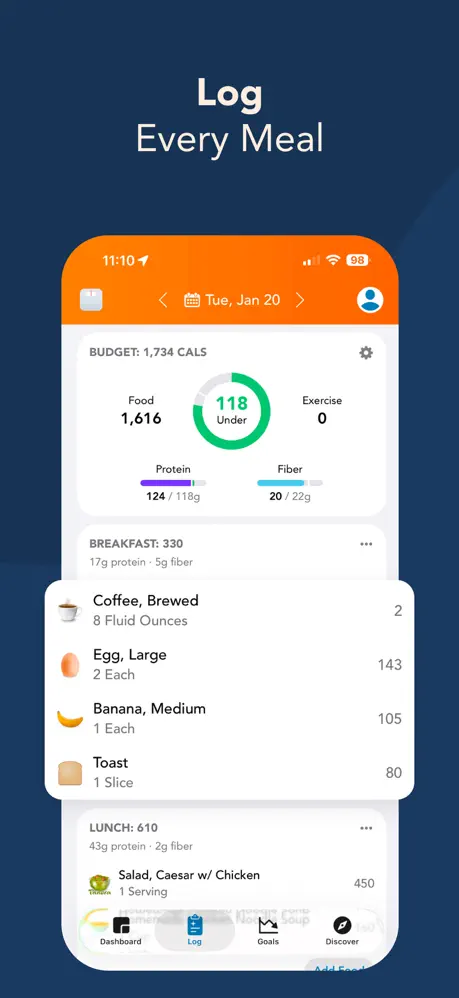
Lose It! is one of the longest-running calorie counting apps, known for its approachable design and low barrier to entry. The onboarding is quick, the food search is fast, and the overall experience is optimized for users who want calorie tracking without complexity. It has been around since 2008 and maintains a large user base drawn to its simplicity.
Lose It! uses a crowd-sourced food database where users contribute entries. This means coverage is broad — you can usually find what you are looking for — but accuracy varies significantly. Users report barcode scans returning incorrect calorie-per-serving counts, serving sizes listed in odd units like fluid ounces for dry ingredients, and multiple duplicate entries for the same product with different nutritional values.
The app offers a basic Apple Watch integration for quick logging and a Premium subscription at $39.99 per year. The free tier is functional but heavily monetized with persistent advertising banners, countdown discount timers, and upsell nudges on nearly every screen. Lose It! provides no coaching — just a static calorie target based on your initial goal weight and timeline. The target does not adapt to your actual behavior or adjust based on progress.
Winner: Cronometer
The difference in data quality between these two apps is fundamental. Cronometer's USDA-backed database uses institutional sources where every nutritional value has been measured in laboratory settings and verified against published research. When Cronometer says a food contains 23 grams of protein, that number comes from the same data that nutritional researchers and clinical dietitians rely on.
Lose It!'s crowd-sourced database depends on users to enter nutritional information, and accuracy varies dramatically entry to entry. The most common complaints include barcode scans that return calorie counts for a different serving size than what is on the package, entries where macronutrient totals do not add up to the listed calories, and brand-name products with outdated formulations. When you are making dietary decisions based on these numbers — whether that is hitting a protein target or managing a caloric deficit — inaccurate data defeats the purpose of tracking.
For casual calorie awareness, Lose It!'s data is often close enough. For anything requiring precision — athletic performance, medical dietary management, or detailed macro tracking — Cronometer's verified data is in a different league.
The consistency issue compounds over time. If you log a food in Lose It! today and the same food tomorrow, you may get different crowd-sourced entries with different calorie counts. In Cronometer, verified entries remain consistent — what you logged last month is the same data you log today, which makes trend analysis over weeks and months reliable.
Winner: Cronometer
This category is not competitive. Cronometer tracks over 80 micronutrients with verified accuracy: the complete vitamin spectrum (A through K, individual B vitamins), essential and trace minerals (calcium, iron, zinc, selenium, chromium, manganese), all essential amino acids and most non-essential ones, omega-3 and omega-6 fatty acid breakdowns, and additional biomarkers that most apps ignore entirely.
Lose It! offers shallow micronutrient tracking that requires a Premium subscription to access, and even then covers only a fraction of what Cronometer includes for free. The micronutrient data in Lose It! inherits the accuracy issues of its crowd-sourced database, meaning the limited nutrients it does track may not be reliable.
For users who care about nutrition beyond the basic calorie-protein-carb-fat quartet, Cronometer is the only serious option between these two.
Winner: Lose It!
Lose It! earns its reputation for approachability. The interface is clean and modern. Food search is fast, with results appearing as you type. Logging a meal requires minimal taps. The onboarding asks a few basic questions and gets you tracking within minutes. For users who have tried and abandoned more complex apps, Lose It!'s low friction makes a genuine difference in adherence.
Cronometer's interface prioritizes information density over ease of use. The learning curve is steeper, portions need more careful selection, and two daily-use friction points stand out: the Daily Report scroll-resets every time you interact with it, forcing you to scroll back to where you were, and the app only displays consumed totals without showing how much remains toward your targets. You do the math yourself.
Neither app is badly designed, but they optimize for different users. Lose It! optimizes for the person who needs tracking to be effortless or they will stop. Cronometer optimizes for the person who wants every number to be correct regardless of how long logging takes.
Adherence matters in nutrition tracking — the best app is the one you actually use every day. For some users, Lose It!'s approachability genuinely drives more consistent tracking. The trade-off is that consistent tracking with inaccurate data gives you a consistent but potentially misleading picture. Whether that is better than intermittent tracking with accurate data depends on your goals.
Winner: Cronometer
Cronometer's free tier is clean. No ads, no countdown timers, no persistent banners pushing you toward Gold. The upsell exists but is not aggressive. The paid tier adds features rather than removing annoyances.
Lose It!'s free tier is a different experience. Discount countdown timers appear regularly, creating artificial urgency. Advertising banners occupy screen real estate on logging screens. Upsell nudges appear throughout navigation. The monetization is woven into the daily experience in a way that many users find exhausting. Lose It! Premium at $39.99 per year removes these distractions but you are essentially paying to eliminate friction that was deliberately introduced.
This is a meaningful difference for daily-use software. An app you open five or more times per day should not feel like it is constantly selling to you.
The monetization strategy also raises questions about incentive alignment. Lose It!'s free tier appears designed to be uncomfortable enough to convert users to Premium, which means the free experience is deliberately degraded. Cronometer's free tier is genuinely usable — the paid upgrade adds features rather than removing friction.
Winner: Lose It!
Lose It! offers a basic Apple Watch app that allows quick logging from the wrist and displays daily calorie progress. It is not comprehensive — you cannot browse the full database or do detailed logging — but it provides at-a-glance access that Cronometer lacks entirely.
Cronometer has no Apple Watch app. Its Apple Health integration is partial, with documented re-import gaps where historical data does not backfill correctly after sync disruptions. For users in the Apple ecosystem who value wrist access or seamless Health integration, Lose It! has an edge, albeit a modest one.
Neither app delivers a strong Apple ecosystem experience. The Watch integration in Lose It! is basic, and both apps have Health sync limitations. For users who want nutrition data on their wrist or tight integration with the Apple Health dashboard, both apps leave room for improvement.
Winner: Draw
Neither app offers coaching. Cronometer displays your data without interpreting it or telling you what to do with it. Lose It! sets a static calorie target based on your goal weight and timeline and does not adjust it based on your actual behavior. Neither app adapts targets based on trends, provides actionable daily guidance, or offers any form of human or AI coaching.
This is a shared gap. Both apps assume you either already know what to do with your nutrition data or will figure it out on your own.
Winner: Context-dependent
Lose It! Premium at $39.99 per year works out to roughly $3.33 per month — cheaper than Cronometer Gold at $5.49 per month. On pure price, Lose It! wins.
But value is about what you get for the money. Cronometer Gold gives you verified data, 80+ micronutrients, free barcode scanning, and an ad-free experience. Lose It! Premium gives you crowd-sourced data of variable accuracy, shallow micronutrient tracking, and removal of the aggressive advertising that the free tier imposes.
For users who need only basic calorie counting, Lose It!'s lower price is a genuine advantage. For users who care about data accuracy or micronutrient tracking, Cronometer delivers significantly more value per dollar.
It is also worth considering the hidden cost of inaccurate data. If Lose It!'s crowd-sourced entries lead you to believe you are eating 1,800 calories when you are actually eating 2,100, the app is cheaper in dollars but more expensive in outcomes. The value of a nutrition tracker is ultimately measured by whether the data it provides leads to the results you want.
Cronometer is the right choice for users who need to trust the numbers they see. If you are tracking micronutrients for health optimization, managing dietary intake around a medical condition, supporting athletic performance with precise macro targets, or simply want the highest-quality nutritional data available in a consumer app, Cronometer delivers. It asks more of you in daily logging effort but rewards that effort with data that is verified and comprehensive. The lack of upsell pressure means the experience stays focused on tracking rather than selling. Users who are willing to spend a few extra minutes per meal in exchange for data they never have to second-guess will find Cronometer worth the effort.
Lose It! is the right choice for users who need calorie counting to be as simple and approachable as possible and who do not require micronutrient depth or per-entry data accuracy. If basic calorie awareness is your goal — you want a general sense of whether you are eating too much or too little — Lose It!'s approachable design and fast logging make it easy to maintain the habit. The annual pricing is accessible. Just be prepared for aggressive monetization in the free tier and understand that the data may not always be accurate at the individual entry level.
Cronometer and Lose It! represent opposite ends of the nutrition tracking spectrum. Cronometer gives you the most accurate data available and asks you to work for it. Lose It! gives you the easiest experience available and asks you to accept data compromises. If accuracy matters, Cronometer. If simplicity matters, Lose It! — with the understanding that simple comes wrapped in aggressive upsells and variable data quality. The ideal choice depends on whether you prioritize the quality of the data you collect or the ease of the process of collecting it.
Neither app offers coaching, adaptive goals, or a complete Apple ecosystem experience. If you want accurate tracking with a coaching layer that tells you what to do with your numbers — plus Apple Watch support and no upsell pressure — Fuel combines the data rigor with the daily guidance that both of these apps leave out.