The weight printed on a food package can save you a measurement at dinner. Use that quantity, the share you ate, and a matching food entry. Package weights, nutrition labels, and checked meals you repeat give you several ways to track macros without weighing every plate.
01Start with the weight printed on the package
Take a 300 g pack of raw, boneless chicken that you cook and eat in one meal. Log 300 g against a raw entry for the same product or cut. You already have a starting quantity before the pan is hot.
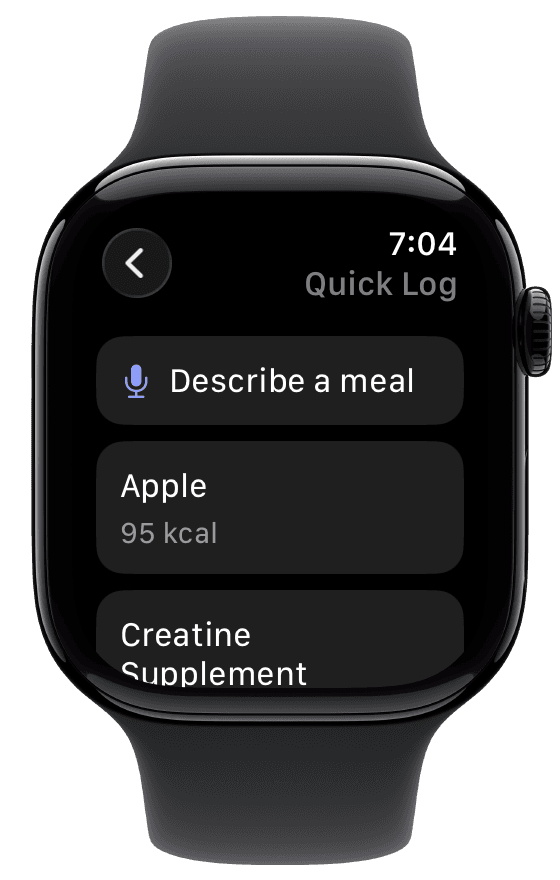
On Apple Watch, choose Describe a meal in Quick Log and dictate the package weight, whether it was raw or cooked, and the share you ate. Include added oil or sauce. Fuel sends the description to iPhone for analysis, where you can check the completed entry.
Match the entry to the food: chicken thigh goes with thigh, and skin-on chicken with skin-on. Account for anything the stated weight includes that you discarded, such as bones, trimmed skin, or liquid. If you kept some food for tomorrow, log only today's share.
Half of a 500 g bag of raw spinach gives you about 250 g to enter as raw spinach. A split by eye is approximate, but the bag gives you a reference for the portion. You can use that quantity even after the spinach has wilted down in the pan.

Raw package weights need raw-food entries. Cooking changes moisture and can remove or add fat, so 300 g raw and 300 g cooked represent different servings.1 Added oil and sauce also belong in the log. The raw versus cooked guide covers cooking yields and discarded fat in more detail.
02Read the label for the amount you ate
Check whether a prepared meal's nutrition applies per serving, per 100 g, or per package. U.S. Nutrition Facts labels usually give per-serving figures, and some also show a whole-package column.2 The amount you ate determines the multiplication.
For example, suppose a 400 g tray lists 150 calories, 10 g protein, 15 g carbohydrate, and 5 g fat per 100 g. Half the tray is about 200 g: 300 calories, 20 g protein, 30 g carbohydrate, and 10 g fat. With a different label format, the calculation changes.
| Panel shows | Half of the 400 g tray | Multiply the panel by |
|---|---|---|
| Per 100 g | About 200 g | 2 |
| Per serving, 4 servings per package | 2 servings | 2 |
| Per package | Half the package | 0.5 |
Count sauce already included in the label once, and add anything extra you put on the plate. In Fuel, Food Scanning reads the panel into a draft; check the product and serving calculation before saving. The nutrition-label guide explains serving sizes and rounding in detail.
03Save the meals you already know
A regular yogurt bowl, packed lunch, or home-cooked dinner deserves one carefully checked entry. Confirm its foods and amounts against the package or label, correct anything wrong, and reuse it while the meal stays the same.

Fuel's Favorites and Recent rows in Quick Log immediately relog the stored portion. For a changed meal, describe the new version. Smart Recall can also prepare yesterday's meal for review, including a requested change such as "copy yesterday dinner but no rice."
Spend the checking effort on the first entry you plan to repeat. That gives you a useful shortcut for the rest of the week. Food Logging covers the repeat options.
04Add the details a meal photo leaves out
For a mixed plate or shared dish, combine a photo with what you know about the ingredients and your share. Put package amounts, cooking oil, sauce, and the portion eaten into Add food details in Fuel's Log Meal composer.
For a shared sushi platter, for example, specify "six slices of salmon sashimi and two pieces from the roll, no nigiri." That tells Fuel which part of the photographed food belongs in your log.
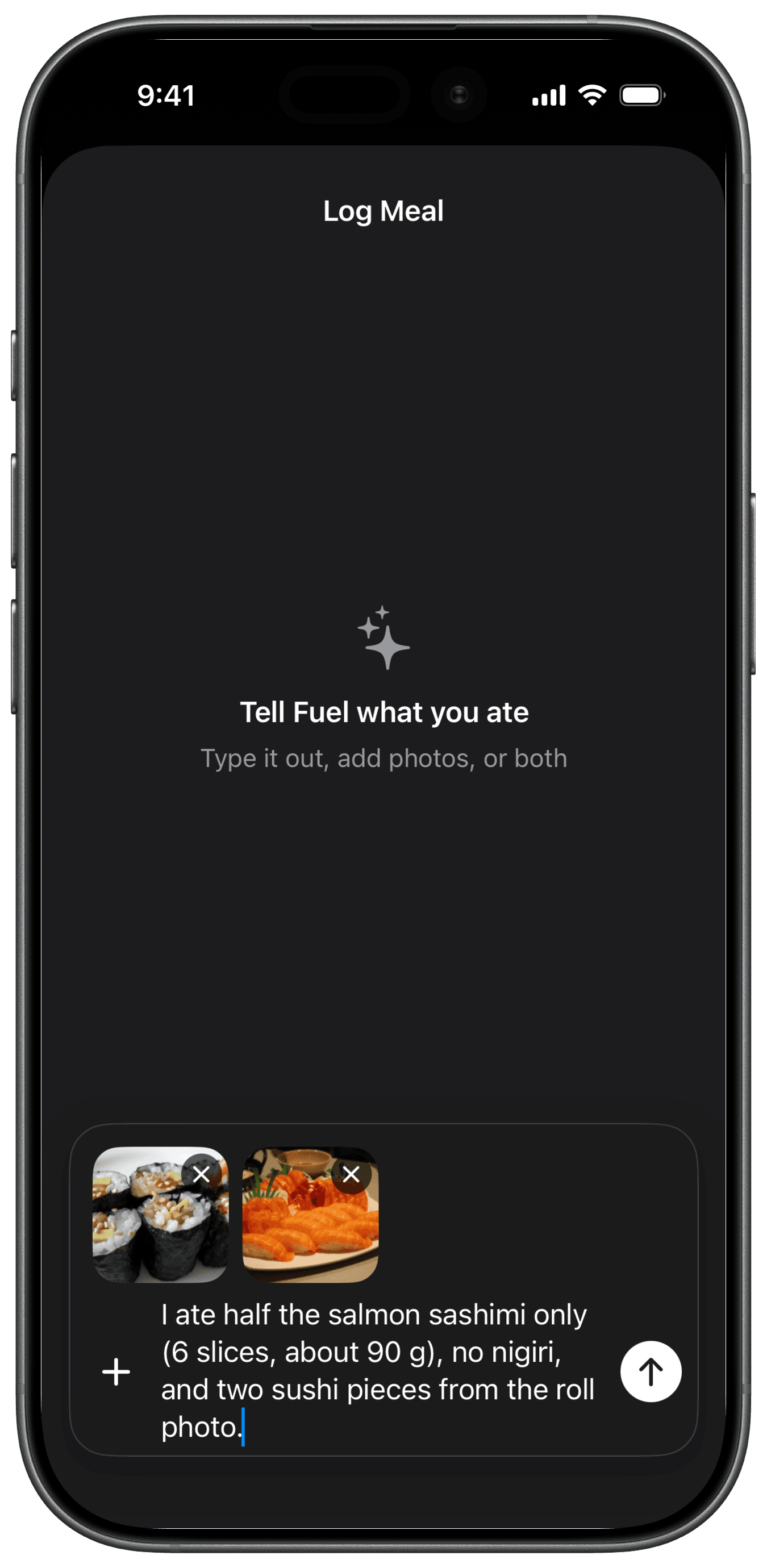
Review the result against your meal. If an ingredient or portion is wrong, tap Edit Result, describe the correction under What should change?, then use Ask AI to Update. Save with Log Food. AI Food Logging covers the photo and text workflow.
Food recognition and calorie estimation are separate problems. A 2024 evaluation of seven image-recognition apps using 22 controlled food and drink images found inaccurate automatic energy estimates; it did not test Fuel.3 Give the logger the quantities you know, then check what it had to estimate.
05Use a visual estimate when you have no quantity
At a friend's house or with an unlabelled restaurant side, your palm or fist can provide a rough portion reference. Thickness and hand size vary, so treat the comparison as an estimate rather than converting a palm into fixed grams of protein.
A scale helps when a specific uncertainty keeps recurring: the nut butter you spread every morning, the oil you add to the pan, or a batch that is hard to divide evenly. Measure that portion once and use it to improve the entry you will repeat. Follow any precise intake instructions from your clinician or dietitian.
06Make your next packaged meal a reusable entry
Log one meal in Fuel using its package quantity or label and the share you ate. Check the result, then save it as a favorite if you will repeat the same food and portion. The next time that meal comes around, the checked entry is ready.
Footnotes
U.S. Department of Agriculture, Agricultural Research Service. USDA Table of Cooking Yields for Meat and Poultry. December 2012. USDA ARS PDF.
Back to textU.S. Food and Drug Administration. Serving Size on the Nutrition Facts Label.
Back to textLi X, Yin A, Choi HY, Chan V, Allman-Farinelli M, Chen J. Evaluating the Quality and Comparative Validity of Manual Food Logging and Artificial Intelligence-Enabled Food Image Recognition in Apps for Nutrition Care. Nutrients. 2024;16:2573. Full study.
Back to text